
ros2中创建一个python package
完整的python package的目录结构如下:
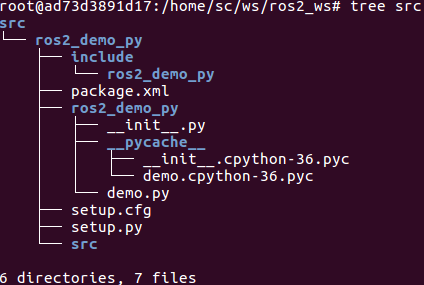
- source /opt/ros/dashing/setup.bash
- cd ros2_ws/src && ros2 pkg create <package_name>
- Delete CMakeLists.txt , create setup.py and setup.cfg and edit package.xml
setup.py内容参考:
from setuptools import setup

package_name = 'ros2_demo_py'

setup(

    name=package_name,

    version='0.7.0',

    packages=[package_name],

    install_requires=['setuptools'],

    zip_safe=True,

    author='You',

    author_email='you@youremail.com',

    maintainer='YourFirstname Lastname',

    maintainer_email='your@youremail.com',

    keywords=['ROS'],

    classifiers=[

        'Intended Audience :: Developers',

        'License :: OSI Approved :: Apache Software License',

        'Programming Language :: Python',

        'Topic :: Software Development',

    ],

    description='A simple ROS2 Python package',

    license='Apache License, Version 2.0',

    tests_require=['pytest'],

    entry_points={

        'console_scripts': [

            'demo = ros2_demo_py.demo:main'

        ],

    },

)
fbi warning!!!!!!!!!
'console_scripts': [
'demo = ros2_demo_py.demo:main'
],
告知ros2如何加载脚本.比如ros2 run ros2_demo_py demo实际上就是说要去执行ros2_demo_py/demo.py的main()函数. 更改setup.py后必须重新colcon build才会生效.
当我改成'console_scripts': [
'fuck_ = ros2_demo_py.what:main'
],时,相应的执行命令就变为ros2 run ros2_demo_py fuck_,执行的就是ros2_demo_py/what.py的main()函数
setup.cfg内容参考:
[develop]

script-dir=$base/lib/ros2_demo_py

[install]

install-scripts=$base/lib/ros2_demo_py
package.xml内容参考:
<?xml version="1.0"?>

<?xml-model href="http://download.ros.org/schema/package_format2.xsd" schematypens="http://www.w3.org/2001/XMLSchema"?>

<package format="2">

  <name>ros2_demo_py</name>

  <version>0.7.3</version>

  <description>A simple ROS2 Python package</description>

  <maintainer email="sloretz@openrobotics.org">Shane Loretz</maintainer>

  <license>Apache License 2.0</license>

  <exec_depend>rclpy</exec_depend>

  <exec_depend>std_msgs</exec_depend>

  <!-- These test dependencies are optional

  Their purpose is to make sure that the code passes the linters -->

  <test_depend>ament_copyright</test_depend>

  <test_depend>ament_flake8</test_depend>

  <test_depend>ament_pep257</test_depend>

  <test_depend>python3-pytest</test_depend>

  <export>

    <build_type>ament_python</build_type>

  </export>

</package>
- 创建python代码
demo.py
# Copyright 2016 Open Source Robotics Foundation, Inc.

#

# Licensed under the Apache License, Version 2.0 (the "License");

# you may not use this file except in compliance with the License.

# You may obtain a copy of the License at

#

#     http://www.apache.org/licenses/LICENSE-2.0

#

# Unless required by applicable law or agreed to in writing, software

# distributed under the License is distributed on an "AS IS" BASIS,

# WITHOUT WARRANTIES OR CONDITIONS OF ANY KIND, either express or implied.

# See the License for the specific language governing permissions and

# limitations under the License.

import rclpy

from rclpy.node import Node

from std_msgs.msg import String

class MinimalPublisher(Node):

    def __init__(self):

        super().__init__('minimal_publisher')

        self.publisher_ = self.create_publisher(String, 'topic')

        timer_period = 0.5  # seconds

        self.timer = self.create_timer(timer_period, self.timer_callback)

        self.i = 0

    def timer_callback(self):

        msg = String()

        msg.data = 'Hello World: %d' % self.i

        self.publisher_.publish(msg)

        self.get_logger().info('Publishing: "%s"' % msg.data)

        self.i += 1

def main(args=None):

    rclpy.init(args=args)

    minimal_publisher = MinimalPublisher()

    rclpy.spin(minimal_publisher)

    # Destroy the node explicitly

    # (optional - otherwise it will be done automatically

    # when the garbage collector destroys the node object)

    minimal_publisher.destroy_node()

    rclpy.shutdown()

if __name__ == '__main__':

    main()
- 回到workspace目录,编译
user:~/ros2_ws$ colcon build --symlink-install
详细步骤参考:https://www.theconstructsim.com/ros2-tutorials-5-how-to-create-a-ros2-package-for-python-update/
ros2中创建一个python package的更多相关文章
- 创建一个目录info,并在目录中创建一个文件test.txt,把该文件的信息读取出来,并显示出来
/*4.创建一个目录info,并在目录中创建一个文件test.txt,把该文件的信息读取出来,并显示出来*/ #import <Foundation/Foundation.h>#defin ...
- Ionic 2 中创建一个照片倾斜浏览组件
内容简介 今天介绍一个新的UI元素,就是当我们改变设备的方向时,我们可以看到照片的不同部分,有一种身临其境的感觉,类似于360全景视图在移动设备上的应用. 倾斜照片浏览 Ionic 2 实例开发 新增 ...
- iOS9中如何在日历App中创建一个任意时间之前开始的提醒(三)
大熊猫猪·侯佩原创或翻译作品.欢迎转载,转载请注明出处. 如果觉得写的不好请多提意见,如果觉得不错请多多支持点赞.谢谢! hopy ;) 四.创建任意时间之前开始的提醒 现在我们找到了指定源中的指定日 ...
- 在C#/.NET应用程序开发中创建一个基于Topshelf的应用程序守护进程(服务)
本文首发于:码友网--一个专注.NET/.NET Core开发的编程爱好者社区. 文章目录 C#/.NET基于Topshelf创建Windows服务的系列文章目录: C#/.NET基于Topshelf ...
- Eclipse中创建一个新的SpringBoot项目
在Eclipse中创建一个新的spring Boot项目: 1. 首先在Eclipse中安装STS插件:在Eclipse主窗口中点击 Help -> Eclipse Marketplace... ...
- 在存放源程序的文件夹中建立一个子文件夹 myPackage。例如,在“D:\java”文件夹之中创建一个与包同名的子文件夹 myPackage(D:\java\myPackage)。在 myPackage 包中创建一个YMD类,该类具有计算今年的年份、可以输出一个带有年月日的字符串的功能。设计程序SY31.java,给定某人姓名和出生日期,计算该人年龄,并输出该人姓名、年龄、出生日期。程序使用YM
题目补充: 在存放源程序的文件夹中建立一个子文件夹 myPackage.例如,在“D:\java”文件夹之中创建一个与包同名的子文件夹 myPackage(D:\java\myPackage).在 m ...
- 父类是在子类创建对象时候 在子类中创建一个super内存空间
父类是在子类创建对象时候 在子类中创建一个super内存空间
- iOS9中怎样在日历App中创建一个随意时间之前開始的提醒(三)
大熊猫猪·侯佩原创或翻译作品.欢迎转载,转载请注明出处. 假设认为写的不好请多提意见,假设认为不错请多多支持点赞.谢谢! hopy ;) 四.创建随意时间之前開始的提醒 如今我们找到了指定源中的指定日 ...
- [Xcode 实际操作]九、实用进阶-(28)在iTunes Connect(苹果商店的管理后台)中创建一个新的新的APP
目录:[Swift]Xcode实际操作 本文将演示如何在iTunes Connect(苹果商店的管理后台)中创建一个新的新的APP. 首先要做的是打开浏览器,并进入[iTunesConnect网站], ...
随机推荐
- CCF-CSP题解 201709-3 JSON查询
要求写一个小程序完成JSON查询的功能. 查询dfs就好了. 存储JSON对象用图(树)就好,把\(<key[],type,val[]>\)作为节点,然后又是字符串处理了. 其实就是个简化 ...
- Django之视图层与模板层
目录 视图层 小白必会三板斧 HttpResponse render redirect JsonResponse 前后端分离 FBV CBV 给CBV加装饰器 模板层 模板语法 模板传值 过滤器 语法 ...
- 规范git commit提交记录和版本发布记录
在开发过程中我们一般都会用到git管理代码,在git commit提交代码时我们一般对git commit message随便写点简单的描述,可是随着项目参与人数的增多,发现提交的commit记录越来 ...
- 终极CURD-4-java8新特性
目录 1 概述 2 lambda表达式 2.1 lambda重要知识点总结 2.2 java内置函数接口 2.3 方法引用 2.4 构造器引用 2.5 数组引用 2.6 lambda表达式的陷阱 3 ...
- C#线程学习笔记四:线程同步
本笔记摘抄自:https://www.cnblogs.com/zhili/archive/2012/07/21/ThreadsSynchronous.html,记录一下学习过程以备后续查用. ...
- sqoop 安装与使用
Sqoop(发音:skup)是一款开源的工具,主要用于在Hadoop(Hive)与传统的数据库间进行数据的传递,可以将一个关系型数据库(例如 : MySQL ,Oracle ,Postgres等)中的 ...
- 黑苹果 macOS 10.13.6 17G66 安装 nVidia WebDriver
目前很多N卡的WebDriver已经不支持macOS 10.14了,只能停留在10.13.6,苹果AppStore下载的 macOS High Sierra 10.13.6 版本号是17G66,遗憾的 ...
- finger
finger <username> 显示用户信息,包括用户的home目录,上一次登录的时间,默认shell等 finger XXXXX #输出: #Login: XXXXX Name: X ...
- IT兄弟连 HTML5教程 CSS3属性特效 2D变换1
通过CSS3转换,能够对元素进行移动.缩放.转动.拉长或拉伸.它如何工作?转换是使元素改变形状.尺寸和位置的一种效果.CSS3转换包括2D转换和3D转换,本小结我们来了解2D变换的转换方法. 转换属性 ...
- Java中的日期与时间
日期与时间 最常用的几个类,Date.DateFormat.Calendar.Locale Date 1.无参构造方法 //根据当前系统默认的毫秒值创建时间对象 public Date() { thi ...