
Linux嵌入式GDB调试环境搭建
======================= 我的环境 ==========================
PC 端: CPU:x86_64, 系统:Ubuntu,IP:172.16.2.212
开发板:CPU:sw9820c,系统:openwrt linux,IP:172.16.30.20
PC端安装的 C 交叉编译器为 arm-none-linux-gnueabi-gcc(gcc version 4.6.3),即交叉编译工具链的前缀为 arm-none-linux-gnueabi。
===========================================================
1、GDB调试方式说明
一般桌面系统如Ubuntu、Centos等可以直接运行gdb + 目标可执行程序, 而嵌入式系统则分情况, 如果性能强劲且调试的源码文件比较少, 也可以编译嵌入式版的gdb执行文件, 即嵌入式gdb + 目标可执行程序。
如果性能弱或者调试对象的源码文件多可采用分离法, 即PC端运行gdb, 同时源码也在PC端, 而目标可执行程序放到开发板, 那怎么联系呢, 所以开发板端还需要运行gdbserver, 与PC端的gdb通过网络通信。
PC端也称客户端, 开发板端为服务端, gdbserver 接收 gdb 所传送的命令(list, step等), 然后调度执行文件, 并把相关信息反馈给PC端, PC端解析后查询源码文件并显示到控制台。
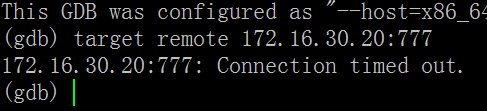
注意,gdb调试除了可执行文件外还需要源码! 而我的源码文件比较多, 所以采用后者即 gdb + gdbserver。 在介绍安装前, 请确保宿主机和目标机可以相互ping通且可以telnet访问端口, 因为两者是靠网络通信的!
2、安装
a. 下载gdb
ftp://ftp.gnu.org/gnu/gdb , 我选择的是 gdb-6.8a.tar.bz2
b. 解压编译
tar jxvf gdb-.8a.tar.bz2

//编译PC端 gdb

cd gdb-6.8/

mkdir _install

./configure --target=arm-none-linux-gnueabi --disable-werror --prefix=/home/fuzk/tools/gdb/gdb-6.8/_install  //没有设置host 默认= x86_64

make

make install

//编译开发板端 gdbserver

cd gdb-6.8/gdb/gdbserver

./configure --host=arm-none-linux-gnueabi

make //当前路径就有gdbserver
3、测试
首先编写测试用例:
#include <stdio.h>

void debug(char *str)

{

    printf("debug info :%s\n",str );

}

main(int argc,char *argv[])

{

    int i,j;

    j=;

    for(i=;i<;i++){

        j+=;

        printf("now a=%d\n", j);

    }

}
arm-none-linux-gnueabi-gcc -g test.c 生成a.out可执行文件, 连同 gdb-6.8/gdb/gdbserver/gdbserver 一并拷贝到开发板, 然后运行
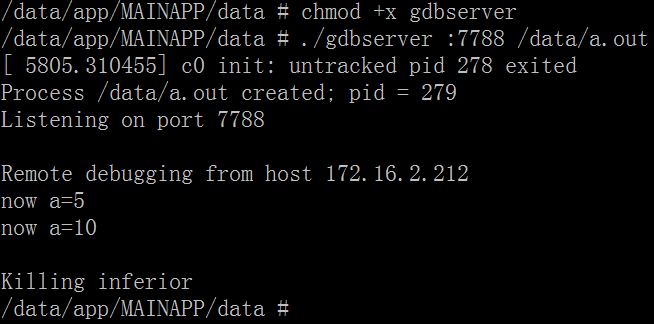
当然也可以指定允许哪个IP地址访问, 比如我的PC 172.16.2.212 访问开发板

PC端把可执行文件和源码拷贝到gdb-6.8/_install/bin下,

运行gdb:
fuzk@ubuntu:~/tools/gdb/gdb-6.8/_install/bin$ ./arm-none-linux-gnueabi-gdb

GNU gdb 6.8

Copyright (C)  Free Software Foundation, Inc.

License GPLv3+: GNU GPL version  or later <http://gnu.org/licenses/gpl.html>

This is free software: you are free to change and redistribute it.

There is NO WARRANTY, to the extent permitted by law.  Type "show copying"

and "show warranty" for details.

This GDB was configured as "--host=x86_64-unknown-linux-gnu --target=arm-none-linux-gnueabi".

(gdb) target remote 172.16.30.20:777  重中之重!

Remote debugging using 172.16.30.20:

[New Thread ]

0xb6efced0 in ?? ()

(gdb) b main

No symbol table is loaded.  Use the "file" command.

(gdb) file a.out

A program is being debugged already.

Are you sure you want to change the file? (y or n) y

Reading symbols from /home/fuzk/tools/gdb/gdb-6.8/_install/bin/a.out...done.

(gdb) b main

Breakpoint  at 0x846c: file test.c, line .

(gdb) c

Continuing.

Breakpoint , main (argc=, argv=0xbe8d4e54) at test.c:

          j=;

(gdb) n

          for(i=;i<;i++){

(gdb) n                  这里发生异常, 直接执行完, 同时开发板也打印全部, 猜测是版本问题

Program exited with code .

(gdb)

开发板log:
/data/app/MAINAPP/data # ./gdbserver 172.16.2.212:777 /data/a.out
[ 7431.399932] c0 init: untracked pid 318 exited
Process /data/a.out created; pid = 319
Listening on port 777
Remote debugging from host 172.16.2.212
now a=5
now a=10
now a=15
now a=20
now a=25
now a=30
now a=35
now a=40
now a=45
now a=50
Child exited with retcode = a
Child exited with status 10
GDBserver exiting
gdb-6.8的PC端gdb貌似有问题, 无法全部单步调试, 我的交叉编译器是arm-none-linux-gnueabi-gcc, 同时也提供了arm-none-linux-gnueabi-gdb, 发现调试正常, 跟我自己编译的区别在于版本是7.2, 所以应该是版本问题, 后续用系统自带的
其log如下:
fuzk@ubuntu:~/test/gdb/simple$ arm-none-linux-gnueabi-gdb

GNU gdb (Sourcery CodeBench Lite 2012.03-) 7.2.50.20100908-cvs

Copyright (C)  Free Software Foundation, Inc.

License GPLv3+: GNU GPL version  or later <http://gnu.org/licenses/gpl.html>

This is free software: you are free to change and redistribute it.

There is NO WARRANTY, to the extent permitted by law.  Type "show copying"

and "show warranty" for details.

This GDB was configured as "--host=i686-pc-linux-gnu --target=arm-none-linux-gnueabi".

For bug reporting instructions, please see:

<https://support.codesourcery.com/GNUToolchain/>.

(gdb) target remote 172.16.30.20:

Remote debugging using 172.16.30.20:

0xb6ed7ed0 in ?? ()

(gdb) b main

No symbol table is loaded.  Use the "file" command.

Make breakpoint pending on future shared library load? (y or [n]) y

Breakpoint  (main) pending.

(gdb) b main

No symbol table is loaded.  Use the "file" command.

Make breakpoint pending on future shared library load? (y or [n]) y

Breakpoint  (main) pending.

(gdb) file a.out

A program is being debugged already.

Are you sure you want to change the file? (y or n) y

Reading symbols from /home/fuzk/test/gdb/simple/a.out...done.

Cannot access memory at address 0x0

(gdb) b main

Cannot access memory at address 0x0

Note: breakpoints  and  also set at pc 0x846c.

Breakpoint  at 0x846c: file test.c, line .

(gdb) c

Continuing.

Breakpoint , main (argc=, argv=0xbe9bbe54) at test.c:

          j=;

(gdb) s

          for(i=;i<;i++){

(gdb) s

              j+=;

(gdb) s

              printf("now a=%d\n", j);

(gdb) n

          for(i=;i<;i++){

(gdb) s

              j+=;

(gdb) s

              printf("now a=%d\n", j);

(gdb) n

          for(i=;i<;i++){

(gdb) n

              j+=;

(gdb) n

              printf("now a=%d\n", j);

(gdb) n

          for(i=;i<;i++){

(gdb) n

              j+=;

(gdb) n

              printf("now a=%d\n", j);

(gdb)
(gdb) s
12 for(i=0;i<10;i++){
(gdb) s
13 j+=5;
(gdb) s printf由于没有-g编译 调用step会导致异常, 所以建议使用next, 但如果用系统自带的会有上面红色提示 所以用step也不怕!
14 printf("now a=%d\n", j);
(gdb) s
12 for(i=0;i<10;i++){
(gdb) s
13 j+=5;
(gdb) s
14 printf("now a=%d\n", j);
=====================

对应开发板:

/data/app/MAINAPP/data # ./gdbserver 172.16.2.212: /data/a.out

[ 8046.924774] c0 init: untracked pid  exited

Process /data/a.out created; pid =

Listening on port

Remote debugging from host 172.16.2.212

now a=

now a=

now a=15
now a=20
now a=25
4. 其他
igure: error: no termcap library found
Makefile:10927: recipe for target 'configure-gdb' failed
make[1]: *** [configure-gdb] Error 1
make[1]: Leaving directory '/home/fuzk/tools/gdb/gdb-7.2'
缺少 termcap库, 先安装该库: https://ftp.gnu.org/gnu/termcap/
tar zxvf termcap-1.3.1.tar.gz
cd termcap-1.3.1/
./configure --prefix=/home/fuzk/tools/gdb/gdb-7.2/_install --target=arm-none-linux-gnueabi
vi Makefile :
CC = /opt/toolchain/arm-2012.03/bin/arm-none-linux-gnueabi-gcc
AR = /opt/toolchain/arm-2012.03/bin/arm-none-linux-gnueabi-ar
make install
重初始化:
CFLAGS=-I/home/fuzk/tools/gdb/gdb-7.2/_install/include LDFLAGS=-L/home/fuzk/tools/gdb/gdb-7.2/_install/lib ./configure --prefix=/home/fuzk/tools/gdb/gdb-7.2/_install --target=arm-none-linux-gnueabi --host=arm-none-linux-gnueabi
make
make install
Linux嵌入式GDB调试环境搭建的更多相关文章
- Linux嵌入式kgdb调试环境搭建
======================= 我的环境 ==========================PC 端: win7 + vmware-15 ubuntu16.04开发板:Freesca ...
- HDP2.0.6+hadoop2.2.0+eclipse(windows和linux下)调试环境搭建
花了好几天,搭建好windows和linux下连接HDP集群的调试环境,在此记录一下 hadoop2.2.0的版本比hadoop0.x和hadoop1.x结构变化很大,没有eclipse-hadoop ...
- 【课程分享】深入浅出嵌入式linux系统移植开发 (环境搭建、uboot的移植、嵌入式内核的配置与编译)
深入浅出嵌入式linux系统移植开发 (环境搭建.uboot的移植.嵌入式内核的配置与编译) 亲爱的网友,我这里有套课程想和大家分享,假设对这个课程有兴趣的,能够加我的QQ2059055336和我联系 ...
- win10下搭建jz2440v3(arm s3c2440)开发及gdb调试环境【转】
本文转载自:https://blog.csdn.net/newjay03/article/details/72835758 本来打算完全在Ubuntu下开发的,但是水平有限,没有在Ubuntu下找到合 ...
- Windows下Lua+Redis 断点调试环境搭建==Linux下类似
Lua+Redis 断点调试环境搭建 windows环境,使用Redis,写lua脚本头疼的问题之一不能对脚本断点调试,google加上自己的摸索,终于搞定. 1.下载ZeroBraneStudio, ...
- arm64 调试环境搭建及 ROP 实战
前言 比赛的一个 arm 64 位的 pwn 题,通过这个题实践了 arm 64 下的 rop 以及调试环境搭建的方式. 题目文件 https://gitee.com/hac425/blog_data ...
- 一步一步 Pwn RouterOS之调试环境搭建&&漏洞分析&&poc
前言 本文由 本人 首发于 先知安全技术社区: https://xianzhi.aliyun.com/forum/user/5274 本文分析 Vault 7 中泄露的 RouterOs 漏洞.漏洞影 ...
- eos源码分析和应用(一)调试环境搭建
转载自 http://www.limerence2017.com/2018/09/02/eos1/#more eos基于区块链技术实现的开源引擎,开发人员可以基于该引擎开发DAPP(分布式应用).下面 ...
- ubuntu基于VSCode的C++编程语言的构建调试环境搭建指南
ubuntu基于VSCode的C++编程语言的构建调试环境搭建指南 首先安装g++ sudo apt install g++ 检查是否安装成功: 在插件栏安装插件c/c++.code runner: ...
随机推荐
- Android经典项目开发之天气APP实例分享
原文:Android经典项目开发之天气APP实例分享 版权声明:本文为博主原创文章,未经博主允许不得转载. https://blog.csdn.net/mzc186/article/details/5 ...
- Spring MVC 专题
Spring静态资源路径是指系统可以直接访问的路径,且路径下的所有文件均可被用户直接读取.在Springboot中默认的静态资源路径有:classpath:/META-INF/resources/,c ...
- 你好,Oh My Zsh - 社区力量全新方式定义命令行 | 咖啡时间
Oh My Zsh 是一款社区驱动的命令行工具,正如它的主页上说的,Oh My Zsh 是一种生活方式.它基于 zsh 命令行,提供了主题配置,插件机制,已经内置的便捷操作.给我们一种全新的方式使用命 ...
- xcode缓存清理
移除对旧设备的支持 影响:可重新生成:再连接旧设备调试时,会重新自动生成. 路径: ~/Library/Developer/Xcode/iOS DeviceSupport 如果你不是在wb145230 ...
- RSA加密解密及RSA签名和验证
原文:RSA加密解密及RSA签名和验证 1.RSA加密解密: (1)获取密钥,这里是产生密钥,实际应用中可以从各种存储介质上读取密钥 (2)加密 (3)解密2.RSA签名和验证 (1)获取密钥,这里是 ...
- ASP.NET MVC5快速入门--MyFirstWeb并发布到Windows Azure上
博主刚刚学习ASP.NET MVC5,看着微软的文档一点点学,就把FirstWeb的建立展示一下下啦,本次建立一个带个人身份验证的例子(即有注册登录机制的动态网页),开始,啦啦啦~~ 新建一个项目,选 ...
- Qt5.5.0在Linux下静态编译(加上-fontconfig编译项才能显示中文) good
测试系统环境:Ubuntu12.04 (32bit/64bit)编译软件环境:QT5.5.0 本文章主要介绍Linux下QT静态编译环境的搭建,以及如何编译我们的程序board_driver. 1 ...
- 使用SpringMVC框架解决中文乱码的问题
spring Web MVC框架提供了org.springframework.web.filter.CharacterEncodingFilter用于解决POST方式造成的中文乱码 问题. 需要在we ...
- VS2013设置release版本可调试
http://blog.csdn.net/caoshangpa/article/details/76575640
- 关于Qt 5-MSVC 2015 64位在 win7 64位系统debug程序崩溃的问题
关于Qt 5-MSVC 2015 64位在 win7 64位系统debug程序崩溃的问题 在win7 64位系统安装VC2015的编译器,并安装了 Qt 5.6 -5.7 VC2015 64位版本测 ...