
Linux嵌入式GDB调试环境搭建
======================= 我的环境 ==========================
PC 端: CPU:x86_64, 系统:Ubuntu,IP:172.16.2.212
开发板:CPU:sw9820c,系统:openwrt linux,IP:172.16.30.20
PC端安装的 C 交叉编译器为 arm-none-linux-gnueabi-gcc(gcc version 4.6.3),即交叉编译工具链的前缀为 arm-none-linux-gnueabi。
===========================================================
1、GDB调试方式说明
一般桌面系统如Ubuntu、Centos等可以直接运行gdb + 目标可执行程序, 而嵌入式系统则分情况, 如果性能强劲且调试的源码文件比较少, 也可以编译嵌入式版的gdb执行文件, 即嵌入式gdb + 目标可执行程序。
如果性能弱或者调试对象的源码文件多可采用分离法, 即PC端运行gdb, 同时源码也在PC端, 而目标可执行程序放到开发板, 那怎么联系呢, 所以开发板端还需要运行gdbserver, 与PC端的gdb通过网络通信。
PC端也称客户端, 开发板端为服务端, gdbserver 接收 gdb 所传送的命令(list, step等), 然后调度执行文件, 并把相关信息反馈给PC端, PC端解析后查询源码文件并显示到控制台。
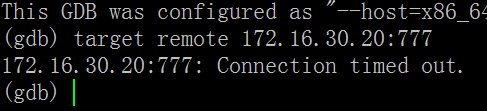
注意,gdb调试除了可执行文件外还需要源码! 而我的源码文件比较多, 所以采用后者即 gdb + gdbserver。 在介绍安装前, 请确保宿主机和目标机可以相互ping通且可以telnet访问端口, 因为两者是靠网络通信的!
2、安装
a. 下载gdb
ftp://ftp.gnu.org/gnu/gdb , 我选择的是 gdb-6.8a.tar.bz2
b. 解压编译
tar jxvf gdb-.8a.tar.bz2

//编译PC端 gdb

cd gdb-6.8/

mkdir _install

./configure --target=arm-none-linux-gnueabi --disable-werror --prefix=/home/fuzk/tools/gdb/gdb-6.8/_install  //没有设置host 默认= x86_64

make

make install

//编译开发板端 gdbserver

cd gdb-6.8/gdb/gdbserver

./configure --host=arm-none-linux-gnueabi

make //当前路径就有gdbserver
3、测试
首先编写测试用例:
#include <stdio.h>

void debug(char *str)

{

    printf("debug info :%s\n",str );

}

main(int argc,char *argv[])

{

    int i,j;

    j=;

    for(i=;i<;i++){

        j+=;

        printf("now a=%d\n", j);

    }

}
arm-none-linux-gnueabi-gcc -g test.c 生成a.out可执行文件, 连同 gdb-6.8/gdb/gdbserver/gdbserver 一并拷贝到开发板, 然后运行
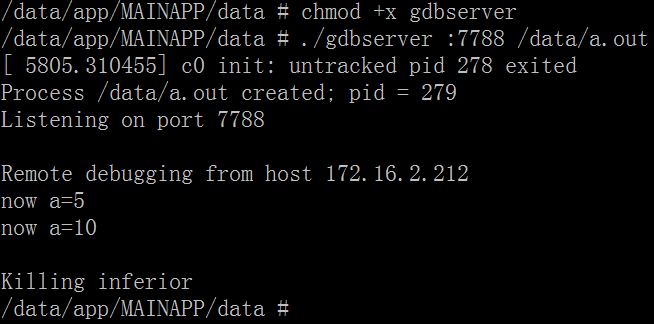
当然也可以指定允许哪个IP地址访问, 比如我的PC 172.16.2.212 访问开发板

PC端把可执行文件和源码拷贝到gdb-6.8/_install/bin下,

运行gdb:
fuzk@ubuntu:~/tools/gdb/gdb-6.8/_install/bin$ ./arm-none-linux-gnueabi-gdb

GNU gdb 6.8

Copyright (C)  Free Software Foundation, Inc.

License GPLv3+: GNU GPL version  or later <http://gnu.org/licenses/gpl.html>

This is free software: you are free to change and redistribute it.

There is NO WARRANTY, to the extent permitted by law.  Type "show copying"

and "show warranty" for details.

This GDB was configured as "--host=x86_64-unknown-linux-gnu --target=arm-none-linux-gnueabi".

(gdb) target remote 172.16.30.20:777  重中之重!

Remote debugging using 172.16.30.20:

[New Thread ]

0xb6efced0 in ?? ()

(gdb) b main

No symbol table is loaded.  Use the "file" command.

(gdb) file a.out

A program is being debugged already.

Are you sure you want to change the file? (y or n) y

Reading symbols from /home/fuzk/tools/gdb/gdb-6.8/_install/bin/a.out...done.

(gdb) b main

Breakpoint  at 0x846c: file test.c, line .

(gdb) c

Continuing.

Breakpoint , main (argc=, argv=0xbe8d4e54) at test.c:

          j=;

(gdb) n

          for(i=;i<;i++){

(gdb) n                  这里发生异常, 直接执行完, 同时开发板也打印全部, 猜测是版本问题

Program exited with code .

(gdb)

开发板log:
/data/app/MAINAPP/data # ./gdbserver 172.16.2.212:777 /data/a.out
[ 7431.399932] c0 init: untracked pid 318 exited
Process /data/a.out created; pid = 319
Listening on port 777
Remote debugging from host 172.16.2.212
now a=5
now a=10
now a=15
now a=20
now a=25
now a=30
now a=35
now a=40
now a=45
now a=50
Child exited with retcode = a
Child exited with status 10
GDBserver exiting
gdb-6.8的PC端gdb貌似有问题, 无法全部单步调试, 我的交叉编译器是arm-none-linux-gnueabi-gcc, 同时也提供了arm-none-linux-gnueabi-gdb, 发现调试正常, 跟我自己编译的区别在于版本是7.2, 所以应该是版本问题, 后续用系统自带的
其log如下:
fuzk@ubuntu:~/test/gdb/simple$ arm-none-linux-gnueabi-gdb

GNU gdb (Sourcery CodeBench Lite 2012.03-) 7.2.50.20100908-cvs

Copyright (C)  Free Software Foundation, Inc.

License GPLv3+: GNU GPL version  or later <http://gnu.org/licenses/gpl.html>

This is free software: you are free to change and redistribute it.

There is NO WARRANTY, to the extent permitted by law.  Type "show copying"

and "show warranty" for details.

This GDB was configured as "--host=i686-pc-linux-gnu --target=arm-none-linux-gnueabi".

For bug reporting instructions, please see:

<https://support.codesourcery.com/GNUToolchain/>.

(gdb) target remote 172.16.30.20:

Remote debugging using 172.16.30.20:

0xb6ed7ed0 in ?? ()

(gdb) b main

No symbol table is loaded.  Use the "file" command.

Make breakpoint pending on future shared library load? (y or [n]) y

Breakpoint  (main) pending.

(gdb) b main

No symbol table is loaded.  Use the "file" command.

Make breakpoint pending on future shared library load? (y or [n]) y

Breakpoint  (main) pending.

(gdb) file a.out

A program is being debugged already.

Are you sure you want to change the file? (y or n) y

Reading symbols from /home/fuzk/test/gdb/simple/a.out...done.

Cannot access memory at address 0x0

(gdb) b main

Cannot access memory at address 0x0

Note: breakpoints  and  also set at pc 0x846c.

Breakpoint  at 0x846c: file test.c, line .

(gdb) c

Continuing.

Breakpoint , main (argc=, argv=0xbe9bbe54) at test.c:

          j=;

(gdb) s

          for(i=;i<;i++){

(gdb) s

              j+=;

(gdb) s

              printf("now a=%d\n", j);

(gdb) n

          for(i=;i<;i++){

(gdb) s

              j+=;

(gdb) s

              printf("now a=%d\n", j);

(gdb) n

          for(i=;i<;i++){

(gdb) n

              j+=;

(gdb) n

              printf("now a=%d\n", j);

(gdb) n

          for(i=;i<;i++){

(gdb) n

              j+=;

(gdb) n

              printf("now a=%d\n", j);

(gdb)
(gdb) s
12 for(i=0;i<10;i++){
(gdb) s
13 j+=5;
(gdb) s printf由于没有-g编译 调用step会导致异常, 所以建议使用next, 但如果用系统自带的会有上面红色提示 所以用step也不怕!
14 printf("now a=%d\n", j);
(gdb) s
12 for(i=0;i<10;i++){
(gdb) s
13 j+=5;
(gdb) s
14 printf("now a=%d\n", j);
=====================

对应开发板:

/data/app/MAINAPP/data # ./gdbserver 172.16.2.212: /data/a.out

[ 8046.924774] c0 init: untracked pid  exited

Process /data/a.out created; pid =

Listening on port

Remote debugging from host 172.16.2.212

now a=

now a=

now a=15
now a=20
now a=25
4. 其他
igure: error: no termcap library found
Makefile:10927: recipe for target 'configure-gdb' failed
make[1]: *** [configure-gdb] Error 1
make[1]: Leaving directory '/home/fuzk/tools/gdb/gdb-7.2'
缺少 termcap库, 先安装该库: https://ftp.gnu.org/gnu/termcap/
tar zxvf termcap-1.3.1.tar.gz
cd termcap-1.3.1/
./configure --prefix=/home/fuzk/tools/gdb/gdb-7.2/_install --target=arm-none-linux-gnueabi
vi Makefile :
CC = /opt/toolchain/arm-2012.03/bin/arm-none-linux-gnueabi-gcc
AR = /opt/toolchain/arm-2012.03/bin/arm-none-linux-gnueabi-ar
make install
重初始化:
CFLAGS=-I/home/fuzk/tools/gdb/gdb-7.2/_install/include LDFLAGS=-L/home/fuzk/tools/gdb/gdb-7.2/_install/lib ./configure --prefix=/home/fuzk/tools/gdb/gdb-7.2/_install --target=arm-none-linux-gnueabi --host=arm-none-linux-gnueabi
make
make install
Linux嵌入式GDB调试环境搭建的更多相关文章
- Linux嵌入式kgdb调试环境搭建
======================= 我的环境 ==========================PC 端: win7 + vmware-15 ubuntu16.04开发板:Freesca ...
- HDP2.0.6+hadoop2.2.0+eclipse(windows和linux下)调试环境搭建
花了好几天,搭建好windows和linux下连接HDP集群的调试环境,在此记录一下 hadoop2.2.0的版本比hadoop0.x和hadoop1.x结构变化很大,没有eclipse-hadoop ...
- 【课程分享】深入浅出嵌入式linux系统移植开发 (环境搭建、uboot的移植、嵌入式内核的配置与编译)
深入浅出嵌入式linux系统移植开发 (环境搭建.uboot的移植.嵌入式内核的配置与编译) 亲爱的网友,我这里有套课程想和大家分享,假设对这个课程有兴趣的,能够加我的QQ2059055336和我联系 ...
- win10下搭建jz2440v3(arm s3c2440)开发及gdb调试环境【转】
本文转载自:https://blog.csdn.net/newjay03/article/details/72835758 本来打算完全在Ubuntu下开发的,但是水平有限,没有在Ubuntu下找到合 ...
- Windows下Lua+Redis 断点调试环境搭建==Linux下类似
Lua+Redis 断点调试环境搭建 windows环境,使用Redis,写lua脚本头疼的问题之一不能对脚本断点调试,google加上自己的摸索,终于搞定. 1.下载ZeroBraneStudio, ...
- arm64 调试环境搭建及 ROP 实战
前言 比赛的一个 arm 64 位的 pwn 题,通过这个题实践了 arm 64 下的 rop 以及调试环境搭建的方式. 题目文件 https://gitee.com/hac425/blog_data ...
- 一步一步 Pwn RouterOS之调试环境搭建&&漏洞分析&&poc
前言 本文由 本人 首发于 先知安全技术社区: https://xianzhi.aliyun.com/forum/user/5274 本文分析 Vault 7 中泄露的 RouterOs 漏洞.漏洞影 ...
- eos源码分析和应用(一)调试环境搭建
转载自 http://www.limerence2017.com/2018/09/02/eos1/#more eos基于区块链技术实现的开源引擎,开发人员可以基于该引擎开发DAPP(分布式应用).下面 ...
- ubuntu基于VSCode的C++编程语言的构建调试环境搭建指南
ubuntu基于VSCode的C++编程语言的构建调试环境搭建指南 首先安装g++ sudo apt install g++ 检查是否安装成功: 在插件栏安装插件c/c++.code runner: ...
随机推荐
- qt部分类释义
如果测试错误,输出包含源码的警告信息 Q_ASSERT Qtime最后一次star()或restar()到现在的毫秒数 QTime::elapsed QMetaObject::invokeMethod ...
- Pytorch Code积累
2017 Python最新面试题及答案16道题 15个重要Python面试题 测测你适不适合做Python? torch.squeeze() Returns a tensor with all the ...
- MugLife静态照片变3D动画算法研究
原文:MugLife静态照片变3D动画算法研究 MugLife app是一款可以将静态照片变成3D动画的手机应用,如下效果图所示: 大家可以看到,这个静态图具有了类3D的动画特效,是不是很好玩? 这种 ...
- 浅谈Android高通(Qualcomm)和联发科(MTK)平台
一款CPU好不好是要从多个方面考虑的,并不是说简简单单看一个主频.几个核心数就完了,更重要的是它的综合实力到底有多强,这里面当然也会牵扯到价格问题,性能相似当然是便宜的获胜,这是毋庸置疑的. 事实上, ...
- Central Subscriber Model Explained
原文 http://www.sqlrepl.com/sql-server/central-subscriber-model-explained/ The majority of SQL Server ...
- 程序异常崩溃后用windbg辅助调试解决的经验 以及 堆栈问题调试经验
1,程序异常崩溃后用windbg辅助调试解决的经验 状况:我的程序调用别人的库做 文件写入工作. 在这一过程中出现异常,程序崩溃. 经反复检查,认为自己的程序没有错,但无法判断在别人库里哪里有错. ...
- WPF Aero Glass Window
原文:WPF Aero Glass Window 用法 Win7 DwmSetWindowAttribute function Win10 SetWindowCompositionAttribute ...
- MySQL 其它基本操作
索引 所谓索引,就是类似于书的目录,目的也类似,都是为了提高检索速度.ALTER TABLE <表名> ADD INDEX <索引名(列名)>;或者CREATE INDEX & ...
- 百度网盘背后的存储系统atlas
原文 http://www.bitstech.net/2015/07/25/baidu-atlas/ 百度网盘免费提供2TB存储, 它的存储量一定是惊人的, 支持它的存储系统atlas也是相当不 ...
- Win7和Vista的安全机制对于应用程序读取配置文件相关操作的影响(虚拟重定向技术)
今天构造了一个新版本的XXXX软件,并且在纯净的系统下进行了较为全面的测试.测试中也发现了一些问题.其中包括在Win7测试时程序竟然在另一个目录中创建了文件夹和配置文件,并且进行相关读取操作,却并没有 ...