
爬虫(四):requests模块
1. requests模块
1.1 requests简介
requests 是一个功能强大、简单易用的 HTTP 请求库,比起之前用到的urllib模块,requests模块的api更加便捷。(本质就是封装了urllib3)
可以使用pip install requests命令进行安装,但是很容易出网络问题,所以我找了下国内的镜像源来加速。
然后就找到了豆瓣的镜像源:
pip install 包名 -i http://pypi.douban.com/simple/ --trusted-host pypi.douban.com
只要将包名修改一下,就能快速下载模块了。
1.2 requests请求
请求方法有很多种,但是我们只讲最常用的两种:GET请求和POST请求。
1.2.1 GET请求
GET方法用于向目标网址发送请求,方法返回一个Response响应对象,Response下一小节详细讲解。
GET方法的参数:
url:必填,指定请求的URL
params:字典类型,指定请求参数,常用于发送GET请求时使用
例子:
import requests

url = 'http://www.httpbin.org/get'

params = {

    'key1':'value1',

    'key2':'value2'

}

response = requests.get(url=url,params=params)

print(response.text)
结果:

headers:字典类型,指定请求头部
例子:
import requests

url = 'http://www.httpbin.org/headers'

headers = {

    'USER-AGENT':'Mozilla/5.0 (Windows NT 10.0; WOW64) AppleWebKit/537.36 (KHTML, like Gecko) Chrome/67.0.3396.99 Safari/537.36'

}

response = requests.get(url=url,headers=headers)

print(response.text)
结果:

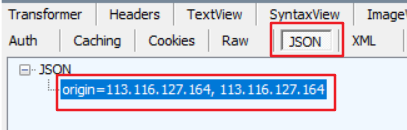
proxies:字典类型,指定使用的代理
例子:
import requests

url = 'http://www.httpbin.org/ip'

proxies = {

    'http':'113.116.127.164:8123',

    'http':'113.116.127.164:80'

}

response = requests.get(url=url,proxies=proxies)

print(response.text)
结果:
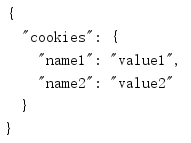
cookies:字典类型,指定Cookie
例子:
import requests

url = 'http://www.httpbin.org/cookies'

cookies = {

    'name1':'value1',

    'name2':'value2'

}

response = requests.get(url=url,cookies=cookies)

print(response.text)
结果:
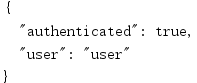
auth:元组类型,指定登陆时的账号和密码
例子:
import requests

url = 'http://www.httpbin.org/basic-auth/user/password'

auth = ('user','password')

response = requests.get(url=url,auth=auth)

print(response.text)
结果:
verify:布尔类型,指定请求网站时是否需要进行证书验证,默认为 True,表示需要证书验证,假如不希望进行证书验证,则需要设置为False
import requests

response = requests.get(url='https://www.httpbin.org/',verify=False)
结果:

但是在这种情况下,一般会出现 Warning 提示,因为 Python 希望我们能够使用证书验证。
如果不希望看到 Warning 信息,可以使用以下命令消除:
import urllib3

urllib3.disable_warnings(urllib3.exceptions.InsecureRequestWarning)
timeout:指定超时时间,若超过指定时间没有获得响应,则抛出异常
1.2.2 POST请求
POST请求和GET请求的区别就是POST数据不会出现在地址栏,并且数据的大小没有上限。
所以GET的参数,POST差不多都可以使用, 除了params参数,POST使用data参数即可。
data:字典类型,指定表单信息,常用于发送 POST 请求时使用
例子:
import requests

url = 'http://www.httpbin.org/post'

data = {

    'key1':'value1',

    'key2':'value2'

}

response = requests.post(url=url,data=data)

print(response.text)
结果:

1.3 requests响应
1.3.1 response属性
使用GET或POST请求后,就会接收到response响应对象,其常用的属性和方法列举如下:
response.url:返回请求网站的 URL
response.status_code:返回响应的状态码
response.encoding:返回响应的编码方式
response.cookies:返回响应的 Cookie 信息
response.headers:返回响应头
response.content:返回 bytes 类型的响应体
response.text:返回 str 类型的响应体,相当于response.content.decode('utf-8')
response.json():返回 dict 类型的响应体,相当于json.loads(response.text)
import requests

response = requests.get('http://www.httpbin.org/get')

print(type(response))

# <class 'requests.models.Response'>

print(response.url) # 返回请求网站的 URL

# http://www.httpbin.org/get

print(response.status_code) # 返回响应的状态码

#

print(response.encoding) # 返回响应的编码方式

# None

print(response.cookies) # 返回响应的 Cookie 信息

# <RequestsCookieJar[]>

print(response.headers) # 返回响应头

# {'Access-Control-Allow-Credentials': 'true', 'Access-Control-Allow-Origin': '*', 'Content-Encoding': 'gzip', 'Content-Type': 'application/json', 'Date': 'Mon, 16 Dec 2019 03:16:22 GMT', 'Referrer-Policy': 'no-referrer-when-downgrade', 'Server': 'nginx', 'X-Content-Type-Options': 'nosniff', 'X-Frame-Options': 'DENY', 'X-XSS-Protection': '1; mode=block', 'Content-Length': '189', 'Connection': 'keep-alive'}

print(type(response.content))# 返回 bytes 类型的响应体

# <class 'bytes'>

print(type(response.text)) # 返回 str 类型的响应体

# <class 'str'>

print(type(response.json())) # 返回 dict 类型的响应体

# <class 'dict'>
1.3.2 编码问题
#编码问题

import requests

response=requests.get('http://www.autohome.com/news/')

# response.encoding='gbk' #汽车之家网站返回的页面内容为gb2312编码的,而requests的默认编码为ISO-8859-1,如果不设置成gbk则中文乱码

print(response.text)
爬虫(四):requests模块的更多相关文章
- 孤荷凌寒自学python第六十七天初步了解Python爬虫初识requests模块
孤荷凌寒自学python第六十七天初步了解Python爬虫初识requests模块 (完整学习过程屏幕记录视频地址在文末) 从今天起开始正式学习Python的爬虫. 今天已经初步了解了两个主要的模块: ...
- Python爬虫练习(requests模块)
Python爬虫练习(requests模块) 关注公众号"轻松学编程"了解更多. 一.使用正则表达式解析页面和提取数据 1.爬取动态数据(js格式) 爬取http://fund.e ...
- 网络爬虫之requests模块的使用+Github自动登入认证
本篇博客将带领大家梳理爬虫中的requests模块,并结合Github的自动登入验证具体讲解requests模块的参数. 一.引入: 我们先来看如下的例子,初步体验下requests模块的使用: ...
- 爬虫之requests模块
requests模块 什么是requests模块 requests模块是python中原生的基于网络请求的模块,其主要作用是用来模拟浏览器发起请求.功能强大,用法简洁高效.在爬虫领域中占据着半壁江山的 ...
- 04.Python网络爬虫之requests模块(1)
引入 Requests 唯一的一个非转基因的 Python HTTP 库,人类可以安全享用. 警告:非专业使用其他 HTTP 库会导致危险的副作用,包括:安全缺陷症.冗余代码症.重新发明轮子症.啃文档 ...
- 06.Python网络爬虫之requests模块(2)
今日内容 session处理cookie proxies参数设置请求代理ip 基于线程池的数据爬取 知识点回顾 xpath的解析流程 bs4的解析流程 常用xpath表达式 常用bs4解析方法 引入 ...
- Python 爬虫二 requests模块
requests模块 Requests模块 get方法请求 整体演示一下: import requests response = requests.get("https://www.baid ...
- Python网络爬虫之requests模块(2)
session处理cookie proxies参数设置请求代理ip 基于线程池的数据爬取 xpath的解析流程 bs4的解析流程 常用xpath表达式 常用bs4解析方法 引入 有些时候,我们在使用爬 ...
- Python网络爬虫之requests模块(1)
引入 Requests 唯一的一个非转基因的 Python HTTP 库,人类可以安全享用. 警告:非专业使用其他 HTTP 库会导致危险的副作用,包括:安全缺陷症.冗余代码症.重新发明轮子症.啃文档 ...
- Python网络爬虫之requests模块
今日内容 session处理cookie proxies参数设置请求代理ip 基于线程池的数据爬取 知识点回顾 xpath的解析流程 bs4的解析流程 常用xpath表达式 常用bs4解析方法 引入 ...
随机推荐
- netty的调优-及-献上写过注释的源码工程
Netty能干什么? Http服务器 使用Netty可以编写一个 Http服务器, 就像tomcat那样,能接受用户发送的http请求, , 只不过没有实现Servelt规范, 但是它也能解析携带的参 ...
- 【并发编程】ThreadLocal的兄弟InheritableThreadLocal
本博客系列是学习并发编程过程中的记录总结.由于文章比较多,写的时间也比较散,所以我整理了个目录贴(传送门),方便查阅. 并发编程系列博客传送门 引子 public class InheritableT ...
- Mybatis整合spring详细教程(适合小白童鞋)
目录 1.整合思路 2.整合需要的jar包 3.整合的步骤 4.Dao的开发的两种实现方式 6.Dao的开发的实现方式总结图 @ Mybatis整合spring其实就是SSM框架中SM的整合集成. 1 ...
- Spring Boot缓存Ehcache
Spring Boot 整合 Ehcache 修改 pom 文件 <!-- Spring Boot 缓存支持启动器 --> <dependency> <groupId ...
- 移动开发在路上-- IOS移动开发系列 多线程三
这一次说一点概念性的东西,也是为后边做一些基础 HTTP协议的基本概念 http协议的基本概念 全称“超文本传输协议”,浏览器和服务器之间的通信规则 HTTp协议永远都是客户端发起的请求,服务器回送响 ...
- 学习go语言第二天-变量、常量
编写测试程序 源码文件以_test结尾;例如:xxx_test.go 测试方法名以Test开头;例如:func TestXXXXX(t *testing.T){} 实现斐波那且数列 package f ...
- [TimLinux] WireShark 安装篇——CentOS7
1. 下载 libpcap: http://www.tcpdump.org/release/libpcap-1.9.0.tar.gz cmake: https://github-production- ...
- FPGA+VGA+OV7725 视频图像FPGA开发板 图像采集板CP511A使用
- DRF Django REST framework 之 路由器与版本控制组件(七)
路由器 一些Web框架提供了用于自动确定应如何将应用程序的URL映射到处理传入请求的逻辑的功能. 而DRF的路由器组件也提供了一种简单,快速且一致的方式将视图逻辑映射到一组URL上. 路由器组件的使用 ...
- 205K+程序员关注过的问题:为什么不应该使用Java的原始类型?
在逛 Stack Overflow 的时候,发现了一些访问量像熊耳山一样高的问题,比如说这个:为什么不应该使用Java的原始类型?访问量足足有 205K+,这不得了啊!说明有很多很多的程序员被这个问题 ...