
SpringMVC流程源码分析及DispatcherServlet核心源码
一、源码分析前还是需要一张流程图作为指导,如下:
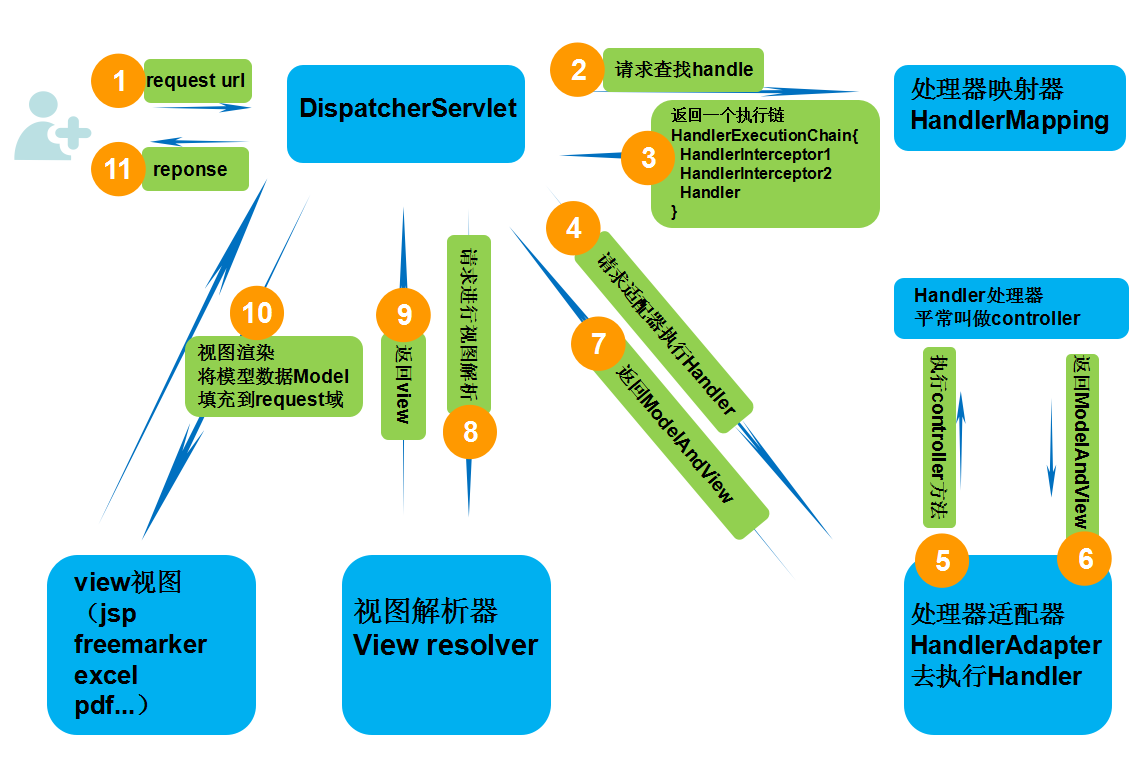
二、简单介绍以及源码定位
DispatcherServlet其实就是一个HttpServlet,他是HttpServlet的子类,所以它和普通的HttpServlet在web.xml里同样的配置。
这个Servlet的doPost和doGet方法的实现是DispatcherServlet的父类FrameworkServlet中实现的,两个方法里都是调用processRequest方法。processRequest的实现是在FrameworkServlet中,此方法中最主要的操作就是调用doService方法。
doService方法的最终实现是在DispatcherServlet中,这样所有的Http请求(GET、POST、PUT和DELETE等)的最终操作就DispatcherServlet中实现了。
DispatcherServlet中doService的实现如下,对Request设置了一些全局属性,最终接下来的操作是在doDispatcher函数中实现了。
[java] view plain copy

//获取请求,设置一些request的参数,然后分发给doDispatch

    @Override

    protected void doService(HttpServletRequest request, HttpServletResponse response) throws Exception {

        if (logger.isDebugEnabled()) {

            String resumed = WebAsyncUtils.getAsyncManager(request).hasConcurrentResult() ? " resumed" : "";

            logger.debug("DispatcherServlet with name '" + getServletName() + "'" + resumed +

                    " processing " + request.getMethod() + " request for [" + getRequestUri(request) + "]");

        }

        // Keep a snapshot of the request attributes in case of an include,

        // to be able to restore the original attributes after the include.

        Map<String, Object> attributesSnapshot = null;

        if (WebUtils.isIncludeRequest(request)) {

            attributesSnapshot = new HashMap<String, Object>();

            Enumeration<?> attrNames = request.getAttributeNames();

            while (attrNames.hasMoreElements()) {

                String attrName = (String) attrNames.nextElement();

                if (this.cleanupAfterInclude || attrName.startsWith("org.springframework.web.servlet")) {

                    attributesSnapshot.put(attrName, request.getAttribute(attrName));

                }

            }

        }

        // Make framework objects available to handlers and view objects.

        /* 设置web应用上下文**/

        request.setAttribute(WEB_APPLICATION_CONTEXT_ATTRIBUTE, getWebApplicationContext());

        /* 国际化本地**/

        request.setAttribute(LOCALE_RESOLVER_ATTRIBUTE, this.localeResolver);

        /* 样式**/

        request.setAttribute(THEME_RESOLVER_ATTRIBUTE, this.themeResolver);

        //设置样式资源

        request.setAttribute(THEME_SOURCE_ATTRIBUTE, getThemeSource());

        //请求刷新时保存属性

        FlashMap inputFlashMap = this.flashMapManager.retrieveAndUpdate(request, response);

        if (inputFlashMap != null) {

            request.setAttribute(INPUT_FLASH_MAP_ATTRIBUTE, Collections.unmodifiableMap(inputFlashMap));

        }

        //Flash attributes 在对请求的重定向生效之前被临时存储(通常是在session)中,并且在重定向之后被立即移除

        request.setAttribute(OUTPUT_FLASH_MAP_ATTRIBUTE, new FlashMap());

        //FlashMap 被用来管理 flash attributes 而 FlashMapManager 则被用来存储,获取和管理 FlashMap 实体.

        request.setAttribute(FLASH_MAP_MANAGER_ATTRIBUTE, this.flashMapManager);

        try {

            doDispatch(request, response);

        }

        finally {

            if (!WebAsyncUtils.getAsyncManager(request).isConcurrentHandlingStarted()) {

                // Restore the original attribute snapshot, in case of an include.

                if (attributesSnapshot != null) {

                    restoreAttributesAfterInclude(request, attributesSnapshot);

                }

            }

        }

    }
doDispatch()方法源码如下:
/**

	 * Process the actual dispatching to the handler.

	 * <p>The handler will be obtained by applying the servlet's HandlerMappings in order.

	 * The HandlerAdapter will be obtained by querying the servlet's installed HandlerAdapters

	 * to find the first that supports the handler class.

	 * <p>All HTTP methods are handled by this method. It's up to HandlerAdapters or handlers

	 * themselves to decide which methods are acceptable.

	 * @param request current HTTP request

	 * @param response current HTTP response

	 * @throws Exception in case of any kind of processing failure

	 */

	protected void doDispatch(HttpServletRequest request, HttpServletResponse response) throws Exception {

		HttpServletRequest processedRequest = request;

		HandlerExecutionChain mappedHandler = null;

		boolean multipartRequestParsed = false;

		WebAsyncManager asyncManager = WebAsyncUtils.getAsyncManager(request);

		try {

			ModelAndView mv = null;

			Exception dispatchException = null;

			try {

				processedRequest = checkMultipart(request);

				multipartRequestParsed = (processedRequest != request);

				// Determine handler for the current request.

				mappedHandler = getHandler(processedRequest);

				if (mappedHandler == null || mappedHandler.getHandler() == null) {

					noHandlerFound(processedRequest, response);

					return;

				}

				// Determine handler adapter for the current request.

				HandlerAdapter ha = getHandlerAdapter(mappedHandler.getHandler());

				// Process last-modified header, if supported by the handler.

				String method = request.getMethod();

				boolean isGet = "GET".equals(method);

				if (isGet || "HEAD".equals(method)) {

					long lastModified = ha.getLastModified(request, mappedHandler.getHandler());

					if (logger.isDebugEnabled()) {

						logger.debug("Last-Modified value for [" + getRequestUri(request) + "] is: " + lastModified);

					}

					if (new ServletWebRequest(request, response).checkNotModified(lastModified) && isGet) {

						return;

					}

				}

				if (!mappedHandler.applyPreHandle(processedRequest, response)) {

					return;

				}

				// Actually invoke the handler.

				mv = ha.handle(processedRequest, response, mappedHandler.getHandler());

				if (asyncManager.isConcurrentHandlingStarted()) {

					return;

				}

				applyDefaultViewName(processedRequest, mv);

				mappedHandler.applyPostHandle(processedRequest, response, mv);

			}

			catch (Exception ex) {

				dispatchException = ex;

			}

			processDispatchResult(processedRequest, response, mappedHandler, mv, dispatchException);

		}

		catch (Exception ex) {

			triggerAfterCompletion(processedRequest, response, mappedHandler, ex);

		}

		catch (Error err) {

			triggerAfterCompletionWithError(processedRequest, response, mappedHandler, err);

		}

		finally {

			if (asyncManager.isConcurrentHandlingStarted()) {

				// Instead of postHandle and afterCompletion

				if (mappedHandler != null) {

					mappedHandler.applyAfterConcurrentHandlingStarted(processedRequest, response);

				}

			}

			else {

				// Clean up any resources used by a multipart request.

				if (multipartRequestParsed) {

					cleanupMultipart(processedRequest);

				}

			}

		}

	}
三、通过阅读源码总结分析流程如下:
1. web应用服务器接收到一个新请求是,读取web.xml中的配置,如果匹配DispatcherServlet的请求映射路径,web容器将该请求转发给DispatcherServlet进行处理
2. DispatcherServlet接收到请求后,执行doDispatch方法,此方法遍历DispatcherServlet中的HandlerMapping(处理器映射器)集合,根据请求的HttpServletRequest信息通过HandlerMapping对象方法找到HandlerExecutionChain(执行链,内含拦截器和处理器)。
3. DispatcherServlet继续执行doDispatch方法,根据得到的HandlerExecutionChain(执行链)中的handler遍历自己的HandlerAdapter(处理器适配器)集合,找到支持这个Handler的HandlerAdapter并返回。
4.继续doDispatch方法,把HandlerExecutionChain(执行链)内部的那些前置拦截器逻辑都执行完,然后再再通过得到的HandlerAdapter执行HandlerExecutionChain内部的处理器,会返回一个ModelAndView包含了视图逻辑名和模型数据信息
5.调用执行链的方法,执行拦截器的后置拦截器
6. ModelAndView中包含的是“逻辑视图名”,而非真正的视图对象,DispatcherServlet借助ViewResolver完成逻辑视图名到真实视图名对象的解析工作
7. 当得到真实的视图对象View后,DispatcherServlet就使用这个View对象对ModelAndView中的模型数据进行视图渲染
8. 最终客户端得到HTML页面什么的
SpringMVC流程源码分析及DispatcherServlet核心源码的更多相关文章
- Android版数据结构与算法(五):LinkedHashMap核心源码彻底分析
版权声明:本文出自汪磊的博客,未经作者允许禁止转载. 上一篇基于哈希表实现HashMap核心源码彻底分析 分析了HashMap的源码,主要分析了扩容机制,如果感兴趣的可以去看看,扩容机制那几行最难懂的 ...
- 并发编程之 SynchronousQueue 核心源码分析
前言 SynchronousQueue 是一个普通用户不怎么常用的队列,通常在创建无界线程池(Executors.newCachedThreadPool())的时候使用,也就是那个非常危险的线程池 ^ ...
- iOS 开源库系列 Aspects核心源码分析---面向切面编程之疯狂的 Aspects
Aspects的源码学习,我学到的有几下几点 Objective-C Runtime 理解OC的消息分发机制 KVO中的指针交换技术 Block 在内存中的数据结构 const 的修饰区别 block ...
- HashMap的结构以及核心源码分析
摘要 对于Java开发人员来说,能够熟练地掌握java的集合类是必须的,本节想要跟大家共同学习一下JDK1.8中HashMap的底层实现与源码分析.HashMap是开发中使用频率最高的用于映射(键值对 ...
- Java内存管理-掌握类加载器的核心源码和设计模式(六)
勿在流沙筑高台,出来混迟早要还的. 做一个积极的人 编码.改bug.提升自己 我有一个乐园,面向编程,春暖花开! 上一篇文章介绍了类加载器分类以及类加载器的双亲委派模型,让我们能够从整体上对类加载器有 ...
- 3 手写Java HashMap核心源码
手写Java HashMap核心源码 上一章手写LinkedList核心源码,本章我们来手写Java HashMap的核心源码. 我们来先了解一下HashMap的原理.HashMap 字面意思 has ...
- HTTP流量神器Goreplay核心源码详解
摘要:Goreplay 前称是 Gor,一个简单的 TCP/HTTP 流量录制及重放的工具,主要用 Go 语言编写. 本文分享自华为云社区<流量回放工具之 goreplay 核心源码分析> ...
- Netty 学习(六):创建 NioEventLoopGroup 的核心源码说明
Netty 学习(六):创建 NioEventLoopGroup 的核心源码说明 作者: Grey 原文地址: 博客园:Netty 学习(六):创建 NioEventLoopGroup 的核心源码说明 ...
- Backbone事件机制核心源码(仅包含Events、Model模块)
一.应用场景 为了改善酷版139邮箱的代码结构,引入backbone的事件机制,按照MVC的分层思想搭建酷版云邮局的代码框架.力求在保持酷版轻量级的基础上提高代码的可维护性. 二.遗留问题 1.b ...
随机推荐
- Spring Boot2 系列教程(五)Spring Boot中的 yaml 配置
搞 Spring Boot 的小伙伴都知道,Spring Boot 中的配置文件有两种格式,properties 或者 yaml,一般情况下,两者可以随意使用,选择自己顺手的就行了,那么这两者完全一样 ...
- Protostuff序列化问题
最近在开发中遇到一个Protostuff序列化问题,在这记录一下问题的根源:分析一下Protostuff序列化和反序列化原理:以及怎么样避免改bug. 1. 问题描述 有一个push业务用到了mq,m ...
- Unity3D_UGUI与NGUI的区别与优缺点
1. NGUI与UGUI的区别 1) UGUI的Canvas 有世界坐标和屏幕坐标; 2) UGUI的Image可以使用material; 3) UGUI通过Mask来裁剪,而NGUI通过Panel的 ...
- charles 启用/禁用断点
本文参考:charles 启用/禁用断点 1.3. enable/disable breakpoints 和 2.3 breakpoints settings 断点设置是常用的了,没啥好说的了,可以设 ...
- query 与 params 使用
这个是路由: { path:'/city/:city', name:'City', component:City } 下面使用query和params分别传参 quer ...
- nfs 存储服务
今日内容: NFS 1.什么是nfs? network file system 网络文件系统 nfs共享存储 2.nfs能干什么? nfs 能为 不同主机系统之间 实现 文件的共享 3.为什么要使用n ...
- 当 K8s 集群达到万级规模,阿里巴巴如何解决系统各组件性能问题?
作者 | 阿里云容器平台高级技术专家 曾凡松(逐灵) 本文主要介绍阿里巴巴在大规模生产环境中落地 Kubernetes 的过程中,在集群规模上遇到的典型问题以及对应的解决方案,内容包含对 etcd.k ...
- JAVA用递归来判断回文串
用递归来判断回文串 思路: ①首先如果是空串,一个字符,则判断是回文串 ②若不满足①,则我们需要对字符串进行递归判断,我们会想到要用第一个字符和最后一个字符进行比较,若相同则,第二个和倒数第二个进行比 ...
- 用git提交新项目到github
1.(先进入项目文件夹)通过命令 git init 把这个目录变成git可以管理的仓库 git init 2.把文件添加到版本库中,使用命令 git add .添加到暂存区里面去,不要忘记后面的小数点 ...
- 转:ext的xtype值
基本组件: xtype Class 描述 button Ext.Button 按钮 splitbutton Ext.SplitButton 带下拉菜单的按钮 cycle Ext.CycleButton ...