
Java期末考试冲刺总结
经过长达将近三个小时的冲刺,我感觉身心俱疲,但它无法掩盖我敲代码的欲望!
三个小时我只实现了公文流转系统的的部分功能。
我深刻的意识到建民老师说的这套关系之复杂,它真的是太复杂了!!!没有系统的梳理,之前也没有系统地敲过这样一个程序,敲起来感到十分的头大!
期末考试感觉压力很大!
这部分是部门写邮件的代码,这部分我卡的是转码的问题,url传值出现了问题,最新版本的tomcat并不支持其他字符,需要转码
<%@ page language="java" contentType="text/html; charset=UTF-8"

    pageEncoding="UTF-8"%>

<!DOCTYPE html>

<html>

<head>

<meta charset="UTF-8">

<title>Document</title>

<style type="text/css">

        #d1{

            text-align: center;

            padding-top: 40px;

            font-family: "微软雅黑";

            font-size: 40px;

            background-color: #DDDDDD;

            height: 100px;

        }

        div ul{

            vertical-align: top;

            list-style-type: none;

            margin: 0px;

            vertical-align: left;

            width: 200px;

            padding: 0px;

            border-top: 20px solid #F8A0E7;

            border-bottom :20px solid #F8A0E7;

        }

        .headd{

            font-family: "微软雅黑";

            lighting-color: red;

            font-size: 20px;

        }

        div li a{

            height: 80px;

            display: block;

            padding: 0px 0px 0px 0em;

            text-decoration: none;

            border-left: 20px solid pink;

        }

        div li a:link,div li a:visited{

            background-color: #F0F0F0;

            color: #461737;

        }

        div li a:hover{

            background-color: green;

            color: gray;

        }

        div li a:active{

            background-color: pink;

        }

        #left{

        float:left;

        }

        #right{

        height:400px;

        width:120px;

        float:left;

        border:1px solid green;

        }

        #inp{

        float:left;

        height:400px;

        width:1202px;

        }

        .btn{

        float:left;

        }

</style>

<script type="text/javascript">

//function Onload(){

//    var s="<%=request.getParameter("message")%>";

//    if (s !== null || s !== undefined ||s !== '') {

//        alert(s);

//        }

//}

function Out(){

    var title=document.getElementById("title").value;

    if(title=="") {

        alert("标题不能为空!!!");

        return false;

    }

    var text=encodeURIComponent(document.getElementById("inp").value);

    var s="SaveAritical?text="+text+"&type=Document&title="+encodeURIComponent(title);

    window.location.href=s;

}

function Save(){

    var title=document.getElementById("title").value;

    if(title=="") {

        alert("标题不能为空!!!");

        return false;

    }

    var text=encodeURIComponent(document.getElementById("inp").value);

    var s="OutAritical?text="+text+"&type=Document&title="+encodeURIComponent(title);

    window.location.href=s;

}

</script>

</head>

<body onload="Onload()">

    <div id="d1">Aritical Of Department</div>

    <div id="left">

<ul>

    <li class="headd"><a href="#" onclick="fresh()">Refresh</a></li>

    <li><a href="Document.jsp">公文拟制</a></li>

    <li><a href="Receive?type=Document">签收公文</a></li>

    <li><a href="DocumentView.jsp">浏览公文</a></li>

</ul>

</div>

<div id="right">

<div><textarea type="text" id="title" placeholder="输入标题">

</textarea></div>

<div ><textarea type="text" id="inp" placeholder="输入内容">

 </textarea></div>

<div><button class="btn" onclick="Save()">保存</button></div>

<div><button class="btn" onclick="Out()">发布</button></div>

</div>

</body>

</html>
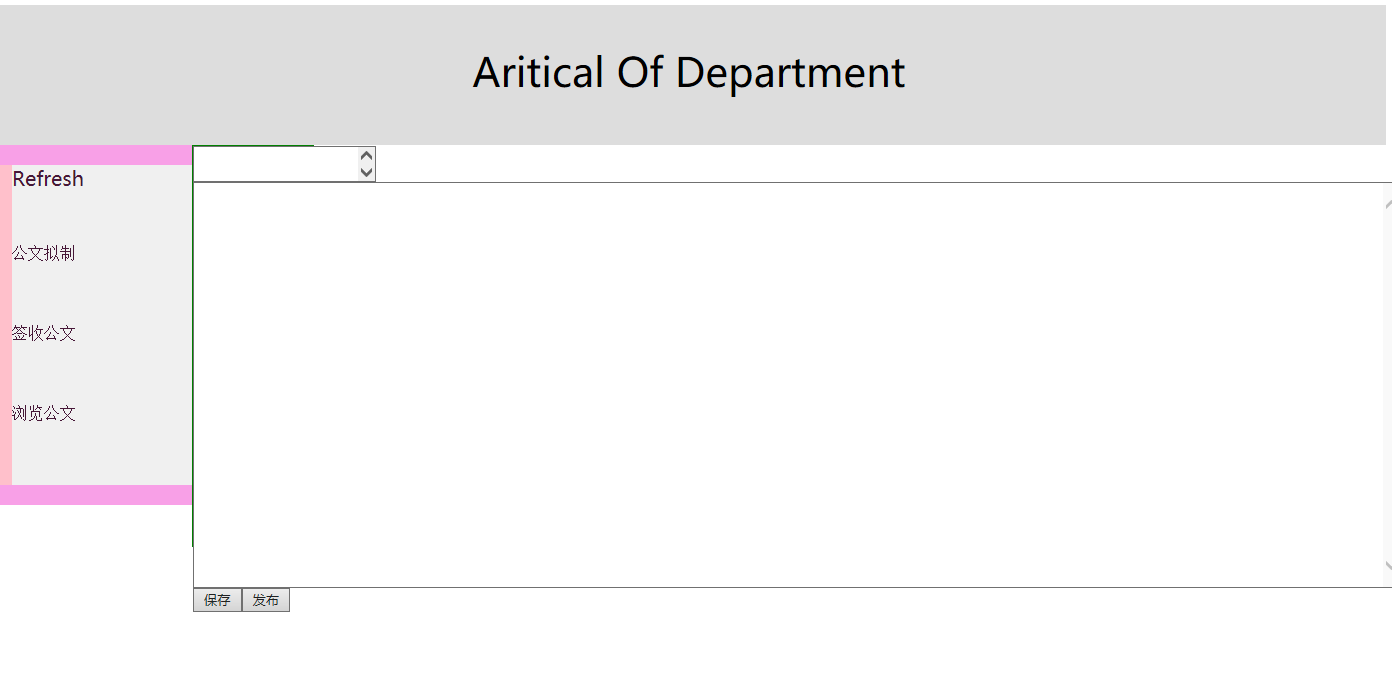
这部分是保存 html:
<%@ page language="java" contentType="text/html; charset=UTF-8"

    pageEncoding="UTF-8"%>

<!DOCTYPE html>

<html>

<head>

<meta charset="UTF-8">

<title>Document</title>

<style type="text/css">

        #d1{

            text-align: center;

            padding-top: 40px;

            font-family: "微软雅黑";

            font-size: 40px;

            background-color: #DDDDDD;

            height: 100px;

        }

        div ul{

            vertical-align: top;

            list-style-type: none;

            margin: 0px;

            vertical-align: left;

            width: 200px;

            padding: 0px;

            border-top: 20px solid #F8A0E7;

            border-bottom :20px solid #F8A0E7;

        }

        .headd{

            font-family: "微软雅黑";

            lighting-color: red;

            font-size: 20px;

        }

        div li a{

            height: 80px;

            display: block;

            padding: 0px 0px 0px 0em;

            text-decoration: none;

            border-left: 20px solid pink;

        }

        div li a:link,div li a:visited{

            background-color: #F0F0F0;

            color: #461737;

        }

        div li a:hover{

            background-color: green;

            color: gray;

        }

        div li a:active{

            background-color: pink;

        }

        #left{

        float:left;

        }

        #right{

        height:400px;

        width:120px;

        float:left;

        border:1px solid green;

        }

        #inp{

        float:left;

        height:400px;

        width:1202px;

        }

        .btn{

        float:left;

        }

</style>

<script type="text/javascript">

function Onload(){

        alert("发布成功!");

}

function Out(){

    var title=document.getElementById("title").value;

    if(title=="") {

        alert("标题不能为空!!!");

        return false;

    }

    var text=encodeURIComponent(document.getElementById("inp").value);

    var s="OutAritical?text="+text+"&type=Document&title="+title;

    window.location.href=s;

}

function Save(){

    var title=document.getElementById("title").value;

    if(title=="") {

        alert("标题不能为空!!!");

        return false;

    }

    var text=encodeURIComponent(document.getElementById("inp").value);

    var s="SaveAritical?text="+text+"&type=Document&title="+title;

    window.location.href=s;

}

</script>

</head>

<body onload="Onload()">

    <div id="d1">Aritical Of Department</div>

    <div id="left">

<ul>

    <li class="headd"><a href="#" onclick="fresh()">Refresh</a></li>

    <li><a href="Produce.jsp">公文拟制</a></li>

    <li><a href="Receive.jsp">签收公文</a></li>

    <li><a href="View.jsp">浏览公文</a></li>

</ul>

</div>

<div id="right">

<div><textarea type="text" id="title" placeholder="输入标题">

</textarea></div>

<div ><textarea type="text" id="inp" placeholder="输入内容">

 </textarea></div>

<div><button class="btn" onclick="Save()">保存</button></div>

<div><button class="btn" onclick="Out()">发布</button></div>

</div>

</body>

</html>
servlet:
package com.Aritical.servlet;

import java.io.IOException;

import java.sql.Connection;

import java.sql.ResultSet;

import java.sql.SQLException;

import java.sql.Statement;

import javax.servlet.ServletException;

import javax.servlet.annotation.WebServlet;

import javax.servlet.http.HttpServlet;

import javax.servlet.http.HttpServletRequest;

import javax.servlet.http.HttpServletResponse;

@WebServlet("/SaveAritical")

public class SaveAritical extends HttpServlet {

    private static final long serialVersionUID = 1L;

    public SaveAritical() {

        super();

        // TODO Auto-generated constructor stub

    }

    protected void doGet(HttpServletRequest request, HttpServletResponse response) throws ServletException, IOException {

        String text=request.getParameter("text");

        String type=request.getParameter("type");

        String title=request.getParameter("title");

        Link l=new Link();

        try {

            int id=0;

            Connection con=l.lin("AriticalManager");

            Statement stmt=con.createStatement();

            String queryid="select * from Aritical_"+type;

            ResultSet rsst=stmt.executeQuery(queryid);

            while(rsst.next()) {

                id=Integer.parseInt(rsst.getString("id"));

            }

            rsst.close();

            id++;

            String s="insert into Aritical values("+id+",1,'"+title+"','"+text+"')";

            stmt.executeUpdate(s);

            stmt.close();

            con.close();

        } catch (SQLException e) {

            // TODO Auto-generated catch block

            e.printStackTrace();

        }

        String url=type+"Out.jsp";

        request.getRequestDispatcher(url).forward(request, response);

    }

    protected void doPost(HttpServletRequest request, HttpServletResponse response) throws ServletException, IOException {

        // TODO Auto-generated method stub

        doGet(request, response);

    }

}
这是servlet:
package com.Aritical.servlet;

import java.io.IOException;

import java.sql.Connection;

import java.sql.ResultSet;

import java.sql.SQLException;

import java.sql.Statement;

import javax.servlet.ServletException;

import javax.servlet.annotation.WebServlet;

import javax.servlet.http.HttpServlet;

import javax.servlet.http.HttpServletRequest;

import javax.servlet.http.HttpServletResponse;

@WebServlet("/OutAritical")

public class OutAritical extends HttpServlet {

    private static final long serialVersionUID = 1L;

    public OutAritical() {

        super();

    }

    protected void doGet(HttpServletRequest request, HttpServletResponse response) throws ServletException, IOException {

        String text=request.getParameter("text");

        String type=request.getParameter("type");

        String title=request.getParameter("title");

        Link l=new Link();

        try {

            int id=0;

            Connection con=l.lin("AriticalManager");

            Statement stmt=con.createStatement();

            String queryid="select * from Aritical_"+type;

            ResultSet rsst=stmt.executeQuery(queryid);

            while(rsst.next()) {

                id=Integer.parseInt(rsst.getString("id"));

            }

            rsst.close();

            id++;

            String s="insert into Aritical_"+type+" values("+id+",0,'"+title+"','"+text+"')";

            stmt.executeUpdate(s);

            stmt.close();

            con.close();

        } catch (SQLException e) {

            // TODO Auto-generated catch block

            e.printStackTrace();

        }

        String url=type+"Save.jsp";

        request.getRequestDispatcher(url).forward(request, response);

    }

    protected void doPost(HttpServletRequest request, HttpServletResponse response) throws ServletException, IOException {

        doGet(request, response);

    }

}
这部分是发布的代码
<%@ page language="java" contentType="text/html; charset=UTF-8"

    pageEncoding="UTF-8"%>

<!DOCTYPE html>

<html>

<head>

<meta charset="UTF-8">

<title>Document</title>

<style type="text/css">

        #d1{

            text-align: center;

            padding-top: 40px;

            font-family: "微软雅黑";

            font-size: 40px;

            background-color: #DDDDDD;

            height: 100px;

        }

        div ul{

            vertical-align: top;

            list-style-type: none;

            margin: 0px;

            vertical-align: left;

            width: 200px;

            padding: 0px;

            border-top: 20px solid #F8A0E7;

            border-bottom :20px solid #F8A0E7;

        }

        .headd{

            font-family: "微软雅黑";

            lighting-color: red;

            font-size: 20px;

        }

        div li a{

            height: 80px;

            display: block;

            padding: 0px 0px 0px 0em;

            text-decoration: none;

            border-left: 20px solid pink;

        }

        div li a:link,div li a:visited{

            background-color: #F0F0F0;

            color: #461737;

        }

        div li a:hover{

            background-color: green;

            color: gray;

        }

        div li a:active{

            background-color: pink;

        }

        #left{

        float:left;

        }

        #right{

        height:400px;

        width:120px;

        float:left;

        border:1px solid green;

        }

        #inp{

        float:left;

        height:400px;

        width:1202px;

        }

        .btn{

        float:left;

        }

</style>

<script type="text/javascript">

function Onload(){

        alert("发布成功!");

}

function Out(){

    var title=document.getElementById("title").value;

    if(title=="") {

        alert("标题不能为空!!!");

        return false;

    }

    var text=encodeURIComponent(document.getElementById("inp").value);

    var s="OutAritical?text="+text+"&type=Document&title="+title;

    window.location.href=s;

}

function Save(){

    var title=document.getElementById("title").value;

    if(title=="") {

        alert("标题不能为空!!!");

        return false;

    }

    var text=encodeURIComponent(document.getElementById("inp").value);

    var s="SaveAritical?text="+text+"&type=Document&title="+title;

    window.location.href=s;

}

</script>

</head>

<body onload="Onload()">

    <div id="d1">Aritical Of Department</div>

    <div id="left">

<ul>

    <li class="headd"><a href="#" onclick="fresh()">Refresh</a></li>

    <li><a href="Produce.jsp">公文拟制</a></li>

    <li><a href="Receive.jsp">签收公文</a></li>

    <li><a href="View.jsp">浏览公文</a></li>

</ul>

</div>

<div id="right">

<div><textarea type="text" id="title" placeholder="输入标题">

</textarea></div>

<div ><textarea type="text" id="inp" placeholder="输入内容">

 </textarea></div>

<div><button class="btn" onclick="Save()">保存</button></div>

<div><button class="btn" onclick="Out()">发布</button></div>

</div>

</body>

</html>
这是发布的servlet:
package com.Aritical.servlet;

import java.io.IOException;

import java.sql.Connection;

import java.sql.ResultSet;

import java.sql.SQLException;

import java.sql.Statement;

import javax.servlet.ServletException;

import javax.servlet.annotation.WebServlet;

import javax.servlet.http.HttpServlet;

import javax.servlet.http.HttpServletRequest;

import javax.servlet.http.HttpServletResponse;

@WebServlet("/SaveAritical")

public class SaveAritical extends HttpServlet {

    private static final long serialVersionUID = 1L;

    public SaveAritical() {

        super();

        // TODO Auto-generated constructor stub

    }

    protected void doGet(HttpServletRequest request, HttpServletResponse response) throws ServletException, IOException {

        String text=request.getParameter("text");

        String type=request.getParameter("type");

        String title=request.getParameter("title");

        Link l=new Link();

        try {

            int id=0;

            Connection con=l.lin("AriticalManager");

            Statement stmt=con.createStatement();

            String queryid="select * from Aritical_"+type;

            ResultSet rsst=stmt.executeQuery(queryid);

            while(rsst.next()) {

                id=Integer.parseInt(rsst.getString("id"));

            }

            rsst.close();

            id++;

            String s="insert into Aritical values("+id+",1,'"+title+"','"+text+"')";

            stmt.executeUpdate(s);

            stmt.close();

            con.close();

        } catch (SQLException e) {

            // TODO Auto-generated catch block

            e.printStackTrace();

        }

        String url=type+"Out.jsp";

        request.getRequestDispatcher(url).forward(request, response);

    }

    protected void doPost(HttpServletRequest request, HttpServletResponse response) throws ServletException, IOException {

        // TODO Auto-generated method stub

        doGet(request, response);

    }

}
签收:
<%@ page language="java" contentType="text/html; charset=UTF-8"

    pageEncoding="UTF-8"%>

    <%@ taglib uri="http://java.sun.com/jsp/jstl/core" prefix="c"%>

<!DOCTYPE html>

<html>

<head>

<meta charset="UTF-8">

<title>DocumentReceive</title>

<style type="text/css">

        #d1{

            text-align: center;

            padding-top: 40px;

            font-family: "微软雅黑";

            font-size: 40px;

            background-color: #DDDDDD;

            height: 100px;

        }

        div ul{

            vertical-align: top;

            list-style-type: none;

            margin: 0px;

            vertical-align: left;

            width: 200px;

            padding: 0px;

            border-top: 20px solid #F8A0E7;

            border-bottom :20px solid #F8A0E7;

        }

        .headd{

            font-family: "微软雅黑";

            lighting-color: red;

            font-size: 20px;

        }

        div li a{

            height: 80px;

            display: block;

            padding: 0px 0px 0px 0em;

            text-decoration: none;

            border-left: 20px solid pink;

        }

        div li a:link,div li a:visited{

            background-color: #F0F0F0;

            color: #461737;

        }

        div li a:hover{

            background-color: green;

            color: gray;

        }

        div li a:active{

            background-color: pink;

        }

        #left{

        float:left;

        }

        #right{

        height:400px;

        width:120px;

        float:left;

        border:1px solid green;

        }

        #inp{

        float:left;

        height:400px;

        width:1202px;

        }

        .btn{

        float:left;

        }

</style>

<script type="text/javascript">

function receive(){

    }

</script>

</head>

<body>

    <div id="d1">Aritical Of Department</div>

    <div id="left">

<ul>

    <li class="headd"><a href="#" onclick="fresh()">Refresh</a></li>

    <li><a href="Document.jsp">公文拟制</a></li>

    <li><a href="Receive?type=Document">签收公文</a></li>

    <li><a href="DocumentView.jsp">浏览公文</a></li>

</ul>

</div>

<div id="right">

<table>

<c:forEach items="${list}" var="list" >

<tr>

<td onmouseover="this.style.backgroundColor='#FCADEC';"

                        onmouseout="this.style.backgroundColor='#d4e3e5';">${list.id}</td>

<td onmouseover="this.style.backgroundColor='#FCADEC';"

                        onmouseout="this.style.backgroundColor='#d4e3e5';">${list.state}</td>

<td onmouseover="this.style.backgroundColor='#FCADEC';"

                        onmouseout="this.style.backgroundColor='#d4e3e5';">${list.title}</td>

</tr>

<button onclick="receive()">签收</button>

</c:forEach>

</table>

</div>

</body>

</html>
这部分还没完善servlet:
package com.Aritical.servlet;

import java.io.IOException;

import java.sql.Connection;

import java.sql.ResultSet;

import java.sql.SQLException;

import java.sql.Statement;

import java.util.ArrayList;

import javax.servlet.ServletException;

import javax.servlet.annotation.WebServlet;

import javax.servlet.http.HttpServlet;

import javax.servlet.http.HttpServletRequest;

import javax.servlet.http.HttpServletResponse;

/**

 * Servlet implementation class Receive

 */

@WebServlet("/Receive")

public class Receive extends HttpServlet {

    private static final long serialVersionUID = 1L;

    public Receive() {

        super();

    }

    protected void doGet(HttpServletRequest request, HttpServletResponse response) throws ServletException, IOException {

        String type=request.getParameter("type");

        int min=0,max=0;

        ArrayList<AriticalBean> arr=new ArrayList<AriticalBean>();

        switch (type) {

        case "Document":

        {    min=1;

            max=4;

            break;

        }

        default:

            break;

        }

        Link l=new Link();

        try {

            Connection con=l.lin("AriticalManager");

            Statement stmt=con.createStatement();

            String s="select * from Aritical where id between "+min+" and "+max;

            ResultSet rsst=stmt.executeQuery(s);

            while(rsst.next()) {

            AriticalBean ab=new AriticalBean();

            ab.setId(rsst.getInt("id"));

            ab.setState(rsst.getInt("state"));

            ab.setTitle(rsst.getString("title"));

            ab.setText(rsst.getString("text"));

            arr.add(ab);

            }

        } catch (SQLException e) {

            // TODO Auto-generated catch block

            e.printStackTrace();

        }

        request.setAttribute("list", arr);

        String s=type+"Receive.jsp";

        request.getRequestDispatcher(s).forward(request, response);

    }

    protected void doPost(HttpServletRequest request, HttpServletResponse response) throws ServletException, IOException {

        // TODO Auto-generated method stub

        doGet(request, response);

    }

}
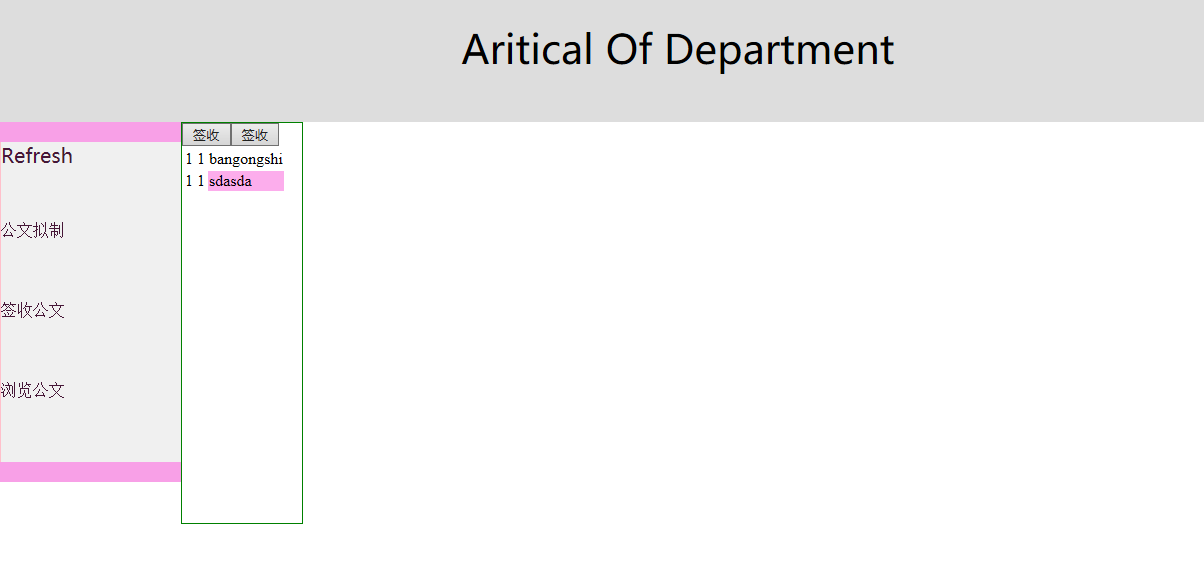
目前只写出了这么点,稍后会完善并进行深度总结!
Java期末考试冲刺总结的更多相关文章
- java 期末考试复习
//Scanner这样写? Scanner input = new Scanner(System.in); //不断获得下一个单词 names[i] = toTitleCase(input.nex ...
- java期末考试
水仙花数 package txt; public class shuixianhua { public static void main(String[] args) { // TODO Auto-g ...
- Java期末考试编程题复习
在程序中定义Person类,为该类编写如下字段.构造器.访问器.修改器和相应的其他方法.(20分) <1>在Person类中定义两个字段: 私有访问权限,类型为String的name字段: ...
- Java 期末考试
一: 题目:打印出100-999之间所有的"水仙花数",所谓"水仙花数"是指一个三位数,其各位数字立方和等于该数本身. 例如:153是一个"水仙花 ...
- JAVA期末考试整理
Technical problem: 0.read: Scanner input= new Scanner(System.in) random#: x=(int)(Math.random()*10) ...
- Java开发工程师(Web方向) - 03.数据库开发 - 期末考试
期末考试 编程题 本编程题包含4个小题,覆盖知识点从基础的JDBC.连接池到MyBatis. 1(10分) 有一款在线教育产品“天天向上”主要实现了在手机上查看课程表的功能.该产品的后端系统有一张保存 ...
- 中国MOOC_面向对象程序设计——Java语言_期末考试编程题_1细胞自动机
期末考试编程题 返回 这是期末考试的编程题 温馨提示: 1.本次考试属于Online Judge题目,提交后由系统即时判分. 2.学生可以在考试截止时间之前提交答案,系统将取其中的最高分作为最终成 ...
- 中国MOOC_零基础学Java语言_期末考试的编程题_1二进制的前导的零
期末考试的编程题 返回 这是期末考试的编程题,在60分钟内,你可以多次提交,直到正确为止. 温馨提示: 1.本次考试属于Online Judge题目,提交后由系统即时判分. 2.学生可以在考试截止 ...
- 复旦大学2015--2016学年第二学期高等代数II期末考试情况分析
一.期末考试成绩班级前几名 胡晓波(90).杨彦婷(88).宋卓卿(85).唐指朝(84).陈建兵(83).宋沛颖(82).王昊越(81).白睿(80).韩沅伯(80).王艺楷(80).张漠林(80) ...
随机推荐
- Sunset: dusk: Vulnhub Walkthrough
靶机链接: https://www.vulnhub.com/entry/sunset-dusk,404/ 主机IP扫描: IP端口扫描: 21 端口 pyftpdlib 1.5.5 版本漏洞 25 ...
- RxJava的concat操作符
更多文章请点击:http://77blogs.com/?p=170 转载请标明出处:https://www.cnblogs.com/tangZH/p/12088332.html,http://77bl ...
- MySQL 普通索引和唯一索引的区别
该文为< MySQL 实战 45 讲>的学习笔记,感谢查看,如有错误,欢迎指正 一.查询和更新上的区别 这两类索引在查询能力上是没差别的,主要考虑的是对更新性能的影响.建议尽量选择普通索引 ...
- MFC/QT 学习笔记(一)——认识windows基础库
MFC (微软基础类库),Windows系统平台做GUI尚且OK,但不支持跨平台. //Windows消息机制: //1.SDK与API Software Development Kit,为特定软件框 ...
- linux centos7安装mysql8
一.RPM版安装 查看是否有其他版本的数据库,若有,删除干净 非root用户必须要有sudo权限 1.下载mysql相关安装包 https://mirrors.tuna.tsinghua.edu.cn ...
- vue 注意
Path Intellisense 插件 @路径提醒 配置文件中配置: "path-intellisense.mappings": { "@": "$ ...
- 第1章 JavaScript 简介
第1章 JavaScript 简介 1.1 JavaScript简史 1.2 JavaScript实现 1.2.1 ECMAScript 1.2.2 文档对象模型(DOM) 1.2.3 浏览器对象模型 ...
- PAT甲级代码仓库
大道至简,知易行难.希望能够坚持刷题. PAT甲级真题题库,附上我的代码. Label Title Score Code Level 1001 A+B Format 20 1001 * 1002 A+ ...
- java设计模式学习笔记--依赖倒转原则
依赖倒转原则简述 1.高层模块不应该依赖低层模块,二者都应该依赖其抽象 2.抽象不应该依赖细节,细节应该依赖抽象 3.依赖倒转得中心思想时面向接口编程 4.依赖倒转原则时基于这样得设计理念:相对于细节 ...
- JavaScript语法规则+JavaScript数据类型
JavaScript: ECMAScript + BOM +DOM javascript 标识符命名规则: 1.只能是字母.数字.下划线.$ 2.不能以数字开头 3.不能使用关键字和保留字 省略var ...