
Android中通过Fragment进行简单的页面切换
首先是activity中的布局
<?xml version="1.0" encoding="utf-8"?>

<androidx.constraintlayout.widget.ConstraintLayout xmlns:android="http://schemas.android.com/apk/res/android"

    xmlns:app="http://schemas.android.com/apk/res-auto"

    xmlns:tools="http://schemas.android.com/tools"

    android:layout_width="match_parent"

    android:layout_height="match_parent"

    tools:context=".MainActivity">

    <FrameLayout

        android:id="@+id/fragment"

        android:layout_width="395dp"

        android:layout_height="509dp"

        app:layout_constraintEnd_toEndOf="parent"

        app:layout_constraintHorizontal_bias="0.333"

        app:layout_constraintStart_toStartOf="parent"

        app:layout_constraintTop_toTopOf="parent">

    </FrameLayout>

    <Button

        android:id="@+id/b1"

        android:layout_width="wrap_content"

        android:layout_height="wrap_content"

        android:layout_marginStart="50dp"

        android:layout_marginBottom="12dp"

        android:text="1"

        app:layout_constraintBottom_toBottomOf="parent"

        app:layout_constraintStart_toStartOf="parent" />

    <Button

        android:id="@+id/b2"

        android:layout_width="wrap_content"

        android:layout_height="wrap_content"

        android:layout_marginEnd="64dp"

        android:layout_marginBottom="17dp"

        android:text="2"

        app:layout_constraintBottom_toBottomOf="parent"

        app:layout_constraintEnd_toEndOf="parent" />

</androidx.constraintlayout.widget.ConstraintLayout>
创建两个Fragment子类
这里以一个为例
package com.example.fragment;

import android.os.Bundle;

import androidx.annotation.NonNull;
import androidx.annotation.Nullable;
import androidx.fragment.app.Fragment;

import android.view.LayoutInflater;
import android.view.View;
import android.view.ViewGroup;

public class f1 extends Fragment {

    @Override
    public View onCreateView(@NonNull LayoutInflater inflater, @Nullable ViewGroup container,
                             @Nullable Bundle savedInstanceState) {
        return inflater.inflate(R.layout.f1_fragment2, container, false);
    }

}
其布局:
<?xml version="1.0" encoding="utf-8"?>

<androidx.constraintlayout.widget.ConstraintLayout xmlns:android="http://schemas.android.com/apk/res/android"

    xmlns:app="http://schemas.android.com/apk/res-auto"

    xmlns:tools="http://schemas.android.com/tools"

    android:id="@+id/f1"

    android:layout_width="match_parent"

    android:layout_height="match_parent"

    tools:context="f1">

    <TextView

        android:id="@+id/textView4"

        android:layout_width="182dp"

        android:layout_height="85dp"

        android:layout_marginTop="165dp"

        android:text="我是1"

        app:layout_constraintEnd_toEndOf="parent"

        app:layout_constraintStart_toStartOf="parent"

        app:layout_constraintTop_toTopOf="parent" />

</androidx.constraintlayout.widget.ConstraintLayout>
最后也是最重要的,Mainactivity内容:
package com.example.fragment;

import androidx.appcompat.app.AppCompatActivity;

import androidx.fragment.app.FragmentManager;

import androidx.fragment.app.FragmentTransaction;

import android.os.Bundle;

import android.view.View;

import android.widget.Button;

public class MainActivity extends AppCompatActivity {

    private Button b1=null;

    private Button b2=null;

   private  FragmentManager fm=null ;

    private  FragmentTransaction transaction =null ;

    private f1 f1;

    private f2 f2;

    @Override

    protected void onCreate(Bundle savedInstanceState) {

        super.onCreate(savedInstanceState);

        setContentView(R.layout.activity_main);

        b1=(Button)findViewById(R.id.b1);

        b2=(Button)findViewById(R.id.b2);

       fm = getSupportFragmentManager();

    setDefaultFragment();

    b1.setOnClickListener(new View.OnClickListener() {

        @Override

        public void onClick(View v) {

            transaction = fm.beginTransaction();

            f1=new f1();

            transaction.replace(R.id.fragment,f1);

            transaction.commit();

        }

    });

    b2.setOnClickListener(new View.OnClickListener() {

        @Override

        public void onClick(View v) {

            transaction = fm.beginTransaction();

            f2=new f2();

            transaction.replace(R.id.fragment,f2);

            transaction.commit();

        }

    });

    }

    private void setDefaultFragment()

    {

        transaction = fm.beginTransaction();

        f1=new f1();

        transaction.replace(R.id.fragment,f1);

        transaction.commit();

    }

}
注意:每个FragmentTransaction只能提交一次,因此在每次提交前都要重新为transaction赋予一个新对象;
还有关于“fm = getSupportFragmentManager();”处使用“getSupportFragmentManager();”,而不使用“fm = getFragmentManager();”的原因请参照这篇帖子https://blog.csdn.net/qq_28484355/article/details/67824228
效果:

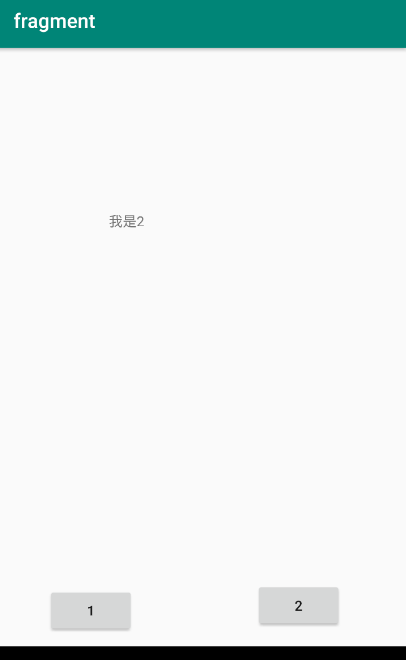
点击“2”后:
Android中通过Fragment进行简单的页面切换的更多相关文章
- android中viewPager+fragment实现的屏幕左右切换(进阶篇)
Fragment支持在不同的Activity中使用并且可以处理自己的输入事件以及生命周期方法等.可以看做是一个子Activity. 先看一下布局: 1 <LinearLayout xmlns:a ...
- Android中ViewPager+Fragment取消(禁止)预加载延迟加载(懒加载)问题解决方案
转载请注明出处:http://blog.csdn.net/linglongxin24/article/details/53205878本文出自[DylanAndroid的博客] Android中Vie ...
- Android笔记(十九) Android中的Fragment
通常我们使用Activity来展示界面,但是在手机上界面可能显示的很好看,但在平板上,因为平板的屏幕非常大,手机的界面放在平板上可能会出现控件被拉长.控件之间间距变大等问题.为了更好的体验效果,在Ac ...
- Android 中关于Fragment嵌套Fragment的问题
转载请注明出处:http://www.cnblogs.com/Joanna-Yan/p/5802146.html 问题描述: 在项目中Activity A中嵌套Fragment B,Fragment ...
- Android中GPS定位的简单应用
在Android中通过GPS获得当前位置,首先要获得一个LocationManager实例,通过该实例的getLastKnownLocation()方法获得第一个的位置,该方法的说明如下: void ...
- ViewPager (下)-- 利用 Fragment 实现美丽的 页面切换
之前用的ViewPager适用于简单的广告切换,但实现页面间的切换最好是用官方推荐的Fragment来处理. 本人力争做到最简单.最有用,是想以后用到的时候能够方便的拿过来复制就能够了. 效果图: w ...
- Android中的Fragment页面切换和selector选择器
效果如图: 提示:下面是用的整个的图片 下面看代码: //--------------------这是主页面布局文件----------------------- <?xml version=& ...
- Android中ViewPgae中的Fragment如何确认当前页面可见的问题
由于在ViewPage中PageAdapter来管理所有的Fragment.在加载一个Fragment的时候,会自动缓存左右几个(默认是一个)页面,此时也会调用到正常的生命周期函数,onCreate, ...
- 【IOS】ios中NSUserDefault与android中的SharedPreference用法简单对比
以下内容为原创,欢迎转载,转载请注明 来自天天博客:http://www.cnblogs.com/tiantianbyconan/p/3405308.html 有Android开发经验的朋友对Shar ...
随机推荐
- AntV F2 数据可视化填坑,图表横向滚动
柱状图横向滚动 思路 通过 Interaction 实现平移,通过 ScrollBar 显示滚动条 1.Interaction F2 提供一套交互机制,以达到通用交互行为的封装和复用.基于此机制,我们 ...
- Python zmq的三种简单模式
ZMQ (以下 ZeroMQ 简称 ZMQ)是一个简单好用的传输层,像框架一样的一个 socket library,他使得 Socket 编程更加简单.简洁和性能更高. 是一个消息处理队列库,可在多个 ...
- netty EventLoop线程与当前线程的问题
模拟客户端向服务端发送消息: 客户端部分代码如下,当连接激活触发消息发送,采用线程池的形式,分多个线程向服务端发送同一消息 @Override public void channelActive(Ch ...
- win10下安装Anaconda3
1.官方下载:https://www.anaconda.com/distribution/#download-section (最新版直接下即可) 或者国内镜像下载:https://mirrors. ...
- Dubbo(三):深入理解Dubbo源码之如何实现服务引用
一.前言 前面讲了服务是如何导出到注册中心的.其实Dubbo做的一件事就是将服务的URL发布到注册中心上.那现在我们聊一聊消费者一方如何从注册中心订阅服务并进行远程调用的. 二.引用服务时序图 首先总 ...
- 【C/C++】概念: VC虚函数布局引发的问题
在网上看到一个非常热的帖子,里面是这样的一个问题: 在打印的时候发现pFun的地址和 &(Base::f)的地址竟然不一样太奇怪了?经过一番深入研究,终于把这个问题弄明白了.下面就来一步步进行 ...
- 时序数据库 Apache-IoTDB 源码解析之文件索引块(五)
上一章聊到 TsFile 的文件组成,以及数据块的详细介绍.详情请见: 时序数据库 Apache-IoTDB 源码解析之文件数据块(四) 打一波广告,欢迎大家访问IoTDB 仓库,求一波 Star. ...
- vue初始化、数据处理、组件传参、路由传参、全局定义CSS与JS、组件生命周期
目录 项目初始化 组件数据局部化处理 子组件 父组件 路由逻辑跳转 案例 组件传参 父传子 子组件 父组件 子传父 子组件 父组件 组件的生命周期钩子 路由传参 第一种 配置:router/index ...
- Jenkins report 打开样式失败解决方案
1.临时解决方案(重启Jenkins失效):在系统管理->脚本命令行: 执行: System.setProperty("hudson.model.DirectoryBrowserSup ...
- 如何高效地远程部署?自动化运维利器 Fabric 教程
关于 Python 自动化的话题,在上一篇文章中,我介绍了 Invoke 库,它是 Fabric 的最重要组件之一.Fabric 也是一个被广泛应用的自动化工具库,是不得不提的自动化运维利器,所以,本 ...