
mybatis_day02
2.映射器Mapper
相当于dao层,不用写实现类(mybatis底层会采用动态代理模式 会跟我生成实现)
步骤:
(1) 创建项目 配置mybatis-config.xml 和昨天一样
(2) 创建接口 ProductMapper (XXXXMapper) 里面定义一个方法findAll -->以前dao层/mapper层
(3) 在对应的ProductMapper.xml namespace 和
标签里面id (namespace+id) == (ProductMapper包路径+方法)
<select id="findAll" resultType="product">
select * from product
</select>
3.高级查询
3.1 like查询
方式一(存在sql注入的问题):
<if test="productName != null">
and productName like '%${productName}%'
</if>
方式二:
<if test="productName != null">
and productName like concat('%',#{productName},'%')
</if>
3.2特殊符号转译
方式一:
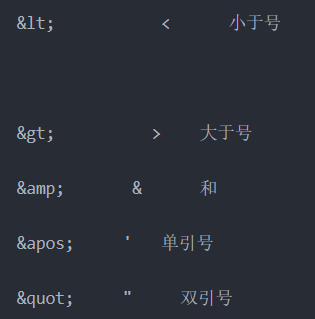
Eq: <if test="minPrice != null and maxPrice != null">
and salePrice > #{minPrice} and salePrice < #{maxPrice}
</if>
方式二(CDATA):
<![CDATA[ ]]>
Eq:<if test="minPrice != null and maxPrice != null">
<![CDATA[
and salePrice > #{minPrice} and salePrice <= #{maxPrice}
]]>
</if>
4.结果映射
处理表字段和domain的对象字段不一致的情况
4.1 使用别名
<select id="findAll" resultType="product">
select id,productName pName,salePrice,costPrice,cutoff from product
</select>
4.2 返回Map解决
<select id="findAll" resultMap="productMap">
select id,productName,salePrice,costPrice,cutoff from product
</select>
<resultMap id="productMap" type="product">
<!-- id:主键
property:类里面的属性
column:查询列名称
-->
<id property="id" column="id"></id>
<result property="pName" column="productName"></result>
<result property="salePrice" column="salePrice"></result>
</resultMap>
5.关系处理
5.1 对一方处理
嵌套结果: 只发送一条sql
嵌套查询: 发送 1+n条sql
<?xml version="1.0" encoding="UTF-8" ?>
<!DOCTYPE mapper
PUBLIC "-//mybatis.org//DTD Mapper 3.0//EN"
"http://mybatis.org/dtd/mybatis-3-mapper.dtd">
<mapper namespace="cn.itsource._03_manytoone.mapper.ProductMapper">
<!-- <resultMap id="productMap" type="product">
<id column="id" property="id"></id>
<result column="productName" property="pName"></result>
<result column="salePrice" property="salePrice"></result>
<result column="costPrice" property="costPrice"></result>
<result column="cutoff" property="cutoff"></result>
<!– 处理一方–>
<association property="dir" javaType="productDir">
<id column="did" property="id"></id>
<result column="dname" property="dirName"></result>
</association>
</resultMap>-->
<!-- (1)嵌套结果 发送一条sql语句-->
<!-- <select id="findAll" resultMap="productMap">
SELECT p.id, p.productName, p.salePrice, p.costPrice, p.cutoff, dir.id did, dir.dirName dname
FROM
product p
JOIN productDir dir ON p.dir_id = dir.id
</select>-->
<!-- 嵌套查询:发送多sql语句(1+n条sql)-->
<select id="findAll" resultMap="productMap">
SELECT
p.id,p.productName,p.salePrice, p.costPrice,p.cutoff,p.dir_id
FROM product p
</select>
<resultMap id="productMap" type="product">
<id column="id" property="id"></id>
<result column="productName" property="pName"></result>
<result column="salePrice" property="salePrice"></result>
<result column="costPrice" property="costPrice"></result>
<result column="cutoff" property="cutoff"></result>
<!--根据上面查询dir_id 在去查询 分类对象-->
<association property="dir" column="dir_id" javaType="productDir" select="selectDir">
</association>
</resultMap>
<select id="selectDir" parameterType="long" resultType="ProductDir">
select * from productDir where id = #{dir_id}
</select>
</mapper>
5.2 对多方进行处理
嵌套结果和嵌套查询
<?xml version="1.0" encoding="UTF-8" ?>
<!DOCTYPE mapper
PUBLIC "-//mybatis.org//DTD Mapper 3.0//EN"
"http://mybatis.org/dtd/mybatis-3-mapper.dtd">
<mapper namespace="cn.itsource._04_onetomany.mapper.ProductDirMapper">
<!-- 嵌套结果-->
<!-- <select id="findAll" resultMap="productDirMap">
select dir.id ,dir.dirName,
p.id pid,p.productName pName,p.salePrice,p.costPrice,p.cutoff
from productDir dir join product p
on dir.id = p.dir_id
</select>
<resultMap id="productDirMap" type="productDir">
<id property="id" column="id"></id>
<result property="dirName" column="dirName"></result>
<collection property="products" ofType="product">
<id property="id" column="pid"></id>
<result property="pName" column="pName"></result>
<result property="salePrice" column="salePrice"></result>
<result property="costPrice" column="costPrice"></result>
</collection>
</resultMap>-->
<!-- 嵌套查询-->
<select id="findAll" resultMap="productDirMap">
select dir.id ,dir.dirName from productDir dir
</select>
<resultMap id="productDirMap" type="productDir">
<id property="id" column="id"></id>
<result property="dirName" column="dirName"></result>
<collection property="products" column="id" ofType="product" select="selectProducts">
</collection>
</resultMap>
<select id="selectProducts" parameterType="long" resultType="product">
select id,productName pName,salePrice,costPrice,cutoff
from product where dir_id = #{dir_id}
</select>
</mapper>
6.SSM整合
6.1 整合步骤
(1)创建项目--web项目 (maven/普通web)
(2)导入三个框架的jar包
(3)配置文件
applicationContext.xml --配置spring+mybatis
<!--sqlSessionFactory -->
<bean id="sqlSessionFactory" class="org.mybatis.spring.SqlSessionFactoryBean">
<property name="dataSource" ref="dataSource"></property>
<property name="mapperLocations" value="classpath:cn/itsource/ssm/mapper/*Mapper.xml"></property>
<property name="typeAliasesPackage">
<value>
cn.itsource.ssm.domain
</value>
</property>
</bean>
<!-- 把产生mapper 交给 spring-->
<bean class="org.mybatis.spring.mapper.MapperScannerConfigurer">
<property name="basePackage" value="cn.itsource.ssm.mapper"></property>
</bean>
mybatis_day02的更多相关文章
- Spring 和 MyBatis 环境整合
本案例主要是讲述Spring 和 MyBatis 的环境整合 , 对页面功能的实现并没有做的很完整 先附上本案例的结构 1 . 创建项目并导入相关jar包 commons-collections4 ...
随机推荐
- Spring5.x源码分析 | 从踩坑到放弃之环境搭建
Spring5.x源码分析--从踩坑到放弃之环境搭建 前言 自从Spring发行4.x后,很久没去好好看过Spring源码了,加上最近半年工作都是偏管理和参与设计为主,在技术细节上或多或少有点疏忽,最 ...
- 学习记录一(Python算数运算符与if语句)
从网上找到一个Python的学习视频,之前的环境都装好了,今天看的就是算术运算符和变量的命名 其中Python的除法直接就是 / %用于求余 其中还可以进行幂运算** 例如2 ** 3 = 8 ...
- centos6.8安装lnmp
一.配置CentOS 第三方yum源(CentOS默认的标准源里没有nginx软件包) [root@localhost ~]# yum install wget #安装下载工具wget[root@lo ...
- C++输出中文字符
注:本文转载自互联网,感谢作者整理! 1. cout 场景1: 在源文件中定义 const char* str = "中文" 在 VC++ 编译器上,由于Windows环境用 ...
- 脚本、脚本语言、shell脚本
脚本是批处理文件的延伸,是一种纯文本保存的程序,一般来说的计算机脚本程序是确定的一系列控制计算机进行运算操作动作的组合,在其中可以实现一定的逻辑分支等.脚本程序相对一般程序开发来说比较接近自然语言,可 ...
- Ansible 学习目录
1. Ansible 安装 2. Ansible hosts 文件配置 3. Ansible 常用模块 4. Ansible playbook使用
- zabbix-mysql迁移分离
io过高,迁移mysql 停掉zabbix 导出数据库的zabbix库 导入到新机器,并启动mysql 1:修改zabbix_server.conf文件里DB相关的地址,用户名和密码. vim /et ...
- php oci 和 pdo_oci 安装
安装非常复杂,必须记录 CentOS服务器上已有相关环境:apache.php5 需要安装:1.oracle客户端.2.oci8扩展.3.pdo_oci扩展. 一. 准备文件 1) oracle客户端 ...
- 向C++之父Bjarne Stroustrup致敬
2013-04-25 21:30 (分类:社会人生) 非常好的文章 C ++ 的 背 影 ——C++之父Bjarne Strou ...
- Android Studio 找不到夜神模拟器的解决办法
Android Studio 找不到夜神模拟器的解决办法 1.启动夜神模拟器 2.找到你电脑上的夜神安装目录,在bin目录下打开cmd窗口,运行命令 nox_adb.exe connect 127.0 ...