
安装PHP到CentOS(YUM)
运行环境
系统版本:CentOS Linux release 7.3.1611
软件版本:PHP-7.2
硬件要求:无
安装过程
1、配置YUM-REMI存储库
YUM-REMI存储库由REMI官方提供。
[root@localhost ~]# rpm -i http://rpms.famillecollet.com/enterprise/remi-release-7.rpm

[root@localhost ~]# rpm -i https://dl.fedoraproject.org/pub/epel/epel-release-latest-7.noarch.rpm
2、安装PHP72+Nginx
[root@localhost ~]# yum -y install php72 php72-php-bcmath php72-php-fpm php72-php-gd php72-php-mbstring php72-php-mysqlnd php72-php-opcache php72-php-pecl-crypto php72-php-pecl-mcrypt php72-php-pecl-memcache php72-php-pecl-mysql php72-php-pecl-redis php72-php-pecl-swoole nginx
3、启动PHP-FPM服务
[root@localhost ~]# systemctl start php72-php-fpm.service

[root@localhost ~]# systemctl enable php72-php-fpm.service
4、配置Nginx反代PHP
[root@localhost ~]# vim /etc/nginx/conf.d/php72

server {

        listen 8080;

        server_name  _php;

        root   "/usr/share/nginx/html";

        location / {

                index index.php index.html;

                if (!-e $request_filename){

                        rewrite  ^(.*)$  /index.php?s=$1  last;

                break;

                }

        }

        location ~ ^.*\.php(.*)$ {

            fastcgi_pass   127.0.0.1:9000;

            #连接到PHP-FPM,这里采用UNIX套接字的连接方式,设置由PHP-FPM提供的UNIX套接字文件路径。

            fastcgi_index  index.php;

            #设置PHP默认首页文件。

            fastcgi_param  SCRIPT_FILENAME  /usr/share/nginx/html$fastcgi_script_name;

            #设置FastCGI的一个环境变量"SCRIPT_FILENAME",设置FastCGI服务器读取的PHP入口文件完整路径。

            include        fastcgi_params;

            #包含当前配置目录下"fastcgi_param"文件中的所有配置,该文件中存储了一些默认配置FastCGI服务器的一些环境变量,这些变量都有特殊的作用,一般情况下无需修改。

        }

}
5、创建一个PHP测试页面
[root@localhost ~]# vi /usr/share/nginx/html/index.php

<?php

phpinfo()

?>
6、启动Nginx
[root@localhost ~]# nginx -t

nginx: the configuration file /etc/nginx/nginx.conf syntax is ok

nginx: configuration file /etc/nginx/nginx.conf test is successful

[root@localhost ~]# systemctl start nginx

[root@localhost ~]# systemctl enable nginx
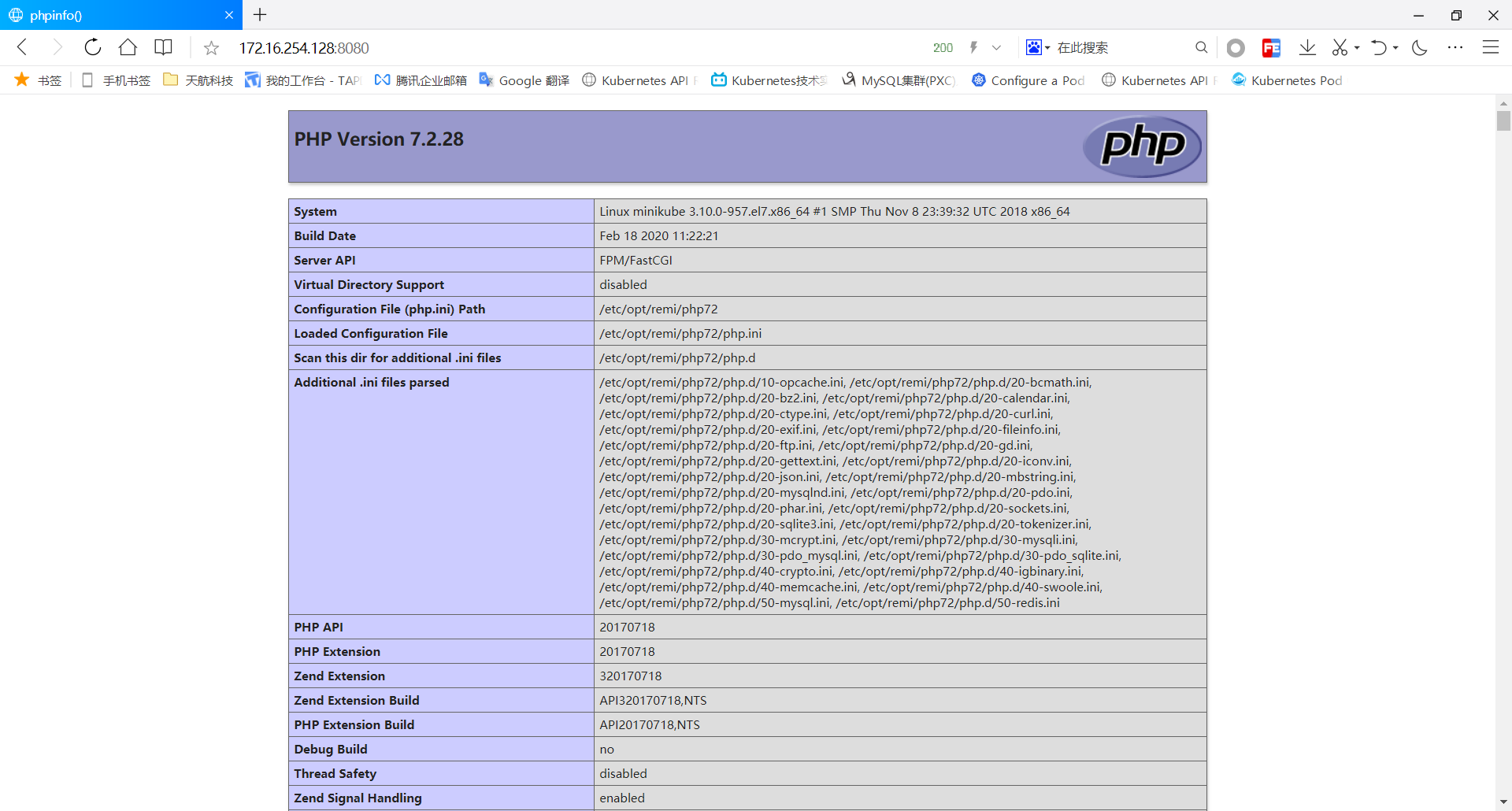
7、访问到PHP页面
直接在浏览器输入地址+端口即可。
安装PHP到CentOS(YUM)的更多相关文章
- Ejabberd2:安装和操作指南(centos yum 安装ejabberd)
(1)首先安装EPEL Repository ## RHEL/CentOS 6 32-Bit ## # wget http://download.fedoraproject.org/pub/ ...
- centos yum 安装 mongodb 以及php扩展
centos yum 安装 mongodb 以及php扩展 投稿:hebedich 字体:[增加 减小] 类型:转载 MongoDB是一个基于分布式文件存储的数据库.由C++语言编写.旨在为WEB应用 ...
- yum-config-manager YUM安装遭遇: [Errno 256] No more mirrors to try CentOS yum之$releasever和$basearch
YUM安装遭遇: [Errno 256] No more mirrors to try createrepo 有问题. CentOS yum之$releasever和$basearch分类: 操作系统 ...
- redhat centos yum源的安装
redhat centos yum源的安装 1.除旧 #cd /etc/yum.repos.d #mv rhel-debuginfo.repo rhel-debuginfo.repo.bak 此处将其 ...
- 【转】CentOS yum安装和卸载软件的使用方法
在CentOS yum安装和卸载软件的使用方法安装方法安装一个软件时. CentOS yum -y install httpd安装多个相类似的软件时 CentOS yum -y install ...
- CentOS6.5系统挂载NTFS分区的移动硬盘 centos安装repoforge源(yum)
CentOS6.5系统挂载NTFS分区的移动硬盘 作为IT的工作者,避免不了使用Linux系统,我现在使用的系统是CentOS6.5 X86_64位版本,但是插入NTFS移动硬盘没有办法识别.通过下面 ...
- centos的软件安装方法rpm和yum
centos的软件安装大致可以分为两种类型: [centos]rpm文件安装,使用rpm指令 类似[ubuntu]deb文件安装,使用dpkg指令 [centos]yum安装 类似[ubuntu ...
- RHEL 6.3使用CentOS yum源 (redhat yum安装失败)
由于Redhat的yum在线更新是收费的,如果没有注册的话是不能使用的,即不能在线安装软件.所以yum install 命令每次都安装失败 下面介绍一种更改yum源的方式: 系统说明: 系统:Red ...
- CentOS yum 安装 PHP 5.6.24
配置yum源 追加CentOS 6.5的epel及remi源. # rpm -Uvh http://ftp.iij.ad.jp/pub/linux/fedora/epel/6/x86_64/epel- ...
- linux CentOS YUM 安装 nginx+tomcat+java+mysql运行环境
Java环境配置 1 安装JDK 查看CentOS自带JDK是否已安装 1 [root@test ~]# yum list installed |grep java 若有自带安装的JDK,应如下操作进 ...
随机推荐
- Django设置session过期时间
settings.py #session 设置 SESSION_COOKIE_AGE = 60 * 10 # 设置过期时间10分钟,默认为两周 SESSION_SAVE_EVERY_REQUEST = ...
- Android教程2020 - RecyclerView实际使用
示例,用RecyclerView的item做出一个列表. Android教程2020 - 系列总览 本文链接 前面我们已经知道如何用RecyclerView显示一列数据.这里我们做出一个具体的例子.尽 ...
- Linux下安装nvidia显卡驱动
部署环境 操作系统:Centos 7.4 在线源:Centos 7.4镜像源 安装操作 1.安装系统插件 [root@localhost ~]# yum -y install gcc kernel-d ...
- IDEA更换banner(娱乐专用)
1.佛祖保佑 永无bug _ooOoo_ o8888888o 88" . "88 (| -_- |) O\ = /O ____/`---'\____ .' \\| |// `. / ...
- shiro盐值加密并验证
在数据表中存的密码不应该是123456,而应该是123456加密之后的字符串,而且还要求这个加密算法是不可逆的,即由加密后的字符串不能反推回来原来的密码,如果能反推回来那这个加密是没有意义的.著名的加 ...
- python如何从内存地址上加载pythn对象
python如何从内存地址上加载pythn对象 在python中我们可以通过id函数来获取某个python对象的内存地址,或者可以通过调用对象的__repr__魔术函数来获取对象的详细信息 def t ...
- 创建一个圆类Circle的对象,分别设置圆的半径计算并分别显示圆半径、圆面积、圆周长。
编写一个圆类Circle,该类拥有: ①一个成员变量 Radius(私有,浮点型): // 存放圆的半径: ②两个构造方法 Circle( ) // 将半径设为0 Circle(double r ) ...
- 如何在网页读取用户IP,操作系统版本等数据demo
我们浏览网页的时候,会不经意间看到,有些地方(如个人的签名档)显示出了个人的IP,操作系统等数据.借助第三方API和请求报头useragent是很容易实现的. <html> <hea ...
- Codeforces_734_D
http://codeforces.com/problemset/problem/734/D 保存最近的八个方向的点,判断即可. #include<iostream> #include&l ...
- 2018icpc南京网络赛-L Magical Girl Haze (分层图最短路)
题意: 有向图,可以把k条路的长度变为0,求1到n的最短路 思路: 将图复制k份,一共k+1层图,对于每一条i→j,都连一条低层的i→高层的j,并且权值为0 即对每一对<i,j,w>,都加 ...