
iOS开发本地推送(iOS10)UNUserNotificationCenter
1、简介
iOS10之后苹果对推送进行了封装,UNUserNotificationCenter就这样产生了。简单介绍本地推送的使用UserNotifications官方文档说明!
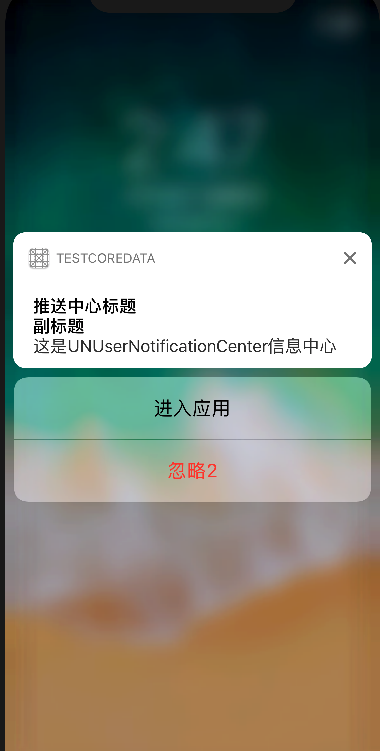
2、简单使用UNUserNotificationCenter
一、创建UNUserNotificationCenter,设置推送模式和代理!
        UNUserNotificationCenter *center = [UNUserNotificationCenter currentNotificationCenter];

        [center requestAuthorizationWithOptions:(UNAuthorizationOptionAlert|UNAuthorizationOptionSound|UNAuthorizationOptionBadge)

                              completionHandler:^(BOOL granted, NSError * _Nullable error) {

                                  if (!error) {

                                      NSLog(@"succeeded!");

                                  }

                              }];

        center.delegate = self;
二、设置推送内容
        UNMutableNotificationContent *content = [UNMutableNotificationContent new];

        content.title = @"推送中心标题";

        content.subtitle = @"副标题";

        content.body  = @"这是UNUserNotificationCenter信息中心";

        content.badge = @;

        content.categoryIdentifier = @"categoryIdentifier";

//        需要解锁显示,红色文字。点击不会进app。

//        UNNotificationActionOptionAuthenticationRequired = (1 << 0),

//

//        黑色文字。点击不会进app。

//        UNNotificationActionOptionDestructive = (1 << 1),

//

//        黑色文字。点击会进app。

//        UNNotificationActionOptionForeground = (1 << 2),

        UNNotificationAction *action = [UNNotificationAction actionWithIdentifier:@"enterApp"

                                                                            title:@"进入应用"

                                                                          options:UNNotificationActionOptionForeground];

        UNNotificationAction *clearAction = [UNNotificationAction actionWithIdentifier:@"destructive"

                                                                                 title:@"忽略2"

                                                                               options:UNNotificationActionOptionDestructive];

        UNNotificationCategory *category = [UNNotificationCategory categoryWithIdentifier:@"categoryIdentifier"

                                                                                  actions:@[action,clearAction]

                                                                        intentIdentifiers:@[requestID]

                                                                                  options:UNNotificationCategoryOptionNone];

        [center setNotificationCategories:[NSSet setWithObject:category]];
三、设置推送方式
        UNTimeIntervalNotificationTrigger *timeTrigger = [UNTimeIntervalNotificationTrigger triggerWithTimeInterval: repeats:YES];

        UNNotificationRequest *request = [UNNotificationRequest requestWithIdentifier:requestID content:content trigger:timeTrigger];
trigger的其它用法:
        //1分钟后提醒

        UNTimeIntervalNotificationTrigger *trigger1 = [UNTimeIntervalNotificationTrigger triggerWithTimeInterval: repeats:NO];

        //每小时重复 1 次

        UNTimeIntervalNotificationTrigger *trigger2 = [UNTimeIntervalNotificationTrigger triggerWithTimeInterval: repeats:YES];

        //周日早8点

        NSDateComponents *components = [[NSDateComponents alloc] init];

        components.weekday = ;

        components.hour = ;

        UNCalendarNotificationTrigger *trigger3 = [UNCalendarNotificationTrigger triggerWithDateMatchingComponents:components repeats:YES];

        //#import <CoreLocation/CoreLocation.h>

        CLRegion *region = [[CLRegion alloc] init];

        UNLocationNotificationTrigger *trigger4 = [UNLocationNotificationTrigger triggerWithRegion:region repeats:NO];
四、添加推送request
[center addNotificationRequest:request withCompletionHandler:^(NSError * _Nullable error) { }];
3、UNUserNotificationCenter的Delegate
//将要推送

- (void)userNotificationCenter:(UNUserNotificationCenter *)center willPresentNotification:(UNNotification *)notification withCompletionHandler:(void (^)(UNNotificationPresentationOptions))completionHandler{

    NSLog(@"----------willPresentNotification");

}

//已经完成推送

- (void)userNotificationCenter:(UNUserNotificationCenter *)center didReceiveNotificationResponse:(UNNotificationResponse *)response withCompletionHandler:(void (^)(void))completionHandler{

    NSLog(@"============didReceiveNotificationResponse");

    NSString *categoryID = response.notification.request.content.categoryIdentifier;

    if ([categoryID isEqualToString:@"categoryIdentifier"]) {

        if ([response.actionIdentifier isEqualToString:@"enterApp"]) {

            if (@available(iOS 10.0, *)) {

            } else {

                // Fallback on earlier versions

            }

        }else{

            NSLog(@"No======");

        }

    }

    completionHandler();

}
4、移除推送
        [center removePendingNotificationRequestsWithIdentifiers:@[requestID]];

        [center removeAllDeliveredNotifications];
附录:
- (BOOL)application:(UIApplication *)application didFinishLaunchingWithOptions:(NSDictionary *)launchOptions {

    // Override point for customization after application launch.

    if (@available(iOS 10.0, *)) {

        //第一步:获取推送通知中心

        UNUserNotificationCenter *center = [UNUserNotificationCenter currentNotificationCenter];

        [center requestAuthorizationWithOptions:(UNAuthorizationOptionAlert|UNAuthorizationOptionSound|UNAuthorizationOptionBadge)

                              completionHandler:^(BOOL granted, NSError * _Nullable error) {

                                  if (!error) {

                                      NSLog(@"succeeded!");

                                  }

                              }];

        center.delegate = self;

        //第二步:设置推送内容

        UNMutableNotificationContent *content = [UNMutableNotificationContent new];

        content.title = @"推送中心标题";

        content.subtitle = @"副标题";

        content.body  = @"这是UNUserNotificationCenter信息中心";

        content.badge = @;

        content.categoryIdentifier = @"categoryIdentifier";

//        需要解锁显示,红色文字。点击不会进app。

//        UNNotificationActionOptionAuthenticationRequired = (1 << 0),

//

//        黑色文字。点击不会进app。

//        UNNotificationActionOptionDestructive = (1 << 1),

//

//        黑色文字。点击会进app。

//        UNNotificationActionOptionForeground = (1 << 2),

        UNNotificationAction *action = [UNNotificationAction actionWithIdentifier:@"enterApp"

                                                                            title:@"进入应用"

                                                                          options:UNNotificationActionOptionForeground];

        UNNotificationAction *clearAction = [UNNotificationAction actionWithIdentifier:@"destructive"

                                                                                 title:@"忽略2"

                                                                               options:UNNotificationActionOptionDestructive];

        UNNotificationCategory *category = [UNNotificationCategory categoryWithIdentifier:@"categoryIdentifier"

                                                                                  actions:@[action,clearAction]

                                                                        intentIdentifiers:@[requestID]

                                                                                  options:UNNotificationCategoryOptionNone];

        [center setNotificationCategories:[NSSet setWithObject:category]];

        //第三步:设置推送方式

        UNTimeIntervalNotificationTrigger *timeTrigger = [UNTimeIntervalNotificationTrigger triggerWithTimeInterval: repeats:YES];

        UNNotificationRequest *request = [UNNotificationRequest requestWithIdentifier:requestID content:content trigger:timeTrigger];

        //第四步:添加推送request

        [center addNotificationRequest:request withCompletionHandler:^(NSError * _Nullable error) {

        }];

        [center removePendingNotificationRequestsWithIdentifiers:@[requestID]];

        [center removeAllDeliveredNotifications];

//        [center getNotificationSettingsWithCompletionHandler:^(UNNotificationSettings * _Nonnull settings) {

//            NSLog(@"settings===%@",settings);

//        }];

    } else {

    }

    return YES;

}

#pragma mark - UNUserNotificationCenterDelegate

//将要推送

- (void)userNotificationCenter:(UNUserNotificationCenter *)center willPresentNotification:(UNNotification *)notification withCompletionHandler:(void (^)(UNNotificationPresentationOptions))completionHandler{

    NSLog(@"----------willPresentNotification");

}

//已经完成推送

- (void)userNotificationCenter:(UNUserNotificationCenter *)center didReceiveNotificationResponse:(UNNotificationResponse *)response withCompletionHandler:(void (^)(void))completionHandler{

    NSLog(@"============didReceiveNotificationResponse");

    NSString *categoryID = response.notification.request.content.categoryIdentifier;

    if ([categoryID isEqualToString:@"categoryIdentifier"]) {

        if ([response.actionIdentifier isEqualToString:@"enterApp"]) {

            if (@available(iOS 10.0, *)) {

            } else {

                // Fallback on earlier versions

            }

        }else{

            NSLog(@"No======");

        }

    }

    completionHandler();

}
iOS开发本地推送(iOS10)UNUserNotificationCenter的更多相关文章
- iOS开发本地推送
1.简介 本地通知是由本地应用触发的,它是基于时间行为的一种通知形式,例如闹钟定时.待办事项提醒,又或者一个应用在一段时候后不使用通常会提示用户使用此应用等都是本地通知. 2.创建UILocalNot ...
- IOS 本地推送 IOS10.0以上 static的作用 const的作用
//需要在AppDelegate里面启动APP的函数 加上 UIUserNotificationType types = UIUserNotificationTypeBadge | UIUserNot ...
- iOS的本地推送删除不了解决方法
最近在研究苹果推送,当测试本地推送的时候,发现一个问题,就是一旦你添加了一个本地推动的通知,当你修改代码,删除应用,当你再次运行app,它还是会在横幅上面弹出推送,尼玛怎么搞都删除不了,近乎崩溃了,开 ...
- iOS关于本地推送
不多说 直接上代码 NSDate *now = [NSDate date]; UILocalNotification *reminderNotification = [[UILocalNoti ...
- iOS开发,推送消息 steps
概述:推送过程简介 一.App启动过程中,使用UIApplication::registerForRemoteNotificationTypes函数与苹果的APNS服务器通信,发出注册远程推送的申请. ...
- iOS开发——消息推送跳转
项目开发用集成是极光推送JPush 这里主要是消息推送过来处理对应界面跳转 同时看到两篇写的不错的相关博客分享一下: http://www.jianshu.com/ ...
- iOS开发——极光推送
1.到极光官网 https://www.jpush.cn/ 下载极光推送SDK. 具体如何集成最好参考官网的文档,以及一些失败的原因.文档非常详细,我也是参考集成的. 2.到极光推送官网注册自己的应用 ...
- iOS开发消息推送原理
转载自:http://www.cnblogs.com/cdts_change/p/3240893.html 一.消息推送原理: 在实现消息推送之前先提及几个于推送相关概念,如下图1-1: 1.Prov ...
- iOS之本地推送(前台模式与后台模式)
#import "AppDelegate.h" #import "GlobalDefine.h" @interface AppDelegate () @end ...
随机推荐
- sshpass批量分发ssh秘钥
首先安装sshpass: yum -y install sshpass 单条命令: sshpass -p“password” ssh-copy-id -i /root/.ssh/id_rsa.pub ...
- 2-MySQL高级-事务-基本概念(1)
事务 1. 为什么要有事务 事务广泛的运用于订单系统.银行系统等多种场景 例如: A用户和B用户是银行的储户,现在A要给B转账500元,那么需要做以下几件事: 检查A的账户余额>500元: A ...
- 关于ctype.h头文件使用说明
ctype.h里的函数概况: 1.字符测试函数 (1)函数原型均为 int isXXX( int ch) (2)参数为int,任何参数均被转换为整形 (3)只能处理[0,127]之间的值 2.字符映射 ...
- hashmap1.7的死锁模拟
package com.cxy.springdataredis.hashmap; import javax.lang.model.element.VariableElement; import jav ...
- Impala简介
- event.target.tagName
html中 event.target.tagName 中的tagName属性他返回的就是元素标签的大写名称 例如标签他的tagName就是EM 所以用大写 记住:在 HTML 中,tagName 属性 ...
- CSIC_716_20191106【列表、元组、字典、集合】
python的数据类型及其内置方法 一.列表(续) list.count( ).list.index( ) list = ['1', '2', '3', '2', 'a', 'b', 'c', 'a' ...
- Sqlite && EF Code FIRST 终极解决方案 2019.5.17
Sqlite && EF Code FIRST 终极解决方案 2019.5.17 包括根据模型自动生成数据库,初始化数据,模型改变时的自动数据迁移等 2019.12.25 更新 支持E ...
- Vim: 强大的g
来源于:http://vim.wikia.com/wiki/Power_of_g 一般格式: :[range]g/pattern/cmd 对range内所有符合pattern的行执行cmd 常见的一些 ...
- 树的直径+质因子——好题!cf1101D
/* 因为质因子很少 状态转移时用dp[u][i]表示结点u的第i个质因子所在的最大深度即可 等价于带限制的求直径 */ #include<bits/stdc++.h> #include& ...