
Nginx模块讲解
Nginx模块分为:nginx官方模块、第三方模块
通过nginx -V查看编译参数,可以看到官方编译的模块
--with-compat

--with-file-aio

--with-threads

--with-http_addition_module

--with-http_auth_request_module

--with-http_dav_module

--with-http_flv_module

--with-http_gunzip_module

--with-http_gzip_static_module

--with-http_mp4_module

--with-http_random_index_module

--with-http_realip_module

--with-http_secure_link_module

--with-http_slice_module

--with-http_ssl_module

--with-http_stub_status_module

作用:nginx的客户端连接状态

Syntax:stub_status;

Default:——

Context:server,location

--with-http_sub_module

--with-http_v2_module

--with-mail

--with-mail_ssl_module

--with-stream

--with-stream_realip_module

--with-stream_ssl_module

--with-stream_ssl_preread_module

--with-cc-opt='-O2 -g -pipe -Wall -Wp,-D_FORTIFY_SOURCE=2 -fexceptions -fstack-protector-strong

--param=ssp-buffer-size=4 -grecord-gcc-switches -m64 -mtune=generic -fPIC'

--with-ld-opt='-Wl,-z,relro -Wl,-z,now -pie'

--with-http_stub_status_module
作用:nginx的客户端连接状态
Syntax:stub_status
Default:——
Context:server,location
演示:
vi /etc/nginx/conf.d/default.conf
配置如图下:
location /mystatus {
stub_status;
}

使用配置是否正确
nginx -tc /etc/nginx/nginx.conf
然后重载服务
nginx -s reload -c /etc/nginx/nginx.conf
在浏览器中输入ip+路径
http://192.168.96.188/mystatus

Active connections: 1    #当前活跃的连接数

server accepts handled requests

 1 1 1    # 第一个值代表握手总次数;第二个值代理处理的连接数;第三个值是总的请求数;(握手次数一般都等于连接数,代表连接没有丢失)

Reading: 0 Writing: 1 Waiting: 0 #读、写、等待
--with-http_random_index_module
作用:目录中选择一个随机主页
Syntax:random_index on | off
Default:random_index off
Context:location
演示:
在/opt/app/code目录下定义3个html文件1.html、2.html、3.html
分别复制如下代码
<html>

<head>

        <meta charset="utf-8">

        <title>imooc1</title>

</head>

<body style="">        # 红色

</body>

</html>

<html>

<head>

	<meta charset="utf-8">

	<title>imooc1</title>

</head>

<body style="">        #黑色

</body>

</html>

<html>

<head>

	<meta charset="utf-8">

	<title>imooc1</title>

</head>

<body style="">      #蓝色

</body>

</html>
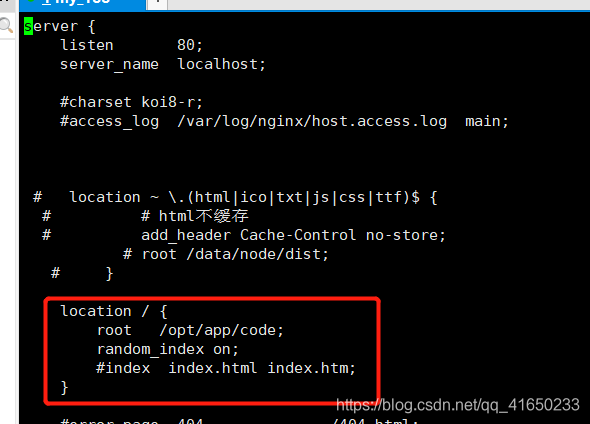
修改配置文件
vi /etc/nginx/conf.d/default.conf
 location / {

        root   /opt/app/code;

        random_index on;

        #index  index.html index.htm;

    }
查看配置是否正确
nginx -tc /etc/nginx/nginx.conf
然后重载服务
nginx -s reload -c /etc/nginx/nginx.conf
在浏览器中访问ip,刷新页面就会变颜色了

--with-http_sub_module
作用:http内容替换
#1语法
Syntax:sub_filter string replacement
Default:——
Context:http,server,location
#2语法
Syntax:sub_filter_last_modified on|off
Default:sub_filter_last_modified off
Context:server,location
#3语法
Syntax:sub_filter_last_once on | off
Default:sub_filter_last_once on
Context:http,server,location
演示:
在/opt/app/code目录下添加html文件
复制如下代码,保存

<html>

<head>

        <meta charset="utf-8">

        <title>submodules</title>

</head>

<body>

        <a>joy</a>

        <a>at</a>

        <a>imooc</a>

        <a>joy</a>

        <a>imooc</a>

</head>

</body>

</html>
访问 192.168.96.188/submodule.html。
通过配置语法替换“imooc“”的内容为“IMOOC_JOY”

vi /etc/nginx/conf.d/default.conf
加入下列代码
location / {

   root   /opt/app/code;

   index  index.html index.htm;

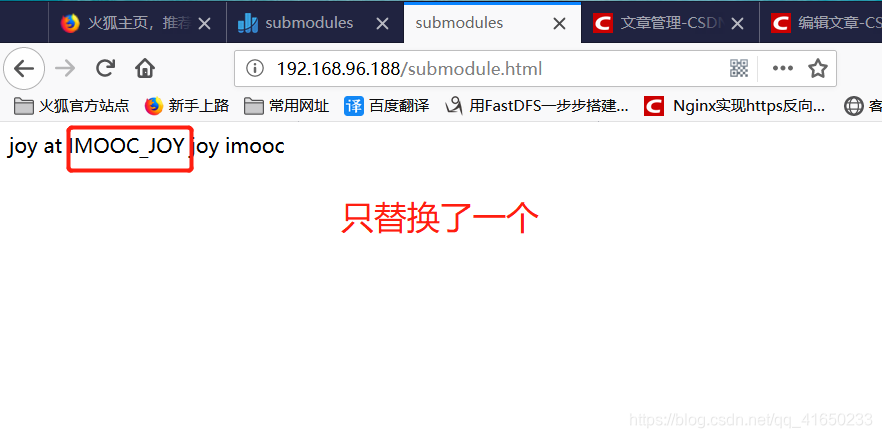
   sub_filter '<a>imooc' '<a>IMOOC_JOY';  #sub_filter 后面添加需要替换内容,已经替换后的内容

    }
访问 192.168.96.188/submodule.html
默认只替换一个
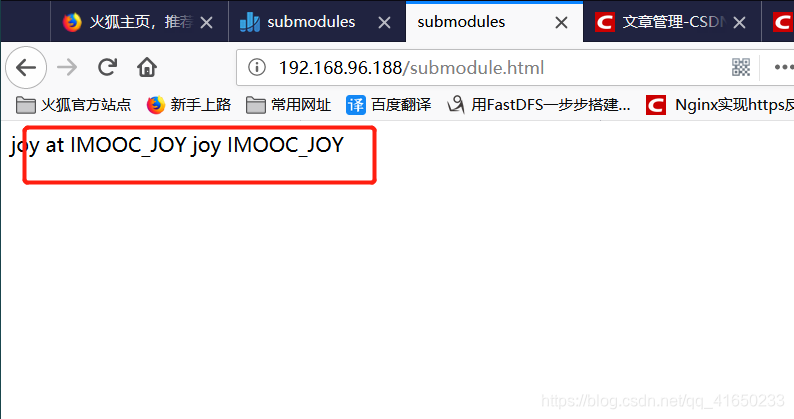
如果替换全部,加入新的语法
location / {

        root   /opt/app/code;

        index  index.html index.htm;

        sub_filter '<a>imooc' '<a>IMOOC_JOY';

        sub_filter_once off;        #在原有基础加上此模块,off 关闭

    }
保存访问地址,记得强刷或者清理缓存,此时内容全部替换
Nginx模块讲解的更多相关文章
- nginx 模块讲解
1. 通用配置选项: --prefix=<path> 指定Nginx的安装路径,所有其他的路径都要依赖于该选项 --sbin-path=<path> ...
- 【转】Nginx模块开发入门
转自: http://kb.cnblogs.com/page/98352/ 结论:对Nginx模块开发入门做了一个helloworld的示例,简单易懂.也有一定的深度.值得一看. Nginx模块开发入 ...
- Nginx模块开发入门
前言 Nginx是当前最流行的HTTP Server之一,根据W3Techs的统计,目前世界排名(根据Alexa)前100万的网站中,Nginx的占有率为6.8%.与Apache相比,Nginx在高并 ...
- [转] Nginx模块开发入门
前言 Nginx是当前最流行的HTTP Server之一,根据W3Techs的统计,目前世界排名(根据Alexa)前100万的网站中,Nginx的占有率为6.8%.与Apache相比,Nginx在高并 ...
- Nginx模块开发入门(转)
前言 Nginx是当前最流行的HTTP Server之一,根据W3Techs的统计,目前世界排名(根据Alexa)前100万的网站中,Nginx的占有率为6.8%.与Apache相比,Nginx在高并 ...
- Nginx模块开发入门(转)
前言 Nginx是当前最流行的HTTP Server之一,根据W3Techs的统计,目前世界排名(根据Alexa)前100万的网站中,Nginx的占有率为6.8%.与Apache相比,Nginx在高并 ...
- Nginx模块
模块概述 https://kb.cnblogs.com/page/98352/ Nginx模块工作原理概述 (Nginx本身支持多种模块,如HTTP模块.EVENT模块和MAIL模块,本文只讨论HTT ...
- FW: Nginx模块开发入门
前言 Nginx是当前最流行的HTTP Server之一,根据W3Techs的统计,目前世界排名(根据Alexa)前100万的网站中,Nginx的占有率为6.8%.与Apache相比,Nginx在高并 ...
- Nginx 模块开发
Nginx 模块概述 Nginx 模块有三种角色: 处理请求并产生输出的 Handler 模块 : 处理由 Handler 产生的输出的 Filter (滤波器)模块: 当出现多个后台 服务器时, ...
随机推荐
- Vmware虚拟机用户密码忘记了怎么办?
Vmware虚拟机用户密码忘记了怎么办? 虚拟机Linux上用户密码忘记了怎么办? 今天准备再学习一下linux操作系统,由于之前已经安装过vaware和linux(redhat),所以这次认为不 ...
- linux oops 消息
大部分 bug 以解引用 NULL 指针或者使用其他不正确指针值来表现自己的. 此类 bug 通 常的输出是一个 oops 消息. 处理器使用的任何地址几乎都是一个虚拟地址, 通过一个复杂的页表结构映 ...
- vue 弹窗时 监听手机返回键关闭弹窗(页面不跳转)
[注]: popstate 事件 a.当活动历史记录条目更改时,将触发popstate事件. b.如果被激活的历史记录条目是通过对history.pushState()的调用创建的,或者受到对his ...
- linux进程延迟
#include <linux/wait.h> long wait_event_interruptible_timeout(wait_queue_head_t *q, condition, ...
- TOJ 6121: 学长的情书 ( 二分)
传送门: 点我 6121: 学长的情书 时间限制(普通/Java):2000MS/6000MS 内存限制:65536KByte总提交: 79 测试通过:2 描述 抹布收 ...
- Hamcrest使用
What is Hamcrest? 什么是Hamcrest? Hamcrest is a library of matchers, which can be combined in to crea ...
- vue-learning:12 - 2 - 区分:outerHTML - innerTHML - outerText - innerText - textContent
区分:outerHTML - innerTHML - outerText - innerText - textContent 获取值 <div id="outer"> ...
- Oracle生成批量清空表数据脚本
select 'DELETE FROM ' || a.table_name || '; --' || a.comments from user_tab_comments a where a.table ...
- jQuery无new创建对象原理
// jQuery 无new 创建对象套路 (function(g,undefined){ var foo = function(){ return new foo.fn.init(); }; foo ...
- DynamoDB的基本操作(一)
一.创建表 1 var AWS = require("aws-sdk"); 2 AWS.config.update({ 3 region: "us-west-2" ...