
Passive Client Feature
Q. How is the passive client feature used on Wireless LAN Controllers?
A. Passive clients are wireless devices, such as scales and printers that are configured with a static IP address. These clients do not transmit any IP information such as IP address, subnet mask, and gateway information when they associate with an access point. As a result, when passive clients are used, the controller never knows the IP address unless they use the DHCP.
WLCs currently act as a proxy for ARP requests. Upon receiving an ARP request, the controller responds with an ARP response instead of passing the request directly to the client. This scenario has two advantages:
The upstream device that sends out the ARP request to the client will not know where the client is located.
Power for battery-operated devices such as mobile phones and printers is preserved because they do not have to respond to every ARP requests.
Since the wireless controller does not have any IP related information about the passive clients, it cannot respond to any ARP requests. The current behavior does not allow the transfer of ARP requests to passive clients. Any application that tries to access a passive client will fail.
The passive client feature enables the ARP requests and responses to be exchanged between wired and wireless clients. This feature, when enabled, allows the controller to pass ARP requests from wired to wireless clients until the desired wireless client gets to the RUN state.
Enabling the Passive Client Feature on the Controller (GUI)
Procedure
Step 1 Choose WLANs > WLANs > WLAN ID to open the WLANs > Edit page. By default, the General tab is displayed.
Step 2 Choose the Advanced tab.
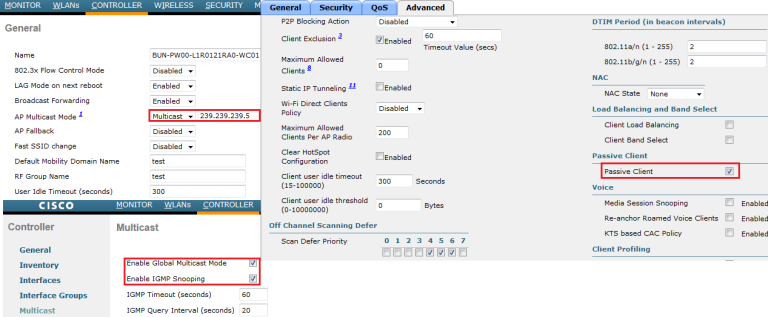
Step 3 Select the Passive Client check box to enable the passive client feature.
Step 4 Click Apply to commit your changes.
When configuring this feature following needs to be remember.
1. Passive clients is supported on 5500 & 2100 series (as per 7.0.116 config guide, may be there all the new controller)
2. Passive client is NOT supported with AP Groups & FlexConnect(H-REAP) centrally switched WLANs
3. Passive client feature works on multicast-multicast mode of multicast operation.By using GUI you can do this in “WLAN -> Advanced” section, First you have to enable Multicast on your controller as well (see below)
You can do the same using CLI
config network multicast global {enable|disable}

config network multicast mode multicast <mcast-group-address>

config network multicast igmp snooping {enable|disable}

config network multicast igmp timeout <timeout-vaule>

config network multicast igmp query interval < interval-value>

config wlan passive-client {enable|disable} <wlan-id>
You can verify this by “show wlan <wlan-id>” command output.
WLC config guide:https://www.cisco.com/c/en/us/td/docs/wireless/controller/8-5/config-guide/b_cg85/wlan_interfaces.html?bookSearch=true
Passive Client Feature的更多相关文章
- oracle的oci和thin区别(数据源)
我是今天看到tomcat数据源的配置时,想起来这个问题,刚开始还不晓得thin是什么东西! database.url=jdbc:oracle:thin:angel/oracle@192.168.55. ...
- 关于uboot中tftp上传内存数据到tftp服务器
uboot下的tftp下载功能是非常重要和常见的功能.但是偶尔有些特殊需求的人需要使用uboot的tftp具有上传功能.默认的uboot没有tftp上传功能,如果需要修改uboot代码.使用时键入第4 ...
- Class loading in JBoss AS 7--官方文档
Class loading in AS7 is considerably different to previous versions of JBoss AS. Class loading is ba ...
- 为 GlusterFS 设计新的xlator (编译及调用过程分析)
GlusterFS 是一个开源的网络分布式文件系统,前一阵子看了一点GlusterFS(Gluster)的代码,修改了部分代码,具体是增加了一个定制的xlator,简单记录一下. Gluster与xl ...
- Maqetta源码运行
一.Maqetta简介 Maqetta是IBM开发的一个创建桌面和移动用户界面的HTML5设计编辑工具.该项目已经捐助给开源机构Dojo基金会.Maqetta提供WYSIWYG可视化HTML5用户界面 ...
- Cisco Smart Install远程命令执行漏洞
0x01前言 在Smart Install Client代码中发现了基于堆栈的缓冲区溢出漏洞,该漏洞攻击者无需身份验证登录即可远程执行任意代码.cisco Smart Install是一种“即插即用” ...
- 让uboot的tftp支持上传功能
转载:http://blog.chinaunix.net/uid-20737871-id-2124122.html uboot下的tftp下载功能是非常重要和常见的功能.但是偶尔有些特殊需求的人需要使 ...
- Burpsuite被动扫描流量转发插件:Passive Scan Client
编译成品:链接: https://pan.baidu.com/s/1E0vsPGgPgB9bXCW-8Yl1gw 提取码: 49eq Passive Scan Client Burpsuite被动扫描 ...
- Setting up a Passive FTP Server in Windows Azure VM(ReplyCode: 227, Entering Passive Mode )
This post is authored by Lalitesh Kumar, Pradeep M G and reviewed by Avinash Venkat Reddy. Also spec ...
随机推荐
- LED Decorative Light Manufacturer - Decorative Lighting: Functionality And Aesthetics
Whether it is for general ambient lighting, task lighting or accent lighting, the decorative lightin ...
- 【C语言】用指针作为形参完成数据的升序排列
#include<stdio.h> void sort(int *x,int n); int main() { ] = { ,,,,,,,,, },i; sort(arr, ); prin ...
- 各技能DBC参数
推荐你 通过 引擎的帮助文件查找标准魔法DB 下面是 部分hero引擎的标准魔法DB 34,解毒术,2,26,16,0,0,0,0,0,2,42,50,44,100,46,200,40,, 35,老 ...
- SSG (slow global), TTG (typical global) and FFG (fast global)
https://semiwiki.com/x-subscriber/clk-design-automation/4481-variation-alphabet-soup/ n response, fo ...
- SparkSQL个人记录
SparkSQL将RDD封装成一个DataFrame对象,这个对象类似于关系型数据库中的表. 一.SparkSQL入门 1.创建DataFrame 相当于数据库中的一张表,它是一个只读的表,不能在运算 ...
- Yum与list结合
我用两台Linux LinuxA IP:192.168.10.101 LinuxB IP:192.168.10.102 首先我们在LinuxA上挂载光驱和安装FTP服务器 然后安装 ...
- MongoDB高可用集群配置方案
原文链接:https://www.jianshu.com/p/e7e70ca7c7e5 高可用性即HA(High Availability)指的是通过尽量缩短因日常维护操作(计划)和突发的系统崩溃(非 ...
- 国内某Python大神自创完整版,系统性学习Python
很多小伙伴纠结于这个一百天的时间,我觉得完全没有必要,也违背了我最初放这个大纲上来的初衷,我是觉得这个学习大纲还不错,自学按照这个来也能相对系统的学习知识,而不是零散细碎的知识最后无法整合,每个人的基 ...
- JS高级---复习
复习 面向过程和面向对象都是编程的思想, 方式不一样 面向过程: 凡事都是亲力亲为, 所有的代码都要自己写, 每一步都要很清楚, 注重的是过程 面向对象: 执行者成为指挥者, 只要找对象, 然后让对象 ...
- Chinese Window Lattice And CSS
谁向云端着此亭,檐前树木映窗棂.-- 释绍嵩<陪赵知府登桃岭山亭> (image from 中国窗棂) The traditional Chinese window lattice has ...