
Latex报错: Could not start the command: xelatex.exe -synctex=1 -interaction=nonstopmode?
Latex报错: Could not start the command: xelatex.exe -synctex=1 -interaction=nonstopmode
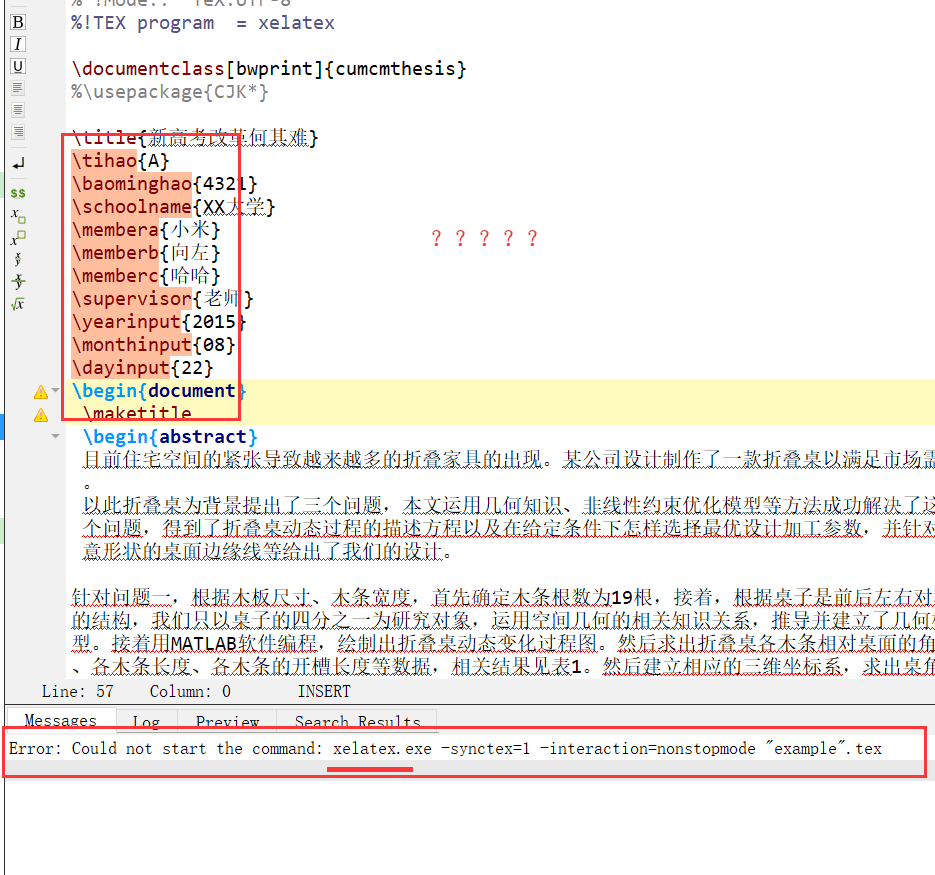
网上还有很多说出Could not start the command: pdflatex.exe -synctex=1 -interaction=nonstopmode这个问题的,
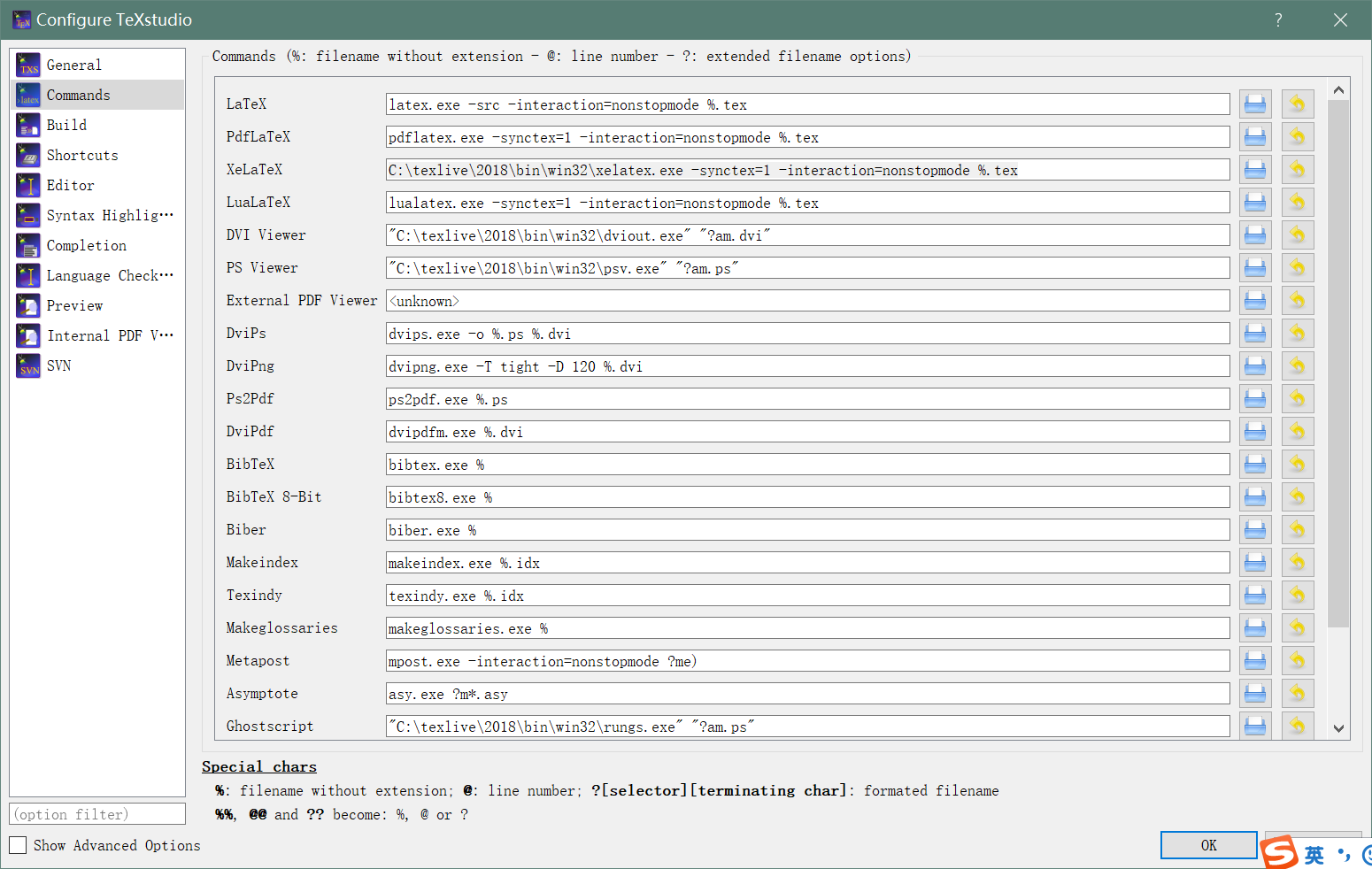
其实解决方案都差不多,只要在texstudio的options->config texstudio->commands中找到xelatex选项然后把框里的东西换成
xelatex.exe的路径+空格+-synctex=1 -interaction=nonstopmode %.tex即可,如下所示
C:\texlive\2018\bin\win32\xelatex.exe -synctex=1 -interaction=nonstopmode %.tex
Latex报错: Could not start the command: xelatex.exe -synctex=1 -interaction=nonstopmode?的更多相关文章
- 【IntellJ IDEA】idea启动测试类报错Error running 'Test1.test': Command line is too long. Shorten command line for Test1.test or also for JUnit default configuration.
idea启动测试类报错 Error running 'Test1.test': Command line is too long. Shorten command line for Test1.tes ...
- [问题]编译报错:clang: error: linker command failed with exit code 1及duplicate symbol xxxx in错误解决方法之一
今天添加了一个新类(包括m,h,xib文件),还没有调用,-编译遇到如下错误,根据错误提示, duplicate symbol param1 in: /Users/xxxx/Library/Devel ...
- xcode编译报错unknown error -1=ffffffffffffffff Command /bin/sh failed with exit code 1
升级完xcode9.1之后,编译项目出现如下错误: CI今日构建时报出如下错误: /Users/xxx/Library/Developer/Xcode/DerivedData/Snowball-ebl ...
- [报错]编译报错:clang: error: linker command failed with exit code 1及duplicate symbol xxxx in错误解决方法之一
今天添加了一个新类(包括m,h,xib文件),还没有调用,—编译遇到如下错误,根据错误提示, duplicate symbol param1 in: /Users/xxxx/Library/Devel ...
- idea报错:Error running $classname: Command line is too long. Shorten command line for $classname.
Command line is too long 打印的变量太长了,超过了限制,这都会报错...我只想知道idea基于什么原理会报这个错... 解决 1.按照提示修改该类的配置,选择jar manif ...
- Jenkins中shell-script执行报错sh: line 2: npm: command not found
<1>本地执行npm run build--正常 <2>查看环境变量--正常 [root@localhost bin]# echo $PATH /usr/local/node/ ...
- svn更新报错Please execute the 'Cleanup' command.
更新svn报错 要Clearnup一下就可以再更新了 点击svn中 clear up ok之后恢复正常
- CLR调试报错“Visual Studio远程调试监视器 (MSVSMON.EXE) 的 64 位版本无法调试 32 位进程或 32 位转储。请改用 32 位版本”的解决
Win7 64位电脑上进行visual studio的数据库项目的CLR存储过程进行调试时,报错: ---------------------------Microsoft Visual Studio ...
- texmaker报错:could not start command 解决
我当时文件命名加了邮箱,引入特殊字符@,然后就报错了
随机推荐
- 论文阅读-(ECCV 2018) Second-order Democratic Aggregation
本文是Tsung-Yu Lin大神所作(B-CNN一作),主要是探究了一种无序的池化方法\(\gamma\) -democratic aggregators,可以最小化干扰信息或者对二阶特征的内容均等 ...
- windows pip 安装 转载
经常在使用Python的时候需要安装各种模块,而pip是很强大的模块安装工具,但是由于国外官方pypi经常被墙,导致不可用,所以我们最好是将自己使用的pip源更换一下,这样就能解决被墙导致的装不上库的 ...
- 以太坊solidity智能合约语言学习资源整理
暂时看到篇文章写的不错,先收集下来,后面有机会自己也整理一个 Solidity语言学习(一)Solidity语言学习(二)——Solidity的安装与编译Solidity语言学习(三)——智能合约编程 ...
- Xstream 解析xml文件内容
刚刚接手的一个项目,接到一个对接用户数据的需求,对方使用的是xml格式来传输文件,特此记下解析该类文件的方法 public interface XmlResolver<T> { XStre ...
- 07.27NOIP模拟赛
戳这里下载过去三次NOIP模拟赛总成绩 (别嘲笑垫底的我...解压密码为信奥生所在的两个班的班号,文档密码为机房开机用户名+密码) 又一次垫底…… 我难受. 上来感觉T1不可做,T2和蔼可亲,T3一脸 ...
- iPhoneX适配随笔
1.安全区域 2.NavigationBar 和 TabBar的xib示意图 两个View要相同的效果,坐标不同 UIButton *btn = [UIButton buttonWithType:UI ...
- csdn阅读更多自动展开插件
点击获取 当然也可以自己写脚本.写js.
- codeforces 1129A2-Toy Train
传送门:QAQQAQ 题意:有1-n个站点,成环形,有一辆运货车,在这个n个站点之间运输糖果,货车只能按照1->n的方向走,到第n个站的时候,又回到的1,现在告诉你有m个运输任务,从x站点运输一 ...
- Axure教程:如何使用动态面板?动态面板功能详解
写了几个Axure教程之后发现,可能教程的起点有些高了,过分的去讲效果的实现,而忽略了axure功能以及基础元件的使用,那么从这个教程开始,把这些逐渐的展开讲解. 关于Axure动态面板 动态面板是a ...
- Netty设置高低水位
Configure high and low write watermarks Server ServerBootstrap bootstrap = new ServerBootstrap(); ...