
Android布局管理器-使用TableLayout表格布局管理器实现简单的用户登录页面
场景
Android布局管理器-使用FrameLayout帧布局管理器显示层叠的正方形以及前景照片:
https://blog.csdn.net/BADAO_LIUMANG_QIZHI/article/details/103839149
实现效果如下

注:
博客:
https://blog.csdn.net/badao_liumang_qizhi
关注公众号
霸道的程序猿
获取编程相关电子书、教程推送与免费下载。
实现
将activity_main.xml修改为TableLayout
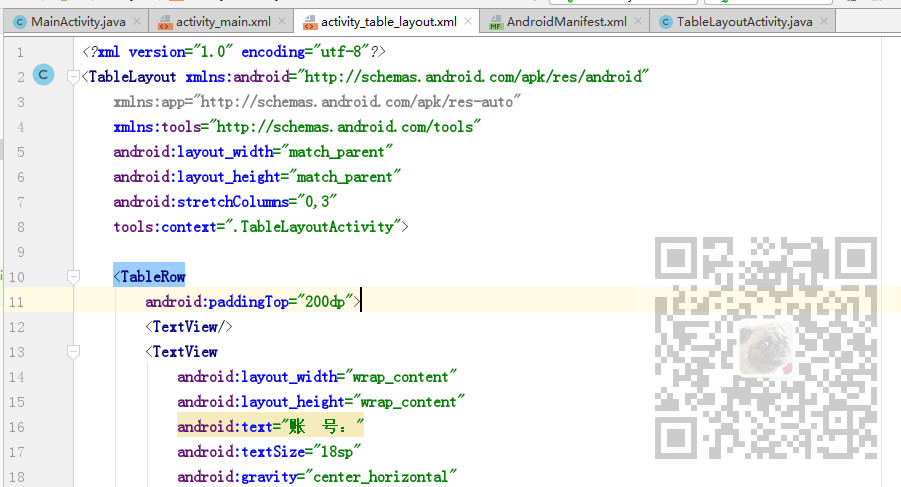
然后使用<TabelRow>标签代表添加一行,首行使用
android:paddingTop="200dp">
设置顶部内边距
第一行,添加空的TextView,再添加一个水平居中的TextView和一个EditText
 <TableRow

        android:paddingTop="200dp">

        <TextView/>

        <TextView

            android:layout_width="wrap_content"

            android:layout_height="wrap_content"

            android:text="账  号:"

            android:textSize="18sp"

            android:gravity="center_horizontal"

            />

        <EditText

            android:layout_width="match_parent"

            android:layout_height="wrap_content"

            android:hint="输入邮箱或手机号"

            />

    </TableRow>
第二行,同理,改为密码输入行,不用再设置内顶边距
<TableRow>

        <TextView/>

        <TextView

            android:layout_width="wrap_content"

            android:layout_height="wrap_content"

            android:text="密  码:"

            android:textSize="18sp"

            android:gravity="center_horizontal"

            />

        <EditText

            android:layout_width="match_parent"

            android:layout_height="wrap_content"

            android:hint="输入6-16位数字或字母"

            />

    </TableRow>
第三行添加注册和登录按钮
    <TableRow>

        <TextView/>

        <Button

            android:layout_width="wrap_content"

            android:layout_height="wrap_content"

            android:text="注  册"

            />

        <Button

            android:layout_width="match_parent"

            android:layout_height="wrap_content"

            android:text="登  录"

            android:background="#FF8247"

            />

    </TableRow>
第四行,添加忘记密码提示
<TableRow

        android:paddingTop="20dp"

        >

        <TextView/>

        <TextView/>

        <TextView

            android:layout_width="wrap_content"

            android:layout_height="wrap_content"

            android:textColor="#FF4500"

            android:text="忘记密码?"

            android:gravity="right"

            />

        <TextView/>

    </TableRow>
完整示例代码
<?xml version="1.0" encoding="utf-8"?>

<TableLayout xmlns:android="http://schemas.android.com/apk/res/android"

    xmlns:app="http://schemas.android.com/apk/res-auto"

    xmlns:tools="http://schemas.android.com/tools"

    android:layout_width="match_parent"

    android:layout_height="match_parent"

    tools:context=".TableLayoutActivity">

    <TableRow

        android:paddingTop="200dp">

        <TextView/>

        <TextView

            android:layout_width="wrap_content"

            android:layout_height="wrap_content"

            android:text="账  号:"

            android:textSize="18sp"

            android:gravity="center_horizontal"

            />

        <EditText

            android:layout_width="match_parent"

            android:layout_height="wrap_content"

            android:hint="输入邮箱或手机号"

            />

    </TableRow>

    <TableRow>

        <TextView/>

        <TextView

            android:layout_width="wrap_content"

            android:layout_height="wrap_content"

            android:text="密  码:"

            android:textSize="18sp"

            android:gravity="center_horizontal"

            />

        <EditText

            android:layout_width="match_parent"

            android:layout_height="wrap_content"

            android:hint="输入6-16位数字或字母"

            />

    </TableRow>

    <TableRow>

        <TextView/>

        <Button

            android:layout_width="wrap_content"

            android:layout_height="wrap_content"

            android:text="注  册"

            />

        <Button

            android:layout_width="match_parent"

            android:layout_height="wrap_content"

            android:text="登  录"

            android:background="#FF8247"

            />

    </TableRow>

    <TableRow

        android:paddingTop="20dp"

        >

        <TextView/>

        <TextView/>

        <TextView

            android:layout_width="wrap_content"

            android:layout_height="wrap_content"

            android:textColor="#FF4500"

            android:text="忘记密码?"

            android:gravity="right"

            />

        <TextView/>

    </TableRow>

</TableLayout>
Android布局管理器-使用TableLayout表格布局管理器实现简单的用户登录页面的更多相关文章
- Android零基础入门第29节:善用TableLayout表格布局,事半功倍
原文:Android零基础入门第29节:善用TableLayout表格布局,事半功倍 前面学习了线性布局和相对布局,线性布局虽然方便,但如果遇到控件需要排列整齐的情况就很难达到要求,用相对布局又比较麻 ...
- android的布局-----TableLayout(表格布局)
学习导图 (1)TableLayout的相关简介 java的swing编程和html中经常会使用到表格,可见表格的应用开发中使用还是比较多的,同样android也为我们提供这样的布局方式. (2)如何 ...
- 案例:TableLayout表格布局——迷你计算器
计算器可以常用线性布局(LinearLayout)和表格布局(tableLayout).Gridlayout 今天我用的是表格布局 效果如下: 代码如下: <TableLayout xmlns: ...
- 【转】TableLayout(表格布局)
转自:http://www.cnblogs.com/zhangs1986/archive/2013/01/17/2864536.html TableLayout(表格布局) 表格布局模型以行列的形式管 ...
- android:TableLayout表格布局详解
1.TableLayout简介2.TableLayout行列数的确定3.TableLayout可设置的属性详解4.一个包含4个TableLayout布局的实例及效果图一.Tablelayout简介 ...
- Android布局-TableLayout表格布局
一.表格布局-TableLayout 1.概念 表格布局采用行列的形式来管理UI的控件.表格布局适合于有规则的布局. TableRow,用来管理行,TableRow中的一个空间占据该行的一列.若不用T ...
- android:TableLayout表格布局详解
http://blog.csdn.net/justoneroad/article/details/6835915 这篇博文包括的内容:1.TableLayout简介2.TableLayout行列数的确 ...
- Android之TableLayout表格布局
1.相关属性 1.1.常用属性 android:collapseColumns 设置需要被隐藏的列的序列号 android:shrinkColumns 设置允许被收缩的列的序列号 android:st ...
- Android TableLayout 表格布局
TableLayout继承LinearLayout 有多少个TableRow对象就有多少行, 列数等于最多子控件的TableRow的列数 直接在TableLayout加控件,控件会占据一行 Table ...
随机推荐
- 60 个让程序员崩溃的瞬间,太TM真实了
前方高能!笑死人不偿命系列~ 表演即将开始,吃东西的请停下来,不然你会后悔的 1. 公司实习生找 Bug 2. 在调试时,将断点设置在错误的位置 3. 当我有一个很棒的调试想法时 4. 偶然间看到自己 ...
- Knative 简介
原文地址:https://yq.aliyun.com/articles/658800
- 文艺平衡树(区间splay)
文艺平衡树(luogu) Description 题目描述 您需要写一种数据结构(可参考题目标题),来维护一个有序数列. 其中需要提供以下操作:翻转一个区间,例如原有序序列是 5\ 4\ 3\ 2\ ...
- linux--->阿里云centos6.9环境配置安装lnmp
阿里云centos6.9环境配置安装lnmp mysql安装 本人博客:http://www.cnblogs.com/frankltf/p/8615418.html PHP安装 1.安装依赖关系 yu ...
- Python变量、方法、类的命名规则
1. 变量命名总结: - 1.单下划线开头变量:protected - 2.双下划线开头变量:private - 3.双下划线开头,双下划线结尾:系统内置变量 2. 函数命名总结: - 1.私有方法: ...
- Shiro Web集成及拦截器机制(四)
Shiro与 Web 集成 Shiro 提供了与 Web 集成的支持,其通过一个 ShiroFilter 入口来拦截需要安全控制的 URL,然后进行相应的控制,ShiroFilter 类似于如 Str ...
- 安装jrebel并激活
1.File-Settings-Plugins搜索jrebel,找到JRebel for IntelliJ ,点击install(我这里已经安装过了,所以显示的是更新) 2.重启idea 3.激活步骤 ...
- 什么是 ThreadLocal?
什么是 ThreadLocal? ThreadLocal 诞生于 JDK 1.2,用于解决多线程间的数据隔离问题.也就是说 ThreadLocal 会为每一个线程创建一个单独的变量副本. Thread ...
- 基于 H5 和 webGL 的 3d 智慧城市
前言 中共中央.国务院在今年12月印发了<长江三角洲区域一体化发展规划纲要>(下文简称<纲要>),并发出通知,要求各地区各部门结合实际认真贯彻落实. <纲要>强调, ...
- Ceph 存储集群1-配置:硬盘和文件系统、配置 Ceph、网络选项、认证选项和监控器选项
所有 Ceph 部署都始于 Ceph 存储集群.基于 RADOS 的 Ceph 对象存储集群包括两类守护进程: 1.对象存储守护进程( OSD )把存储节点上的数据存储为对象: 2.Ceph 监视器( ...