
jQuery的动画以及扩展功能
动画DOM及CSS操作
自定义动画 animate(最终css状态,时间)
这个最终css状态是一个对象
<!DOCTYPE html>

<html lang="en">

<head>

    <meta charset="UTF-8">

    <title>demo</title>

    <style>

    div{

        width:200px;

        height:200px;

        background:pink;

    }

    </style>

    <script src="jquery.js"></script>

    <script>

        $(function(){

            $("div").mouseover(function(){

                $(this).animate({

                    "opacity":.3,

                    "width":"300px",

                    "height":300

                },3000);

            })

        })

    </script>

</head>

<body>

    <div></div>

</body>

</html>
第二个参数可以给动画设置时间,有个问题是当鼠标快速触发事件时,动画由于时长的原因会出现延迟的效果
因此需要保证在下一次动画执行时,先立刻停止上一次未完成的动画
<!DOCTYPE html>

<html lang="en">

<head>

    <meta charset="UTF-8">

    <title>demo</title>

    <style>

    div{

        width:200px;

        height:200px;

        background:pink;

    }

    </style>

    <script src="jquery.js"></script>

    <script>

        $(function(){

            $("div").mouseover(function(){

                $(this).stop().animate({

                    "opacity":.3,

                    "width":"300px",

                    "height":300

                },1000);

            });

            $("div").mouseout(function(){

                $(this).stop().animate({

                    "opacity":1,

                    "width":"200px",

                    "height":200

                },1000);

            })

        })

    </script>

</head>

<body>

    <div></div>

</body>

</html>
.delay(时间) 方法可以实现动画的暂停
以下效果实现延迟1s后再进行下一次动画
<!DOCTYPE html>

<html lang="en">

<head>

    <meta charset="UTF-8">

    <title>demo</title>

    <style>

    div{

        width:200px;

        height:200px;

        background:pink;

    }

    </style>

    <script src="jquery.js"></script>

    <script>

        $(function(){

            $("div").mouseover(function(){

                $(this).stop().animate({

                    "opacity":.3,

                    "width":"300px",

                    "height":300

                },1000).delay(1000).animate({

                    "opacity":.3,

                    "width":"400px",

                    "height":"400px"

                });

            });

        })

    </script>

</head>

<body>

    <div></div>

</body>

</html>
动画函数
.show() 显示
.hode() 隐藏
传入时间时会产生动画效果,是通过改变元素的宽高和透明度来进行动画
参数有:具体的时间、slow、normal、fast
.toggle() 根据当前状态决定是show还是hide
<!DOCTYPE html>

<html lang="en">

<head>

    <meta charset="UTF-8">

    <title>demo</title>

    <style>

    div{

        width:200px;

        height:200px;

        background:pink;

    }

    </style>

    <script src="jquery.js"></script>

    <script>

        $(function(){

            $("div").mouseover(function(){

                $(this).stop().hide("slow").show("fast");

                $(this).stop().toggle(1000);

            });

        })

    </script>

</head>

<body>

    <div></div>

</body>

</html>

.fadeIn() 淡入
.fadeOut() 淡出
通过更改元素的透明度来实现,不会改变元素的宽高
.fadeToggle() 根据元素的状态来判断是显示还是隐藏
<!DOCTYPE html>

<html lang="en">

<head>

    <meta charset="UTF-8">

    <title>demo</title>

    <style>

    div{

        width:200px;

        height:200px;

        background:pink;

    }

    </style>

    <script src="jquery.js"></script>

    <script>

        $(function(){

            $("div").mouseover(function(){

                $(this).stop().fadeOut("slow").fadeIn("fast");

            });

        })

    </script>

</head>

<body>

    <div></div>

</body>

</html>
.slideDown() 垂直方向显示
.slideUp() 垂直方向隐藏
在垂直方向上改变元素的高度
.slideToggle() 根据当前状态决定是显示还是隐藏
<!DOCTYPE html>

<html lang="en">

<head>

    <meta charset="UTF-8">

    <title>demo</title>

    <style>

    div{

        width:200px;

        height:200px;

        background:pink;

    }

    </style>

    <script src="jquery.js"></script>

    <script>

        $(function(){

            $("div").mouseover(function(){

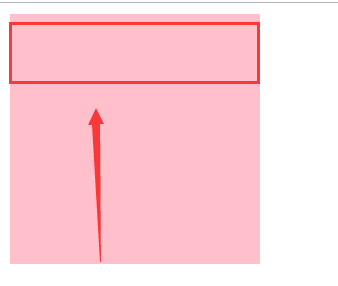
                $(this).stop().slideUp().slideDown();

            });

        })

    </script>

</head>

<body>

    <div></div>

</body>

</html>
计时器
.setTimeout(fn, time) 延迟
当函数内部使用计时器调用自身时,可以起到循环的效果
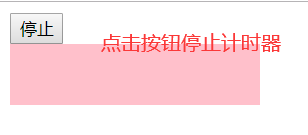
可以使用clearTimeout() 清空计时器
<!DOCTYPE html>

<html lang="en">

<head>

    <meta charset="UTF-8">

    <title>demo</title>

    <style>

    div{

        width:200px;

        height:200px;

        background:pink;

    }

    </style>

    <script src="jquery.js"></script>

    <script>

        $(function(){

            var timer=null;

            function fn(){

                $("div").stop().slideUp().slideDown();

                timer=setTimeout(fn,1000);//开始计时器

            }

            fn();

            $("button").click(function(){

                clearTimeout(timer);//清空计时器

            });

        });

    </script>

</head>

<body>

    <button>停止</button>

    <div></div>

</body>

</html>
.setInterval(fn, time) 每隔一定时间执行一次
有个缺陷:不会立刻执行,而是会等待1秒钟
.clearInterval() 清空循环
<!DOCTYPE html>

<html lang="en">

<head>

    <meta charset="UTF-8">

    <title>demo</title>

    <style>

    div{

        width:200px;

        height:200px;

        background:pink;

    }

    </style>

    <script src="jquery.js"></script>

    <script>

        $(function(){

            var timer=null;

            function fn(){

                $("div").stop().slideUp().slideDown();

            }

            timer=setInterval(fn,1000);//开始循环

            $("button").click(function(){

                clearInterval(timer);//停止循环

            });

        });

    </script>

</head>

<body>

    <button>停止</button>

    <div></div>

</body>

</html>
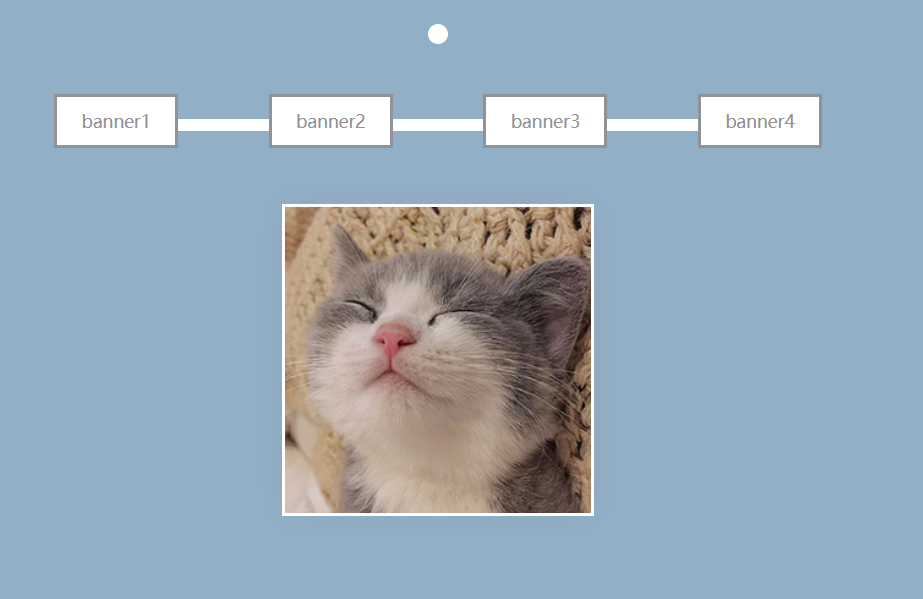
最后是之前的轮播图项目改进
index.html
<!DOCTYPE html>

<html lang="en">

<head>

    <meta charset="UTF-8">

    <meta name="viewport" content="width=device-width, initial-scale=1.0">

    <title>jquery</title>

    <link rel="stylesheet" href="style.css">

    <script src="jquery.js"></script>

    <script src="script.js"></script>

</head>

<body>

    <span class="top"></span>

    <nav>

        <a href="#">banner1</a>

        <a href="#">banner2</a>

        <a href="#">banner3</a>

        <a href="#">banner4</a>

    </nav>

    <div class="img-box">

        <img src="data:image/cat1.jpg">

        <img src="data:image/cat2.jpg">

        <img src="data:image/cat3.jpg">

        <img src="data:image/cat4.jpg">

    </div>

</body>

</html>
style.css
* { margin:; padding:; border: none; }

html, body { overflow: hidden;/*解决因为盒模型溢出造成的垂直方向滚动条*/ height: 100%; background-color: rgb(145, 176, 200); }

span.top { display: block; width: 16px; height: 16px; margin: 30px auto 40px; border-radius: 50%; background-color: #fff; }

nav { position: relative; display: flex;/*弹性盒模型*/ width: 40%; margin: 0 auto 45px; justify-content: space-between;/*实现元素在容器内左右均匀分布*/ }

nav:before { position: absolute; top: 20px; display: block; width: 100%; height: 10px; content: '';/*激活伪元素*/ background-color: #fff; }

nav > a { font-size: 14px; position: relative;    /*默认是static定位,会被绝对定位覆盖 修改为相对定位之后,会覆盖前面的元素*/ padding: 10px 20px; text-decoration: none; color: rgb(144, 146, 152); border: 2px solid rgb(144, 146, 152); background-color: #fff; }

.img-box { position: relative; overflow: hidden; width: 250px; height: 250px; margin: 0 auto; background-color: #fff; box-shadow: 0 0 30px 0 rgba(144, 146, 152, .3); }

.img-box img { position: absolute; top:; right:; bottom:; left:; width: 98%; margin: auto;/*以上5句实现绝对定位的居中*/ }

/*# sourceMappingURL=style.css.map */
script.js
$(function(){

    var index=$("a").length-1;

    //绑定多个事件

    $("a").add(document).on({

        click:function(event){

            event.stopPropagation();//阻止冒泡

            index=$(this).index(); // 获取当前点击的a的index

            swiper();

        },

        mouseenter:function(event){

            event.stopPropagation();//阻止冒泡

            console.log($(this)[0].nodeName);//当前对象的标签名

            if($(this)[0].nodeName=="A"){

                index=$(this).index(); // 获取当前点击的a的index

            }else{

                return true;

            }

            swiper();

        },

        keydown:function(event){

            if(event.keyCode==37){//左

                index=index>0 ? --index : $("a").length-1;

            }else if(event.keyCode==39){//右

                index=index<$("a").length-1 ? ++index : 0;

            }else{

                return true;

            }

            swiper();

        }

    });

    var swiper=function(){

        $("img").eq(index)

                .stop().fadeIn(1000)

                .siblings()

                .stop().fadeOut(1000);

    }

    //初始化

    var init=function(){

        index=0;

        swiper();

    }

    init();

});
效果图
jQuery的动画以及扩展功能的更多相关文章
- jquery animate 动画效果使用解析
animate的意思是:使有生气:驱动:使栩栩如生地动作:赋予…以生命作为形容词:有生命的:活的:有生气的:生气勃勃的 先看动画效果:http://keleyi.com/keleyi/phtml/jq ...
- jQuery的动画处理总结
最近一年多一直在做前端的东西,由于老板在追求一些年轻动感的效果,让页面元素不能仅仅是简单的隐藏显示,所以经常会使用一些动画效果,发现jQuery的动画真心好用啊,把常用的几个总结一下,希望不再每次使用 ...
- jQuery实现动画过程中尽量避免出现网页滚动条
jQuery实现动画过程中尽量避免出现网页滚动条,不然可能会出现动画效果异常.
- jQuery Easing动画效果扩展(转)
jQuery API提供了简单的动画效果如淡入淡出以及自定义动画效果,而今天我给大家分享的是一款jQuery动画效果扩展增强插件jquery.easing.js,使用该插件可以实现直线匀速运功.变加速 ...
- jQuery 停止动画、jQuery Callback 函数、jQuery - Chaining
一.jQuery 停止动画 jQuery stop() 方法用于在动画或效果完成前对它们进行停止. stop() 方法适用于所有 jQuery 效果函数,包括滑动.淡入淡出和自定义动画. $(sele ...
- 精选7款绚丽的HTML5和jQuery图片动画特效
在HTML5出现后,图片就变得更加富有动感了,各种图片动画特效也层出不穷,例如图片播放器.图片导航.3D图片动画等等.本文将精选几款具有代表性的HTML5和jQuery图片动画特效,绚丽的画面.实用的 ...
- jQuery之动画效果show()......animate()
jQuery之动画效果 1.show()显示效果 语法:show(speed,callback) Number/String,Function speend为动画执行时间,单位为毫秒.也可以为slow ...
- jQuery 停止动画
jQuery stop() 方法用于在动画或效果完成前对它们进行停止. 停止滑动 点击这里,向上/向下滑动面板 实例 jQuery stop() 滑动演示 jQuery stop() 方法. jQue ...
- 放弃使用jQuery实现动画
在Web开发的圈子里,开发人员经常觉得CSS动画是一种高性能web动画技术.假设想让网页载入的更快一些,就应该用纯CSS动画.事实上这样的观点是错误的,非常多开发人员早就放弃了javascript的动 ...
随机推荐
- Java多线程,对锁机制的进一步分析
1 可重入锁 可重入锁,也叫递归锁.它有两层含义,第一,当一个线程在外层函数得到可重入锁后,能直接递归地调用该函数,第二,同一线程在外层函数获得可重入锁后,内层函数可以直接获取该锁对应其它代码的控制权 ...
- Pileup 格式详细说明
转自: https://blog.csdn.net/herokoking/article/details/79276939 Pileup 格式最初是由Sanger Institute的Tony Cox ...
- ubuntu19配置静态IP并开启SSH远程登陆
前言 从ubuntu从17.10开始,已经不再在/etc/network/interfaces里配置IP,即使配置了也不会生效,而是改成netplan方式 ,配置写在/etc/netplan/文件夹 ...
- 一、Shell概述
什么是Shell 解释Shell脚本名词之前,我们先来说下什么是Shell? Shell是一个命令解释器,它在操作系统的最底层,负责直接与用户对话,把用户的输入解释给操作系统,并处理各种各样的操作系统 ...
- (数据科学学习手札75)基于geopandas的空间数据分析——坐标参考系篇
本文对应代码已上传至我的Github仓库https://github.com/CNFeffery/DataScienceStudyNotes 1 简介 在上一篇文章中我们对geopandas中的数据结 ...
- 使用 FRP 让部门同事都能直接远程桌面办公( 适用于 TEAM 和向日葵卡顿的用户)
背景说明 这两天由于疫情的原因,很多公司都得在家远程上班,然后像我们这类小公司有没有 VPN 这些东西.传统的远程回公司只能依靠 Teamviewer 或者向日葵等工具.但是由于最近用户量很多,可能会 ...
- java枚举类的常见用法
枚举类型(Enumerated Type) 很早就出现在编程语言中,它被用来将一组类似的值包含到一种类型当中.而这种枚举类型的名称则会被定义成独一无二的类型描述符,在这一点上和常量的定义相似.不过相比 ...
- FPGA基础知识关键点摘要
FPGA基础知识关键点摘要 一.组合逻辑和时序逻辑的区别:组合逻辑与输入直接实时相关,时序逻辑还必须在时钟上升沿出发后输出新值,有没有时钟输入是他们最大的区别!组合时序容易出现竞争冒险现象出现亚稳态, ...
- ubuntu 全英文环境下安装 拼音输入法
原文转自:http://my.oschina.net/No5stranger/blog/290026 ubuntu默认的输入法是ibus,综合网上评论,fcitx的支持者更多,而且个人感觉fcitx也 ...
- 关于求最长子串,使得最大减最小小于k的问题-以POJ4003为例
问题 给出一个长度为\(n\)的序列\(a[i]\),有\(m\)次询问, 每次给你一个\(k\),让你求一个最长子串\([l,r]\),使得\(max_l^r\{a_i\}-min_l^r\{a_i ...