
部署hadoop的开发环境
第一步:安装jdk
由于hadoop是java开发的,所以需要JDK来运行代码。这里安装的是jdk1.6.
jdk的安装见http://www.cnblogs.com/tommyli/archive/2012/01/06/2314706.html
第二步:创建独立的用户
useradd hadoop

passwd hadoop
有些机器不能设置空密码的时候
passwd -d hadoop
这里的用户名为hadoop,如果你要调试的时候要注意名字。
比如我用windows调试linux的集群,这个名字应该是windows系统的用户名(否则你没有权限提交作业到hadoop)。
第三步:设置用户无密码登陆
su - hadoop

ssh-keygen -t rsa

cat ~/.ssh/id_rsa.pub >> ~/.ssh/authorized_keys

chmod 0600 ~/.ssh/authorized_keys

exit
第四步:下载hadoop
mkdir /opt/hadoop

cd /opt/hadoop/

wget http://apache.mesi.com.ar/hadoop/common/hadoop-1.2.0/hadoop-1.2.0.tar.gz

tar -xzf hadoop-1.2.0.tar.gz

mv hadoop-1.2.0 hadoop

chown -R hadoop /opt/hadoop

cd /opt/hadoop/hadoop/
第五步:配置hadoop
vi conf/core-site.xml
<property>

  <name>hadoop.tmp.dir</name>

  <value>/app/hadoop/tmp</value>

  <description>A base for other temporary directories.</description>

</property>

<property>

  <name>fs.default.name</name>

  <value>hdfs://10.53.132.52:54310</value>

  <description>The name of the default file system.  A URI whose

  scheme and authority determine the FileSystem implementation.  The

  uri's scheme determines the config property (fs.SCHEME.impl) naming

  the FileSystem implementation class.  The uri's authority is used to

  determine the host, port, etc. for a filesystem.</description>

</property>

<property>

    <name>dfs.permissions</name>

    <value>false</value>

</property>
vi conf/hdfs-site.xml
<property>

  <name>dfs.replication</name>

  <value>1</value>

  <description>Default block replication.

  The actual number of replications can be specified when the file is created.

  The default is used if replication is not specified in create time.

  </description>

</property>
vi conf/mapred-site.xml
<property>

  <name>mapred.job.tracker</name>

  <value>10.53.132.52:54311</value>

  <description>The host and port that the MapReduce job tracker runs

  at.  If "local", then jobs are run in-process as a single map

  and reduce task.

  </description>

</property>
第六步:开启hadoop
bin/hadoop namenode -format
bin/start-all.sh
关闭是
bin/stop-all.sh
验证开启是
jps
26049 SecondaryNameNode

25929 DataNode

26399 Jps

26129 JobTracker

26249 TaskTracker

25807 NameNode
第七步:下载并设置eclipse的hadoop插件。
插件文件是:hadoop-eclipse-plugin-1.2.0.jar
放到eclipse的plugins目录下即可。
第八步:打开eclipse创建map/reduce项目。
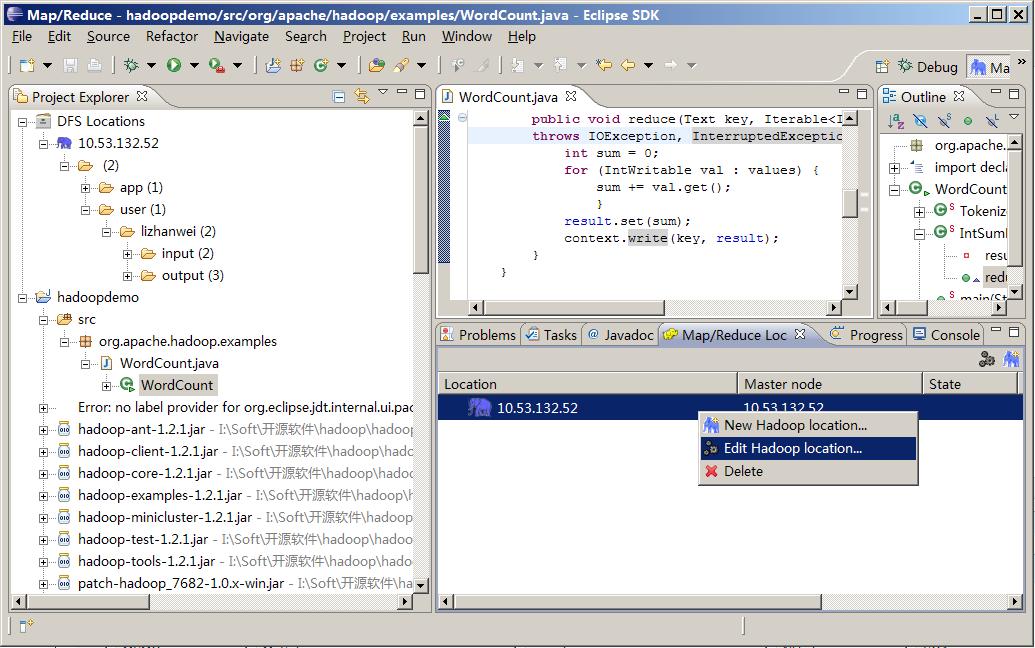
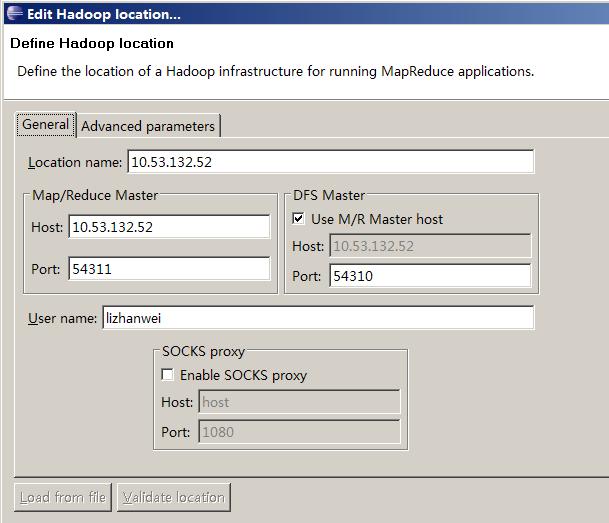
修改map/reduce和hdfs的地址和端口
第九步:调试hadoop
package org.apache.hadoop.examples;

import java.io.IOException;

import java.util.StringTokenizer;

import org.apache.hadoop.conf.Configuration;

import org.apache.hadoop.fs.Path;

import org.apache.hadoop.io.IntWritable;

import org.apache.hadoop.io.Text;

import org.apache.hadoop.mapreduce.Job;

import org.apache.hadoop.mapreduce.Mapper;

import org.apache.hadoop.mapreduce.Reducer;

import org.apache.hadoop.mapreduce.lib.input.FileInputFormat;

import org.apache.hadoop.mapreduce.lib.output.FileOutputFormat;

import org.apache.hadoop.util.GenericOptionsParser;

public class WordCount {

	public static class TokenizerMapper

	extends Mapper<Object, Text, Text, IntWritable>{

		private final static IntWritable one = new IntWritable(1);

		private Text word = new Text();

		public void map(Object key, Text value, Context context)

		throws IOException, InterruptedException {

			StringTokenizer itr = new StringTokenizer(value.toString());

            while (itr.hasMoreTokens()) {

            	word.set(itr.nextToken());

            	context.write(word, one);

            	}

		}

	}

	public static class IntSumReducer

	extends Reducer<Text,IntWritable,Text,IntWritable> {

		private IntWritable result = new IntWritable();

		public void reduce(Text key, Iterable<IntWritable> values,Context context)

		throws IOException, InterruptedException {

			int sum = 0;

			for (IntWritable val : values) {

				sum += val.get();

				}

			result.set(sum);

			context.write(key, result);

		}

	}

	  public static void main(String[] args) throws Exception {

		    Configuration conf = new Configuration();

		    conf.set("mapred.job.tracker", "10.53.132.52:54311");

		    //conf.addResource(new Path("\\soft\\hadoop\\conf\\core-site.xml"));

		    //conf.addResource(new Path("\\soft\\hadoop\\conf\\hdfs-site.xml"));

		    String[] ars=new String[]{"input","output"};

		    String[] otherArgs = new GenericOptionsParser(conf, ars).getRemainingArgs();

		    if (otherArgs.length != 2) {

		      System.err.println("Usage: wordcount  ");

		      System.exit(2);

		    }

		    Job job = new Job(conf, "word count");

		    job.setJarByClass(WordCount.class);

		    job.setMapperClass(TokenizerMapper.class);

		    job.setCombinerClass(IntSumReducer.class);

		    job.setReducerClass(IntSumReducer.class);

		    job.setOutputKeyClass(Text.class);

		    job.setOutputValueClass(IntWritable.class);

		    FileInputFormat.addInputPath(job, new Path(otherArgs[0]));

		    FileOutputFormat.setOutputPath(job, new Path(otherArgs[1]));

		    System.exit(job.waitForCompletion(true) ? 0 : 1);

	  }

}
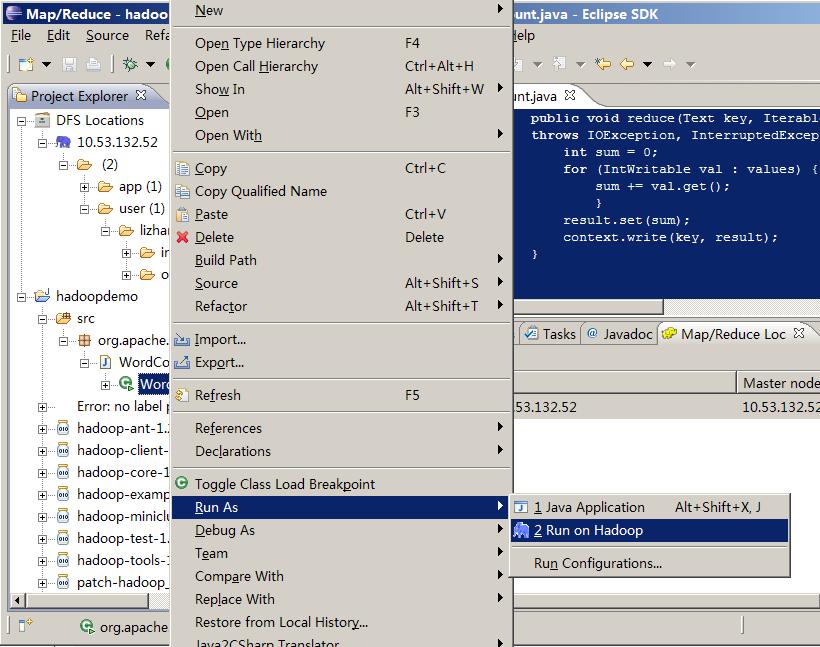
(这里是吧作业提交到远端的hadoop)
调试
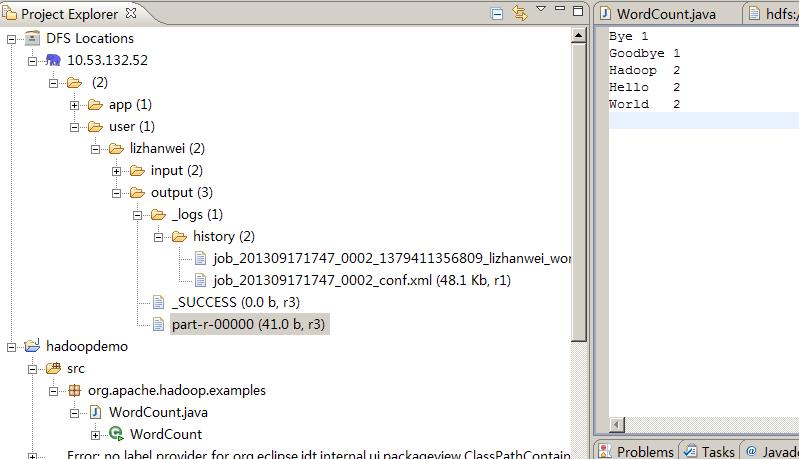
结果
13/09/17 17:50:32 INFO input.FileInputFormat: Total input paths to process : 2

13/09/17 17:50:33 WARN util.NativeCodeLoader: Unable to load native-hadoop library for your platform... using builtin-java classes where applicable

13/09/17 17:50:33 WARN snappy.LoadSnappy: Snappy native library not loaded

13/09/17 17:50:33 INFO mapred.JobClient: Running job: job_201309171747_0002

13/09/17 17:50:34 INFO mapred.JobClient:  map 0% reduce 0%

13/09/17 17:50:39 INFO mapred.JobClient:  map 100% reduce 0%

13/09/17 17:50:47 INFO mapred.JobClient:  map 100% reduce 33%

13/09/17 17:50:48 INFO mapred.JobClient:  map 100% reduce 100%

13/09/17 17:50:49 INFO mapred.JobClient: Job complete: job_201309171747_0002

13/09/17 17:50:49 INFO mapred.JobClient: Counters: 29

13/09/17 17:50:49 INFO mapred.JobClient:   Job Counters

13/09/17 17:50:49 INFO mapred.JobClient:     Launched reduce tasks=1

13/09/17 17:50:49 INFO mapred.JobClient:     SLOTS_MILLIS_MAPS=6115

13/09/17 17:50:49 INFO mapred.JobClient:     Total time spent by all reduces waiting after reserving slots (ms)=0

13/09/17 17:50:49 INFO mapred.JobClient:     Total time spent by all maps waiting after reserving slots (ms)=0

13/09/17 17:50:49 INFO mapred.JobClient:     Launched map tasks=2

13/09/17 17:50:49 INFO mapred.JobClient:     Data-local map tasks=2

13/09/17 17:50:49 INFO mapred.JobClient:     SLOTS_MILLIS_REDUCES=8702

13/09/17 17:50:49 INFO mapred.JobClient:   File Output Format Counters

13/09/17 17:50:49 INFO mapred.JobClient:     Bytes Written=41

13/09/17 17:50:49 INFO mapred.JobClient:   FileSystemCounters

13/09/17 17:50:49 INFO mapred.JobClient:     FILE_BYTES_READ=79

13/09/17 17:50:49 INFO mapred.JobClient:     HDFS_BYTES_READ=286

13/09/17 17:50:49 INFO mapred.JobClient:     FILE_BYTES_WRITTEN=174015

13/09/17 17:50:49 INFO mapred.JobClient:     HDFS_BYTES_WRITTEN=41

13/09/17 17:50:49 INFO mapred.JobClient:   File Input Format Counters

13/09/17 17:50:49 INFO mapred.JobClient:     Bytes Read=50

13/09/17 17:50:49 INFO mapred.JobClient:   Map-Reduce Framework

13/09/17 17:50:49 INFO mapred.JobClient:     Map output materialized bytes=85

13/09/17 17:50:49 INFO mapred.JobClient:     Map input records=2

13/09/17 17:50:49 INFO mapred.JobClient:     Reduce shuffle bytes=85

13/09/17 17:50:49 INFO mapred.JobClient:     Spilled Records=12

13/09/17 17:50:49 INFO mapred.JobClient:     Map output bytes=82

13/09/17 17:50:49 INFO mapred.JobClient:     Total committed heap usage (bytes)=602996736

13/09/17 17:50:49 INFO mapred.JobClient:     CPU time spent (ms)=2020

13/09/17 17:50:49 INFO mapred.JobClient:     Combine input records=8

13/09/17 17:50:49 INFO mapred.JobClient:     SPLIT_RAW_BYTES=236

13/09/17 17:50:49 INFO mapred.JobClient:     Reduce input records=6

13/09/17 17:50:49 INFO mapred.JobClient:     Reduce input groups=5

13/09/17 17:50:49 INFO mapred.JobClient:     Combine output records=6

13/09/17 17:50:49 INFO mapred.JobClient:     Physical memory (bytes) snapshot=555175936

13/09/17 17:50:49 INFO mapred.JobClient:     Reduce output records=5

13/09/17 17:50:49 INFO mapred.JobClient:     Virtual memory (bytes) snapshot=1926799360

13/09/17 17:50:49 INFO mapred.JobClient:     Map output records=8
部署hadoop的开发环境的更多相关文章
- 基于Eclipse的Hadoop应用开发环境配置
基于Eclipse的Hadoop应用开发环境配置 我的开发环境: 操作系统ubuntu11.10 单机模式 Hadoop版本:hadoop-0.20.1 Eclipse版本:eclipse-java- ...
- 【Yeoman】热部署web前端开发环境
本文来自 “简时空”:<[Yeoman]热部署web前端开发环境>(自动同步导入到博客园) 1.序言 记得去年的暑假看RequireJS的时候,曾少不更事般地惊为前端利器,写了<Sp ...
- hadoop搭建开发环境及编写Hello World
hadoop搭建开发环境及编写Hello World 本文地址:http://www.cnblogs.com/archimedes/p/hadoop-helloworld.html,转载请注明源地 ...
- 批量部署Hadoop集群环境(1)
批量部署Hadoop集群环境(1) 1. 项目简介: 前言:云火的一塌糊涂,加上自大二就跟随一位教授做大数据项目,所以很早就产生了兴趣,随着知识的积累,虚拟机已经不能满足了,这次在服务器上以生产环境来 ...
- 使用 docker 部署常用的开发环境
使用 docker 部署常用的开发环境 Intro 使用 docker,很多环境可以借助 docker 去部署,没必要所有的环境都在本地安装,十分方便. 前段时间电脑之前返厂修了,回来之后所有的软件都 ...
- 使用vagrant一键部署本地php开发环境(二)制作自己的vagrant box
在上篇的基础上 ,我们已经安装好了virtualbox和vagrant,没有安装的话,参照上篇 使用vagrant一键部署本地php开发环境(一) 1.从网易镜像或阿里等等镜像下载Centos7 ht ...
- 【原创干货】大数据Hadoop/Spark开发环境搭建
已经自学了好几个月的大数据了,第一个月里自己通过看书.看视频.网上查资料也把hadoop(1.x.2.x).spark单机.伪分布式.集群都部署了一遍,但经历短暂的兴奋后,还是觉得不得门而入. 只有深 ...
- windows部署React-Native的开发环境实践(技术细节)
前情摘要 众所周知,有人说.net可以用Xamrian,呵呵,不习惯收费的好么?搞.Net的人设置一次java的环境变量,可能都觉得实在太麻烦了,可能是因为这些年微软确实把我们给带坏了,所有东西一键安 ...
- Hadoop Eclipse开发环境搭建
This document is from my evernote, when I was still at baidu, I have a complete hadoop developme ...
随机推荐
- registry-1.docker.io TimeOut 错误
用Docker For Windows在Windows 10上执行docker login或者 docker pull/push的时候,经常会报这样的错误: https: Get https://re ...
- php 字符串中的\n换行符无效、不能换行的解决方法
php 字符串中的\n换行符无效.不能换行的解决方法 程序的中的换行符\n会直接输出,无法正确换行,解决方法是把单引号改为双引号 aa
- 微软BI 之SSRS 系列 - 使用分组 Group 属性实现基于父子递归关系的汇总报表
基于父子关系的递归结构在公司组织结构里比较常见,基本上都是在一张表里实现的自引用关系.在报表中如果要实现这种效果,并且在这个基础上做一些数据的汇总,可以使用到下面提到的方法. 要实现的效果大致如下 - ...
- JSP与Servlet之间的关系事例说明
Servlet Servlet 没有 main 方法,不能够独立的运行,它的运行需要容器的支持,Tomcat 是最常用的 JSP/Servlet 容器.Servlet 运行在 Servlet 容器中, ...
- MobX快速入门教程(重要概念讲解)
转载请注明原文地址:http://www.cnblogs.com/ygj0930/p/7372119.html 一:Mobx工作流程图 二:MobX涉及到的概念 1:状态state 组件中的数据. 2 ...
- RHEL/CentOS/Fedora各种源
CentOS 默认自带 CentOS-Base.repo 源, 但官方源中去除了很多有版权争议的软件, 而且安装的软件也不是最新的稳定版. Fedora 自带的源中也找不到很多多媒体软件, 如果需要安 ...
- std::thread中获取当前线程的系统id
std::thread不提供获取当前线程的系统id的方法,仅可以获取当前的线程id,但是我们可以通过建立索引表的方式来实现 std::mutex m; std::map<std::thread: ...
- OdiSendMail
在Package中使用ODI自带的发送邮件OdiSendMail,生成的场景迁移到正式环境中,提示 javax.mail.AuthenticationFailedException: failed t ...
- [转]URL汉字编码问题(及乱码解决)
一.问题的由来 URL就是网址,只要上网,就一定会用到. 一般来说,URL只能使用英文字母.阿拉伯数字和某些标点符号,不能使用其他文字和符号.比如,世界上有英文字母的网址 “http://www.ab ...
- android自动化测试--appium运行的坑问题及解决方法
问题 1. error: Failed to start an Appium session, err was: Error: Requested a new session but one was ...