
使用JDBC向Kudu表插入中文数据乱码(转载)
参考:https://cloud.tencent.com/developer/article/1077763
问题描述
使用Impala JDBC向Kudu表中插入中文字符,插入的中文字符串乱码,中文字符串被截断。
此文档描述使用jdbc的PreparedStatement方式插入中文字符串乱码问题。
1、使用ImpalaJDBC代码进行测试,测试代码
staticString JDBC_DRIVER ="com.cloudera.impala.jdbc41.Driver";

static String CONNECTION_URL ="jdbc:impala://ip-172-31-10-118:21050/default";

public static void main(String[] args) {

    Connection con = null;

 ResultSetrs = null;

 PreparedStatementps = null;

    try {

        Class.forName(JDBC_DRIVER);

 con =DriverManager.getConnection(CONNECTION_URL);

 Stringsql2 = "insert into my_first_table values(?, ?)";

 ps =con.prepareStatement(sql2);

 ps.setInt(1,81);

 ps.setString(2,"测试中文字符");

 ps.execute();

 ps.close();

 ps =con.prepareStatement("select * from my_first_table order byid asc");

 rs = ps.executeQuery();

        while (rs.next()){

            System.out.println(rs.getLong(1)+ "\t" +rs.getString(2));

 }

    } catch (Exceptione) {

        e.printStackTrace();

 } finally{

 try {// 关闭rs、ps和con

 rs.close();

 ps.close();

 con.close();

 } catch(SQLException e) {

 // TODOAuto-generated catch block

 e.printStackTrace();

 }

    }

}
2、向Kudu表中分别插入测试数据,如“测试”,“测试中文”,“测试中文字符”
String sql2 = "insert into my_first_table values(?, ?)";

ps = con.prepareStatement(sql2);

ps.setInt(1, 73);

ps.setString(2, "测试");

ps.execute();

ps.close();

ps = con.prepareStatement(sql2);

ps.setInt(1, 74);

ps.setString(2, "测试中文");

ps.execute();

ps.close();

ps = con.prepareStatement(sql2);

ps.setInt(1, 75);

ps.setString(2, "测试中文字符");

ps.execute();

ps.close();
通过查询kudu数据库如下:
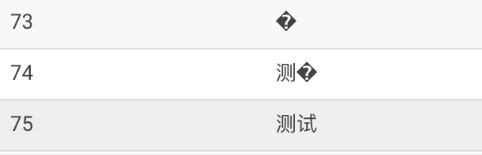
中文字符全部乱码,部分乱码,字符串被截断问题重现。
3、解决方法
修改程序中插入语句,将插入字符串列使用cast函数转成String类型
String sql2 = "insert into my_first_table values(?, cast(? as string))";

ps = con.prepareStatement(sql2);

ps.setInt(1, 60);

ps.setString(2, "测试中文字符");

ps.execute();

ps.close();

ps = con.prepareStatement(sql2);

ps.setInt(1, 61);

ps.setString(2, "测试中文");

ps.execute();

ps.close();

ps = con.prepareStatement(sql2);

ps.setInt(1, 62);

ps.setString(2, "测试");

ps.execute();

ps.close();
修改后重新向Kudu中插入测试数据:“测试中文字符”,“测试中文”,“测试”
使用Hue查询显示如下:
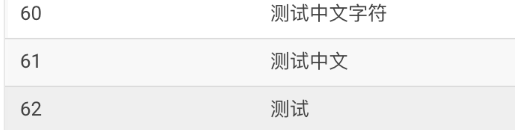
中文字符串插入Kudu显示正常。
另一种情况
1、向Kudu表中分别插入测试数据,如“测试”,“测试中文”,“测试中文字符”


2、解决办法
修改程序中插入语句,将插入字符串的单引号修改为双引号
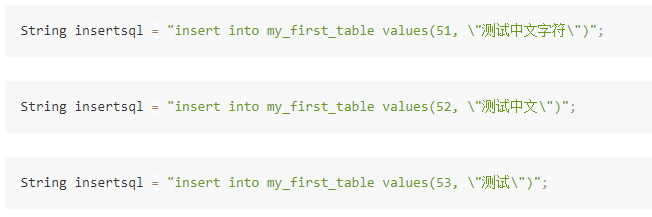
修改后重新向Kudu中插入测试数据:“测试中文字符”,“测试中文”,“测试”
使用Hue查询显示如下:

备注
1.使用Cloudera官网最新的JDBC驱动,插入中文字符时也有上述问题
下载地址:https://downloads.cloudera.com/connectors/impala_jdbc_2.5.38.1058.zip
2.通过Impala-shell插入中文字符串正常
    [172.31.10.118:21000] > insert into my_first_table values(66,'插入中文字符');

    Modified 1 row(s), 0 row error(s) in 0.11s

    [172.31.10.118:21000] > select * from my_first_table where id=66;

    +----+--------------+

    | id | name         |

    +----+--------------+

    | 66 | 插入中文字符 |

    +----+--------------+

    Fetched 1 row(s) in 0.21s

    [172.31.10.118:21000] >

    [172.31.10.118:21000] > insert into my_first_table values(77, "测试中文字符");

    Modified 1 row(s), 0 row error(s) in 0.11s

    [172.31.10.118:21000] > select * from my_first_table where id=77;

    +----+--------------+

    | id | name         |

    +----+--------------+

    | 77 | 测试中文字符 |

    +----+--------------+

    Fetched 1 row(s) in 0.18s

    [172.31.10.118:21000] >
使用JDBC向Kudu表插入中文数据乱码(转载)的更多相关文章
- mariadb插入中文数据乱码解决过程
基本情况: 系统:centos 7 mariadb安装方式:yum 乱码解决过程: 查看当前数据库编码(登录数据库后) # show variables like 'character%'; (上图为 ...
- MySQL 插入 中文数据乱码解决
问题描述: 1.在命令行中进行插入,没有问题.但是显示存在部分乱码 2.在JDBC中插入成功.中文是直接以“??”形式显示. 通过Navicat客户端查看 与在网页中看到的一一致,说明读取没有问题,问 ...
- java web 向数据库插入中文数据乱码问题
一.先检查下是 页面返回数据时已经乱码了,还是在插入数据库的时候乱的码. 二.页面返回乱码: 1. Web.XML 文件配置 <!-- 配置编码过滤器 --> <filter&g ...
- Hibernate向MySQL插入中文数据--乱码解决
<property name="hibernate.connection.url">jdbc:mysql://127.0.0.1:3306/exam?useUnicod ...
- Oracle插入中文数据乱码 设置服务器编码和客户端编码一致
- mysql不能插入中文数据
上次遇到的是向mysql插入中文数据,中文数据乱码了.这次直接就不能插入中文数据了!!!! 参考博文:http://blog.csdn.net/generalyy0/article/details/7 ...
- MySQL插入中文数据出现?号
原文转载自:https://blog.csdn.net/LynneZoe/article/details/79174119 运行环境:win10 mysql版本:Mysql5.6 做一个项目的时候,向 ...
- 解决Python向MySQL数据库插入中文数据时出现乱码
解决Python向MySQL数据库插入中文数据时出现乱码 先在MySQL命令行中输入如下语句查看结果: 只要character_set_client character_set_database ch ...
- mysql插入中文数据变成问号怎么处理
插入中文数据变成问号,一般都是因为字符集没有设置成utf8的原因 1.修改字符集: ALTER TABLE 表名 MODIFY 列名 类型(50) CHARACTER SET "utf8&q ...
随机推荐
- 折腾一天安装Centos7,以及后面恢复Win7引导的曲折历程
一.下载centos 7 livecd iso 访问镜像网站,http://mirrors.aliyun.com/centos/7.0.1406/isos/x86_64/ 或者直接下载:http:// ...
- 查看APP的下载量
开发者账号登陆后:→用户中心→iTunes Connect→Sales Trend
- Intel Code Challenge Elimination Round (Div.1 + Div.2, combined) A. Broken Clock 水题
A. Broken Clock 题目连接: http://codeforces.com/contest/722/problem/A Description You are given a broken ...
- git 仓库迁移,git remote 更改源
git仓库迁移 我们有时候需要迁移git仓库,但又想保留每次commit的记录,所以我们只需要更改git remote [源]的问题即可 首先查看你的remote的地址 git remote -vv ...
- Nginx配置直接php
nginx配置文件: server { listen 80; server_name localhost; access_log /var/log/nginx/log/host.access.log ...
- [廖雪峰] Git 分支管理(3):分支管理策略
通常,合并分支时,如果可能,Git 会用 Fast forward 模式,但这种模式下,删除分支后,会丢掉分支信息. 如果要强制 禁用 Fast forward 模式,Git 就会在 merge 时生 ...
- 【Go命令教程】9. go list
go list 命令的作用是列出指定的 代码包 的信息.与其他命令相同,我们需要以 代码包导入路径 的方式给定代码包.被给定的代码包可以有多个.这些代码包对应的目录中必须直接保存有 Go 语言源码文件 ...
- cocos2dx学习之路
http://blog.csdn.net/qq_30501909/article/details/50720227
- uistatusBar 详解
成功的方法: 方法1.隐藏应用程序内所有的StatusBar 第一步:在Info.plist,然后添加一个新的row,"View controller-based status bar ap ...
- C#编程(二十七)----------创建泛型类
创建泛型类 首先介绍一个一般的,非泛型的简化链表类,可以包含任意类型的对象,以后再把这个类转化为泛型类. 在立案表中,一个元素引用下一个元素.所以必须创建一个类,他将对象封装在链表中,并引用下一个对象 ...