
SpringMVC由浅入深day01_9商品修改功能开发
9 商品修改功能开发
9.1 需求
操作流程:
1、进入商品查询列表页面
2、点击修改,进入商品修改页面,页面中显示了要修改的商品(从数据库查询)
要修改的商品从数据库查询,根据商品id(主键)查询商品信息
3、在商品修改页面,修改商品信息,修改后,点击提交
9.2 开发mapper
mapper:
根据id查询商品信息
根据id更新Items表的数据
不用开发了,使用逆向工程生成的代码。
ItemsMapper.java
package cn.itcast.ssm.mapper;

import cn.itcast.ssm.po.Items;

import cn.itcast.ssm.po.ItemsExample;

import java.util.List;

import org.apache.ibatis.annotations.Param;

public interface ItemsMapper {

    int countByExample(ItemsExample example);

    int deleteByExample(ItemsExample example);

    int deleteByPrimaryKey(Integer id);

    int insert(Items record);

    int insertSelective(Items record);

    List<Items> selectByExampleWithBLOBs(ItemsExample example);

    List<Items> selectByExample(ItemsExample example);

    Items selectByPrimaryKey(Integer id);

    int updateByExampleSelective(@Param("record") Items record, @Param("example") ItemsExample example);

    int updateByExampleWithBLOBs(@Param("record") Items record, @Param("example") ItemsExample example);

    int updateByExample(@Param("record") Items record, @Param("example") ItemsExample example);

    int updateByPrimaryKeySelective(Items record);

    int updateByPrimaryKeyWithBLOBs(Items record);

    int updateByPrimaryKey(Items record);

}
ItemsMapper.xml
<?xml version="1.0" encoding="UTF-8" ?>

<!DOCTYPE mapper PUBLIC "-//mybatis.org//DTD Mapper 3.0//EN" "http://mybatis.org/dtd/mybatis-3-mapper.dtd" >

<mapper namespace="cn.itcast.ssm.mapper.ItemsMapper" >

  <resultMap id="BaseResultMap" type="cn.itcast.ssm.po.Items" >

    <id column="id" property="id" jdbcType="INTEGER" />

    <result column="name" property="name" jdbcType="VARCHAR" />

    <result column="price" property="price" jdbcType="REAL" />

    <result column="pic" property="pic" jdbcType="VARCHAR" />

    <result column="createtime" property="createtime" jdbcType="TIMESTAMP" />

  </resultMap>

  <resultMap id="ResultMapWithBLOBs" type="cn.itcast.ssm.po.Items" extends="BaseResultMap" >

    <result column="detail" property="detail" jdbcType="LONGVARCHAR" />

  </resultMap>

  <sql id="Example_Where_Clause" >

    <where >

      <foreach collection="oredCriteria" item="criteria" separator="or" >

        <if test="criteria.valid" >

          <trim prefix="(" suffix=")" prefixOverrides="and" >

            <foreach collection="criteria.criteria" item="criterion" >

              <choose >

                <when test="criterion.noValue" >

                  and ${criterion.condition}

                </when>

                <when test="criterion.singleValue" >

                  and ${criterion.condition} #{criterion.value}

                </when>

                <when test="criterion.betweenValue" >

                  and ${criterion.condition} #{criterion.value} and #{criterion.secondValue}

                </when>

                <when test="criterion.listValue" >

                  and ${criterion.condition}

                  <foreach collection="criterion.value" item="listItem" open="(" close=")" separator="," >

                    #{listItem}

                  </foreach>

                </when>

              </choose>

            </foreach>

          </trim>

        </if>

      </foreach>

    </where>

  </sql>

  <sql id="Update_By_Example_Where_Clause" >

    <where >

      <foreach collection="example.oredCriteria" item="criteria" separator="or" >

        <if test="criteria.valid" >

          <trim prefix="(" suffix=")" prefixOverrides="and" >

            <foreach collection="criteria.criteria" item="criterion" >

              <choose >

                <when test="criterion.noValue" >

                  and ${criterion.condition}

                </when>

                <when test="criterion.singleValue" >

                  and ${criterion.condition} #{criterion.value}

                </when>

                <when test="criterion.betweenValue" >

                  and ${criterion.condition} #{criterion.value} and #{criterion.secondValue}

                </when>

                <when test="criterion.listValue" >

                  and ${criterion.condition}

                  <foreach collection="criterion.value" item="listItem" open="(" close=")" separator="," >

                    #{listItem}

                  </foreach>

                </when>

              </choose>

            </foreach>

          </trim>

        </if>

      </foreach>

    </where>

  </sql>

  <sql id="Base_Column_List" >

    id, name, price, pic, createtime

  </sql>

  <sql id="Blob_Column_List" >

    detail

  </sql>

  <select id="selectByExampleWithBLOBs" resultMap="ResultMapWithBLOBs" parameterType="cn.itcast.ssm.po.ItemsExample" >

    select

    <if test="distinct" >

      distinct

    </if>

    <include refid="Base_Column_List" />

    ,

    <include refid="Blob_Column_List" />

    from items

    <if test="_parameter != null" >

      <include refid="Example_Where_Clause" />

    </if>

    <if test="orderByClause != null" >

      order by ${orderByClause}

    </if>

  </select>

  <select id="selectByExample" resultMap="BaseResultMap" parameterType="cn.itcast.ssm.po.ItemsExample" >

    select

    <if test="distinct" >

      distinct

    </if>

    <include refid="Base_Column_List" />

    from items

    <if test="_parameter != null" >

      <include refid="Example_Where_Clause" />

    </if>

    <if test="orderByClause != null" >

      order by ${orderByClause}

    </if>

  </select>

  <select id="selectByPrimaryKey" resultMap="ResultMapWithBLOBs" parameterType="java.lang.Integer" >

    select

    <include refid="Base_Column_List" />

    ,

    <include refid="Blob_Column_List" />

    from items

    where id = #{id,jdbcType=INTEGER}

  </select>

  <delete id="deleteByPrimaryKey" parameterType="java.lang.Integer" >

    delete from items

    where id = #{id,jdbcType=INTEGER}

  </delete>

  <delete id="deleteByExample" parameterType="cn.itcast.ssm.po.ItemsExample" >

    delete from items

    <if test="_parameter != null" >

      <include refid="Example_Where_Clause" />

    </if>

  </delete>

  <insert id="insert" parameterType="cn.itcast.ssm.po.Items" >

    insert into items (id, name, price,

      pic, createtime, detail

      )

    values (#{id,jdbcType=INTEGER}, #{name,jdbcType=VARCHAR}, #{price,jdbcType=REAL},

      #{pic,jdbcType=VARCHAR}, #{createtime,jdbcType=TIMESTAMP}, #{detail,jdbcType=LONGVARCHAR}

      )

  </insert>

  <insert id="insertSelective" parameterType="cn.itcast.ssm.po.Items" >

    insert into items

    <trim prefix="(" suffix=")" suffixOverrides="," >

      <if test="id != null" >

        id,

      </if>

      <if test="name != null" >

        name,

      </if>

      <if test="price != null" >

        price,

      </if>

      <if test="pic != null" >

        pic,

      </if>

      <if test="createtime != null" >

        createtime,

      </if>

      <if test="detail != null" >

        detail,

      </if>

    </trim>

    <trim prefix="values (" suffix=")" suffixOverrides="," >

      <if test="id != null" >

        #{id,jdbcType=INTEGER},

      </if>

      <if test="name != null" >

        #{name,jdbcType=VARCHAR},

      </if>

      <if test="price != null" >

        #{price,jdbcType=REAL},

      </if>

      <if test="pic != null" >

        #{pic,jdbcType=VARCHAR},

      </if>

      <if test="createtime != null" >

        #{createtime,jdbcType=TIMESTAMP},

      </if>

      <if test="detail != null" >

        #{detail,jdbcType=LONGVARCHAR},

      </if>

    </trim>

  </insert>

  <select id="countByExample" parameterType="cn.itcast.ssm.po.ItemsExample" resultType="java.lang.Integer" >

    select count(*) from items

    <if test="_parameter != null" >

      <include refid="Example_Where_Clause" />

    </if>

  </select>

  <update id="updateByExampleSelective" parameterType="map" >

    update items

    <set >

      <if test="record.id != null" >

        id = #{record.id,jdbcType=INTEGER},

      </if>

      <if test="record.name != null" >

        name = #{record.name,jdbcType=VARCHAR},

      </if>

      <if test="record.price != null" >

        price = #{record.price,jdbcType=REAL},

      </if>

      <if test="record.pic != null" >

        pic = #{record.pic,jdbcType=VARCHAR},

      </if>

      <if test="record.createtime != null" >

        createtime = #{record.createtime,jdbcType=TIMESTAMP},

      </if>

      <if test="record.detail != null" >

        detail = #{record.detail,jdbcType=LONGVARCHAR},

      </if>

    </set>

    <if test="_parameter != null" >

      <include refid="Update_By_Example_Where_Clause" />

    </if>

  </update>

  <update id="updateByExampleWithBLOBs" parameterType="map" >

    update items

    set id = #{record.id,jdbcType=INTEGER},

      name = #{record.name,jdbcType=VARCHAR},

      price = #{record.price,jdbcType=REAL},

      pic = #{record.pic,jdbcType=VARCHAR},

      createtime = #{record.createtime,jdbcType=TIMESTAMP},

      detail = #{record.detail,jdbcType=LONGVARCHAR}

    <if test="_parameter != null" >

      <include refid="Update_By_Example_Where_Clause" />

    </if>

  </update>

  <update id="updateByExample" parameterType="map" >

    update items

    set id = #{record.id,jdbcType=INTEGER},

      name = #{record.name,jdbcType=VARCHAR},

      price = #{record.price,jdbcType=REAL},

      pic = #{record.pic,jdbcType=VARCHAR},

      createtime = #{record.createtime,jdbcType=TIMESTAMP}

    <if test="_parameter != null" >

      <include refid="Update_By_Example_Where_Clause" />

    </if>

  </update>

  <update id="updateByPrimaryKeySelective" parameterType="cn.itcast.ssm.po.Items" >

    update items

    <set >

      <if test="name != null" >

        name = #{name,jdbcType=VARCHAR},

      </if>

      <if test="price != null" >

        price = #{price,jdbcType=REAL},

      </if>

      <if test="pic != null" >

        pic = #{pic,jdbcType=VARCHAR},

      </if>

      <if test="createtime != null" >

        createtime = #{createtime,jdbcType=TIMESTAMP},

      </if>

      <if test="detail != null" >

        detail = #{detail,jdbcType=LONGVARCHAR},

      </if>

    </set>

    where id = #{id,jdbcType=INTEGER}

  </update>

  <update id="updateByPrimaryKeyWithBLOBs" parameterType="cn.itcast.ssm.po.Items" >

    update items

    set name = #{name,jdbcType=VARCHAR},

      price = #{price,jdbcType=REAL},

      pic = #{pic,jdbcType=VARCHAR},

      createtime = #{createtime,jdbcType=TIMESTAMP},

      detail = #{detail,jdbcType=LONGVARCHAR}

    where id = #{id,jdbcType=INTEGER}

  </update>

  <update id="updateByPrimaryKey" parameterType="cn.itcast.ssm.po.Items" >

    update items

    set name = #{name,jdbcType=VARCHAR},

      price = #{price,jdbcType=REAL},

      pic = #{pic,jdbcType=VARCHAR},

      createtime = #{createtime,jdbcType=TIMESTAMP}

    where id = #{id,jdbcType=INTEGER}

  </update>

</mapper>
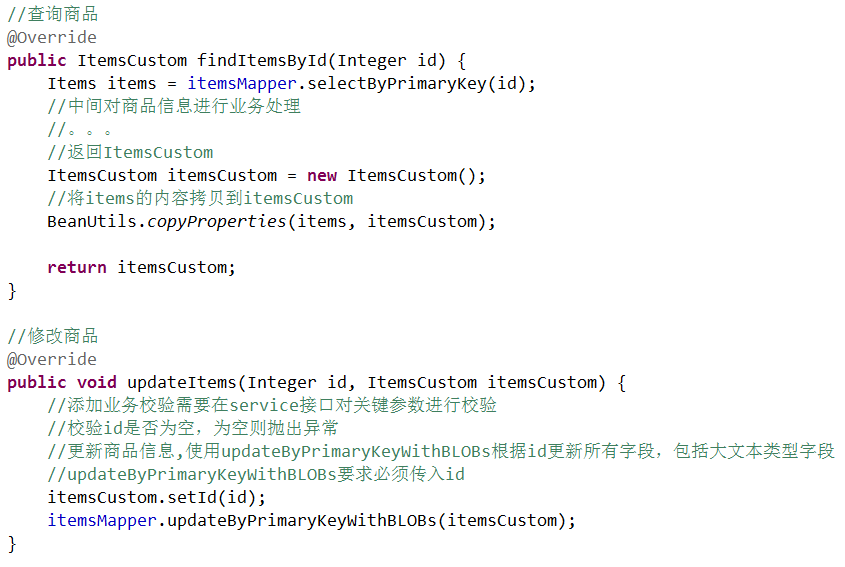
9.3 开发service
接口功能:
根据id查询商品信息
修改商品信息

ItemsServiceImpl.java
9.4 开发controller
方法:
商品信息修改页面显示
商品信息修改提交
ItemsController.java

添加成功页面

修改修改链接

修改页面editItems.jsp:
<%@ page language="java" contentType="text/html; charset=UTF-8"

    pageEncoding="UTF-8"%>

<%@ taglib uri="http://java.sun.com/jsp/jstl/core" prefix="c"%>

<%@ taglib uri="http://java.sun.com/jsp/jstl/fmt" prefix="fmt"%>

<!DOCTYPE html PUBLIC "-//W3C//DTD HTML 4.01 Transitional//EN" "http://www.w3.org/TR/html4/loose.dtd">

<html>

<head>

<meta http-equiv="Content-Type" content="text/html; charset=UTF-8">

<title>修改商品信息</title>

</head>

<body>

    <form id="itemForm"

        action="${pageContext.request.contextPath }/items/editItemsSubmit.action"

        method="post">

        <input type="hidden" name="id" value="${itemsCustom.id }" /> 修改商品信息:

        <table width="100%" border=1>

            <tr>

                <td>商品名称</td>

                <td><input type="text" name="name" value="${itemsCustom.name }" /></td>

            </tr>

            <tr>

                <td>商品价格</td>

                <td><input type="text" name="price"

                    value="${itemsCustom.price }" /></td>

            </tr>

            <tr>

                <td>商品生产日期</td>

                <td><input type="text" name="createtime"

                    value="<fmt:formatDate value="${itemsCustom.createtime}" pattern="yyyy-MM-dd HH:mm:ss"/>" /></td>

            </tr>

            <%-- <tr>

                <td>商品图片</td>

                <td>

                    <c:if test="${item.pic !=null}">

                        <img src="/pic/${item.pic}" width=100 height=100/>

                        <br/>

                    </c:if>

                    <input type="file"  name="pictureFile"/>

                </td>

            </tr> --%>

            <tr>

                <td>商品简介</td>

                <td><textarea rows="3" cols="30" name="detail">${itemsCustom.detail }</textarea>

                </td>

            </tr>

            <tr>

                <td colspan="2" align="center"><input type="submit" value="提交" />

                </td>

            </tr>

        </table>

    </form>

</body>

</html>
测试:访问http://localhost:8080/springmvc_mybatis1217/editItems.action

SpringMVC由浅入深day01_9商品修改功能开发的更多相关文章
- 后台商品搜索功能开发SQL
在做后台的商品搜索功能开发时遇到了一些问题记录下来 版本一 <select id="SelectByNameAndParentId resultMap="Base_resul ...
- springMVC学习(4)-商品修改(RequestMapping解释、controller返回值)
一.需求: 操作流程: 1.进入商品查询列表页面 2.点击修改,进入商品修改页面,页面中显示了要修改的商品(从数据库查询) 3.在商品修改页面,修改商品信息,修改后,点击提交 代码: ItemsMap ...
- SpringMVC学习记录四——功能开发及参数绑定
9 商品修改功能开发 9.1 需求 操作流程: 1.进入商品查询列表页面 2.点击修改,进入商品修改页面,页面中显示了要修改的商品(从数据库查询) 要修改的商品从数据库查询,根据 ...
- SpringMVC由浅入深day02_1课程安排_2包装类型pojo参数绑定_3集合类型绑定
springmvc第二天 高级知识 复习: springmvc框架: DispatcherServlet前端控制器:接收request,进行response HandlerMapping处理器映射器: ...
- springmvc学习笔记(10)-springmvc注解开发之商品改动功能
springmvc学习笔记(10)-springmvc注解开发之商品改动功能 标签: springmvc springmvc学习笔记10-springmvc注解开发之商品改动功能 需求 开发mappe ...
- SpringMVC学习记录五——功能开发及参数处理
15 包装类型pojo参数绑定 15.1 需求 商品查询controller方法中实现商品查询条件传入. 15.2 实现方法 第一种方法:在形参中 添加HttpServ ...
- SpringMVC由浅入深day02_5数据回显_6异常处理器
5 数据回显 5.1 什么数据回显 表单提交失败需要再回到表单页面重新填写,原来提交的数据需要重新在页面上显示. 5.2 pojo数据回显方法 1.springmvc默认对pojo数据进行回显. po ...
- [5] 微信公众号开发 - 微信支付功能开发(网页JSAPI调用)
1.微信支付的流程 如下三张手机截图,我们在微信网页端看到的支付,表面上看到的是 "点击支付按钮 - 弹出支付框 - 支付成功后出现提示页面",实际上的核心处理过程是: 点击支付按 ...
- 微信公众号开发 [05] 微信支付功能开发(网页JSAPI调用)
1.微信支付的流程 如下三张手机截图,我们在微信网页端看到的支付,表面上看到的是 "点击支付按钮 - 弹出支付框 - 支付成功后出现提示页面",实际上的核心处理过程是: 点击支付按 ...
随机推荐
- 首部讲Python爬虫电子书 Web Scraping with Python
首部python爬虫的电子书2015.6pdf<web scraping with python> http://pan.baidu.com/s/1jGL625g 可直接下载 waterm ...
- Android指南 - 主题
译者注:theme(主题)和style(样式)是专用术语,下面对这两个词汇不在使用中文词汇. theme 是安卓的一种机制,用于为应用程序和activity提供一致的样式(style).样式s ...
- svn cleanup失败
今天用SVN的时候出现被锁定的情况,既不能更新代码也不能提交. 解决方法如下: 1. 在被锁定的文件夹上点右键,找到并点击Clean up菜单项 2. 在Cleanup对话框中勾选“Break loc ...
- mpvue上手教程
mpvue官网上面已经有了详细的步骤,把每个步骤截图及输出结果做个笔记,供各位看官参考参考~ 1.全局安装 vue-cli $ npm install --global vue-cli 如果你已经设置 ...
- Sword libcurl使用
libcurl编译 >> ./configure --prefix=/opt/soft/curl --disable-ldap --disable-ldaps >> make ...
- linux查找文件夹命令
查找命令: 查找根目录下查找文件夹名称叫www.91cnm.com的目录地址 find / -name www.91cnm.com -d 1 查找/var/www/目录下叫index.php的文件 f ...
- java中String new和直接赋值的区别
Java中String new和直接赋值的区别 对于字符串:其对象的引用都是存储在栈中的,如果是编译期已经创建好(直接用双引号定义的)的就存储在常量池中,如果是运行期(new出来的)才 ...
- [转]android ANR产生原因和解决办法
ANR (Application Not Responding) ANR定义:在Android上,如果你的应用程序有一段时间响应不够灵敏,系统会向用户显示一个对话框,这个对话框称作应用程序无响应(AN ...
- e826. 获得和设置JSplitPane分开的位置
The location of a divider is measured in pixels from either the left edge (in the case of a horizont ...
- 嵌入式开发之hi3516---GV7601 SPI通信问题
http://blog.csdn.net/qq_29350001/article/details/52669964 http://blog.csdn.net/zqj6893/article/detai ...