
springbatch---->springbatch的使用(二)
这里我们对springbatch做一个比较深入的学习例子,解压文件,读取文件内容过滤写入到数据库中。如果你掉进了黑暗里,你能做的,不过是静心等待,直到你的双眼适应黑暗。
springbatch的使用案例
首先,我们来列举一下spring batch里面所涉及到的概念。
1、Job repository

    An infrastructure component that persists job execution metadata

2、Job launcher

    An infrastructure component that starts job executions

3、Job

    An application component that represents a batch process

4、Step

    A phase in a job; a job is a sequence of steps

5、Tasklet

    A transactional, potentially repeatable process occurring in a step

6、Item

    A record read from or written to a data source

7、Chunk

    A list of items of a given size

8、Item reader

    A component responsible for reading items from a data source

9、Item processor

    A component responsible for processing (transforming, validating, or filtering) a read item before it’s written

10、Item writer

    A component responsible for writing a chunk to a data source
我们的项目是基于上篇博客的,具体的可以参考博客:springbatch---->springbatch的使用(一)。流程:将得到的zip文件解压成txt文件,根据里面的信息。我们过滤到年龄大于30的数据,并把过滤后的数据按格式存放到数据库中。以下我们只列出新增或者修改的文件内容。
一、关于xml文件的修改,增加一个job.xml文件和修改batch.xml文件
- batch.xml文件增加内容:
<!-- 读取文件写入到数据库的job -->

<job id="readFlatFileJob">

    <step id="decompress" next="readWriter">

        <tasklet ref="decompressTasklet"/>

    </step>

    <step id="readWriter" next="clean">

        <tasklet>

            <chunk reader="reader" writer="writer" commit-interval="100" processor="processor"/>

        </tasklet>

    </step>

    <step id="clean">

        <tasklet ref="cleanTasklet"/>

    </step>

</job>
关于commit-interval:Number of items to process before issuing a commit. When the number of items read reaches the commit interval number, the entire corresponding chunk is written out through the item writer and the transaction is committed.
- 新增的job.xml文件内容如下:
<?xml version="1.0" encoding="UTF-8"?>

<beans xmlns="http://www.springframework.org/schema/beans"

       xmlns:xsi="http://www.w3.org/2001/XMLSchema-instance"

       xsi:schemaLocation="http://www.springframework.org/schema/beans http://www.springframework.org/schema/beans/spring-beans.xsd">

    <!-- 对压缩文件进行解压 -->

    <bean id="decompressTasklet" class="spring.batch.readFile.DecompressTasklet">

        <property name="inputResource" value="file:file/file.zip"/>

        <property name="targetDirectory" value="file"/>

        <property name="targetFile" value="file.txt"/>

    </bean>

    <!-- 读取文本文件 -->

    <bean id="reader" class="org.springframework.batch.item.file.FlatFileItemReader">

        <property name="lineMapper" ref="lineMapper"/>

        <property name="linesToSkip" value="1"/> <!-- 跳过第一行,也就是从第二行开始读 -->

        <property name="resource" value="file:file/file.txt"/>

    </bean>

    <!-- 对读取的内容做过滤处理 -->

    <bean id="processor" class="spring.batch.readFile.FileProcessor"/>

    <!-- 将读取的内容写到数据库中 -->

    <bean id="writer" class="spring.batch.readFile.FileWriter">

        <constructor-arg ref="dataSource"/>

    </bean>

    <!-- 清除压缩文件-->

    <bean id="cleanTasklet" class="spring.batch.readFile.FileCleanTasklet">

        <property name="resource" value="file:file/file.zip"/>

    </bean>

    <!-- 对文件里面的数据进行|分割,映射成一个类 -->

    <bean id="lineMapper" class="org.springframework.batch.item.file.mapping.DefaultLineMapper">

        <property name="lineTokenizer" ref="delimitedLineTokenizer"/>

        <property name="fieldSetMapper">

            <bean class="spring.batch.readFile.ReadFileMapper"/>

        </property>

    </bean>

    <bean id="delimitedLineTokenizer" class="org.springframework.batch.item.file.transform.DelimitedLineTokenizer">

        <constructor-arg name="delimiter" value="|"/>

    </bean>

    <!-- 简单的数据源配置 -->

    <bean id="dataSource" class="org.springframework.jdbc.datasource.DriverManagerDataSource">

        <property name="driverClassName" value="com.mysql.jdbc.Driver"/>

        <property name="url" value="jdbc:mysql://127.0.0.1:3306/csiilearn"/>

        <property name="username" value="root"/>

        <property name="password" value="*****"/>

    </bean>

</beans>
其实关于有格式的文件的读写,springbatch为我们提供了FlatFileItemWriter和FlatFileItemReader类。我们可以直接使用,只需要配置它的属性就行。
二、新增加的java类,如下所示
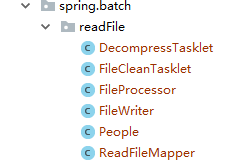
- DecompressTasklet:对zip文件进行解压
package spring.batch.readFile;

import org.apache.commons.io.FileUtils;

import org.apache.commons.io.IOUtils;

import org.springframework.batch.core.StepContribution;

import org.springframework.batch.core.scope.context.ChunkContext;

import org.springframework.batch.core.step.tasklet.Tasklet;

import org.springframework.batch.repeat.RepeatStatus;

import org.springframework.core.io.Resource;

import java.io.BufferedInputStream;

import java.io.BufferedOutputStream;

import java.io.File;

import java.io.FileOutputStream;

import java.util.zip.ZipInputStream;

/**

 * @Author: huhx

 * @Date: 2017-11-01 上午 9:39

 */

public class DecompressTasklet implements Tasklet {

    private Resource inputResource;

    private String targetDirectory;

    private String targetFile;

    @Override

    public RepeatStatus execute(StepContribution contribution, ChunkContext chunkContext) throws Exception {

        System.out.println("file path: " + inputResource.getFile().getAbsolutePath());

        ZipInputStream zis = new ZipInputStream(

                new BufferedInputStream(

                       inputResource.getInputStream()));

        File targetDirectoryAsFile = new File(targetDirectory);

        if (!targetDirectoryAsFile.exists()) {

            FileUtils.forceMkdir(targetDirectoryAsFile);

        }

        File target = new File(targetDirectory, targetFile);

        BufferedOutputStream dest = null;

        while (zis.getNextEntry() != null) {

            if (!target.exists()) {

                target.createNewFile();

            }

            FileOutputStream fos = new FileOutputStream(target);

            dest = new BufferedOutputStream(fos);

            IOUtils.copy(zis, dest);

            dest.flush();

            dest.close();

        }

        zis.close();

        if (!target.exists()) {

            throw new IllegalStateException("Could not decompress anything from the archive!");

        }

        return RepeatStatus.FINISHED;

    }

    public void setInputResource(Resource inputResource) {

        this.inputResource = inputResource;

    }

    public void setTargetDirectory(String targetDirectory) {

        this.targetDirectory = targetDirectory;

    }

    public void setTargetFile(String targetFile) {

        this.targetFile = targetFile;

    }

}
- People:数据库映射的javaBean类
public class People implements Serializable {

    private String username;

    private int age;

    private String address;

    private Date birthday;

    ..get...set...

}
- ReadFileMapper:读取文件字段的映射
package spring.batch.readFile;

import org.springframework.batch.item.file.mapping.FieldSetMapper;

import org.springframework.batch.item.file.transform.FieldSet;

import org.springframework.validation.BindException;

/**

 * @Author: huhx

 * @Date: 2017-11-01 上午 10:11

 */

public class ReadFileMapper implements FieldSetMapper<People> {

    @Override

    public People mapFieldSet(FieldSet fieldSet) throws BindException {

        People people = new People();

        people.setUsername(fieldSet.readString(0));

        people.setAge(fieldSet.readInt(1));

        people.setAddress(fieldSet.readString(2));

        people.setBirthday(fieldSet.readDate(3));

        return people;

    }

}
- FileProcessor:对读取的数据做进一步的处理,这里我们是过滤操作
package spring.batch.readFile;

import org.springframework.batch.item.ItemProcessor;

/**

 * @Author: huhx

 * @Date: 2017-11-01 上午 9:43

 */

public class FileProcessor implements ItemProcessor<People, People> {

    @Override

    public People process(People item) throws Exception {

        return needsToBeFiltered(item) ? null : item;

    }

    private boolean needsToBeFiltered(People item) {

        int age = item.getAge();

        return age > 30 ? true : false;

    }

}
- FileWriter:对最终过滤后的数据写入数据库中
package spring.batch.readFile;

import org.springframework.batch.item.ItemWriter;

import org.springframework.jdbc.core.JdbcTemplate;

import javax.sql.DataSource;

import java.util.List;

/**

 * @Author: huhx

 * @Date: 2017-11-01 上午 9:42

 */

public class FileWriter implements ItemWriter<People> {

    private static final String INSERT_PRODUCT = "INSERT INTO batch_user (user_name, age, address, birthday) VALUES(?, ?, ?, ?)";

    private JdbcTemplate jdbcTemplate;

    public FileWriter(DataSource dataSource) {

        this.jdbcTemplate = new JdbcTemplate(dataSource);

    }

    @Override

    public void write(List<? extends People> items) throws Exception {

        for (People people : items) {

            jdbcTemplate.update(INSERT_PRODUCT, people.getUsername(), people.getAge(), people.getAddress(), people.getBirthday());

        }

    }

}
- FileCleanTasklet:做流程最后的清理处理,删除zip文件
package spring.batch.readFile;

import org.springframework.batch.core.StepContribution;

import org.springframework.batch.core.scope.context.ChunkContext;

import org.springframework.batch.core.step.tasklet.Tasklet;

import org.springframework.batch.repeat.RepeatStatus;

import org.springframework.core.io.Resource;

import java.io.File;

/**

 * @Author: huhx

 * @Date: 2017-11-01 上午 9:44

 */

public class FileCleanTasklet implements Tasklet {

    private Resource resource;

    public void setResource(Resource resource) {

        this.resource = resource;

    }

    @Override

    public RepeatStatus execute(StepContribution contribution, ChunkContext chunkContext) throws Exception {

        File file = resource.getFile();

        file.deleteOnExit();

        return RepeatStatus.FINISHED;

    }

}
三、修改JobLaunch.java文件里面的内容
Job job = (Job) context.getBean("readFlatFileJob");
- zip解压后的文件内容:
姓名|年龄|地址|生日

李元芳||黄冈|--

王昭君||武汉|--

狄仁杰||天津|--

孙悟空||黄冈|--

牛魔王||武汉|--

孙尚香||天津|--
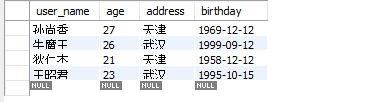
- 运行后的数据库batch_user表的数据:
友情链接
springbatch---->springbatch的使用(二)的更多相关文章
- SpringBatch Sample (二)(CSV文件操作)
本文将通过一个完整的实例,与大家一起讨论运用Spring Batch对CSV文件的读写操作.此实例的流程是:读取一个含有四个字段的CSV文件(ID,Name,Age,Score),对读取的字段做简单的 ...
- YII内置验证规则
required: 必填字段验证, 来自 CRequiredValidator类的别名 array(‘字段名列表用逗号隔开’, ‘required’), 就这样的一个小小的写法,可以让字段前面加 ...
- Spring Batch介绍
简介 SpringBatch 是一个大数据量的并行处理框架.通常用于数据的离线迁移,和数据处理,⽀持事务.并发.流程.监控.纵向和横向扩展,提供统⼀的接⼝管理和任务管理;SpringBatch是Spr ...
- springbatch操作CSV文件
一.需求分析 使用Spring Batch对CSV文件进行读写操作: 读取一个含有四个字段的CSV文件(id, name, age, score), 对文件做简单的处理, 然后输出到还有一个csv文件 ...
- SpringBatch的初步了解
一.SpringBatch是一个批处理的框架,作为一个Spring组件,提供了通过使用Spring的依赖注入来处理批处理的条件. 什么是批处理呢? 在现代企业应用当中,面对复杂的业务以及海量的数据,除 ...
- springbatch操作DB
一.需求分析 使用Spring Batch对DB进行读写操作: 从一个表中读取数据, 然后批量的插入另外一张表中. 二.代码实现 1. 代码结构图: 2. applicationContext.xml ...
- SpringBoot整合SpringBatch
一.引入依赖 pom.xml <?xml version="1.0" encoding="UTF-8"?> <project xmlns=&q ...
- SpringBatch的核心组件JobLauncher和JobRepository
Spring Batch的框架包括启动批处理作业的组件和存储Job执行产生的元数据.因此只需掌握配置这个基础框架在批处理应用程序中即启动Jobs并存储Job元数据. 组件:Job Launcher和J ...
- SpringBatch简介
spring Batch是一个轻量级的.完善的批处理框架,旨在帮助企业建立健壮.高效的批处理应用.SpringBatch是Spring的一个子项目,使用Java语言并基于Spring框架为基础开发,使 ...
- spring-boot-oracle spring-batch
Install/Configure Oracle express Oracle xe installer for linux (I don't care if you're running linux ...
随机推荐
- form中的button按钮在IE11中自动提交表单问题导致弹出框关闭之后表单被重置
最近几天,测试系统,遇到一个兼容性问题,form中有一个button按钮,没有指定type类型,点击按钮弹出框选择值之后回填给form上的一个单行文本框,在IE6.IE7.IE8.IE9.IE10中测 ...
- Linux 限制用户远程SSH登录
通过/etc/hosts.allow和/etc/hosts.deny两个配置文件远程限制某个IP和某段IP地址允许或拒绝访问Linux服务器 SSH.FTP.telnet等服务,其中/etc/host ...
- 联想服务器RD450 配置RAID5
实验环境: 1.服务器型号 ThinkServer RD450 2.四块1TB普通SATA硬盘 实验目的: 配置RAID 5 ,搭建公司文件共享服务器使用. 标注:本教程四块硬盘全做RAID 5,如果 ...
- R语言ggplot2中的panel. strip 基本概念
ggplot2 是一套独立的绘图系统,在一个完整的ggplot2的图表中,会有下面几个概念: 1) plot 2) panel 3) strip 4) legend 所有这些元素都会出现在图表中 代码 ...
- mysql错误代码对照表较完整 mysql_errno()
From: http://blog.csdn.net/aidenliu/article/details/5925604 mysql错误代码对照表较完整 0101 属于其他进程的专用标志. 0102 ...
- Spring核心框架体系结构(jar包引用分析)[转]
很多人都在用spring开发java项目,普通添加lib目录拷贝jar包,或者创建maven项目时,配置maven依赖的时候并不能明确要配置哪些spring的jar,经常是胡乱添加一堆,编译或运行报错 ...
- Springboot学习笔记(七)-集成Redis
redis下载地址 添加依赖 <dependencies> <dependency> <groupId>org.springframework.boot</g ...
- DataTable内容导出为CSV文件
CSVHelper.cs内容: using System; using System.Collections.Generic; using System.Linq; using System.Text ...
- virtualbox谨记:win7上只有4.3.x的版本支持ubuntu14.04.3虚拟机安装Oracle Rac,其他的版本3.x和5.0.2(至2015-08-30)均不可以
virtualbox谨记:win7上只有4.3.x的版本支持ubuntu14.04.3虚拟机安装Oracle Rac,其他的版本3.x和5.0.2(至2015-08-30)均不可以
- hdfs 机架感知
一.背景 分布式的集群通常包含非常多的机器,由于受到机架槽位和交换机网口的限制,通常大型的分布式集群都会跨好几个机架,由多个机架上的机器共同组成一个分布式集群.机架内的机器之间的网络速度通常都会高 ...