
cvc-complex-type.2.4.c: The matching wildcard is strict, but no declaration的解决
导入了一个工程,编译什么的都还好,但是报了一个XML的错误。
cvc-complex-type.2.4.c: The matching wildcard is strict, but no declaration can be found for element 'dubbo:application'.
具体错误如下:
Multiple annotations found at this line:
- cvc-complex-type.2.4.c: The matching wildcard is strict, but no declaration can be found for element 'dubbo:application'.
- schema_reference.4: Failed to read schema document 'http://code.alibabatech.com/schema/dubbo/dubbo.xsd', because 1) could not find the
document; 2) the document could not be read; 3) the root element of the document is not <xsd:schema>.
根据错误提示,有可能是http://code.alibabatech.com/schema/dubbo/dubbo.xsd这个文档找不到或者打不开,于是百度了一下,发现类似问题的问还是比较多的,比较轻松找到解决办法。大致的思路是,到网上下载一个dubbo.xsd文件,其实在dubbo的jar包里就有,直接解压出来就好,放到本地目录,然后在Eclipse里配置上关联关系,让Eclipse能找到这个文件即可。
1、下载一个dubbo.xsd文件;
2、在windows->preferrence->xml->xmlcatalogadd->catalog entry ->file system 选择刚刚下载的文件路径;
3、修改key值和配置文件的http://code.alibabatech.com/schema/dubbo/dubbo.xsd 相同保存。
4、在xml文件右键validate就可以k解决了。
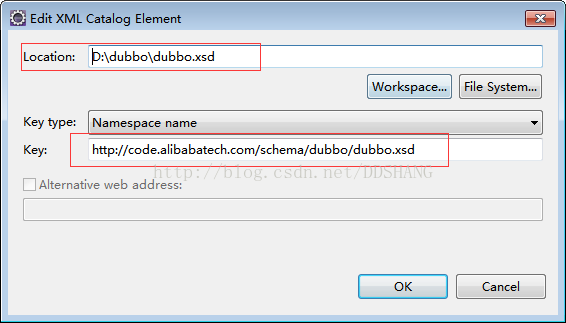
后记:有其它的xsd文件找不到的情况,也可以按照类似的方法解决。
转自https://blog.csdn.net/ddshang/article/details/72772640
cvc-complex-type.2.4.c: The matching wildcard is strict, but no declaration的解决的更多相关文章
- Spring 错误 cvc-complex-type.2.4.c: The matching wildcard is strict, but no declaration can be found for element 'context:property-placeholder'.
我来说下这个出错的原因吧 eclise中xsd的验证问题Description Resource Path Location Type cvc-complex-type.2.4.c: The matc ...
- cvc-complex-type.2.4.c: The matching wildcard is strict, but no declaration can be found for element 'mvc:annotation-driven'.
spring 配置文件报错报错信息:cvc-complex-type.2.4.c: The matching wildcard is strict, but no declaration can be ...
- xml bug之cvc-complex-type.2.4.c: The matching wildcard is strict, but no declaration...
1.今天重装了一下MyEclipse7.5,打开原来的Flex项目,又报了以下两个错误,之前解决过,但不想又出现,于是把它的解决方法贴出来,做个备忘! 错误信息为 错误信息 写道 cvc-comple ...
- xml错误之cvc-complex-type.2.4.c: The matching wildcard is strict, but no declaration can be found for element 'mvc:annotation-driven'.
今天从svn导入项目的时候,一个xml文件里面报错:‘cvc-complex-type.2.4.c: The matching wildcard is strict, but no declarati ...
- 《Spring实战》-- 'cvc-complex-type.2.4.c: The matching wildcard is strict, but no declaration can be found for element' 错误的解决办法
在Eclipse中新建了一个maven项目学习Spring,在 service.xml 中配置 Spring,想要学习'面向切面的Spring',service.xml 内容如下: <beans ...
- cvc-complex-type.2.4.c: The matching wildcard is strict, but no declaration can be found for element 'mongo:mongo-client'.
cvc-complex-type.2.4.c: The matching wildcard is strict, but no declaration can be found for element ...
- xml报错“cvc-complex-type.2.4.c: The matching wildcard is strict, but no declaration can be found for element”
配置使用dubbo时,xml报错“cvc-complex-type.2.4.c: The matching wildcard is strict, but no declaration can be ...
- cvc-complex-type.2.4.c: The matching wildcard is strict, but no declaration can be found for element 'mvc:resources'.
新的错误出现 spring-mvc.xml文件 <mvc:resources mapping="/static/**" location="/static/&qu ...
- cvc-complex-type.2.4.c: The matching wildcard is strict, but no declaration can be found for element ‘dubbo:application’. – schema_reference.4: Failed to read schema document
解决办法: 1.直接百度下载一个dubbo.xsd文件 2.myeclispe-->window-->preferences-->xml catalog-->add 完美解决!
随机推荐
- SAP ML 物料分类账详解(含取消激活物料帐方法)
一.业务背景: 中国会计准则规定,对存货的核算必须采用历史成本法(即实际成本法).如果企业采用计划成本法或者定额成本法进行日常核算的,应当按期结转其成本差异,将计划成本或者定额成本调整为实际成本. “ ...
- 【Html】Vue动态插入组件
html: <div id="app"> <p>{{ message }}</p> <button @click="add('a ...
- MyBatis打印输出SQL语句
Hibernate是可以配置 show_sql 显示 自动生成的SQL 语句,用 format_sql 可以格式化SQL 语句,但如果用 mybatis 怎么实现这个功能呢?如果你搜索看一下,基本都是 ...
- resharper安装后,F12不能转到定义,也不是反编译,而是转到对象浏览器(object browser)
问: resharper安装后,一不小心点错了(选择了object browser)以上配置在哪里设置?转到定义用习惯了. 回答 :打开Resharper,选择Options,然后选择Tools中的E ...
- 【经验之谈】Git使用之TortoiseGit配置VS详解;国内几大Git代码托管网站
转载自: http://www.cnblogs.com/xishuai/p/3590705.html http://www.cnblogs.com/shanyou/p/3662482.html
- js 模拟鼠标事件
<!DOCTYPE html> <html> <head lang="zh-CN"> <meta charset="UTF-8& ...
- tp5的学习
1.安装,官网下载 2.访问配置:http://localhost/App/public/ 3.入口文件,项目目录/public // 定义应用目录 define('APP_PATH', __DIR_ ...
- Mac或者linux下登陆到linux上的SFTP
登陆 sftp -i 密钥路径 用户@ip ➜ ~ sftp -i Desktop/aliyun.pem root@39.106.30.1 Connected to 39.106.30.1 上 ...
- Android使用http协议与服务器通信
网上介绍Android上http通信的文章很多,不过大部分只给出了实现代码的片段,一些注意事项和如何设计一个合理的类用来处理所有的http请求以及返回结果,一般都不会提及.因此,自己对此做了些总结,给 ...
- VIM技巧:选择文本块
在正常模式下(按ESC进入)按键v进入可视化模式,然后按键盘左右键或h,l键即可实现文本的选择.其它相关命令:v:按字符选择.经常使用的模式,所以亲自尝试一下它. V:按行选择.这在你想拷贝或者移动很 ...