
〖Android〗sshd for android, 及映射根文件系统至本地盘符
严重问题:
若移植失败将可能直接导致手机***无法开机***,导入相关文件需慎重!
达成效果:
1. ssh 远程登录 Android 终端;
2. sftp 挂载/映射 Android 根文件系统至本地网络驱动盘符;
适用场景:
前期开发过程中,需要做大量的调试,需要对Android文件系统频繁修改;
操作流程:

详细操作:
一、Linux操作系统相关的部分
1. 编译 openssh for Android
同步及编译Android源码的基础操作:[编译Android源码入门]
在一切准备就绪之后,输入以下命令:
source build/envsetup.sh

lunch cm_mako-userdebug
mmm -B external/zlib
mmm -B external/openssl

mmm -B external/openssh
将会生成以下的文件:
1.zlib
----------------------------------------
/media/Source/cm11/out/target/product/mako/system/lib/libz.so
/media/Source/cm11/out/target/product/mako/system/bin/gzip
2.openssl
----------------------------------------
out/target/product/mako/system/lib/libcrypto.so
out/target/product/mako/system/lib/libssl.so
out/target/product/mako/system/bin/ssltest
out/target/product/mako/system/bin/openssl
3.openssh
----------------------------------------
/media/Source/cm11/out/target/product/mako/system/lib/libssh.so
/media/Source/cm11/out/target/product/mako/system/bin/ssh
/media/Source/cm11/out/target/product/mako/system/bin/sftp
/media/Source/cm11/out/target/product/mako/system/bin/scp
/media/Source/cm11/out/target/product/mako/system/bin/sshd
/media/Source/cm11/out/target/product/mako/system/bin/sftp-server
/media/Source/cm11/out/target/product/mako/system/bin/ssh-keygen
/media/Source/cm11/out/target/product/mako/system/etc/ssh/sshd_config
/media/Source/cm11/out/target/product/mako/system/bin/start-ssh
把这些文件,拷贝至对应的位置即可,备份下载:http://pan.baidu.com/s/1o69DTV0
解压:tar zxf openssh_android_binary.tgz -C /
2. 配置Adnroid操作系统中的 sshd_config 文件
adb shell 登录 Android 操作系统后,vi /data/ssh/sshd_config,复制以下代码:
# Package generated configuration file

# See the sshd_config() manpage for details

# What ports, IPs and protocols we listen for

Port

# Use these options to restrict which interfaces/protocols sshd will bind to

#ListenAddress ::

#ListenAddress 0.0.0.0

Protocol

# HostKeys for protocol version

# custom configure start

# chnange the hostkey default path, by scue

HostKey /data/ssh/ssh_host_rsa_key

HostKey /data/ssh/ssh_host_dsa_key

HostKey /data/ssh/ssh_host_ecdsa_key

# custom configre end

#Privilege Separation is turned on for security

UsePrivilegeSeparation sandbox

# Lifetime and size of ephemeral version  server key

KeyRegenerationInterval

ServerKeyBits

# Logging

SyslogFacility AUTH

LogLevel INFO

# Authentication:

LoginGraceTime

PermitRootLogin yes

StrictModes yes

RSAAuthentication yes

PubkeyAuthentication yes

AuthorizedKeysFile    /data/.ssh/authorized_keys

# Don't read the user's ~/.rhosts and ~/.shosts files

IgnoreRhosts yes

# For this to work you will also need host keys in /etc/ssh_known_hosts

RhostsRSAAuthentication no

# similar for protocol version

HostbasedAuthentication no

# Uncomment if you don't trust ~/.ssh/known_hosts for RhostsRSAAuthentication

#IgnoreUserKnownHosts yes

# To enable empty passwords, change to yes (NOT RECOMMENDED)

PermitEmptyPasswords yes

# Change to yes to enable challenge-response passwords (beware issues with

# some PAM modules and threads)

ChallengeResponseAuthentication no

# Change to no to disable tunnelled clear text passwords

#PasswordAuthentication yes

# Kerberos options

#KerberosAuthentication no

#KerberosGetAFSToken no

#KerberosOrLocalPasswd yes

#KerberosTicketCleanup yes

# GSSAPI options

#GSSAPIAuthentication no

#GSSAPICleanupCredentials yes

X11Forwarding yes

X11DisplayOffset

PrintMotd no

PrintLastLog yes

TCPKeepAlive yes

#UseLogin no

#MaxStartups ::

#Banner /etc/issue.net

# Allow client to pass locale environment variables

AcceptEnv LANG LC_*

# 这里指向 sftp 可执行文件的路径!

Subsystem    sftp    /system/bin/sftp-server

# Set this to 'yes' to enable PAM authentication, account processing,

# and session processing. If this is enabled, PAM authentication will

# be allowed through the ChallengeResponseAuthentication and

# PasswordAuthentication.  Depending on your PAM configuration,

# PAM authentication via ChallengeResponseAuthentication may bypass

# the setting of "PermitRootLogin without-password".

# If you just want the PAM account and session checks to run without

# PAM authentication, then enable this but set PasswordAuthentication

# and ChallengeResponseAuthentication to 'no'.

#UsePAM yes

# root login without passwd, by scue.

# custom configure start

PermitRootLogin without-password

RSAAuthentication yes

PubkeyAuthentication yes

PermitEmptyPasswords yes

# custom configure end
这个配置可以在 start-ssh & 执行之后,启动sshd的同时也启动了 sftp-server ,同时使root帐户无密码可登录(但需要RSA验证),同时还要执行以下命令行操作:
mount -o remount,rw /system

mv /system/etc/ssh/sshd_config{,.bak}

ln -s /data/ssh/sshd_config /system/etc/ssh/sshd_config
虽说Android代码中 sshd 执行时自动查找的是 /data/ssh/sshd_config,但是还是创建一个链接至 /system/etc/ssh/sshd_config的好,说不准哪天情况有变~
3. Android终端中生成 ssh_host_* 等等这些杂项文件:
在终端中输入以下命令:
cd /data/ssh/

ssh-keygen -t rsa -f ssh_host_rsa_key -N ""

ssh-keygen -t dsa -f ssh_host_dsa_key -N ""

ssh-keygen -t ecdsa -f ssh_host_ecdsa_key -N ""
4. 上传本地id_rsa.pub文件 >> 至 Android 手机中:
从sshd_config中的 AuthorizedKeysFile /data/.ssh/authorized_keys,这一行来看,很明了地知道,这个RSA公钥应当保存至/data/.ssh/authorized_keys文件中(这个RSA公钥在Linux中可以通过命令行 ssh-keygen -t rsa -C "your_email" 来生成,win上单独讲解)。
在Linux终端中输入以下命令:
adb root

adb push ~/.ssh/id_rsa.pub /sdcard/id_rsa.pub

adb shell

mkdir -p /data/.ssh

cat /sdcard/id_rsa.pub >> /data/.ssh/authorized_keys

chmod  /data/.ssh/authorized_keys
这样子,就可以在Linux终端中,输入 ssh root@ip_addr 来登录Android手机设备进行操作了,同时 sftp root@ip_addr 对文件操作也是可以的,Enjoy!
二、Windows操作系统相关的部分
大多数人,还是在Windows中操作,为了方便对Android中的设备文件进行操作,可通过”映射网络驱动器“的方式,挂载Android根目录至一个”盘符“,以root权限进行读写操作都是可以的。
主要的工具是:stfpdrive,下载链接:http://pan.baidu.com/s/1c048BTm,具体操作看图示:

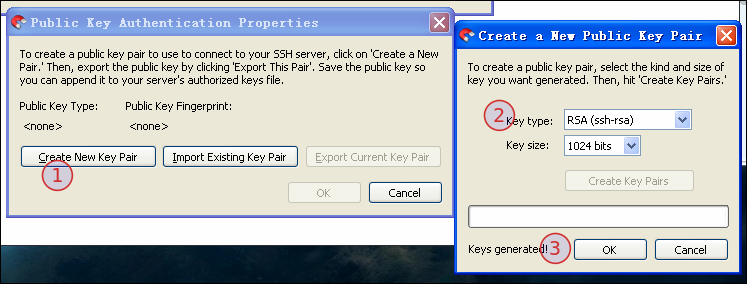
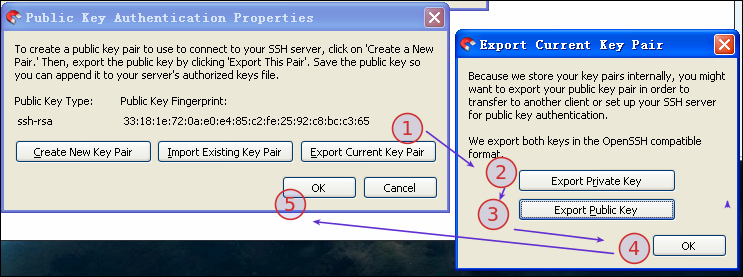

最后,点击"connect"即可链接至手机(注:ip地址请根据设备的自身实际情况进行修改),最终效果图如下:

〖Android〗sshd for android, 及映射根文件系统至本地盘符的更多相关文章
- Android Sshd使用
1. 介绍 因为某些原因, 笔者需要在android上开发, 使用adb比较麻烦, 于是想使用sshd. 推荐的软件是openssh, 其他选择有dropbear, mosh.当然还有其他选择, 如 ...
- 【转】Android ROM研究---Android build system增加模块
原文网址:http://hualang.iteye.com/blog/1141315 Android build system就是编译系统的意思 在我们需要向自己编译的源代码中增加模块的时候,需要一些 ...
- 使用mkbootfs制作ramdisk根文件系统
span::selection, .CodeMirror-line > span > span::selection { background: #d7d4f0; }.CodeMirror ...
- Android知识补充(Android学习笔记)
Android知识补充 ●国际化 所谓的国际化,就是指软件在开发时就应该具备支持多种语言和地区的功能,也就是说开发的软件能同时应对不同国家和地区的用户访问,并针对不同国家和地区的用户,提供相应的.符合 ...
- linux基础知识3_根文件系统详解
文件系统: rootfs:根文件系统 /boot:系统启动相关的文件,如内核.initrd以及grub /dev:设备文件 块设备:随机访问 字符设备:线性访问,按字符为单位 设备号:主设备号(maj ...
- Linux学习 :Uboot, Kernel, 根文件系统初步分析
1.U-Boot启动内核的过程可以分为两个阶段: 1)第一阶段的功能 硬件设备初始化 加载U-Boot第二阶段代码到RAM空间 设置好栈 跳转到第二阶段代码入口 2)第二阶段的功能 初始化本阶段使用的 ...
- linux根文件系统制作
在嵌入式中移植的内核下载到开发板上,是没有办法真正的启动Linux操作系统的,会出现无法加载文件系统的错误. 那么根文件系统在系统启动中到底是什么时候挂载的呢?先将/dev/ram0挂载,而后执行/l ...
- 【Android UI】Android ListView详解
在android开发中ListView是比较常用的组件,它以列表的形式展示具体内容,并且能够根据数据的长度自适应显示.抽空把对ListView的使用做了整理,并写了个小例子,如下图. 列表的显示需要三 ...
- 【Android UI】Android开发之View的几种布局方式及实践
引言 通过前面两篇: Android 开发之旅:又见Hello World! Android 开发之旅:深入分析布局文件&又是“Hello World!” 我们对Android应用程序运行原理 ...
随机推荐
- sys.stdout.flush()以及subprocess的用处
sys.stdout.flush()立即把stdout缓存内容输出. subprocess与shell进行交互,执行shell命令等. 执行shell命令集合: subprocess.check_ou ...
- jQuery事件命名空间多事件绑定自定义事件js 命名空间 javascript命名空间
http://blog.csdn.net/pigpigpig4587/article/details/24727791 jQuery事件命名空间 jQuery支持事件命名空间,以方便事件管理.例如,在 ...
- 使用Log4j将程序日志实时写入Kafka(转)
原文链接:使用Log4j将程序日志实时写入Kafka 很多应用程序使用Log4j记录日志,如何使用Kafka实时的收集与存储这些Log4j产生的日志呢?一种方案是使用其他组件(比如Flume,或者自己 ...
- Java与C/C++的比较(转)
原文链接:Java和c++比较 总结一下Java的小知识,只是想稍微提醒一下自己这些基础的东西,放在这里,随时可以阅览和添加一下,以免走错了方向. 1.面向对象程序设计 面向对象程序设计语言可以直观的 ...
- 从客户端(ctl00$ContentPlaceHolder1$result="<?xml version="1.0" ...")中检测到有潜在危险的 Request.Form 值。
ylbtech-Error-WebForm:从客户端(ctl00$ContentPlaceHolder1$result="<?xml version="1.0" . ...
- tensorflow语义分割api使用(deeplab训练cityscapes)
安装教程:https://github.com/tensorflow/models/blob/master/research/deeplab/g3doc/installation.md citysca ...
- 使用LeakCanary检测内存泄露 翻译 MD
Markdown版本笔记 我的GitHub首页 我的博客 我的微信 我的邮箱 MyAndroidBlogs baiqiantao baiqiantao bqt20094 baiqiantao@sina ...
- SqlServer驱动包 Maven
SqlServer驱动包 Maven 学习了:https://blog.csdn.net/wu843820873/article/details/50484623 mvn install: mvn i ...
- w3cscholl的在线代码编辑工具
https://www.w3cschool.cn/tryrun/runcode?lang=c
- Javascript 面向对象实践
踩到了坑,才能学到东西. 记录我在慢慢的转向模块化遇到的问题以及解决的思路. 1.采用立即执行函数,闭包的方式创建模块 html: <!DOCTYPE html> <html lan ...