Android RIL Architecture

 
by Gomathi Sankar
 

Introduction


The Article explains about the building blocks of Android telephony and how it works.


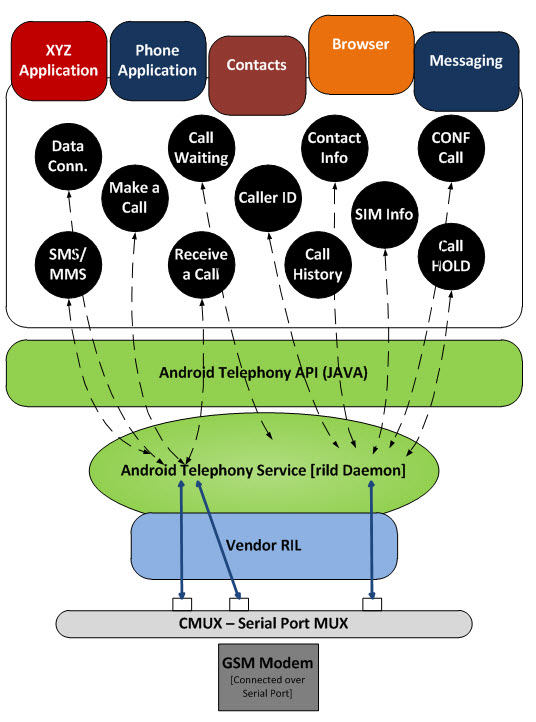
Android telephony architecture

 
Android RIL Architecture
 

Application: All the telephony related applications like Dialer, Call tracker, SMS, MMS, GPRS, Antenna signal indicator and etc, will come into this section. All these applications will be started during the android boot up. These applications will be tied up with the Android telephony framework services. The telephony framework provides APIs to access the Phone.

Framework services: Telephony framework will be initialized and started during the system start up. All the queries from the application through API will directed to the Radio interface Layer of Android by these services. The service will keep tracking of all the unsolicited commands from the modem. Unsolicited commands are the commands initiated from the modem.

Radio Interface Layer: It is the bridge between Android phone framework services and the hardware. In other words, it is the protocol stack for Telephone. The RIL consist of two primary components.

 
  1. RIL Daemon
  2. Vendor RIL
 

RIL Daemon


RILD will be initialized during the Android system start up. It will read the system property to find which library has to be used for Vendor RIL, provide the appropriate input for vendor RIL and finally calls RIL_Init function of Vendor RIL to map all the Vendor RIL functions to the upper layer. Each vendor RIL has RIL_Init function.


Vendor RIL


It is a library specific to each modem. In other words, we can call it as a driver to function the modem. The RIL daemon will call the RIL_Init function with the device location (eg: /dev/ttyS0). It will initiate the modem and returns theRIL_RadioFunctions structure contains the handles of radio functions

 
type structure {

intRIL_version;

RIL_RequestFunconRequest;

RIL_RadioStateRequestonStateRequest;

RIL_Supports supports;

RIL_CancelonCancel;

RIL_GetVersiongetVersion;

} RIL_RadioFunctions;


RIL_version : Version of Android RIL

onRequest : Call to Vendor RIL to make a RIL_REQUEST. It must be completed with a call to RIL_onRequestComplete().It will always be called from the same thread, so returning here implies that the radio is ready to process another command (whether or not the previous command has completed)

supports   : Return current radio state.RADIO_STATE_UNAVAILABLE should be the initial state

getVersion: Version of Vendor RIL

There are two forms of communications in Android RIL


Solicited Commands :


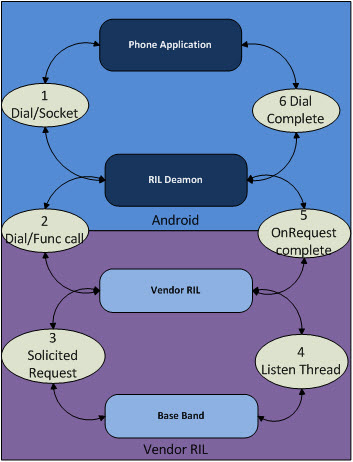
These are commands initiated from the upper layer. Like, Dialing/Send SMS are the solicited commands from the upper layer to the RIL. OnRequestis the function for sending the solicited commands from the upper layer

The following diagram describes the solicited call in Android

 
Solicited call in Android
 

Each onRequest call should end with RIL_onRequestComplete. It is to send the response for the previous onRequest and to intimate we are ready for the next command. Refer ril.h for all the solicited commands


Unsolicited commands

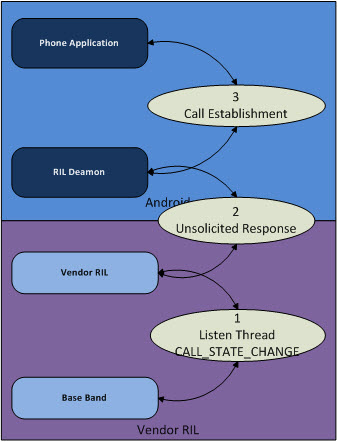
These are the commands initiated from the modem to the upper layer. Like, Receive Call /Receive SMS are the commands. The Vendor RIL has to continuously monitor the device for unsolicited command from the modem.

The following diagram describes the unsolicited call in Android

 
Unsolicited call in Android
 

Implementation of Vendor RIL


Android is providing the basic vendor RIL with minimum feature set (reference-ril). It is good to start with that reference code. Compile the Vendor RIL as a shared library with the following style

libril-<companyname>-<RIL version>.so

libril - all the Vendor ril library should start with this


Vendor RIL Configuration :


Replace the following line in the init.rc file

serviceril-daemon /system/bin/rild

with

serviceril-daemon /system/bin/rild -l /system/lib/libreference-ril.so — -d/dev/ttySx

Commands after "-" will be input for Vendor ril.


Here is sample log of Sending a SMS


D/SMS     ( 1962): SMS send size=0time=1319439322559

D/RILJ    ( 1962): [0312]> SEND_SMS

D/RIL     ( 1814): onRequest: SEND_SMS

D/AT      ( 1814): MUX[primary]: AT> AT+CMGS=14

D/AT      ( 1814): MUX[primary]: AT<>

D/AT      ( 1814): AT> 0001000a814978045948000002c834^Z

D/AT      ( 1814): MUX[primary]: AT< Q: 31,0

D/AT      ( 1814): MUX[primary]: AT< +CUSD: 0,”Your Last Call charge IS Rs  0.5000  AND CURRENT Balance IS  47.8770 AND EXP IS  25/09/21. Love Spl 6 Caller tunes for Jd

D/RILC    ( 1814): Unsolicited Response!!!

D/RILJ    ( 1962): [UNSL]< UNSOL_ON_USSD 0

D/AT      ( 1814): MUX[primary]: AT< “,15

D/AT      ( 1814): MUX[primary]: AT< +CMGS: 219

D/AT      ( 1814): MUX[primary]: AT< OK


Android RIL Architecture的更多相关文章

  1. Android RIL的java框架

    Android RIL的Java部分也被分为了两个模块,RIL模块与Phone模块.其中RIL模块负责进行请求以及相应的处理,它将直接与RIL的原声代码进行通信.而Phone模块则向应用程序开发者提供 ...

  2. Android RIL结构分析与移植

    介绍 本文档对Android RIL部分的内容进行了介绍,其重点放在了Android RIL的原生代码部分. 包括四个主题: 1.Android RIL框架介绍 2.Android RIL与 Wind ...

  3. Android RIL概述

    前言 Android作为一个通用的移动平台,其首要的功能就是通话.短信以及上网等通信功能.那么,从系统的角度来看,Android究竟是怎么实现与网络的交互的了? 这篇文章里,就来看一看Android中 ...

  4. Android RIL Log

    转载: 要调试 RIL,最好的方法就是打开 radio的log: $ adb logcat -b radio 最好加上 log语法亮度工具coloredlogcat.py ,一些常见的LOG TAG要 ...

  5. Android App Architecture使用详解

    Android应用架构简介 对于经过过构建app的Android开发人员来说, 现在是时候了解一下构建鲁棒, 质量高的应用的最佳实践和推荐架构了. 这篇文章假设读者对Android framework ...

  6. 【Android】Architecture Components最佳实践--Lifecycles

    UI controllers (activities and fragments) 中代码越少越好,不应该自己去请求数据,而是用ViewModel来更新数据,并且监听LiveData来更新UI UI ...

  7. Android 5.1.1 源码目录结构

    点击打开链接 最近公司培训新同事,我负责整理一点关于android的基础知识,遥想当年,刚接触android,也是一头雾水, 啥都不懂,就是靠看文档和视频,对android有一个初步了解,然后就通过查 ...

  8. (转)Android 5.1.1 源码目录结构

    转自:http://blog.csdn.net/tfslovexizi/article/details/51888458最近公司培训新同事,我负责整理一点关于android的基础知识,遥想当年,刚接触 ...

  9. 【腾讯Bugly干货分享】一步一步实现Android的MVP框架

    本文来自于腾讯bugly开发者社区,非经作者同意,请勿转载,原文地址:http://dev.qq.com/topic/5799d7844bef22a823b3ad44 内容大纲: Android 开发 ...

随机推荐

  1. 序列化 NSKeyedArchiver,NSPropertyListSerialization

    到目前为止,看到oc实现的序列化方式有两种:NSKeyedArchiver,NSPropertyListSerialization. 在这两种序列化方式中,NSData都是序列化的目标.两种方式的不同 ...

  2. magento的xml文件解读

    其中显示页面的getChildHtml(’')函数是取xml文件中的block中的name属性的:

  3. 故障排查:vsftpd无法用浏览器访问

    在CentOS6上搭建的ftp服务器,突然无法使用浏览器进行访问,但使用xftp等工具可以正常访问 想到之前修改过阿里云的安全组设置,推测可能有关 1)修改vsftpd的配置,手动指定被动模式的随机连 ...

  4. LIBCURL踩坑记

    这里一个java程序员进行C++开发使用libcurl踩过的坑: 1.  发送指定请求类型body,比较通用方法如下,可以直接填写数据并手动指定content type,如果是form表单等形式,则需 ...

  5. 【opencv基础】detectmultiscale函数详解

    前言 简单的人脸检测程序可以直接基于opencv的函数库进行实现,本文介绍一下detectMultiScale函数. 函数简介 opencv2人脸检测使用的是detectMultiScale函数,可以 ...

  6. 任务三 简单程序测试及 GitHub Issues 的使用

    我提交的Issue 我被提出的Issue 在使用Issue的过程中我发现提出的Issue不能指派任务人和问题类型,被提出的Issue可以. 碰到最多的问题是测试程序的过程中, 比如用户未按指定格式输入 ...

  7. Unity插件-ShareSDK使用指南

    Unity插件ShareSDK使用教程 本文提供全流程,中文翻译.Chinar坚持将简单的生活方式,带给世人!(拥有更好的阅读体验 -- 高分辨率用户请根据需求调整网页缩放比例) 1 Summariz ...

  8. URAL - 1397:Points Game (博弈,贪心)

    Two students are playing the following game. There are 2· n points on the plane, given with their co ...

  9. django所遇到问题简单总结

    问题虽小,但却值得深思 一.改mysql密码 方法1: 用SET PASSWORD命令 首先登录MySQL. 格式:mysql> set password for 用户名@localhost = ...

  10. IDEA中遇到One of the two will be used. Which one is undefined.

    某次启动idea的时候看到控制台提示如下错误 : objc[]: Class JavaLaunchHelper is implemented .0_131.jdk/Contents/Home/bin/ ...