
【第十八章】 springboot + thymeleaf
代码结构:
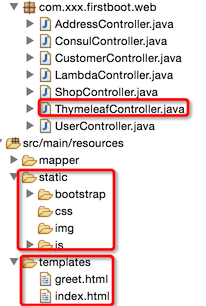
1、ThymeleafController
package com.xxx.firstboot.web;

import org.springframework.stereotype.Controller;
import org.springframework.ui.Model;
import org.springframework.web.bind.annotation.RequestMapping;
import org.springframework.web.bind.annotation.RequestMethod;
import org.springframework.web.bind.annotation.RequestParam;
import org.springframework.web.bind.annotation.ResponseBody;

import io.swagger.annotations.Api;
import io.swagger.annotations.ApiOperation;

@Api("测试Thymeleaf和devtools")
@Controller
@RequestMapping("/thymeleaf")
public class ThymeleafController {

    @ApiOperation("第一个thymeleaf程序")
    @RequestMapping(value = "/greeting", method = RequestMethod.GET)
    public String greeting(@RequestParam(name = "name", required = false, defaultValue = "world") String name,
                           Model model) {
        model.addAttribute("xname", name);
        return "index";
    }

    @ApiOperation("thymeleaf ajax")
    @ResponseBody
    @RequestMapping(value = "/ajax", method = RequestMethod.GET)
    public String ajax(@RequestParam("username") String username) {
        return username;
    }

}
说明:
- 第一个是springMVC经典返回形式modelAndView
- 第二个是ajax返回形式
2、index.html
<!DOCTYPE HTML>
<html xmlns:th="http://www.thymeleaf.org">
<head>
<title>index</title>
<meta http-equiv="Content-Type" content="text/html; charset=UTF-8" />

<link th:href="@{/bootstrap/css/bootstrap.min.css}" rel="stylesheet"/>
<link th:href="@{/bootstrap/css/bootstrap-theme.min.css}" rel="stylesheet" />
</head>
<body>
    <div class="panel panel-primary">
        <div class="panel-heading">hello</div>
        <div class="panel-body" th:text="${xname}"></div>
    </div>
    <div class="panel panel-warning">
        <div class="panel-heading">hello</div>
        <div id="usernamediv" class="panel-body"></div>
    </div>
    <script type="text/javascript" th:src="@{/js/jquery-1.11.1.js}"></script>
    <script type="text/javascript" th:src="@{/bootstrap/js/bootstrap.min.js}"></script>
    <script th:inline="javascript">
        $(function(){
            $.ajax({
                url:"/thymeleaf/ajax",
                data:{
                    username:"xxx"
                },
                type:"get",
                dataType:"text",
                success:function(text){
                    alert(text);
                    $("#usernamediv").text(text);
                }
            });
        });
    </script>
</body>
</html>
说明:
- 引入外界静态资源的方式@{/xxx},默认的静态资源的根是"static"
- ajax的返回类型dataType要选好(一般就是"text"/"json")
- ajax的请求方法类型type要与controller相同,否则抛出405错误
文档:
- thymeleaf的其他配置查看:《springboot实战》、http://www.thymeleaf.org/doc/tutorials/2.1/usingthymeleaf.html
- bootstrap:http://www.bootcss.com/
【第十八章】 springboot + thymeleaf的更多相关文章
- 第十八章 springboot + thymeleaf
代码结构: 1.ThymeleafController package com.xxx.firstboot.web; import org.springframework.stereotype.Con ...
- 第二十八章 springboot + zipkin(brave定制-AsyncHttpClient)
brave本身没有对AsyncHttpClient提供类似于brave-okhttp的ClientRequestInterceptor和ClientResponseInterceptor,所以需要我们 ...
- 第三十八章 springboot+docker(maven)
回顾上一章的整个部署过程: 使用"mvn install"进行打包jar 将jar移动到与Dockerfile文件相同的文件夹下 编写Dockerfile文件 使用"do ...
- 不要再学 JSP 了,学 SpringBoot + Thymeleaf + Vue吧
老读者就请肆无忌惮地点赞吧,微信搜索[沉默王二]关注这个在九朝古都洛阳苟且偷生的程序员.本文 GitHub github.com/itwanger 已收录,里面还有我精心为你准备的一线大厂面试题. 读 ...
- 《Linux内核设计与实现》读书笔记 第十八章 调试
第十八章调试 18.1 准备开始 需要准备的东西: l 一个bug:大部分bug通常都不是行为可靠而且定义明确的 l 一个藏匿bug的内核版本:找出bug首先出现的版本 l 相 ...
- Python之路【第十八章】:Django基础
Django基本配置 Python的WEB框架有Django.Tornado.Flask 等多种,Django相较与其他WEB框架其优势为:大而全,框架本身集成了ORM.模型绑定.模板引擎.缓存.Se ...
- 《Linux内核设计与实现》课本第十八章自学笔记——20135203齐岳
<Linux内核设计与实现>课本第十八章自学笔记 By20135203齐岳 通过打印来调试 printk()是内核提供的格式化打印函数,除了和C库提供的printf()函数功能相同外还有一 ...
- 《Linux命令行与shell脚本编程大全》 第十八章 学习笔记
第十八章:初识sed和gawk 文本处理 sed编辑器 sed编辑器可以基于输入到命令行的或是存储在命令文本文件中的命令来处理数据流中的数据. 它每次读取一行,用提供的编辑器命令匹配数据.按命令中指定 ...
- org.springframework.expression.spel.SpelEvaluationException: EL1004E: Method call: Method service() cannot be found on com.my.blog.springboot.thymeleaf.util.MethodTest type
前言 本文中提到的解决方案,源码地址在:springboot-thymeleaf,希望可以帮你解决问题. 至于为什么已经写了一篇文章thymeleaf模板引擎调用java类中的方法,又多此一举的单独整 ...
- 第十八章 DjangoWeb开发框架
第十八章 DjangoWeb开发框架 第一课 内容概要: 1.JS正则 -登录注册验证 2.组件 1.BootStrap -css -js 学习BootStrap规则 2.jQueryUI -css ...
随机推荐
- 我读过的最好的epoll讲解(转)
原文:http://zhihu.com/question/20122137/answer/14049112 作者:蓝形参来源:知乎 首先我们来定义流的概念,一个流可以是文件,socket,pipe等等 ...
- table的td的1%
使用media-obj和media-bd类似的样式,大多数采用的是display: table-cell(即是table中td)来实现.当然设置display是不够,还要根据情况设置width.如下面 ...
- Goroutines vs Threads
http://tleyden.github.io/blog/2014/10/30/goroutines-vs-threads/ Here are some of the advantages of G ...
- Android APP安装后不在桌面显示图标的应用场景举例和实现方法
最近在为公司做一款车联网的产品,由于公司本身擅长于汽车解码器的研发,所以该产品的诊断功能的实现除了使用目前市面上车联网产品中大量使用的OBD协议外,还会使用一些专车专用协议去实现一些特殊的诊断功能,如 ...
- Logistic Regression Using Gradient Descent -- Binary Classification 代码实现
1. 原理 Cost function Theta 2. Python # -*- coding:utf8 -*- import numpy as np import matplotlib.pyplo ...
- eigen quick reference
参考: http://eigen.tuxfamily.org/dox/AsciiQuickReference.txt // A simple quickref for Eigen. Add anyth ...
- 使用 MtVerify.h头文件 ,用的时候把他头文件的内容添加到项目
#include <windows.h> //windodws变量相关头文件 MtVerify.h的内容如下:#pragma comment( lib, "USER32&quo ...
- webpack 3 & React 的配置 。
今天真是难过的一天
- 何为仿射变换(Affine Transformation)
http://www.cnblogs.com/ghj1976/p/5199086.html 变换模型是指根据待匹配图像与背景图像之间几何畸变的情况,所选择的能最佳拟合两幅图像之间变化的几何变换模型.可 ...
- EntityFramework包含作用
System.Data.Entity.Infrastructure.DbQuery的引用需要加入上面那个包