
android系列9.LinearLayout 学习2
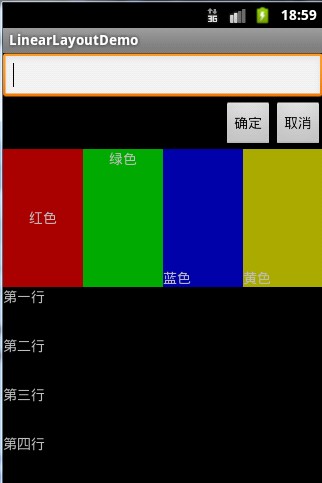
<?xml version="1.0" encoding="utf-8"?>

<LinearLayout xmlns:android="http://schemas.android.com/apk/res/android"

    android:orientation="vertical" android:layout_width="fill_parent"

    android:layout_height="fill_parent">

    <LinearLayout

        android:layout_width="fill_parent"

        android:layout_height="wrap_content"

        android:layout_weight="0"

        >

        <EditText

            android:layout_width="fill_parent"

            android:layout_height="wrap_content"

        />

    </LinearLayout>

    <LinearLayout

        android:layout_width="fill_parent"

        android:layout_height="wrap_content"

        android:gravity="right"

        android:layout_weight="0"

        >

        <!--

        android:gravity="right" 设置对齐方式,如果没有子控件侧作用到文本

        android:orientation="vertical" 设置水平或者垂直布局

        android:layout_weight="0"设置布局大小,总和比如1,1,大家平分,1,2就一个占1/3,一个占2/3,0表示控件自己的大小

        -->

        <Button

            android:layout_width="wrap_content"

            android:layout_height="wrap_content"

            android:text="确定"

        />

        <Button

            android:layout_width="wrap_content"

            android:layout_height="wrap_content"

            android:text="取消"

        />

    </LinearLayout>

    <!-- ######################## -->

    <LinearLayout

        android:layout_width="fill_parent"

        android:layout_height="wrap_content"

        android:layout_weight="1"

        android:orientation="horizontal"

        >

        <TextView

            android:layout_width="wrap_content"

            android:layout_height="fill_parent"

            android:background="#aa0000"

            android:text="红色"

            android:gravity="center_horizontal|center_vertical"

            android:layout_weight="1"

        />

        <TextView

            android:layout_width="wrap_content"

            android:layout_height="fill_parent"

            android:background="#00aa00"

            android:text="绿色"

            android:gravity="top|center_horizontal"

            android:layout_weight="1"

        />

        <TextView

            android:layout_width="wrap_content"

            android:layout_height="fill_parent"

            android:background="#0000aa"

            android:text="蓝色"

            android:gravity="bottom"

            android:layout_weight="1"

        />

        <TextView

            android:layout_width="wrap_content"

            android:layout_height="fill_parent"

            android:background="#aaaa00"

            android:text="黄色"

            android:gravity="bottom|left"

            android:layout_weight="1"

        />

    </LinearLayout>

    <LinearLayout

        android:layout_width="fill_parent"

        android:layout_height="wrap_content"

        android:layout_weight="1"

        android:orientation="vertical"

        >

        <TextView

            android:layout_width="fill_parent"

            android:layout_height="wrap_content"

            android:text="第一行"

            android:gravity="left"

            android:layout_weight="1"

        />

        <TextView

            android:layout_width="fill_parent"

            android:layout_height="wrap_content"

            android:text="第二行"

            android:gravity="left"

            android:layout_weight="1"

        />

        <TextView

            android:layout_width="fill_parent"

            android:layout_height="wrap_content"

            android:text="第三行"

            android:gravity="left"

            android:layout_weight="1"

        />

        <TextView

            android:layout_width="fill_parent"

            android:layout_height="wrap_content"

            android:text="第四行"

            android:gravity="left"

            android:layout_weight="1"

        />

    </LinearLayout>

</LinearLayout>
android系列9.LinearLayout 学习2的更多相关文章
- android系列9.LinearLayout学习
<!-- <LinearLayout> 线性版面配置,在这个标签中,所有元件都是按由上到下的排队排成的 --> <LinearLayout xmlns:android=& ...
- 【Xamarin开发 Android 系列 3】循序渐进的学习顺序
原文:[Xamarin开发 Android 系列 3]循序渐进的学习顺序 指定合理的学习步骤,将各个技术点进行强化.慢慢 的就从点到线 到面的飞跃,一切仅仅是时间问题,开始前,请记住,学习是最佳的投资 ...
- Android系列之网络(三)----使用HttpClient发送HTTP请求(分别通过GET和POST方法发送数据)
[声明] 欢迎转载,但请保留文章原始出处→_→ 生命壹号:http://www.cnblogs.com/smyhvae/ 文章来源:http://www.cnblogs.com/smyhvae/p/ ...
- Android系列之网络(二)----HTTP请求头与响应头
[声明] 欢迎转载,但请保留文章原始出处→_→ 生命壹号:http://www.cnblogs.com/smyhvae/ 文章来源:http://www.cnblogs.com/smyhvae/p/ ...
- Android系列之网络(一)----使用HttpClient发送HTTP请求(通过get方法获取数据)
[声明] 欢迎转载,但请保留文章原始出处→_→ 生命壹号:http://www.cnblogs.com/smyhvae/ 文章来源:http://www.cnblogs.com/smyhvae/p/4 ...
- 【Xamarin开发 Android 系列 7】 Android 结构基础(下)
原文:[Xamarin开发 Android 系列 7] Android 结构基础(下) *******前期我们不打算进行太深入的东西,省的吓跑刚进门的,感觉门槛高,so,我们一开始就是跑马灯一样,向前 ...
- Android系列之Fragment(四)----ListFragment的使用
[声明] 欢迎转载,但请保留文章原始出处→_→ 生命壹号:http://www.cnblogs.com/smyhvae/ 文章来源:http://www.cnblogs.com/smyhvae/p/ ...
- Android系列之Fragment(三)----Fragment和Activity之间的通信(含接口回调)
[声明] 欢迎转载,但请保留文章原始出处→_→ 生命壹号:http://www.cnblogs.com/smyhvae/ 文章来源:http://www.cnblogs.com/smyhvae/p/ ...
- Android系列之Fragment(二)----Fragment的生命周期和返回栈
[声明] 欢迎转载,但请保留文章原始出处→_→ 生命壹号:http://www.cnblogs.com/smyhvae/ 文章来源:http://www.cnblogs.com/smyhvae/p/ ...
随机推荐
- Linux——vim/vi 简单学习笔记
Vim/Vi是一个功能强大的全屏幕文本编辑器,是Linux/UNIX上最常用的文本编辑器,它的作用是建立.编辑.显示文本文件.Vim/Vi 没有菜单,只有命令. 早前也用过Vim变过C++/C的代码, ...
- Hadoop 部分截图
- cookie(2)
转载,原文地址 https://segmentfault.com/a/1190000004743454 一.引言 随着浏览器的处理能力不断增强,越来越多的网站开始考虑将数据存储在「客户端」,那就不得不 ...
- 使用R的数据库查询
JS 很多方法可以用R查询数据.这篇文章展示了三种最常见的方法: 运用 DBI 使用dplyr语法 使用R note book 背景 最近的一些软件包改进可以更轻松地将数据库与R一起使用.下面的查询示 ...
- Java选择结构和数组
Java选择结构和数组 一.Switch语句 二.if和switch区别 推荐使用if 三.函数 Java中的函数和方法是同一个词 四.数组 4.1.数组常见错误 五.内存机制 六.转换成十六进制 移 ...
- 动态规划3--Help Jimmy
动态规划3--Help Jimmy 一.心得 二.题目 三.分析 Jimmy跳到一块板上后,可以有两种选择,向左走,或向右走.走到左端和走到右端所需的时间,是很容易算的.如果我们能知道,以左端为起点到 ...
- Yii中的CComponent应用实例
首先我们先了解一下如何创建一个CComponent,手册讲述如下: CComponent 是所有组件类的基类. CComponent 实现了定义.使用属性和事件的协议. 属性是通过getter方法或/ ...
- Linq 使用skip和take分页
static int Main(string[] args) { //每页条数 const int pageSize = 2; //页码 0就是第一条数据 int pageNum = 0; strin ...
- Clear The Matrix CodeForces - 903F (状压)
大意: 给定4行的棋盘以及4种大小的正方形方块, 每种各有一定花费, 每次可以选一种方块放在棋盘上, 棋盘对应格子全变为'.', 求最少花费使得棋盘全部变成'.' 状压基本操作练习, 状态取12位, ...
- nyoj-1367-河南省第十一届省赛-E物流配送-最小费用流
1367-物流配送 内存限制:128MB 时间限制:8000ms 特判: No通过数:1 提交数:1 难度:4 题目描述: 物流配送是物流活动中一种非单一的业务形式,它与物品流动.资金流动紧密结合.备 ...