
PowerShell添加和部署WSP
SharePoint PowerShell在SharePoint Product列表里边,然后以管理员权限启动。
1. 添加Solution 到 SharePoint Farm.
Add-SPSolution -LiteralPath "c:\ilt.wsp"
2.获取已添加到SharePoint Farm的Solutions.
Get-SPSolution
3. 部署Solution 到SharePoint。
部署Solution到SharePoint Farm中:
Install-SPSolution -Identity ilt.wsp -GACDeployment
possible errors:
| Error | Solution |
| Install-SPSolution : Admin SVC must be running in order to create deployment timer job. | Open services.msc and start the service named SharePoint 2010 Administration. |
|
Install-SPSolution : A deployment or retraction is already under way for the solution "webpartmanualdeployment.wsp", and only one deployment or retraction at a time is supported. |
Go to Central Administration > System Settings > Manage farm solutions > Cancel / Retract the particular solution |
部署Solution到指定的WebApplication中:
Install-SPSolution -Identity ilt.wsp -WebApplication http://sea:31996 -GACDeployment
插曲, 当部署到指定Web Application 遇到错误的时候, 要建一个Dummy data, 制定DeploymentTarget 为 WebApplication: 参考: http://sharedpointers.blogspot.in/2011/03/deploying-solutions-to-specific-web.html
即:
- Double click the package
- Open the Advanced
- add an additional assembly (the solution for example) and mark Deployment Type "Web Application"
4. 升级已部署的Solution
Update-SPSolution -Identity ilt.wsp -LiteralPath "C:\ilt.wsp" -GACDeployment
5.卸载已部署的Solution
Uninstall-SPSolution -Identity ilt.wsp
Web Application 级别的:
Uninstall-SPSolution -Identity ilt.wsp -WebApplication http://sea:31996
6.移除已卸载的Solution
Remove-SPSolution -identity ilt.wsp
Possilble Errors:
Remove-SPSolution: The solution cannot be removed when a job is scheduled or running.

这里介绍一种方法来撤销这个部署的工作。
使用Stsadm -o enumdeployments 获取JobId,:
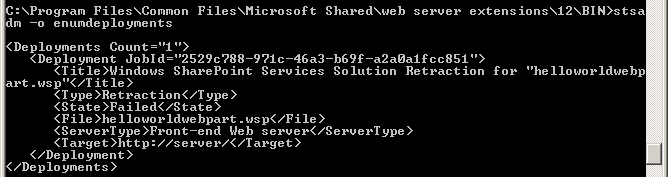
然后使用 stsadm -o canceldeployment -id JobId 来取消部署工作。
stsadm -o canceldeployment -id 2529c788-971c-46a3-b69f-a2a0a1fcc851
参考: http://blog.sina.com.cn/s/blog_5245a6580100z9bd.html;
http://www.cnblogs.com/wsdj-ITtech/archive/2011/05/10/2041843.html;
PowerShell添加和部署WSP的更多相关文章
- 使用powershell部署WSP包
代码如下,先卸载,然后删除,然后添加,然后安装. 卸载之后会重启IIS,所以等待几秒钟,直到卸载完成. 添加snapin $snapin = Get-PSSnapin | Where-Object { ...
- SharePoint 2010 PowerShell 系列 之 备份、还原、部署 .WSP
转:http://www.cnblogs.com/Fengger/archive/2012/08/24/2654093.html PowerShell系列目录 最近在部署测试环境,就顺便把PowerS ...
- PowerShell命令部署WSP
转载:http://www.cnblogs.com/ChunLiangZhang/archive/2012/07/18/2597335.html(作者:ChunLiang) 现在可以用SharePoi ...
- 不直接登录SharePoint服务器,通过远程直接部署WSP解决方案包
在这之前不得不说一下Sysinternals,他最初是一个网站,网站上会经常发布一些有用的系统扩展工具,之后运营这个网站的公司被微软收购.像非常著名的Procmon,AutoRuns.Process ...
- SharePoint 2010 使用Install-SPSolution部署wsp包状态一直是”正在部署”
1.服务器场信息如下: 2.使用下面命令部署,状态一直是"正在部署" Install-SPSolution –Identity xxxx.wsp –WebApplication h ...
- 用PowerShell批量部署wsp包
转:http://www.xuebuyuan.com/168337.html 提供wsp部署的参数: $wsppath:wsp文件所在的路径,如"c:\" $wspnames:路径 ...
- 转载 SharePoint开发部署WSP解决方案包
转载原出处: http://642197992.blog.51cto.com/319331/1582731 注:本文所讲内容以SharePoint2013版本为例,开发工具以VS2013为基础.历史版 ...
- 使用命令部署wsp包,并将其部署到不同的web应用程序
http://www.c-sharpcorner.com/uploadfile/anavijai/how-to-deploy-a-wsp-using-powershell-in-sharepoint- ...
- PowerShell添加或修改注册表开机启动项脚本
代码如下: $name = Read-Host "请输入开机启动项的名字(随便起)" $value = Read-Host "请输入开机启动项的值" try{ ...
随机推荐
- Flutter学习笔记(一)
记得flutter出来的时候,官方推荐的是使用IntelliJ IDEA,当时个人尝试了一下,比较麻烦,整个过程比较漫长. 进入2018年,再去看的时候,官方推荐使用Android Studio和VS ...
- Java 8 Lambda实现原理分析
PDF文档已上传Github Github:https://github.com/zwjlpeng/Angrily_Learn_Java_8 为了支持函数式编程,Java 8引入了Lambda表达式 ...
- Ubuntu 的 desktop 和 server 还是有区别。
除了安装的包,比如 GUI, LAMP 上有差别之外,所用的内核也稍有不一样. 不过desktop可以通过安装 sudo apt-get install linux-image-server 之后,编 ...
- PHP函数笔记
一.函数(Function) 1.什么是函数:封装的,可以重复使用的 完成特定功能的代码段. 2.分类 (1)系统函数 (2)自定义函数 3.自定义函数 ...
- amoba读写分离
原文链接:http://www.abcdocker.com/abcdocker/81 Amoeba(变形虫)项目,该开源框架于2008年 开始发布一款 Amoeba for Mysql软件.这个软件致 ...
- python-day13--装饰器
1.开放封闭的原则: 1.对扩展是开放的 为什么要对扩展开放呢? 我们说,任何一个程序,不可能在设计之初就已经想好了所有的功能并且未来不做任何更新和修改.所以我们必须允许代码扩展.添加新功能. 2.对 ...
- ES bulk源码分析——ES 5.0
对bulk request的处理流程: 1.遍历所有的request,对其做一些加工,主要包括:获取routing(如果mapping里有的话).指定的timestamp(如果没有带timestamp ...
- vue上传文件
<div> <input type="file" class="file" name="file" @change=&qu ...
- SQL触发器实例(上)
--1.) 创建测试用的表(testTable) if exists (select * from sysobjects where name='testTable') drop table test ...
- js组件的写法
工作之中的不足,报了js培训班,因为工作加班原因缺了几天课(js组件开发),现在拾起来补补 <!doctype html> <html> <head> <me ...