
PowerShell添加和部署WSP
SharePoint PowerShell在SharePoint Product列表里边,然后以管理员权限启动。
1. 添加Solution 到 SharePoint Farm.
Add-SPSolution -LiteralPath "c:\ilt.wsp"
2.获取已添加到SharePoint Farm的Solutions.
Get-SPSolution
3. 部署Solution 到SharePoint。
部署Solution到SharePoint Farm中:
Install-SPSolution -Identity ilt.wsp -GACDeployment
possible errors:
| Error | Solution |
| Install-SPSolution : Admin SVC must be running in order to create deployment timer job. | Open services.msc and start the service named SharePoint 2010 Administration. |
|
Install-SPSolution : A deployment or retraction is already under way for the solution "webpartmanualdeployment.wsp", and only one deployment or retraction at a time is supported. |
Go to Central Administration > System Settings > Manage farm solutions > Cancel / Retract the particular solution |
部署Solution到指定的WebApplication中:
Install-SPSolution -Identity ilt.wsp -WebApplication http://sea:31996 -GACDeployment
插曲, 当部署到指定Web Application 遇到错误的时候, 要建一个Dummy data, 制定DeploymentTarget 为 WebApplication: 参考: http://sharedpointers.blogspot.in/2011/03/deploying-solutions-to-specific-web.html
即:
- Double click the package
- Open the Advanced
- add an additional assembly (the solution for example) and mark Deployment Type "Web Application"
4. 升级已部署的Solution
Update-SPSolution -Identity ilt.wsp -LiteralPath "C:\ilt.wsp" -GACDeployment
5.卸载已部署的Solution
Uninstall-SPSolution -Identity ilt.wsp
Web Application 级别的:
Uninstall-SPSolution -Identity ilt.wsp -WebApplication http://sea:31996
6.移除已卸载的Solution
Remove-SPSolution -identity ilt.wsp
Possilble Errors:
Remove-SPSolution: The solution cannot be removed when a job is scheduled or running.

这里介绍一种方法来撤销这个部署的工作。
使用Stsadm -o enumdeployments 获取JobId,:
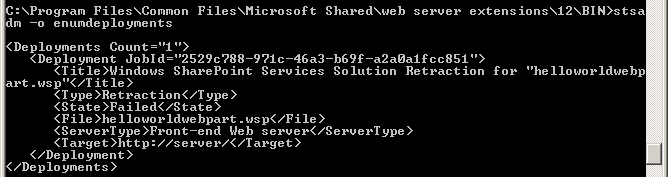
然后使用 stsadm -o canceldeployment -id JobId 来取消部署工作。
stsadm -o canceldeployment -id 2529c788-971c-46a3-b69f-a2a0a1fcc851
参考: http://blog.sina.com.cn/s/blog_5245a6580100z9bd.html;
http://www.cnblogs.com/wsdj-ITtech/archive/2011/05/10/2041843.html;
PowerShell添加和部署WSP的更多相关文章
- 使用powershell部署WSP包
代码如下,先卸载,然后删除,然后添加,然后安装. 卸载之后会重启IIS,所以等待几秒钟,直到卸载完成. 添加snapin $snapin = Get-PSSnapin | Where-Object { ...
- SharePoint 2010 PowerShell 系列 之 备份、还原、部署 .WSP
转:http://www.cnblogs.com/Fengger/archive/2012/08/24/2654093.html PowerShell系列目录 最近在部署测试环境,就顺便把PowerS ...
- PowerShell命令部署WSP
转载:http://www.cnblogs.com/ChunLiangZhang/archive/2012/07/18/2597335.html(作者:ChunLiang) 现在可以用SharePoi ...
- 不直接登录SharePoint服务器,通过远程直接部署WSP解决方案包
在这之前不得不说一下Sysinternals,他最初是一个网站,网站上会经常发布一些有用的系统扩展工具,之后运营这个网站的公司被微软收购.像非常著名的Procmon,AutoRuns.Process ...
- SharePoint 2010 使用Install-SPSolution部署wsp包状态一直是”正在部署”
1.服务器场信息如下: 2.使用下面命令部署,状态一直是"正在部署" Install-SPSolution –Identity xxxx.wsp –WebApplication h ...
- 用PowerShell批量部署wsp包
转:http://www.xuebuyuan.com/168337.html 提供wsp部署的参数: $wsppath:wsp文件所在的路径,如"c:\" $wspnames:路径 ...
- 转载 SharePoint开发部署WSP解决方案包
转载原出处: http://642197992.blog.51cto.com/319331/1582731 注:本文所讲内容以SharePoint2013版本为例,开发工具以VS2013为基础.历史版 ...
- 使用命令部署wsp包,并将其部署到不同的web应用程序
http://www.c-sharpcorner.com/uploadfile/anavijai/how-to-deploy-a-wsp-using-powershell-in-sharepoint- ...
- PowerShell添加或修改注册表开机启动项脚本
代码如下: $name = Read-Host "请输入开机启动项的名字(随便起)" $value = Read-Host "请输入开机启动项的值" try{ ...
随机推荐
- poj 2186 Popular Cows tarjan
Popular Cows Description Every cow's dream is to become the most popular cow in the herd. In a herd ...
- android 开发 出错
Error:Execution failed for task ':app:processDebugResources'. > com.android.ide.common.process.Pr ...
- 《剑指offer》第十七题(打印1到最大的n位数)
// 面试题17:打印1到最大的n位数 // 题目:输入数字n,按顺序打印出从1最大的n位十进制数.比如输入3,则 // 打印出1.2.3一直到最大的3位数即999. #include <ios ...
- 【Golang】格式化JSON字符串,方便查看
分别介绍golang及Python格式化接口返回JSON数据的方法,及Python json.dumps方法出现NameError: name 'true' is not defined原因解析及解决 ...
- 从996到ICU——我们终将被自我厌恶
自从996.icu在github上收获了18万点赞以来,超时工作,超负荷劳动似乎成了天下所有“无产阶级者”的共同点.对于这样的剥削制度,我想再多的批评和抨击都不为过.但是今天我想说3个小故事,只为引起 ...
- Codeforces 895C - Square Subsets
895C - Square Subsets 思路:状压dp. 每个数最大到70,1到70有19个质数,给这19个质数标号,与状态中的每一位对应. 状压:一个数含有这个质因子奇数个,那么他状态的这一位是 ...
- java 路径分隔符File.separator 以及 路径两种写法"/"和"\\"
一.File.separator File file=new File(); 这句是新建一个文件.file.separator这个代表系统目录中的间隔符,说白了就是斜线,不过有时候需要双线,有时候是单 ...
- OTU rank curve(Rank Abundance 曲线)【基本概念】
16S结题报告中都会有这么一张图: 这张图是OTU Rank曲线,该曲线可以展示样品的多样性.而样品的多样性常通过以下两个方面进行解释:物种的丰富程度和均匀程度.Rank曲线中,曲线在横轴上的跨度越长 ...
- python模块——socket (实现简单的C/S架构端通信操作CMD)
# 服务端代码#!/usr/bin/env python # -*- coding:utf-8 -*- __author__ = "loki" import socket impo ...
- Win7 默认.lnk打开方式全是别的程序 还原的办法
Xu言: no zuo no die~ 今天,一个朋友问我,他电脑桌面上点任何东西都是提示下载... - -||| 本以为是中毒了,然后上去看了一眼..发现他自己把所有.lnk 的默认打开方式选择了搜 ...