
【Genymotion】add a new virtual device 失败
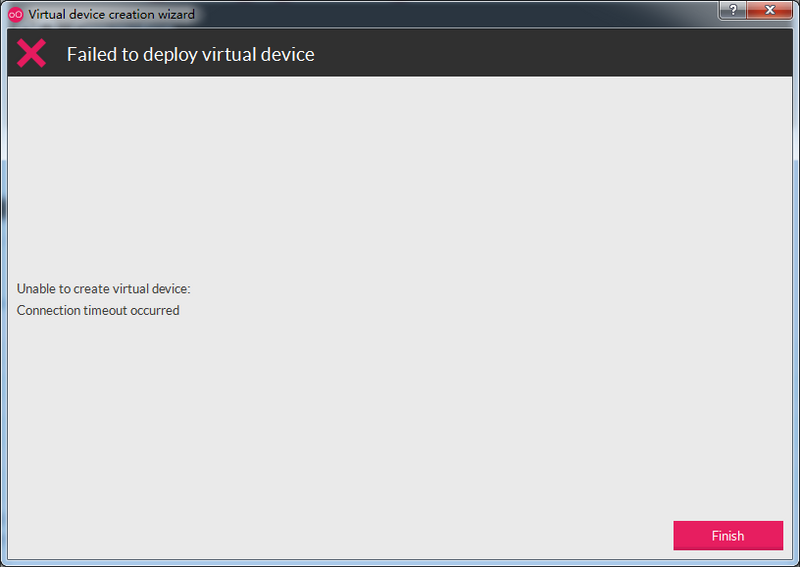
Genymotion 新增虚拟设备(模拟器)时,由于网络原因,总是下载失败,如图:
下载失败提示“Unable to create virtual device: Connection timeout occurred”;
【提高下载速度和成功率的方法】
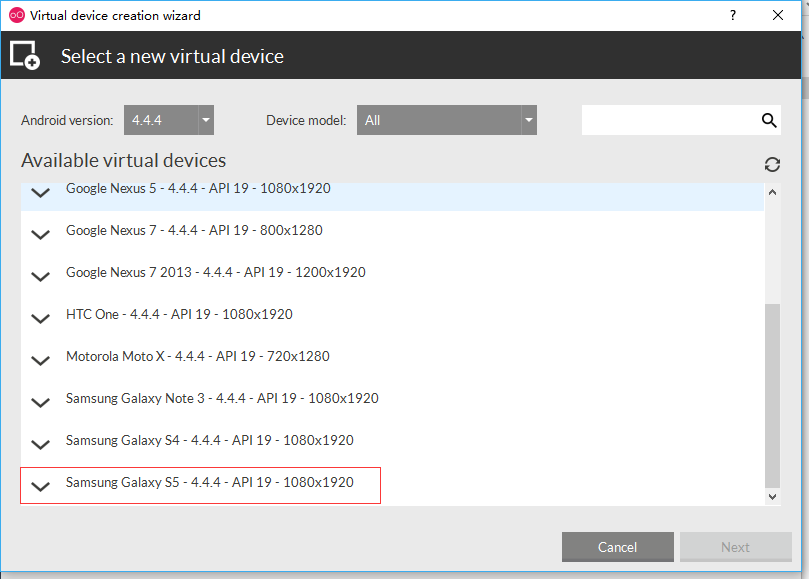
*如下图,我们选择“Samsung Galaxy S5 - 4.4.4 - API 19 - 1080x1920”进行下载;
*打开 C:\Users\用户名\AppData\Local\Genymobile目录
*打开genymotion.log文件,在里面最下面几行,找到如下日志
2月 8 17:04:14 [Genymotion] [Debug] Starting new download
2月 8 17:04:14 [Genymotion] [Debug] Downloading file "http://dl.genymotion.com/dists/5.1.0/ova/genymotion_vbox86p_5.1_160825_071239.ova"
2月 8 17:04:14 [Genymotion] [Debug] Start timer
2月 8 17:05:24 [Genymotion] [Error] Connection Timeout
*复制下载地址http://dl.genymotion.com/dists/5.1.0/ova/genymotion_vbox86p_5.1_160825_071239.ova至迅雷,下载完成后,把文件复制到C:\Users\用户名\AppData\Local\Genymobile\Genymotion\ova目录
*再次依照之前的选项“Samsung Galaxy S5 - 4.4.4 - API 19 - 1080x1920”进行新增,此时窗口显示“deploying virtual device...”

*点击“finish”完成新增。

【Genymotion】add a new virtual device 失败的更多相关文章
- No compatible targets were found Do you wish to a add new Android Virtual Device ?
运行一个Android小程序时提示: No compatible targets were found Do you wish to a add new Android Virtual Device ...
- Genymotion——VirtualBox cannot start virtual device
提示"VirtualBox cannot start virtual device" 打开VirtualBox,想要在里面直接启动Genymotion模拟器,又出现错误,提示“Un ...
- Genymotion Unable to create Virtual Device:Connection timeout
1.进入C:\Users\[UserName]\AppData\Local\Genymobile,打开genymotion.log,找到最后几句话: 九月 2 14:29:45 [Genymo ...
- Genymotion error:The virtual device got no IP address
控制面板,网络和intent,网络和共享中心,更改适配器设置,看下你的VirtualBox Host-Only Ethernet Adapter这个显卡 启动了没有, 没有就启动它!!!
- 获取VirtualBox COM对象失败,Unable to start the virtual device
一.问题 1.将Genymotion和VirtualBox安装好之后,并且已经下载完了virtual device: 2.但是在运行虚拟机的时候却弹出了错误提示:虚拟机电脑控制台——严重错误. 如图: ...
- The Genymotion Virtual device could not obtain an IP address解决办法
打开Genymotion运行虚拟机提示如下错误: The Genymotion Virtual device could not obtain an IP address.For an unknown ...
- (转)Genymotion安装virtual device的“unable to create virtual device, Server returned Http status code 0”的解决方法
网络原因无法下载virtual device,status 为0表示服务器没有响应.FQ下载吧,有VPN的小伙伴推荐这种. 或者直接手动下载ova虚拟机文件,然后将虚拟机文件导入到virtualbox ...
- Error Unable to start the Genymotion virtual device.解决
The Genymotion virtual device could not obtain an IP address.For an unknown reason.VirtualBox DHCP h ...
- eclipse无法连接genymotion+Unable to start the Genymotion virtual device
八月的开头,带着希望和期待,小编继续着实习之路,闭眼呼吸,阳光勾勒微笑,做Android项目,真心想吐槽一下eclipse中的虚拟机,那速度真叫一个慢啊,她肯定是属乌龟的,要不就是蜗牛,这个让小编很是 ...
随机推荐
- 环境安装问题:tensorflow 问题记录 python2.7 和 python3.6发生冲突
似乎是pip在python2.7和python3.6中发生冲突 我想用pip但是python2里没有装pip 但是tensorflow是和python2相关联的 所以我在python2中装pip的过程 ...
- 【转载】非Lumia 950/XL机型 强行开启continuum教程
听说Windows 10 Mobile 的 Continuum 特性很长时间了,但是由于我自己的 Lumia 930 不在支持之列,一直没能体验到这个功能.今天在酷七看到了这篇文章,按文章所述的步骤进 ...
- python unicode
>>> a="jkjjhhjjj" >>> a_uni = a.decode('utf-8') >>> type(a_uni) ...
- python 数据交换
例1 def change(data): data[],data[]=data[],data[] print('函数内交换位置后:') ): print('data[%d]=%3d' %(i,data ...
- Android之动态改变控件大小
利用getLayoutParams()方法和setLayoutParams()方法.三步曲:1.首先利用getLayoutParams()方法,获取控件的LayoutParams.eg:LayoutP ...
- (转帖整理)Linux下的Autoconf和AutoMake(理论篇) 1
在搜索网上资料过程中,这是感觉最简洁有效的一篇文章,特进行转帖记录,并根据情况对部分内容进行了修改.原帖传送门:Linux下的Autoconf和AutoMake 1.工具安装在开始使用autoconf ...
- Codeforces 496C - Removing Columns
496C - Removing Columns 思路:暴力,用vis标记数组实时记录一下之前的行i+1和上一行i否全相等,false表示全相等. 代码: #include<bits/stdc++ ...
- vs2010打包安装
[WinForm] VS2010发布.打包安装程序(超全超详细) 2017年02月17日 21:47:09 y13156556538 阅读数:16487更多 个人分类: C#winform 1. ...
- 3.4 复杂的x86指令举例
计算机组成 3 指令系统体系结构 3.4 复杂的x86指令举例 x86作为复杂指令系统的代表,自然会有不少相当复杂的指令.在这一节我们将会看到其中有代表性的一些例子. 关于复杂的x86指令,我们这里举 ...
- DownLoadImage
Private Declare Function URLDownloadToFile Lib "urlmon" Alias "URLDownloadToFileA&quo ...