
深入浅出WPF之Binding的使用(一)
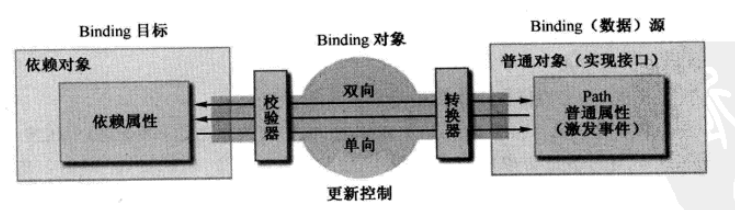
在WPF中Binding可以比作数据的桥梁,桥梁的两端分别是Binding的源(Source)和目标(Target)。一般情况下,Binding源是逻辑层对象,Binding目标是UI层的控件对象;这样,数据就会通过Binding送达UI层,被UI层展现。
首先我们创建一个名为Student的类,这个类的实例作为数据源在UI上显示:
    public class Student

    {

        private string name;

        public string Name

        {

            set { name = value; }

            get { return name; }

        }

    }
Binding是一种自动机制,当值变化后属性要有能力通知Binding,让Binding把变化传递给UI元素。怎样才能让一个属性具备这种通知Binding值已经变化的能力呢?方法是在属性的set语句中激发一个PropertyChanged事件。这个事件不需要我们自己声明,我们要做的是让作为数据源的类实现System.ComponentModel名称空间中的INotifyPropertyChanged接口。当为Binding设置了数据源后,Binding就会自动侦听来自这个接口的PropertyChanged事件。
    public class Student:INotifyPropertyChanged

    {

        private string name;

        public string Name

        {

            set

            {

                name = value;

                NotifyPropertyChanged("Name");

            }

            get { return name; }

        }

        public event PropertyChangedEventHandler PropertyChanged;

        private void NotifyPropertyChanged(string propertyName)

        {

            if (PropertyChanged != null)

            {

                PropertyChanged(this,new PropertyChangedEventArgs(propertyName));

            }

        }

    }
当Name属性的值发生变化时PropertyChanged事件就会被激发,Binding接收到这个事件后发现事件的消息告诉它是名为Name的属性发生了值得改变,于是就会通知Binding目标端的UI元素显示新的值。
XAML代码:
    <Grid>

        <TextBox x:Name="Box" HorizontalAlignment="Left" VerticalAlignment="Top" Margin="100,50,0,0"  Height="30" Width="200"/>

        <Button Content="按钮"  HorizontalAlignment="Left" VerticalAlignment="Top" Margin="120,150,0,0"  Height="30" Width="160" Click="Button_Click"/>

    </Grid>
C#代码:
public partial class MainWindow : Window

    {

        private Student student;

        public MainWindow()

        {

            InitializeComponent();

            student = new Student();

            Binding binding = new Binding();

            binding.Source = student;

            binding.Path = new PropertyPath("Name");

            BindingOperations.SetBinding(this.Box,TextBox.TextProperty,binding);

        }

        private void Button_Click(object sender, RoutedEventArgs e)

        {

            student.Name = DateTime.Now.ToString("yyyy-MM-dd hh:mm:ss");

        }

    }
其中:Binding binding=new Binding()声明Binding类型变量并创建实例,然后使用binding.Source=student为Binding实例指定数据源,最后使用binding.Path = new PropertyPath("Name")为Binding指定访问路径。把数据源和目标连接在一起的任务是使用BindingOperations.SetBinding(this.Box,TextBox.TextProperty,binding)方法完成的。
BindingOperations.SetBinding(this.Box,TextBox.TextProperty,binding)中的参数介绍:
第一个参数主要是指定Binding的目标。
第二个参数是用于为Binding指明将数据绑定到目标的那个属性中去,一般都为目标的依赖属性。
第三个参数是指定那个Binding将数据源与目标关联起来。
上面的代码还可以简化如下:
        private void SetBinding()

        {

            student = new Student();

            this.Box.SetBinding(TextBox.TextProperty, new Binding("Name") { Source=student});

        }
Binding模型如下:
深入浅出WPF之Binding的使用(一)的更多相关文章
- 深入浅出WPF之Binding的使用(二)
在上一篇中介绍了Binding的基本绑定方法,这一篇中我们在深入的介绍Binding的其他用法. Binding的源也就是数据的源头,在日常的工作中,除了使用像上一篇中的Student对象作为数据源外 ...
- 《深入浅出WPF》重点摘要(—)Binding自动通知机制
最近因为公司的项目需要用WPF开发,就学习了一下WPF.刚开始只是用到什么就百度什么,虽然功能是实现了,但还是没有弄清楚原理(如果不弄清原理,会感觉很心虚,整个人会没底气),所以决定找个教程系统地学一 ...
- [转]深入浅出WPF(7)——数据的绿色通道,Binding
本文转自:http://liutiemeng.blog.51cto.com/120361/95273 小序: 怎么直接从2蹦到7啦?!啊哦,实在是不好意思,最近实在是太忙了,忙的原因也非常简单——自己 ...
- WPF之Binding初探
初学wpf,经常被Binding搞晕,以下记录写Binding的基础. 首先,盗用张图.这图形象的说明了Binding的机理. 对于Binding,意思是数据绑定,基本用法是: 1.在xmal中使用 ...
- 【分享】深入浅出WPF全系列教程及源代码
来源:http://blog.csdn.net/yishuaijun/article/details/21345893 本来想一篇一篇复制的.但是考虑到别人已经做过了,就没有必要了吧,就给大家一个目录 ...
- 深入浅出WPF(1)—转(http://liutiemeng.blog.51cto.com/120361/91631/)
深入浅出WPF(1)——什么是WPF 2008-05-15 19:06:00 小序: Hi,大家好!几乎两个月没有写技术文章了.这两个月,我在学习WPF.回顾一下两个月的学习历程,有两个感觉— ...
- 《深入浅出WPF》 学习笔记
<深入浅出WPF> 序言 1. 什么是WPF 2. 为什么要学习WPF 第一章 XAML概览 1. XAML是什么? 2. XAML有哪些优点 第二章 从零起步认识XAML 1. 新 ...
- WPF之Binding对数据的转换(第五天)
Binding在Slider控件与TextBox控件之间建立关联,值可以互相绑定,但是它们的数据类型是不同的,Slider是Double类型,Text为String.原来,Binding有一种机制称为 ...
- WPF之Binding的三种简单写法
环境 类代码 public class Person:INotifyPropertyChanged { private string name; public string Name { get { ...
随机推荐
- 百度编辑器插入视频、iframe 失败
插入失败是因为编辑器的xssFilter过滤,导致插入出现异常 文件位置:ueditor.config.js ,大概在428行加上 video: ['autoplay', 'controls', 'l ...
- UNIX环境编程学习笔记(11)——文件I/O之文件时间以及 utime 函数
lienhua342014-09-16 1 文件的时间 每个文件都有三个时间字段,如表 1 所示. 表 1: 文件的三个时间字段 说明 字段 st_atime 文件数据的最后访问时间 st_mtime ...
- jmeter jdbc request 如何运行多个sql
database url:jdbc:mysql://127.0.0.1:3306/api?useUnicode=true&allowMultiQueries=true&characte ...
- springboot使用@ControllerAdvice(二)之深入理解
前言: 接口类项目开发时,为了便于后期查找问题,一般会拦截器或过滤器中记录每个接口请求的参数与响应值记录, 请求参数很容易从request中获取,但controller的返回值无法从response中 ...
- android app rate on google play and amazon
http://stackoverflow.com/questions/11393191/linking-back-to-amazon-app-store-for-ratings public st ...
- 16个非常酷的jQuery插件
摘要: 下面所有的插件有很大的功能,我相信大多数会帮助你即将到来的项目.借助他们可以使你的网站更加绚丽多彩. Lens Flare in JavaScript 这个jQuery插件可以帮助你处理图片, ...
- SpringMVC由浅入深day02_7上传图片
7 上传图片 7.1 需求 在修改商品页面,添加上传商品图片功能. 7.2 springmvc中对多部件类型解析 在页面form中提交enctype="multipart/form-data ...
- nodejs服务器部署教程一
第一篇教程紧紧让你输出一个hello world 环境介绍 服务器环境:ubuntu(16.04)64位 本地环境:windows10 64位 连接工具:mobaxterm ubuntu安装和基本配置 ...
- COM组件没有注册类 (异常来自 HRESULT:0x80040154 (REGDB_E_CLASSNOTREG))
1.解决办法:在项目属性里设置“生成”=>“目标平台”为x86而不是默认的ANY CPU:
- Apache Kafka 0.11版本新功能简介
Apache Kafka近日推出0.11版本.这是一个里程碑式的大版本,特别是Kafka从这个版本开始支持“exactly-once”语义(下称EOS, exactly-once semantics) ...