
SMTP 通过 ssh 通道发送垃圾邮件
通过SSH隧道传输SMTP
根据设计,我们不允许校外机器使用我们的SMTP服务器。如果我们允许它,我们将允许任何和所有使用我们的SMTP服务器来分发垃圾邮件。
但是也可以通过我们的SMTP服务器发送邮件,这种机制称为SMTP隧道。
Linux说明
1.在Linux机器上安装SSH(默认情况下应该安装)。
2.运行以下命令:(需要你有ssh账号和密码)
ssh -l username -L 25:mail.cs.toronto.edu:25 cs.toronto.edu
3.在您的邮件客户端中调整您的smtp设置,以便
SMTP服务器设置为:127.0.0.1
4.发送邮件。
参考:http://www.cs.toronto.edu/~simon/howto/smtptunnels.html
Warning: Hackers Are Using SSH Tunnels to Send Spam

Don’t get knocked-out by spammers.
Tired of spammers finding new ways to exploit your server?
Me too.
I spend a lot of time investigating spam incidents for customers. Typically, hackers use a few common techniques to send their spam. The most common issues I see are:
- Web application exploits.
- Contact form exploits.
- Compromised user password
With these exploits, you can spot them as they leave clear evidence in the logs. In the case of PHP, you can enable PHP mail logging and quickly find the script sending the spam. This makes stopping these types of attacks easy.
This week, I ran into something I’ve not seen before.
An attacker was using an SSH tunnel to send spam.
This attack can be difficult to detect as it leaves little log evidence – just a ssh login entry and the spam itself.
Fortunately, it is easy to stop once you know how it works.
Setting up SSH Tunnels
Sometimes the best way to recognize an attack is to do it yourself. So once I discovered how the attackers were compromising the server, I tried it myself.
So here’s what I did:
ssh -f user@remote.host.com -L 2000:localhost:25 –NThen
telnet localhost 2000

Connected to localhost.

Escape character is '^]'.

220 remote.host.com ESMTP Postfix
What just happened?
The ssh command tunneled port 25 on the localhost back to my system on port 2000.
I can now send email through the remote host by connecting locally on port 2000.
The attackers used this technique to inject 10,000’s of emails into the server.
This is a clever approach. Unlike other attacks, this method leaves few clues.
With some sleuthing, however, you can catch this attack. You can even prevent it with a simple change to SSH.
Sending Spam with SSH Tunnels
I don’t want to be alarmist, so I want to make it clear:
This SSH spam method requires access to a user account.
In this incident, the attacker had compromised a user account due to a poor quality password.
This is essentially a password compromise, but unlike most attacks, the attackers used a SSH tunnel. The tunnel made it more difficult to detect and block the exploit.
Here’s a breakdown of how the technique works.
TCP Tunnel to SMTP
SSH, by default, permits TCP port forwarding. The attackers were using this feature to forward the SMTP port over SSH back to their local system.
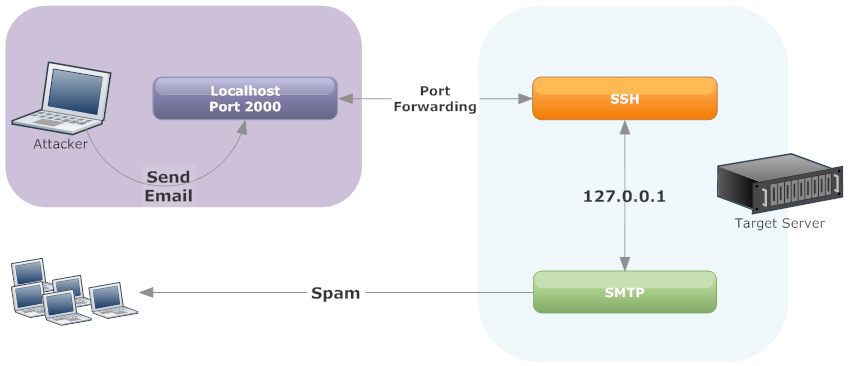
Using an SSH tunnel, you can forward a remote port 25 connection back to your local system and use it to send email without authentication.
As you can see in the diagram, The attackers connects to your server over SSH using a compromised user account. Then, they setup a SSH tunnel to forward port 25 back to their system. They can then connect locally to port 2000 (or any port they select) to send spam. Since most servers trust SMTP connections on localhost, no authentication is required.
With this tunnel in place, they attacker can now send spam via the SSH tunnel.
SMTP AUTH & Localhost
In most spam cases involving exploited password, attackers connect directly to the mail server. As a result, your mail logs will be filled with SMTP authenticationattempts – often from many IP addresses. This makes it easy to identify the compromised account.
With the SSH tunnel technique, SMTP authentication is not required. As a result, there’s remarkably little evidence in the logs of an attack.
The only indication of a problem is a high volume of bounces or email being sent via localhost.
The attack works because most servers implicitly trust email from localhost. For email sent via a localhost host connection to the SMTP server, SMTP AUTH is not required.
Without SMTP authentication, there is no log evidence to identify the compromised account. You just see a lot of email coming from localhost.
Investigating SSH Tunnel Attacks

There are two clues I found with this attack
- Email logs showing SMTP connections from localhost
- Netstat showing SSH connecting to SMTP
Email from Localhost
In most attacks, either attackers either use a web application exploit or compromised user account. These methods produce distinct signatures in the mail logs.
In the case of web application attacks, you can often correlate web logs to email logs to find the site or use PHP mail logging to identify the offending scripts.
For compromised user accounts, SMTP authentication logs will quickly reveal the problem. You will see 100’s of authentications, typically from different IP addresses. Just change the user’s password and your done.
With the SSH tunnel attack, the logs looked like this:
Mar  3 16:05:16 psa001 postfix/smtpd[13792]: 058D82002A: client=localhost.localdomain[127.0.0.1]

Mar  3 16:05:18 psa001 postfix/cleanup[14128]: 058D82002A: message-id=<20140303210516.058D82002A@psa001.rackaid.net>

Mar  3 16:05:18 psa001 postfix/qmgr[2459]: 058D82002A: from=<support@rackaid.com>, size=405, nrcpt=1 (queue active)

Mar  3 16:05:20 psa001 postfix/smtp[14129]: 058D82002A: to=<support@rackaid.com>, relay=rackaid.com.inbound10.mxlogic.net[208.65.145.3]:25, delay=9.4, delays=7.7/0/0.39/1.3, dsn=2.0.0,

status=sent (250 Backend Replied [e8ee4135.0.326436.00-1980.504496.p02c12m006.mxlogic.net]:  2.0.0 Ok: queued as 149162059B (Mode: n)

Mar  3 16:05:20 psa001 postfix/qmgr[2459]: 058D82002A: removed
There’s no SMTP authentication happening. This works because the system trusts emails from localhost.
When you email from scripts (e.g. php’s mail() function) or the command line, the email is sent directly via the servers email binary program.
Message sent directly look like this:
Mar 3 16:04:40 psa001 postfix/pickup[13103]: 886D388003: uid=0 from=Message sent via SMTP look like this:
Mar 3 16:05:16 psa001 postfix/smtpd[13792]: 058D82002A: client=localhost.localdomain[127.0.0.1]In the second example, you will see that the email has a client associated with it: 127.0.0.1. This will also be included in the mail headers.
This was the clue I needed.
I now know that the email is not being sent via a script’s mail function but rather, something or someone is opening a direct connection to the SMTP sever over localhost.
More Clues: Netstat & PS
If you catch the attack in progress, netstat and ps can provide further clues.
During this case, I happened to login while the attackers were sending their spam. As a result, you could see the localhost connection to port 25 in netstat from sshd.
tcp 0 0 127.0.0.1:46298 127.0.0.1:25 ESTABLISHED 8163/sshdNote that the remote and local connections are both localhost. For SMTP, this is a strange connection.
Netstat gives you the process id that has the connection open. Checking ps on that id returns:
root      8157  0.0  0.2  77680  1256 ?        Ss   14:38   0:00 /usr/sbin/sshd

root      8160  0.1  0.6 109352  4196 ?        Ss   14:38   0:00  _ sshd: jeffh [priv]

jeffh     8163  0.0  0.3 109352  2112 ?        S    14:38   0:00      _ sshd: jeffh
During this attack, we see both an SSH process as well as a local connection from SSH to SMTP.
These are two excellent clues to this type of attack.
Access Logs
I usually use the “last” command on systems to review who’s recently logged into the server. This usually works well in most cases. However, there’s a problem with last.
The last command uses /var/log/wtmp and not all logins are recorded in wtmp.
SSH does not log a hit into wtmp if it is a non-interactive session. In the case of a SSH tunnel, you do not need an interactive session. So you have to check /var/log/secure to find the logins.
Shells
As it turns out, you also do not need a valid shell to use SSH tunnels.
You can still use SSH tunneling even if the user’s shell is set to /bin/false or /sbin/nologin. So if you need to restrict SSH use, you have toset the user-level security features in sshd.
Preventing SSH Tunnels
Fortunately, you can easily block tunneling of ports by changing:
AllowTCPForwarding noIf you set this in SSH then try a tunnel, you can still connect to SSH but will get this result:
channel 2: open failed: administratively prohibited: open failedSo this is a quick an easy way to add a layer of security to SSH — along with our other recommended SSH hardening changes.
Conclusion
Attackers will always find subtle ways to avoid detection. Their goal is to use your server as much as possible, so techniques like this one make it harder to identify and fix the issue.
In my research, I only found one mention of a similar case spam using SSH port forwarding and this was in 2009.
Hopefully, this is an isolated incident. However, I know we will start checking for this type of attack as part of our spam incident services.
SMTP 通过 ssh 通道发送垃圾邮件的更多相关文章
- 发送垃圾邮件的僵尸网络——药物(多)、赌博、股票债券等广告+钓鱼邮件、恶意下载链接、勒索软件+推广加密货币、垃圾股票、色情网站(带宏的office文件、pdf等附件)
卡巴斯基实验室<2017年Q2垃圾邮件与网络钓鱼分析报告> 米雪儿 2017-09-07 from:http://www.freebuf.com/articles/network/1465 ...
- drupal7 smtp+mimemail+mailsystem 实现发送html邮件
1.下载三个模块 smtp: https://www.drupal.org/project/smtp mimemail: https://www.drupal.org/project/mimemail ...
- 使用Python登陆QQ邮箱发送垃圾邮件 简单实现
参考:Python爱好者 知乎文章 需要做的是: 1.邮箱开启SMTP功能 2.获取授权码 上述两步百度都有. 源码: #!/usr/bin/env python from email.mime.te ...
- C#发送Outlook邮件(仅SMTP版本)
先表明Outlook的参数:网址:https://support.office.com/zh-cn/article/Outlook-com-%E7%9A%84-POP%E3%80%81IMAP-%E5 ...
- 论垃圾邮件危害性及U-Mail邮件系统必杀技
阿里集团今年“双十一电商节”又一次突破了去年营收,创造了新的历史.相信在电商日益渗入生 活的今天,你在日常工作中一定收到过某店铺发来的推广邮件,的确,邮件如今被电商广泛应用于消费者购物各环节,但是在其 ...
- Postfix上的反垃圾邮件的四个方法
在介绍如何配置Postfix的smtp配置之前有必要首先介绍一下它的背景和特点.Postfix是一个由IBM资助下由WietseVenema 负责开发的自由软件工程的一个产物,其目的是为用户提供除se ...
- 如何让企业邮箱更安全之gmail yahoo hotmail 反垃圾邮件机制
一.雅虎.Gmail Domainkeys 是由雅虎公司推出的一项确保电子邮件来源的真实性和内容的完整性的技术,它能让电子邮件服务商确定某封信是否真实的来自某个域和帮助他们的用户免受“钓鱼欺诈邮件“的 ...
- Exchange2010启用反垃圾邮件功能
今天邮箱服务器发现有大量发件人为空的邮件等待执行,也就是说空邮件堵塞了队列. 一般来说,空邮件就是别人发送垃圾邮件给你,你的服务上不存在这个收件人,那么系统会产生一封退信告诉你这封邮件已经被退.而ex ...
- Linux安全应用之防垃圾邮件server的构建
Linux安全应用之防垃圾邮件server的构建 一.垃圾邮件产生的原因 垃圾邮件(SPAM) 也称作UCE(Unsoticited Commercial Email.未经许可的商业电子邮件)或UBE ...
随机推荐
- Python3 爬取微信好友基本信息,并进行数据清洗
Python3 爬取微信好友基本信息,并进行数据清洗 1,登录获取好友基础信息: 好友的获取方法为get_friends,将会返回完整的好友列表. 其中每个好友为一个字典 列表的第一项为本人的账号信息 ...
- ubuntu 更改python3为默认版本
ubuntu 自带两个python版本,一个是python2一个是python3 默认版本是python2的,想要更改ubuntu python3 为默认版本, 只需要两行命令: sudo updat ...
- 03: vuejs 事件、模板、过滤器
目录:Vue其他篇 01: vue.js安装 02: vue.js常用指令 03: vuejs 事件.模板.过滤器 目录: 1.1 事件 1.2 模板 1.3 自定义过滤器 1.4 过度 1.5 支付 ...
- 04:获取zabbix监控信息
目录:Django其他篇 01: 安装zabbix server 02:zabbix-agent安装配置 及 web界面管理 03: zabbix API接口 对 主机.主机组.模板.应用集.监控项. ...
- 20145317 网络对抗技术 逆向与Bof基础
20145317 网络对抗技术 逆向与Bof基础 实践要求 1. 掌握NOP,JNE,JE,JMP,CMP汇编指令的机器码 2. 掌握反汇编与十六进制编程器 3. 能正确修改机器指令改变程序执行流程 ...
- Python3基础 逻辑运算 and or not 示例
Python : 3.7.0 OS : Ubuntu 18.04.1 LTS IDE : PyCharm 2018.2.4 Conda ...
- 解决 E: Unable to correct problems, you have held broken packages. 问题
参考: Unable to correct problems, you have held broken packages 环境 Ubuntu 14.04, 64bit 问题 在安装gcc-4.9的时 ...
- NOI 4977 怪盗基德的滑翔翼(LIS)
http://noi.openjudge.cn/ch0206/4977/ 描述: 怪盗基德是一个充满传奇色彩的怪盗,专门以珠宝为目标的超级盗窃犯.而他最为突出的地方,就是他每次都能逃脱中村警部的重重围 ...
- nginx缓存功能的设置
首先用的缓存是proxy_cache. 在http段里加入下列几句: [plain] view plain copy proxy_connect_timeout 5; proxy_read_tim ...
- Struts2 文件下载(中文处理方法以及控制下载文件名称和扩展名)
Struts2的框架提供了现成的文件下载方式,大大简化了开发下载功能的便利性.网上的例子有很多,我把一些大家普遍比较关注的点,集中一下,给出一个整体方案. 一般我们照着书本或者网上的列子写出了一个De ...