
[Canvas]首个小游戏告成
英雄在地图上射箭杀怪兽,杀完了就胜利了。
点此下载程序试玩。
图例:
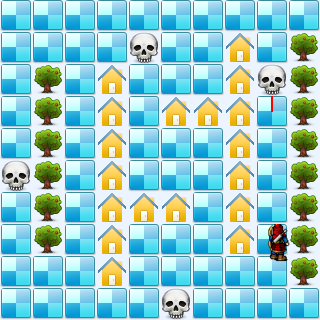
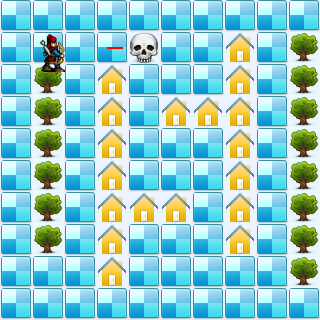
代码:
<!DOCTYPE html>
<html lang="utf-8">
<meta http-equiv="Content-Type" content="text/html; charset=utf-8"/>
<head>
     <title>地图加载 英雄可以射箭了 19.3.6 15:37 by:逆火狂飙 horn19782016@163.com</title>

     <style>
     #canvas{
        background:#ffffff;
        cursor:pointer;
        margin-left:10px;
        margin-top:10px;
        -webkit-box-shadow:3px 3px 6px rgba(0,0,0,0.5);
        -moz-box-shadow:3px 3px 6px rgba(0,0,0,0.5);
        box-shadow:3px 3px 6px rgba(0,0,0,0.5);
     }

     #controls{
        margin-top:10px;
        margin-left:15px;
     }
     </style>

    </head>

     <body onload="init()">
        <div id="controls">
            <input id='animateBtn' type='button' value='开始'/>
        </div>

        <canvas id="canvas" width="160px" height="160px" >
            出现文字表示你的浏览器不支持HTML5
        </canvas>
     </body>
</html>
<script type="text/javascript">
<!--
var paused=true;
animateBtn.onclick=function(e){
    paused=! paused;

    if(paused){
        animateBtn.value="开始";

    }else{
        animateBtn.value="停止";

        window.requestAnimationFrame(animate);
    }
}

var ctx;// 绘图环境
var r;// 表盘半径
var terrain;
var hero;
var arrows;
function init(){
    // init Canvas
    var canvas=document.getElementById('canvas');
    r=160;
    canvas.width =2*r;
    canvas.height=2*r;
    ctx=canvas.getContext('2d');

    terrain=new Terrain();
    hero=new Hero();

    arrows=new Array();

    // 响应键盘事件
    canvas.addEventListener('keydown', doKeyDown, true);
    canvas.focus();
    window.addEventListener('keydown', doKeyDown, true);
};

function draw(){
    // Clear Canvas
    ctx.clearRect(0,0,ctx.canvas.width,ctx.canvas.height);
    ctx.fillStyle="#ECF5FF";
    ctx.fillRect(0,0,ctx.canvas.width,ctx.canvas.height);

    terrain.paint(ctx);
    hero.paint(ctx);
    console.log('draw arrows.length='+arrows.length);
    for(var i=arrows.length-1;i>-1;i--){
        var arrow=arrows[i];
        var x=parseInt(arrow.x / 32,10);
        var y=parseInt(arrow.y / 32,10);
        console.log(x+','+y);
        if(terrain.getValue(x,y)==3){
            terrain.setValue(x,y,0);
            arrows.splice(i,1);
            break;
        }

        if(terrain.getValue(x,y)!=0){
            arrows.splice(i,1);
        }
    }

    for(var i=0;i<arrows.length;i++){
        var arrow=arrows[i];

        arrow.paint(ctx);
    }

    if(terrain.hasMonster()==false){
        alert("You win");
        init();
    }
}

function animate(){
    if(!paused){
        draw();
        window.requestAnimationFrame(animate); /// 让浏览器自行决定帧速率
    }
}

function doKeyDown(e) {
    var keyID = e.keyCode ? e.keyCode :e.which;
    if(keyID === 38 || keyID === 87)  { // up arrow and W
        hero.move('up');
        e.preventDefault();
    }
    if(keyID === 39 || keyID === 68)  { // right arrow and D
        hero.move('right');
        e.preventDefault();
    }
    if(keyID === 40 || keyID === 83)  { // down arrow and S
        hero.move('down');
        e.preventDefault();
    }
    if(keyID === 37 || keyID === 65)  { // left arrow and A
        hero.move('left');
        e.preventDefault();
    }
    //alert('keyID='+keyID);
    if(keyID === 32 )  { // SpaceBar
        //alert(1);
        var a=new Arrow(hero.x+16,hero.y+16,hero.direction);
        arrows.push(a);
        console.log('arrows.length='+arrows.length);
        e.preventDefault();
    }
}

//---------------------------------------------------地形类定义开始------------------------------------------------------------------->>
Terrain=function(){
    this.files=["road.png","tree.png","home.png","skull.png",];

    this.maps=new Array(
        [0,0,0,0,0,3,0,0,0,0],
        [0,0,1,1,1,1,1,1,0,0],
        [0,0,0,0,0,0,0,0,0,0],
        [0,0,2,2,2,2,2,2,2,0],
        [0,3,0,0,0,0,2,0,0,0],
        [0,0,0,2,0,0,2,0,0,3],
        [0,0,0,2,0,0,0,0,0,0],
        [0,2,2,2,2,2,2,2,0,0],
        [0,0,3,0,0,0,0,0,0,0],
        [0,1,1,1,1,1,1,1,1,0],
    );
}
Terrain.prototype={
    files:[],
    // Property
    maps:0,

    // method
    paint:function(ctx){
        for(var i=0;i<this.maps.length;i++){
            var arr=this.maps[i];

            for(var j=0;j<arr.length;j++){
                var value=arr[j];

                var img=new Image();
                img.src=this.files[value];

                ctx.drawImage(img,i*32,j*32);
            }
        }
    },

    hasMonster:function(){
        for(var i=0;i<this.maps.length;i++){
            var arr=this.maps[i];

            for(var j=0;j<arr.length;j++){
                var value=arr[j];

                if(value==3){
                    return true;
                }
            }
        }

        return false;
    },

    getValue:function(i,j){
        if(i<0 || i>=this.maps.length){
            return undefined;
        }
        var arr=this.maps[i];
        if(j<0 || j>=arr.length){
            return undefined;
        }
        var value=arr[j];
        return value;
    },

    setValue:function(i,j,value){
        if(i<0 || i>=this.maps.length){
            return undefined;
        }
        var arr=this.maps[i];
        if(j<0 || j>=arr.length){
            return undefined;
        }
        arr[j]=value;
    },
}
//---------------------------------------------------地形类定义结束-------------------------------------------------------------------<<

//---------------------------------------------------英雄类定义开始------------------------------------------------------------------->>
Hero=function(){
    this.files=["arrow_left.png","arrow_right.png","arrow_up.png","arrow_down.png",];

    this.pngs=[
        {left:0,top:10,width:40,height:40},
        {left:0,top:66,width:40,height:40},
        {left:0,top:120,width:40,height:40},
        {left:0,top:180,width:40,height:40},
    ];
}
Hero.prototype={
    files:[],
    pngs:[],
    x:160,
    y:160,
    xTo:160,
    yTo:160,
    step:32,
    direction:'up',

    // method
    paint:function(ctx){
        var img=new Image();
        img.src='bowman.png';

        var index=0;
        if(this.direction=='up'){
            index=3;
        }
        if(this.direction=='down'){
            index=0;
        }
        if(this.direction=='left'){
            index=1;
        }
        if(this.direction=='right'){
            index=2;
        }
        var pos=this.pngs[index];
        ctx.drawImage(img,pos.left,pos.top,pos.width,pos.height,this.x,this.y,pos.width,pos.height);
        //ctx.drawImage(img,this.x,this.y);
    },

    move:function(direction){
        this.direction=direction;

        if(this.direction=='up'){
            this.yTo-=this.step;
        }
        if(this.direction=='down'){
            this.yTo+=this.step;
        }
        if(this.direction=='left'){
            this.xTo-=this.step;
        }
        if(this.direction=='right'){
            this.xTo+=this.step;
        }

        if(terrain.getValue(this.xTo/this.step,this.yTo/this.step)==0){
            this.x=this.xTo;
            this.y=this.yTo;
        }else{
            this.xTo=this.x;
            this.yTo=this.y;
        }
    }
}
//---------------------------------------------------英雄类定义结束-------------------------------------------------------------------<<

//---------------------------------------------------箭矢类定义开始------------------------------------------------------------------->>
Arrow=function(x,y,direction){
    this.x=x;
    this.y=y;
    this.direction=direction;
}
Arrow.prototype={
    x:0,
    y:0,
    velocity:1,// 飞行速度
    len:16,// 箭杆长
    direction:'',

    // method
    paint:function(ctx){
        var x1=this.x,y1=this.y;

        if(this.direction=='up'){
            this.y-=this.velocity;
            y1=this.y-this.len;
            x1=this.x;
        }
        if(this.direction=='down'){
            this.y+=this.velocity;
            y1=this.y+this.len;
            x1=this.x;
        }
        if(this.direction=='left'){
            this.x-=this.velocity;
            x1=this.x-this.len;
            y1=this.y;
        }
        if(this.direction=='right'){
            this.x+=this.velocity;
            x1=this.x+this.len;
            y1=this.y;
        }

        //alert("this.x="+this.x);
        //alert("this.y="+this.y);
        //alert("x1="+x1);
        //alert("y1="+y1);

        ctx.beginPath();
        ctx.lineWidth = 2;
        ctx.strokeStyle = "#ff0000";
        ctx.moveTo(this.x,this.y);
        ctx.lineTo(x1,y1);
        ctx.stroke();
        ctx.closePath();
        //alert(2);
    },
}
//---------------------------------------------------箭矢类定义结束-------------------------------------------------------------------<<
//-->
</script>
2019年3月6日18点06分
[Canvas]首个小游戏告成的更多相关文章
- java 图形化小工具Abstract Window Toolit :画笔Graphics,画布Canvas(),弹球小游戏
画笔Graphics Java中提供了Graphics类,他是一个抽象的画笔,可以在Canvas组件(画布)上绘制丰富多彩的几何图和位图. Graphics常用的画图方法如下: drawLine(): ...
- Canvas进阶——制作小游戏【贪吃蛇】
今天呢,主要和小伙伴们分享一下一个贪吃蛇游戏从构思到实现的过程~因为我不是很喜欢直接PO代码,所以只copy代码的童鞋们请出门左转不谢. 按理说canvas与其应用是老生常谈了,可我在准备阶段却搜索不 ...
- canvas 实现赛车小游戏
一:样式 <style> #btn{ width: 60px; height: 30px; line-height: 30px; background: #7EC0EE; border: ...
- canvas 实现微信小游戏
var canvas = document.getElementById('canvas'); var cxt = canvas.getContext('2d'); var timer; var iS ...
- 【JavaScript】canvas实现一个小游戏
参考: 1.image onload事件:http://www.runoob.com/jsref/event-img-onload.html(赞) 2.canvas的drawImage无法显示图像:h ...
- vs2019将小游戏打包成msi踩的坑(个人)
1.VS无Setup projecrt? vs2015之前是自带打包msi功能的,vs2017之后需要自己去下载插件: 下载地址:https://marketplace.visualstudio.co ...
- canvas drag 实现拖拽拼图小游戏
博主一直心心念念想做一个小游戏- 前端时间终于做了一个小游戏,直到现在才来总结,哈哈- 以后要勤奋点更新博客! 实现原理 1.如何切图? 用之前的方法就是使用photoshop将图片切成相应大小的图 ...
- 两个Canvas小游戏
或许连小游戏都算不上,可以叫做mini游戏. 没有任何框架或者稍微有点深度的东西,所以有js基础的或者要追求炫酷效果的可以直接ctrl+w了. 先贴出两个游戏的试玩地址: 是男人就走30步 是男人就忍 ...
- Vue+WebSocket+ES6+Canvas 制作「你画我猜」小游戏
Vue+WebSocket+ES6+Canvas 制作「你画我猜」小游戏 转载 来源:jrainlau 链接:https://segmentfault.com/a/1190000005804860 项 ...
随机推荐
- 虫趣:BAD POOL CALLER (par1: 0x20)
[作者:张佩] [原文:http://www.yiiyee.cn/Blog/0x19-1/] 内核在管理内存的时候,为了提高内存使用效率,对于小片内存的申请(小于一个PAGE大小),都是通过内存池来操 ...
- golang-bcc-bpf-function-tracing
http://www.brendangregg.com/blog/2017-01-31/golang-bcc-bpf-function-tracing.html
- systemtap 安装 总结
http://blog.soul11201.com/notes/2017/02/22/systemstap-install.html
- WiX: uninstall older version of the application
I have installer generated by WiX and I want it to ask: "You have already installed this app. D ...
- 没有可用的复制构造函数或复制构造函数声明为“explicit”
c:\Program Files\Microsoft Visual Studio .NET 2003\Vc7\include\vector(810) : error C2558: str ...
- Spring主从数据库的配置和动态数据源切换原理
原文:https://www.liaoxuefeng.com/article/00151054582348974482c20f7d8431ead5bc32b30354705000 在大型应用程序中,配 ...
- mormot支持https
mormot支持https 将ssl证书导入电脑系统,以Windows 10为例: 运行 mmc 证书导入成功后,双击证书,查看证书指纹: 第二项工作:将证书与https绑定:以管理员身份启动cmd, ...
- Nginx rewrite URL examples with and without redirect address
原文地址: http://www.claudiokuenzler.com/blog/436/nginx-rewrite-url-examples-with-without-redirect-addre ...
- IOS开发之——objective-c与javascript交互
原文:http://blog.csdn.net/pjk1129/article/details/6936545 在写 JavaScript 的时候,可以使用一个叫做 window 的对象,像是我们想要 ...
- Mysql导入大容量SQL文件数据问题
mysql在通过导入sql文件可能会出现下面二个问题: 1.如果sql文件过大,会出现"MySQL server has gone away"问题; 2.如果sql文件数据有中文, ...