
pandas练习(二)------ 数据过滤与排序
数据过滤与排序------探索2012欧洲杯数据
相关数据见(github)
步骤1 - 导入pandas库
import pandas as pd
步骤2 - 数据集
path2 = "./data/Euro2012.csv" # Euro2012.csv
步骤3 - 将数据集命名为euro12
euro12 = pd.read_csv(path2)

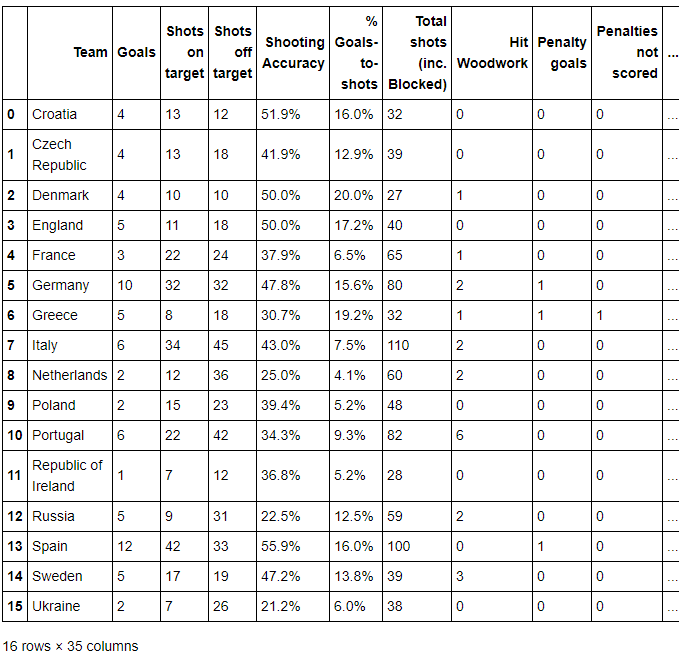
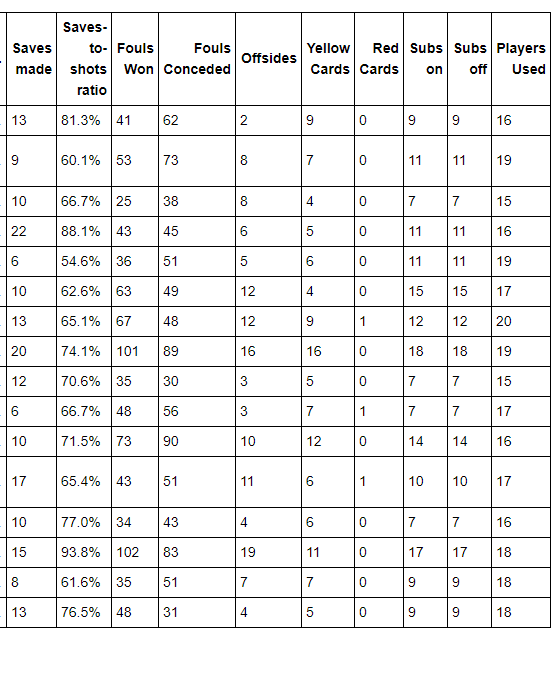
euro12.tail()
输出:
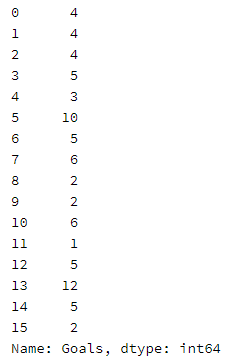
步骤4 选取 Goals 这一列
euro12.Goals # euro12['Goals']
输出:
步骤5 有多少球队参与了2012欧洲杯?
euro12.shape[0]
输出:
16
步骤6 该数据集中一共有多少列(columns)?
euro12.info()
输出:
<class 'pandas.core.frame.DataFrame'>

RangeIndex: 16 entries, 0 to 15

Data columns (total 35 columns):

Team                          16 non-null object

Goals                         16 non-null int64

Shots on target               16 non-null int64

Shots off target              16 non-null int64

Shooting Accuracy             16 non-null object

% Goals-to-shots              16 non-null object

Total shots (inc. Blocked)    16 non-null int64

Hit Woodwork                  16 non-null int64

Penalty goals                 16 non-null int64

Penalties not scored          16 non-null int64

Headed goals                  16 non-null int64

Passes                        16 non-null int64

Passes completed              16 non-null int64

Passing Accuracy              16 non-null object

Touches                       16 non-null int64

Crosses                       16 non-null int64

Dribbles                      16 non-null int64

Corners Taken                 16 non-null int64

Tackles                       16 non-null int64

Clearances                    16 non-null int64

Interceptions                 16 non-null int64

Clearances off line           15 non-null float64

Clean Sheets                  16 non-null int64

Blocks                        16 non-null int64

Goals conceded                16 non-null int64

Saves made                    16 non-null int64

Saves-to-shots ratio          16 non-null object

Fouls Won                     16 non-null int64

Fouls Conceded                16 non-null int64

Offsides                      16 non-null int64

Yellow Cards                  16 non-null int64

Red Cards                     16 non-null int64

Subs on                       16 non-null int64

Subs off                      16 non-null int64

Players Used                  16 non-null int64

dtypes: float64(1), int64(29), object(5)

memory usage: 4.5+ KB
步骤7 将数据集中的列Team, Yellow Cards和Red Cards单独存为一个名叫discipline的数据框
discipline = euro12[['Team', 'Yellow Cards', 'Red Cards']]

discipline
输出:

步骤8 对数据框discipline按照先Red Cards再Yellow Cards进行排序
discipline.sort_values(['Red Cards', 'Yellow Cards'], ascending = False)
输出:

步骤9 计算每个球队拿到的黄牌数的平均值
round(discipline['Yellow Cards'].mean())
输出:
7.0
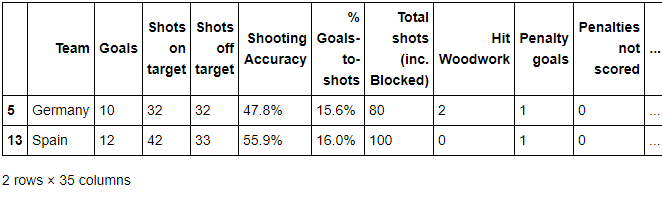
步骤10 找到进球数Goals超过6的球队数据
euro12[euro12.Goals > 6]
输出:

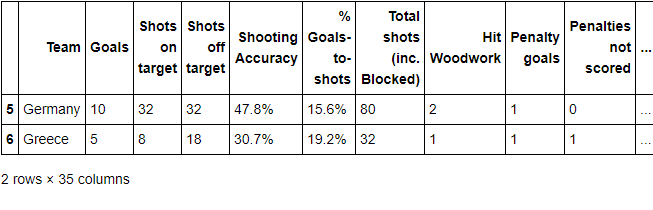
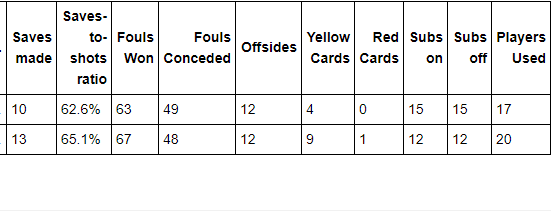
步骤11 选取以字母G开头或以e结尾的球队数据
# euro12[euro12.Team.str.startswith('G')]

euro12[euro12.Team.str.endswith('e')]  # 以字母e结束的球队
输出:
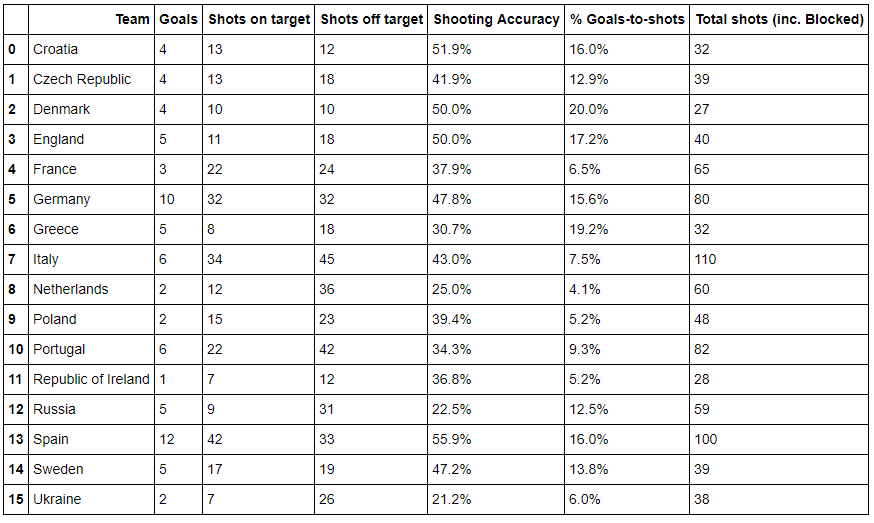
步骤12 选取前7列
euro12.iloc[: , 0:7]
输出:
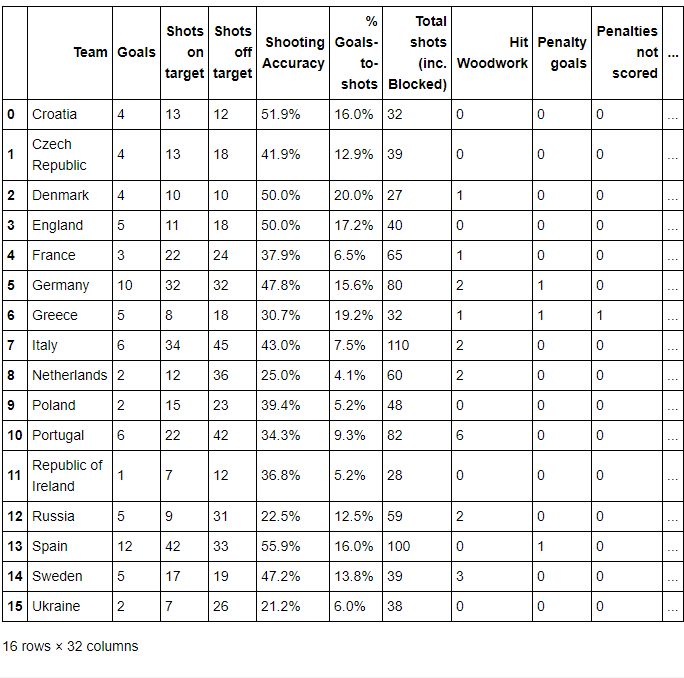
步骤13 选取除了最后3列之外的全部列
euro12.iloc[: , :-3]
输出:
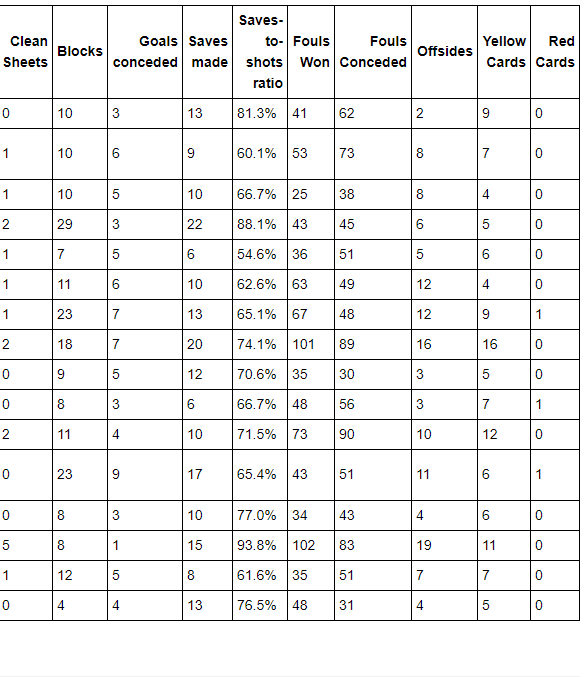
步骤14 找到英格兰(England)、意大利(Italy)和俄罗斯(Russia)的命中率(Shooting Accuracy)
euro12.loc[euro12.Team.isin(['England', 'Italy', 'Russia']), ['Team','Shooting Accuracy']]
输出:

参考链接:
1、http://pandas.pydata.org/pandas-docs/stable/cookbook.html#cookbook
2、https://www.analyticsvidhya.com/blog/2016/01/12-pandas-techniques-python-data-manipulation/
3、https://github.com/guipsamora/pandas_exercises
pandas练习(二)------ 数据过滤与排序的更多相关文章
- Vue 基本列表 && 数据过滤与排序
1 <!DOCTYPE html> 2 <html> 3 <head> 4 <meta charset="UTF-8" /> 5 & ...
- pandas之DateFrame 数据过滤+遍历行+读写csv-txt-excel
# XLS转CSV df = pd.read_excel(r'列表.xls') df2 = pd.DataFrame()df2 = df2.append(list(df['列名']), ignore_ ...
- Oracle学习(二):过滤和排序
1.知识点:能够对比以下的录屏进行阅读 SQL> --字符串大写和小写敏感 SQL> --查询名叫KING的员工信息 SQL> select * 2 from emp 3 where ...
- python 数据清洗之数据合并、转换、过滤、排序
前面我们用pandas做了一些基本的操作,接下来进一步了解数据的操作, 数据清洗一直是数据分析中极为重要的一个环节. 数据合并 在pandas中可以通过merge对数据进行合并操作. import n ...
- [数据清洗]- Pandas 清洗“脏”数据(二)
概要 了解数据 分析数据问题 清洗数据 整合代码 了解数据 在处理任何数据之前,我们的第一任务是理解数据以及数据是干什么用的.我们尝试去理解数据的列/行.记录.数据格式.语义错误.缺失的条目以及错误的 ...
- mysql必知必会(四、检索数据,五、排序检索数据,六、过滤数据,七、数据过滤)
四.select语句 1.检索单个列 select prod_name from products; 2.检索多个列 select prod_name, prod_price from product ...
- [数据清洗]-使用 Pandas 清洗“脏”数据
概要 准备工作 检查数据 处理缺失数据 添加默认值 删除不完整的行 删除不完整的列 规范化数据类型 必要的转换 重命名列名 保存结果 更多资源 Pandas 是 Python 中很流行的类库,使用它可 ...
- [数据清洗]- Pandas 清洗“脏”数据(三)
预览数据 这次我们使用 Artworks.csv ,我们选取 100 行数据来完成本次内容.具体步骤: 导入 Pandas 读取 csv 数据到 DataFrame(要确保数据已经下载到指定路径) D ...
- Oracle01——基本查询、过滤和排序、单行函数、多行函数和多表查询
作者: kent鹏 转载请注明出处: http://www.cnblogs.com/xieyupeng/p/7272236.html Oracle的集群 Oracle的体系结构 SQL> --当 ...
随机推荐
- UEditor富文本WEB编辑器自定义默认值设置方法
1.在使用UEditor编辑器编写内容时你会发现,当输入的内容较多时,编辑框的边框高度也会自动增加,若希望输入内容较多时以拉框滚动的效果. 方法:找到Ueditor文件根目录下的ueditor.con ...
- http后台json解析实例
localhost:8080/hbinterface/orderInterface/sIReverseAccept.do?bizType=4&&bnetAccount=ESBTEST2 ...
- vue--使用过滤器
有个项目需要可以添加和删除选项,但是左侧要显示的 A,B,C,D.... 解决思路: 循环的时候
- 慕课学习--DNS的作用
因为相对于32位的IP地址,人对域名更加敏感,也更容易记忆.所以一般都是把IP地址转化为域名进行网页的访问. DNS(Domain Name System,域名系统),万维网上作为域名和IP地址相互映 ...
- 9.7 Django 书单列表页面
昨天的迭代版本,增加了编辑出版社,编辑列表,增添了返回页面! 具体的看 github : https://github.com/TrueNewBee/pythonDemo 看一下效果图: 整体来说还是 ...
- SqlServer数据库查询表信息/列信息(列ID/列名/数据类型/长度/精度/是否可以为null/默认值/是否自增/是否是主键/列描述)
查询表信息(表名/表描述) Value ) AS value FROM sysobjects a Where a.xtype = 'U' AND a.name <> 'sysdiagram ...
- python MD5步骤
https://www.cnblogs.com/zipon/p/8340720.html import hashlib def get_token(): md5str = "abc" ...
- C语言概述
打印摄氏度 /* 1.1 使用int类型进行计算 */ #include <stdio.h> /* print Fahrenheit-Celsius table for fahr = 0, ...
- 《Nginx - 变量》- log_format/核心变量
一:log_format - 概述 - log_format 用于管理 Nginx 的详细信息,日志管理等信息,很多都是基于这个来实现. - 可配置参数 $remote_addr 客户端地址 $rem ...
- flask中cookie,session的存储,调用,删除 方法(代码demo)
# -*- encoding: utf-8 -*- # cookie,session的存储,调用,删除 from flask import Flask,make_response,request,se ...