
ClangFormat代码格式化
下载地址:https://github.com/travisjeffery/ClangFormat-Xcode
配合Xcode自带的格式化操作,就很不错了
选中内容组合操作:
第一步:ClangFormat(control+U)
第二步:XcodeFormat(control+I)
选中文件组合操作:
第一步:ClangFormat(control+shift+U)
第二步:XcodeFormat(control+A,control+I)
修改ClangFormat.xcodeproj工程里的TRVSClangFormat.m文件的内容,实现快捷键功能(control+U和control+shift+U):
 - (void)addActioningMenuItemsToFormatMenu {

   NSMenuItem *formatActiveFileItem = [[NSMenuItem alloc]

       initWithTitle:NSLocalizedString(@"Format File in Focus", nil)

              action:@selector(formatActiveFile)

       keyEquivalent:@""];

   [formatActiveFileItem setTarget:self.formatter];

   [self.formatMenu addItem:formatActiveFileItem];

   NSMenuItem *formatSelectedCharacters = [[NSMenuItem alloc]

       initWithTitle:NSLocalizedString(@"Format Selected Text", nil)

              action:@selector(formatSelectedCharacters)

       keyEquivalent:@"u"]; //modified by Kenmu

   [formatSelectedCharacters setKeyEquivalentModifierMask:NSControlKeyMask]; //created by Kenmu, in order to use shortcut key to access it.

   [formatSelectedCharacters setTarget:self.formatter];

   [self.formatMenu addItem:formatSelectedCharacters];

   NSMenuItem *formatSelectedFilesItem = [[NSMenuItem alloc]

       initWithTitle:NSLocalizedString(@"Format Selected Files", nil)

              action:@selector(formatSelectedFiles)

       keyEquivalent:@"u"]; //modified by Kenmu

   [formatSelectedFilesItem setKeyEquivalentModifierMask:NSControlKeyMask | NSShiftKeyMask]; //created by, in order to use shortcut key to access it. Kenmu

   [formatSelectedFilesItem setTarget:self.formatter];

   [self.formatMenu addItem:formatSelectedFilesItem];

 }
跟VVDocumenter规范注释生成器的安装方式一样:
下载开源工程在Xcode重新编译运行会自动安装此插件,重启Xcode就可以使用了
PS:可以使用系统偏好设置中设置键盘里针对某应用程序的快捷键,如下操作:
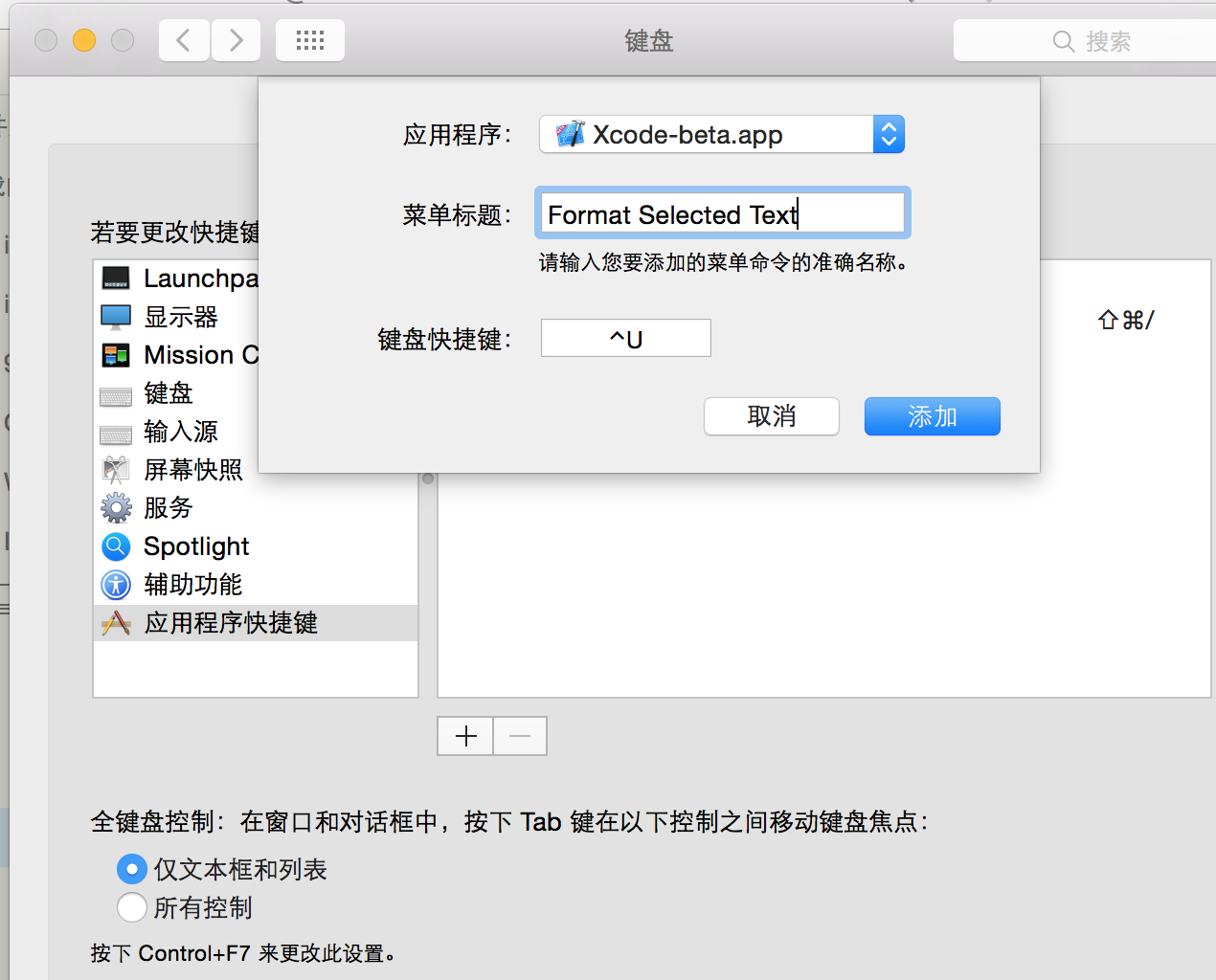
插件设置:
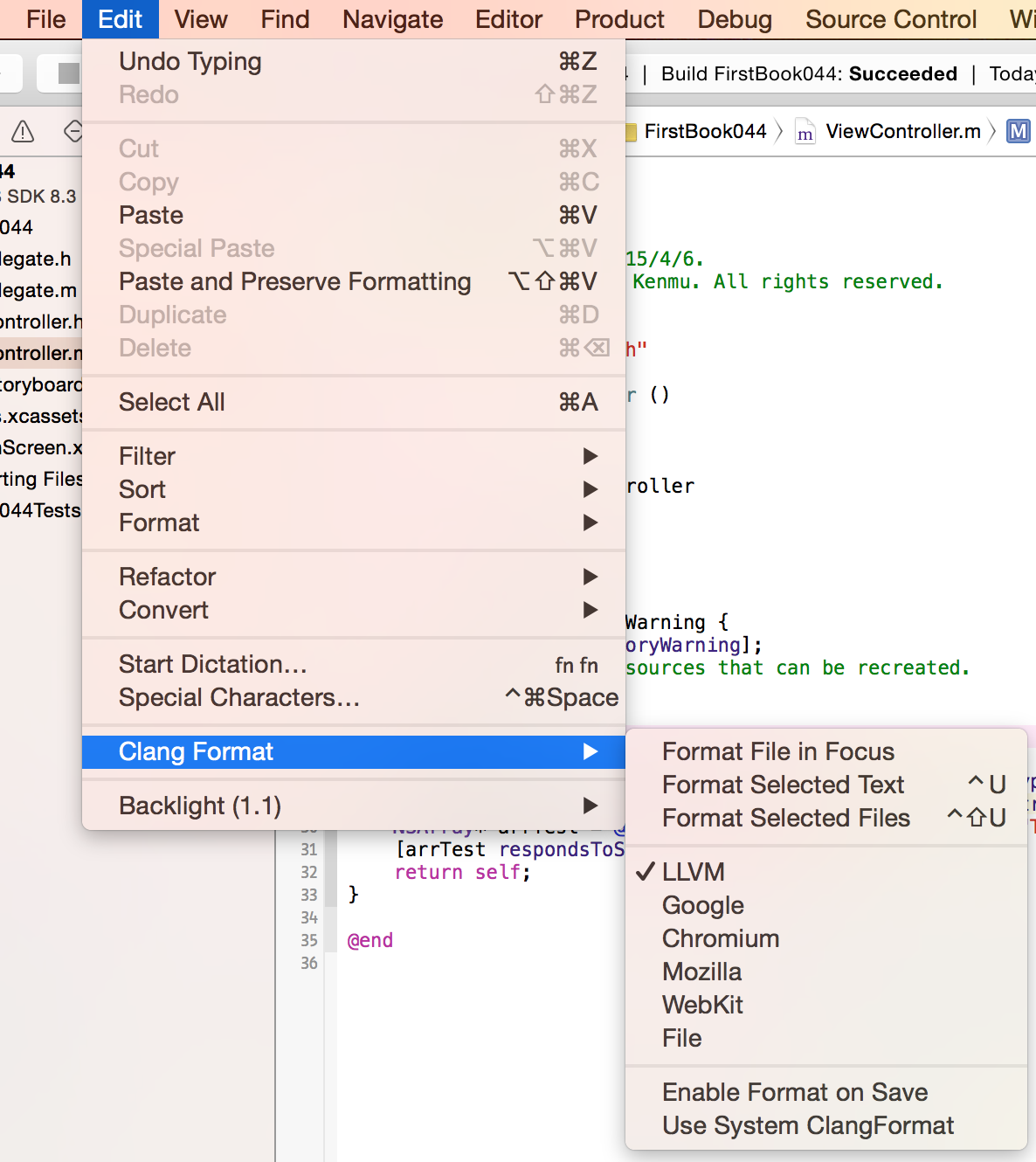
使用方式:

ClangFormat代码格式化的更多相关文章
- vim代码格式化插件clang-format
title: vim代码格式化插件clang-format date: 2017-12-12 20:28:26 tags: vim categories: 开发工具 安装vim-clang-forma ...
- 超详细的Xcode代码格式化教程,可自定义样式。
超详细的Xcode代码格式化教程,可自定义样式. 为什么要格式化代码 当团队内有多人开发的时候,每个人写的代码格式都有自己的喜好,也可能会忙着写代码而忽略了格式的问题.在之前,我们可能会写完代码后,再 ...
- ROS知识(21)----ROS C++代码格式化
这里提供两种方法. 第一种方法:clang_format 1.安装clang format sudo apt-get install -y clang-format-3.6 2.从github的ros ...
- 测试clang-format的格式化效果
我自己写的业余框架已告一段落,主体功能已完成,剩下的就是优化.第一个要优化的,就是代码格式.我一直是用编辑器写代码的,从之前的UltraEdit到notepad++到sublime text,再到现在 ...
- [No00007B]DreamweaverCC 的CSS代码格式化
Dreamweaver自带的代码格式化功能. 1.步骤:命令 -> 应用源格式. 2.你可以选择你的偏好.特别是css代码,有些人喜欢每个属性单独一行,有些人喜欢把所有属性写在同一行.步骤:编辑 ...
- code blocks 如何实现一键代码格式化
问题:code blocks 如何实现一键代码格式化 解答:直接右键,选择format use ASstyle
- 使用AStyle进行代码格式化
转自:http://www.cnblogs.com/JerryTian/archive/2012/09/20/AStyle.html 在日常的编码当中,大家经常要遵照一些设计规范,如命名规则.代码格式 ...
- iOS开发-xCode代码格式化xAlign
xCode默认是可以进行代码格式化的,能满足基础开发需求,如果想要个性一些代码对齐方式宏对齐,等号对齐,属性对齐,xAlign就提供了以上三种功能,参考文中效果~ 基础效果 等号对齐: 属性对齐: 宏 ...
- MyEclipse中防止代码格式化时出现换行的情况的设置
编辑完成代码,用MyEclipse的代码格式化后,本来不长的代码也被自动转成了多行.虽然自动换行以后在编辑器中一眼就能看到全部的代码,但是可读性却大打折扣,避免出现这种情况的办法是: 1.Java代码 ...
随机推荐
- C#学习笔记(15)——c#接口
说明(2017-7-17 21:57:26): 原文:http://www.cnblogs.com/jiajiayuan/archive/2011/09/16/2178462.html 本文意在巩固基 ...
- iOS高德地图使用-搜索,路径规划
项目中想加入地图功能,使用高德地图第三方,想要实现确定一个位置,搜索路线并且显示的方法.耗了一番功夫,总算实现了. 效果 WeChat_1462507820.jpeg 一.配置工作 1.申请key 访 ...
- Android 底部按钮BottomNavigationView + Fragment + viewPager 的使用(一)
实现的效果,左右滑动,底部栏跟着滑动,中间加的是分帧的页面 上代码:主页面activity_main.xml <?xml version="1.0" encod ...
- C#中的Partial
Partial关键词定义的类可以在多个地方被定义,最后编译的时候会被当作一个类来处理. 首先看一段在C#中经常出现的代码,界面和后台分离,但是类名相同. public partial class Fo ...
- [Python Essential Reference, Fourth Edition (2009)]读书笔记
Python programs are executed by an interpreter. When you use Python interactively, the special varia ...
- stm32 r8025
uint8_t RX8025_BCD2DEC(uint8_t val) { uint8_t i; i = val&0x0f; //按位与,i得到低四位数 ...
- for语句练习 阶乘
4的阶乘:4!=1*2*3*4 public class g { /** * @param args */ public static void main(String[] args) { int n ...
- centos5中添加163yum源
1.我们用linux系统的时候,经常需要使用yum.但是如果使用系统自带的yum源时,往往速度很慢,而且经常容易出错.其实国内有很多优秀的开源的yum源.比如(163,sohu,中科大).这里我以16 ...
- eclipse创建文件夹河包
资源的平常使用的主要有三种source/fold/package
- Bootstrap 里的 popover 被挡住的解决方案
在Bootstarp 中我们可以使用 popover 插件做一些内容的展示, 代码如下: <a data-toggle="popover" data-placement=&q ...