
07.LoT.UI 前后台通用框架分解系列之——轻巧的文本编辑器
LoT.UI汇总:http://www.cnblogs.com/dunitian/p/4822808.html#lotui
上次说的是强大的百度编辑器 http://www.cnblogs.com/dunitian/p/5551701.html 这次说下简洁版而又不失功能的WangEditor
先看看效果
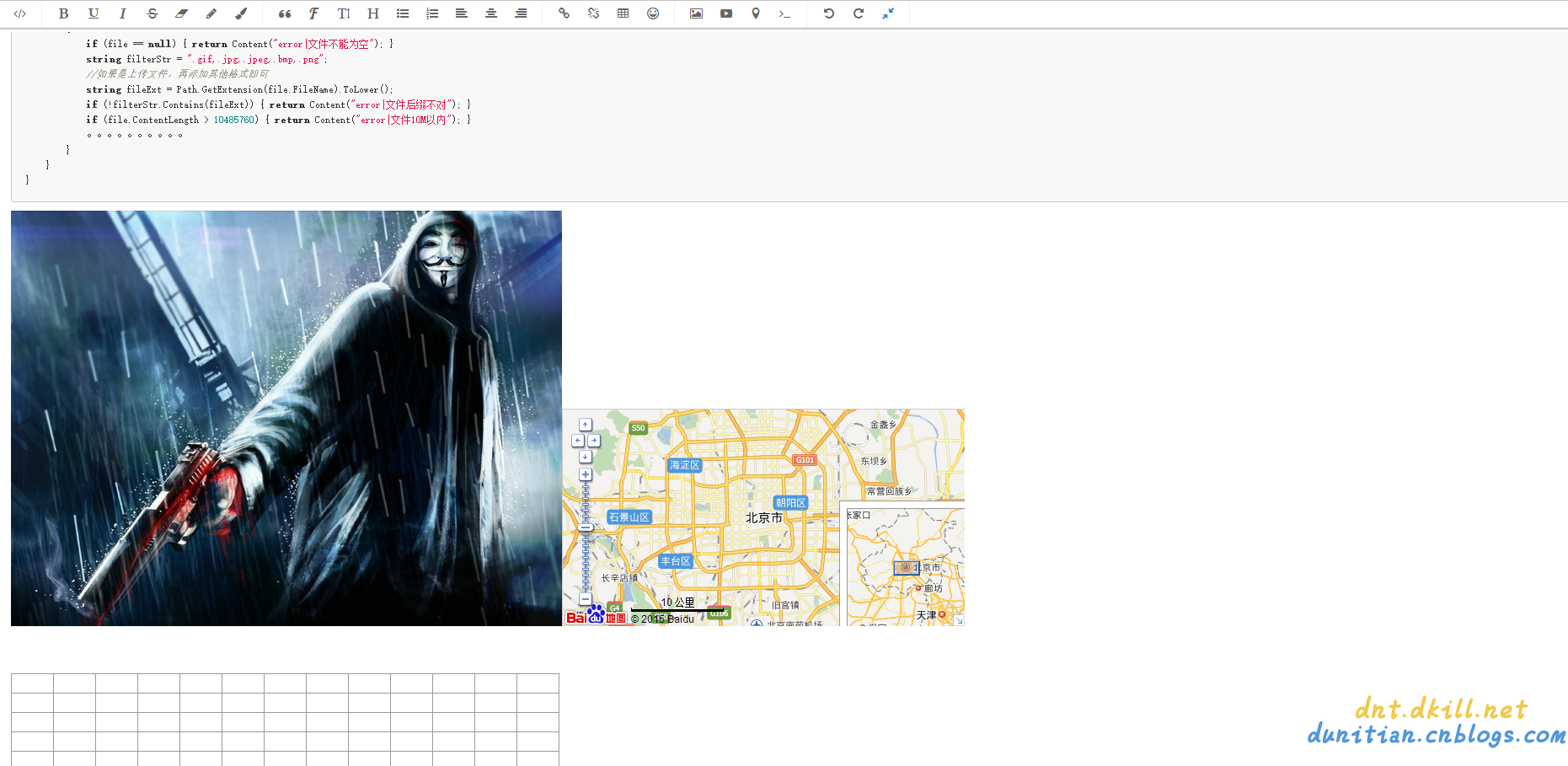
基本上常用功能都有了,下面说下完整的demo:
前端案例:
<!DOCTYPE html>

<html>

<head>

    <meta http-equiv="Content-Type" content="text/html; charset=utf-8" />

    <title>WangEditor</title>

    <meta charset="utf-8" />

    <link href="Script/WangEditor/css/wangEditor.min.css" rel="stylesheet" />

</head>

<body>

    <div id="edit" style="min-height:20em"></div>

    <br />

    <input id="btn1" type="button" value="获取HTML" />

    <input id="btn2" type="button" value="获取Text" />

    <div id="msg"></div>

    <script src="//cdn.bootcss.com/jquery/1.10.2/jquery.min.js"></script>

    <script src="Script/jquery-1.8.3.min.js"></script>

    <script src="Script/WangEditor/js/wangEditor.min.js"></script>

    <script type="text/javascript">

        var editor = new wangEditor('edit');

        // 上传图片路径

        editor.config.uploadImgUrl = '/Home/Upload';

        // 设置统一参数名

        editor.config.uploadImgFileName = 'file';

        //编辑器创建

        editor.create();

        $('#btn1').click(function () {

            // 获取编辑器区域完整html代码

            var html = editor.$txt.html();

            $('#msg').html(html);

        });

        $('#btn2').click(function () {

            // 获取编辑器纯文本内容

            var text = editor.$txt.text();

            // 获取格式化后的纯文本

            //var formatText = editor.$txt.formatText();

            $('#msg').html(text);

        });

    </script>

</body>

</html>
后端代码:(自己写的,如果有什么问题欢迎联系我)
/// <summary>

        /// 图片上传

        /// </summary>

        /// <returns></returns>

        public ContentResult Upload(HttpPostedFileBase file)

        {

            if (file == null) { return Content("error|文件不能为空"); }

            if (file.ContentLength > 10485760) { return Content("error|文件10M以内"); }

            //如果是上传文件,再添加其他格式即可

            string filterStr = ".gif,.jpg,.jpeg,.bmp,.png";

            string fileExt = Path.GetExtension(file.FileName).ToLower();

            if (!filterStr.Contains(fileExt)) { return Content("error|文件后缀不对"); }

            //防止黑客恶意绕过,从根本上判断下文件后缀

            if (!file.InputStream.CheckingExt())

            {

                //todo:一次危险记录

                return Content("error|文件后缀不对");

            }

            //todo: md5判断一下文件是否已经上传过,如果已经上传直接返回 return Content(缩略图地址#sqlPath);

            string path = string.Format("{0}/{1}", "/lotFiles", DateTime.Now.ToString("yyyy-MM-dd"));

            string fileName = string.Format("{0}{1}", Guid.NewGuid().ToString("N"), fileExt);

            string sqlPath = string.Format("{0}/{1}", path, fileName);

            string dirPath = Request.MapPath(path);

            if (!Directory.Exists(dirPath)) { Directory.CreateDirectory(dirPath); }

            try

            {

                //todo:未来写缩略图的代码

                file.SaveAs(Path.Combine(dirPath, fileName));

                //todo: 未来写存数据库的Code

            }

            catch { return Content("error|文件保存失败"); }

            return Content(string.Format("{0}#{1}", sqlPath, sqlPath));//第一个sqlPath以后换成缩略图的地址

        }
/// <summary>

    /// 判断扩展名是否是指定类型---默认是判断图片格式,符合返回true(没有释放stream,请手动:file.InputStream.Dispose();)

    /// eg:图片+压缩+文档:"7173", "255216", "6677", "13780", "8297", "55122", "8075", "208207"

    /// eg:img,"7173", "255216", "6677", "13780" //gif  //jpg  //bmp //png

    /// eg:file,"8297", "55122", "8075", "208207" //rar //7z //zip + 文档系列

    /// </summary>

    /// <param name="stream">文件流</param>

    /// <param name="fileTypes">文件扩展名</param>

    /// <returns></returns>

    public static bool CheckingExt(this Stream stream, params string[] fileTypes)

    {

        if (fileTypes == null || fileTypes.Length == 0) { fileTypes = new string[] { "7173", "255216", "6677", "13780" }; }

        bool result = false;

        string fileclass = "";

        #region 读取头两个字节

        var reader = new BinaryReader(stream);

        byte[] buff = new byte[2];

        try

        {

            reader.Read(buff, 0, 2);//读取每个文件的头两个字节

            fileclass = buff[0].ToString() + buff[1].ToString();

        }

        catch (System.Exception ex) { stream.Dispose(); reader.Dispose(); return false; }

        #endregion

        #region 校验

        for (int i = 0; i < fileTypes.Length; i++)

        {

            if (fileclass == fileTypes[i])

            {

                result = true;

                break;

            }

        }

        #endregion

        return result;

    }
完整demo:https://github.com/dunitian/LoTCodeBase/tree/master/NetCode/3.常用技能/03.Editor/03.WangEditor
07.LoT.UI 前后台通用框架分解系列之——轻巧的文本编辑器的更多相关文章
- 07.LoT.UI 前后台通用框架分解系列之——强大的文本编辑器
LOT.UI分解系列汇总:http://www.cnblogs.com/dunitian/p/4822808.html#lotui LoT.UI开源地址如下:https://github.com/du ...
- 04.LoT.UI 前后台通用框架分解系列之——轻巧的弹出框
LOT.UI分解系列汇总:http://www.cnblogs.com/dunitian/p/4822808.html#lotui LoT.UI开源地址如下:https://github.com/du ...
- 08.LoT.UI 前后台通用框架分解系列之——多样的Tag选择器
LOT.UI分解系列汇总:http://www.cnblogs.com/dunitian/p/4822808.html#lotui LoT.UI开源地址如下:https://github.com/du ...
- 06.LoT.UI 前后台通用框架分解系列之——浮夸的图片上传
LOT.UI分解系列汇总:http://www.cnblogs.com/dunitian/p/4822808.html#lotui LoT.UI开源地址如下:https://github.com/du ...
- 01.LoT.UI 前后台通用框架分解系列之——小图片背景全屏显示(可自动切换背景)
LOT.UI分解系列汇总:http://www.cnblogs.com/dunitian/p/4822808.html#lotui LoT.UI开源地址如下:https://github.com/du ...
- 02.LoT.UI 前后台通用框架分解系列之——灵活的菜单栏
LOT.UI分解系列汇总:http://www.cnblogs.com/dunitian/p/4822808.html#lotui LoT.UI开源地址如下:https://github.com/du ...
- 03.LoT.UI 前后台通用框架分解系列之——多样的表格
LOT.UI分解系列汇总:http://www.cnblogs.com/dunitian/p/4822808.html#lotui LoT.UI开源地址如下:https://github.com/du ...
- 05.LoT.UI 前后台通用框架分解系列之——漂亮的时间选择器
LOT.UI分解系列汇总:http://www.cnblogs.com/dunitian/p/4822808.html#lotui LoT.UI开源地址如下:https://github.com/du ...
- js ui框架 My97日期控件 富文本编辑器
My97日期控件 http://www.my97.net/dp/index.asp 富文本编辑器 http://www.kindsoft.net/demo.php 百度的magic也不错 http:/ ...
随机推荐
- 理解CSS视觉格式化
前面的话 CSS视觉格式化这个词可能比较陌生,但说起盒模型可能就恍然大悟了.实际上,盒模型只是CSS视觉格式化的一部分.视觉格式化分为块级和行内两种处理方式.理解视觉格式化,可以确定得到的效果是应 ...
- 02.LoT.UI 前后台通用框架分解系列之——灵活的菜单栏
LOT.UI分解系列汇总:http://www.cnblogs.com/dunitian/p/4822808.html#lotui LoT.UI开源地址如下:https://github.com/du ...
- C# 多种方式发送邮件(附帮助类)
因项目业务需要,需要做一个发送邮件功能,查了下资料,整了整,汇总如下,亲测可用- QQ邮箱发送邮件 #region 发送邮箱 try { MailMessage mail = new MailMess ...
- 关于Android避免按钮重复点击事件
最近测试人员测试我们的APP的时候,喜欢快速点击某个按钮,出现一个页面出现多次,测试人员能不能禁止这样.我自己点击了几下,确实存在这个问题,也感觉用户体验不太好.于是乎后来我搜了下加一个方法放在我们U ...
- 步入angularjs directive(指令)--准备工作熟悉hasOwnProperty
在讲解directive之前,先做一下准备工作,为何要这样呢? 因为我们不是简单的说说directive怎么用,还要知道为什么这么用!(今天我们先磨磨刀!). 首先我们讲讲js 基础的知识--hasO ...
- JavaScript 常量定义
相信同学们在看见这个标题的时候就一脸懵逼了,什么?JS能常量定义?别逗我好吗?确切的说,JS当中确实没有常量(ES6中好像有了常量定义的关键字),但是深入一下我们可以发现JS很多不为人知的性质,好好利 ...
- 小兔JS教程(三)-- 彻底攻略JS回调函数
这一讲来谈谈回调函数. 其实一句话就能概括这个东西: 回调函数就是把一个函数当做参数,传入另一个函数中.传进去的目的仅仅是为了在某个时刻去执行它. 如果不执行,那么你传一个函数进去干嘛呢? 就比如说对 ...
- nodejs操作arduino入门(javascript操作底层硬件)
用Javascript来操作硬件早就不是一件稀奇的事情了. 所以作为一名电子专业出身的FE,我也打算尝试一下用js来驱动arduino: 要想操作这些底层硬件,肯定是需要一些工具的,我这里介绍的工具主 ...
- springmvc 多数据源 SSM java redis shiro ehcache 头像裁剪
获取下载地址 QQ 313596790 A 调用摄像头拍照,自定义裁剪编辑头像 B 集成代码生成器 [正反双向](单表.主表.明细表.树形表,开发利器)+快速构建表单; 技术:31359679 ...
- firebug不能加载JS文件 ,无法进行JS脚本调试
提示: 本页面不包含 Javascript 如果 <script> 标签有 "type" 属性,其值应为 "text/javascript" 或者& ...