
07.LoT.UI 前后台通用框架分解系列之——轻巧的文本编辑器
LoT.UI汇总:http://www.cnblogs.com/dunitian/p/4822808.html#lotui
上次说的是强大的百度编辑器 http://www.cnblogs.com/dunitian/p/5551701.html 这次说下简洁版而又不失功能的WangEditor
先看看效果
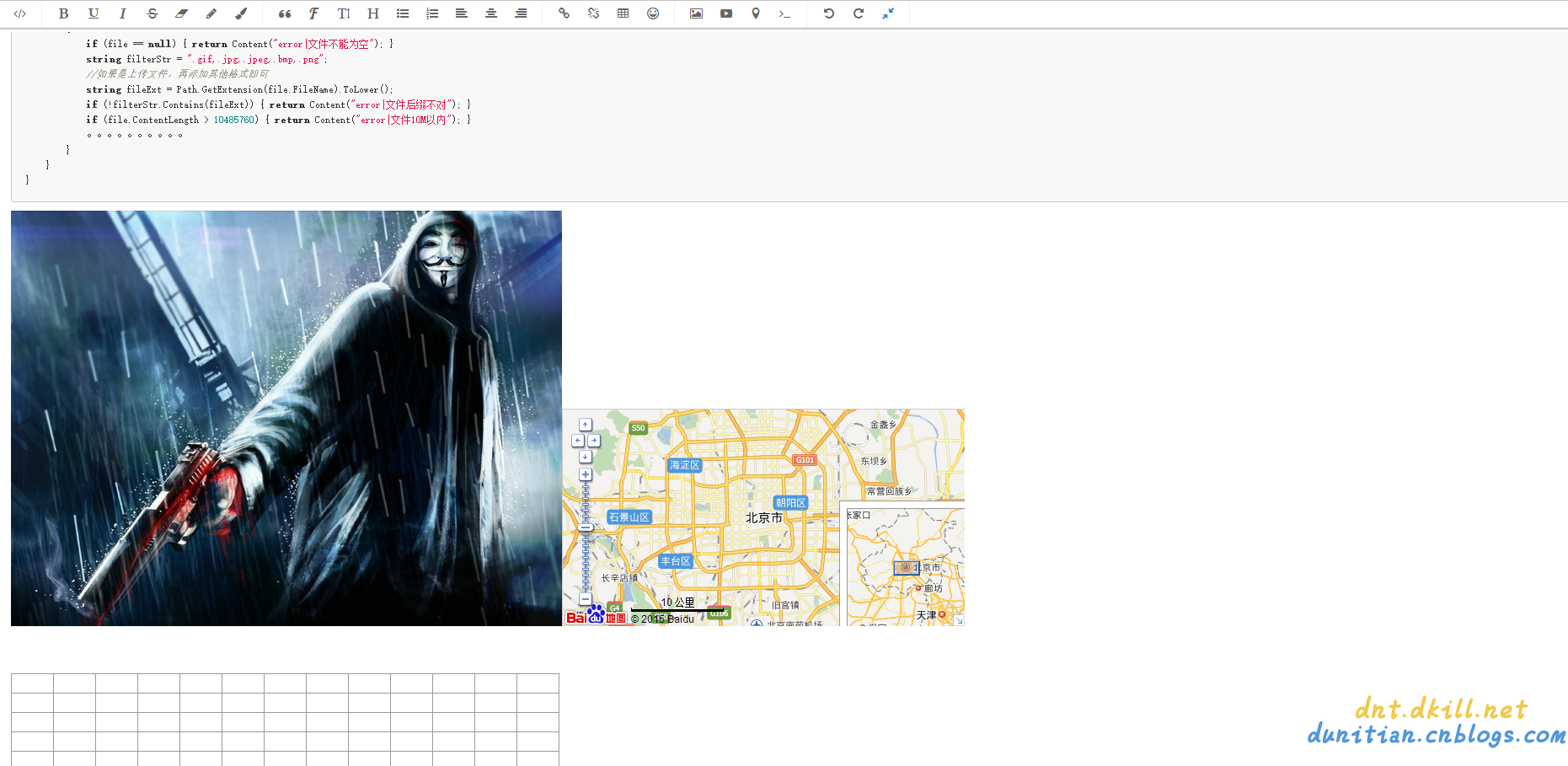
基本上常用功能都有了,下面说下完整的demo:
前端案例:
<!DOCTYPE html>

<html>

<head>

    <meta http-equiv="Content-Type" content="text/html; charset=utf-8" />

    <title>WangEditor</title>

    <meta charset="utf-8" />

    <link href="Script/WangEditor/css/wangEditor.min.css" rel="stylesheet" />

</head>

<body>

    <div id="edit" style="min-height:20em"></div>

    <br />

    <input id="btn1" type="button" value="获取HTML" />

    <input id="btn2" type="button" value="获取Text" />

    <div id="msg"></div>

    <script src="//cdn.bootcss.com/jquery/1.10.2/jquery.min.js"></script>

    <script src="Script/jquery-1.8.3.min.js"></script>

    <script src="Script/WangEditor/js/wangEditor.min.js"></script>

    <script type="text/javascript">

        var editor = new wangEditor('edit');

        // 上传图片路径

        editor.config.uploadImgUrl = '/Home/Upload';

        // 设置统一参数名

        editor.config.uploadImgFileName = 'file';

        //编辑器创建

        editor.create();

        $('#btn1').click(function () {

            // 获取编辑器区域完整html代码

            var html = editor.$txt.html();

            $('#msg').html(html);

        });

        $('#btn2').click(function () {

            // 获取编辑器纯文本内容

            var text = editor.$txt.text();

            // 获取格式化后的纯文本

            //var formatText = editor.$txt.formatText();

            $('#msg').html(text);

        });

    </script>

</body>

</html>
后端代码:(自己写的,如果有什么问题欢迎联系我)
/// <summary>

        /// 图片上传

        /// </summary>

        /// <returns></returns>

        public ContentResult Upload(HttpPostedFileBase file)

        {

            if (file == null) { return Content("error|文件不能为空"); }

            if (file.ContentLength > 10485760) { return Content("error|文件10M以内"); }

            //如果是上传文件,再添加其他格式即可

            string filterStr = ".gif,.jpg,.jpeg,.bmp,.png";

            string fileExt = Path.GetExtension(file.FileName).ToLower();

            if (!filterStr.Contains(fileExt)) { return Content("error|文件后缀不对"); }

            //防止黑客恶意绕过,从根本上判断下文件后缀

            if (!file.InputStream.CheckingExt())

            {

                //todo:一次危险记录

                return Content("error|文件后缀不对");

            }

            //todo: md5判断一下文件是否已经上传过,如果已经上传直接返回 return Content(缩略图地址#sqlPath);

            string path = string.Format("{0}/{1}", "/lotFiles", DateTime.Now.ToString("yyyy-MM-dd"));

            string fileName = string.Format("{0}{1}", Guid.NewGuid().ToString("N"), fileExt);

            string sqlPath = string.Format("{0}/{1}", path, fileName);

            string dirPath = Request.MapPath(path);

            if (!Directory.Exists(dirPath)) { Directory.CreateDirectory(dirPath); }

            try

            {

                //todo:未来写缩略图的代码

                file.SaveAs(Path.Combine(dirPath, fileName));

                //todo: 未来写存数据库的Code

            }

            catch { return Content("error|文件保存失败"); }

            return Content(string.Format("{0}#{1}", sqlPath, sqlPath));//第一个sqlPath以后换成缩略图的地址

        }
/// <summary>

    /// 判断扩展名是否是指定类型---默认是判断图片格式,符合返回true(没有释放stream,请手动:file.InputStream.Dispose();)

    /// eg:图片+压缩+文档:"7173", "255216", "6677", "13780", "8297", "55122", "8075", "208207"

    /// eg:img,"7173", "255216", "6677", "13780" //gif  //jpg  //bmp //png

    /// eg:file,"8297", "55122", "8075", "208207" //rar //7z //zip + 文档系列

    /// </summary>

    /// <param name="stream">文件流</param>

    /// <param name="fileTypes">文件扩展名</param>

    /// <returns></returns>

    public static bool CheckingExt(this Stream stream, params string[] fileTypes)

    {

        if (fileTypes == null || fileTypes.Length == 0) { fileTypes = new string[] { "7173", "255216", "6677", "13780" }; }

        bool result = false;

        string fileclass = "";

        #region 读取头两个字节

        var reader = new BinaryReader(stream);

        byte[] buff = new byte[2];

        try

        {

            reader.Read(buff, 0, 2);//读取每个文件的头两个字节

            fileclass = buff[0].ToString() + buff[1].ToString();

        }

        catch (System.Exception ex) { stream.Dispose(); reader.Dispose(); return false; }

        #endregion

        #region 校验

        for (int i = 0; i < fileTypes.Length; i++)

        {

            if (fileclass == fileTypes[i])

            {

                result = true;

                break;

            }

        }

        #endregion

        return result;

    }
完整demo:https://github.com/dunitian/LoTCodeBase/tree/master/NetCode/3.常用技能/03.Editor/03.WangEditor
07.LoT.UI 前后台通用框架分解系列之——轻巧的文本编辑器的更多相关文章
- 07.LoT.UI 前后台通用框架分解系列之——强大的文本编辑器
LOT.UI分解系列汇总:http://www.cnblogs.com/dunitian/p/4822808.html#lotui LoT.UI开源地址如下:https://github.com/du ...
- 04.LoT.UI 前后台通用框架分解系列之——轻巧的弹出框
LOT.UI分解系列汇总:http://www.cnblogs.com/dunitian/p/4822808.html#lotui LoT.UI开源地址如下:https://github.com/du ...
- 08.LoT.UI 前后台通用框架分解系列之——多样的Tag选择器
LOT.UI分解系列汇总:http://www.cnblogs.com/dunitian/p/4822808.html#lotui LoT.UI开源地址如下:https://github.com/du ...
- 06.LoT.UI 前后台通用框架分解系列之——浮夸的图片上传
LOT.UI分解系列汇总:http://www.cnblogs.com/dunitian/p/4822808.html#lotui LoT.UI开源地址如下:https://github.com/du ...
- 01.LoT.UI 前后台通用框架分解系列之——小图片背景全屏显示(可自动切换背景)
LOT.UI分解系列汇总:http://www.cnblogs.com/dunitian/p/4822808.html#lotui LoT.UI开源地址如下:https://github.com/du ...
- 02.LoT.UI 前后台通用框架分解系列之——灵活的菜单栏
LOT.UI分解系列汇总:http://www.cnblogs.com/dunitian/p/4822808.html#lotui LoT.UI开源地址如下:https://github.com/du ...
- 03.LoT.UI 前后台通用框架分解系列之——多样的表格
LOT.UI分解系列汇总:http://www.cnblogs.com/dunitian/p/4822808.html#lotui LoT.UI开源地址如下:https://github.com/du ...
- 05.LoT.UI 前后台通用框架分解系列之——漂亮的时间选择器
LOT.UI分解系列汇总:http://www.cnblogs.com/dunitian/p/4822808.html#lotui LoT.UI开源地址如下:https://github.com/du ...
- js ui框架 My97日期控件 富文本编辑器
My97日期控件 http://www.my97.net/dp/index.asp 富文本编辑器 http://www.kindsoft.net/demo.php 百度的magic也不错 http:/ ...
随机推荐
- ABP入门系列(1)——学习Abp框架之实操演练
作为.Net工地搬砖长工一名,一直致力于挖坑(Bug)填坑(Debug),但技术却不见长进.也曾热情于新技术的学习,憧憬过成为技术大拿.从前端到后端,从bootstrap到javascript,从py ...
- webpack之傻瓜式教程
接触webpack也有挺长一段时间了,公司的项目也是一直用着webpack在打包处理,但前几天在教新人的情况下,遇到了一个问题,那就是:尽管网上的webpack教程满天飞,但是却很难找到一个能让新人快 ...
- 微信应用号(小程序)开发IDE配置(第一篇)
2016年9月22日凌晨,微信宣布“小程序”问世,当然只是开始内测了,微信公众平台对200个服务号发送了小程序内测邀请.那么什么是“小程序”呢,来看微信之父怎么说 看完之后,相信大家大概都有些明白了吧 ...
- CMS模板应用调研问卷
截止目前,已经有数十家网站与我们合作,进行了MIP化改造,在搜索结果页也能看到"闪电标"的出现.除了改造方面的问题,MIP项目组被问到最多的就是:我用了wordpress,我用了织 ...
- 移动站应该尝试百度MIP的五个原因
MIP是什么?MIP是百度在2016年提出的移动网页加速器项目. MIP能做什么?MIP能帮助站长和网站开发者快速搭建移动端页面. MIP怎么加速?MIP从前端渲染和页面网络传输两方面进行优化,杜绝页 ...
- web全栈开发之网站开发二(弹出式登录注册框前端实现-类腾讯)
这次给大家分享的是目前很多网站中流行的弹出式登录框,如下面的腾讯网登录界面,采用弹出式登录的好处是大大提升了网站的用户体验和交互性,用户不用重新跳转到指定的页面就能登录,非常方便 先来个演示地址 要实 ...
- .NET平台开源项目速览(15)文档数据库RavenDB-介绍与初体验
不知不觉,“.NET平台开源项目速览“系列文章已经15篇了,每一篇都非常受欢迎,可能技术水平不高,但足够入门了.虽然工作很忙,但还是会抽空把自己知道的,已经平时遇到的好的开源项目分享出来.今天就给大家 ...
- 【Oracle 集群】ORACLE DATABASE 11G RAC 知识图文详细教程之集群概念介绍(一)
集群概念介绍(一)) 白宁超 2015年7月16日 概述:写下本文档的初衷和动力,来源于上篇的<oracle基本操作手册>.oracle基本操作手册是作者研一假期对oracle基础知识学习 ...
- Java程序:从命令行接收多个数字,求和并输出结果
一.设计思想:由于命令行接收的是字符串类型,因此应先将字符串类型转化为整型或其他字符型,然后利用for循环求和并输出结果 二.程序流程图: 三.源程序代码: //王荣荣 2016/9/23 ...
- Lind.DDD.LindMQ~关于持久化到Redis的消息格式
回到目录 关于持久化到Redis的消息格式,主要是说在Broker上把消息持久化的过程中,需要存储哪些类型的消息,因为我们的消息是分topic的,而每个topic又有若干个queue组成,而我们的to ...