
使用UIBezierPath绘制图形
当需要画图时我们一般创建一个UIView子类, 重写其中的drawRect方法
再drawRect方法中利用UIBezierPath添加画图
UIBezierPath的使用方法:
#import "BezierView.h"

@implementation BezierView

- (void)drawRect:(CGRect)rect {

    // Drawing code

    //设置线条颜色

    UIColor *color = [UIColor redColor];

    [color set];

    //创建UIBezierPath

    UIBezierPath *apath = ({

        UIBezierPath *path = [UIBezierPath bezierPath];

        path.lineWidth     = 5.0f;              //设置线条宽度

        path.lineCapStyle  = kCGLineCapRound;   //设置拐角

        path.lineJoinStyle = kCGLineCapRound;  //终点处理

        //设置起始点

        [path moveToPoint:CGPointMake(, )];

        //增加线条

        [path addLineToPoint:CGPointMake(, )];

        [path addLineToPoint:CGPointMake(, )];

        [path addLineToPoint:CGPointMake(, )];

        [path addLineToPoint:CGPointMake(, )];

        //关闭路径

        [path closePath];

        path;

    });

    //根据坐标连线

    [apath stroke];

}
然后把自定义的View添加到Controller中
#import "ViewController.h"

#import "BezierView.h"

#define SCREEN_WIDTH [UIScreen mainScreen].bounds.size.width

#define SCREEN_HEIGHT [UIScreen mainScreen].bounds.size.height

@interface ViewController ()

@end

@implementation ViewController

- (void)viewDidLoad {

    [super viewDidLoad];

    BezierView *beView     = [[BezierView alloc] initWithFrame:\

                                CGRectMake(, , SCREEN_WIDTH, SCREEN_HEIGHT)];

    beView.backgroundColor = [UIColor whiteColor];

    [self.view addSubview:beView];

}

@end
运行结果能看到一个多边形

如果把drawRect中最后一句话改为[apath fill];运行结果就是实心图

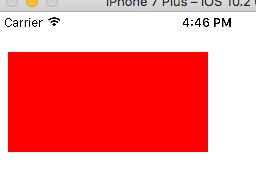
我们可以用UIBezierPath的bezierPathWithRect:CGRect(rect)方法来画矩形, 代码如下
- (void)drawRect:(CGRect)rect {

    // Drawing code

    //设置线条颜色

    UIColor *color = [UIColor redColor];

    [color set];

    //创建UIBezierPath

    UIBezierPath *apath = [UIBezierPath bezierPathWithRect:CGRectMake(, , , )];

    //更具坐标连线

    [apath fill];

}
运行结果:
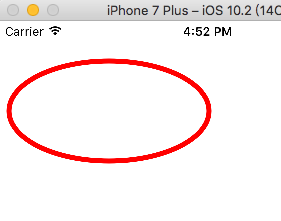
我们可以用UIBezierPath的bezierPathWithOvallInRect:CGRect(rect)方法来画圆形和椭圆, 代码如下
- (void)drawRect:(CGRect)rect {

    // Drawing code

    //设置线条颜色

    UIColor *color = [UIColor redColor];

    [color set];

    //创建UIBezierPath

    UIBezierPath *apath = [UIBezierPath bezierPathWithOvalInRect:CGRectMake(, , , )];

    apath.lineWidth     = 5.0f;

    apath.lineCapStyle  = kCGLineCapRound;

    apath.lineJoinStyle = kCGLineCapRound;

    //更具坐标连线

    [apath stroke];

}
运行结果:
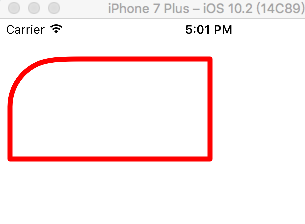
用下面这个方法画带指定远角的矩形
+ (instancetype)bezierPathWithRoundedRect:(CGRect)rect byRoundingCorners:(UIRectCorner)corners cornerRadii:(CGSize)cornerRadii;
上代码:
- (void)drawRect:(CGRect)rect {

    // Drawing code

    //设置线条颜色

    UIColor *color = [UIColor redColor];

    [color set];

    //创建UIBezierPath

    UIBezierPath *apath = [UIBezierPath bezierPathWithRoundedRect:CGRectMake(, , , )

                                                byRoundingCorners:UIRectCornerTopLeft

                                                      cornerRadii:CGSizeMake(, )];

    apath.lineWidth     = 5.0f;

    apath.lineCapStyle  = kCGLineCapRound;

    apath.lineJoinStyle = kCGLineCapRound;

    //更具坐标连线

    [apath stroke];

}
运行结果:
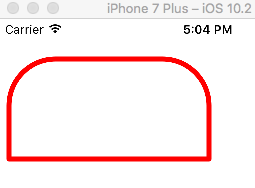
如果要设置多个圆角的话就给byRoundingCorners多设置几个角度, 角度可选如下
typedef NS_OPTIONS(NSUInteger, UIRectCorner) {

    UIRectCornerTopLeft     =  << ,

    UIRectCornerTopRight    =  << ,

    UIRectCornerBottomLeft  =  << ,

    UIRectCornerBottomRight =  << ,

    UIRectCornerAllCorners  = ~0UL

};
例如:
UIBezierPath *apath = [UIBezierPath bezierPathWithRoundedRect:CGRectMake(, , , )

                                                byRoundingCorners:UIRectCornerTopLeft | UIRectCornerTopRight

                                                      cornerRadii:CGSizeMake(, )];
就有两个圆角
也可以用下面这个方法画圆弧
+ (instancetype)bezierPathWithArcCenter:(CGPoint)center //圆心坐标
radius:(CGFloat)radius //半径
startAngle:(CGFloat)startAngle //弧形开始的角度
endAngle:(CGFloat)endAngle //弧形结束的角度
clockwise:(BOOL)clockwise; //正向还是反向画弧
上代码:
- (void)drawRect:(CGRect)rect {

    // Drawing code

    //设置线条颜色

    UIColor *color = [UIColor redColor];

    [color set];

    //创建UIBezierPath

    UIBezierPath *apath = [UIBezierPath bezierPathWithArcCenter:CGPointMake(, )

                                                         radius: startAngle:M_PI /

                                                       endAngle:M_PI

                                                      clockwise:YES];

    apath.lineWidth     = 5.0f;

    apath.lineCapStyle  = kCGLineCapRound;

    apath.lineJoinStyle = kCGLineCapRound;

    //更具坐标连线

    [apath stroke];

}
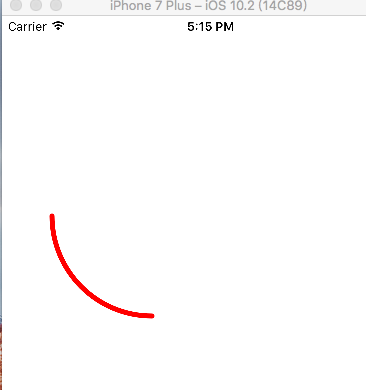
运行结果如下
还可以直接在path中添加圆形段
[path addArcWithCenter:CGPointMake(, )

                        radius: startAngle:M_PI /

                      endAngle:M_PI clockwise:YES];
最后附上UIBezierPath画圆弧时段坐标系

另外UIBezierPath可以画贝赛尔曲线
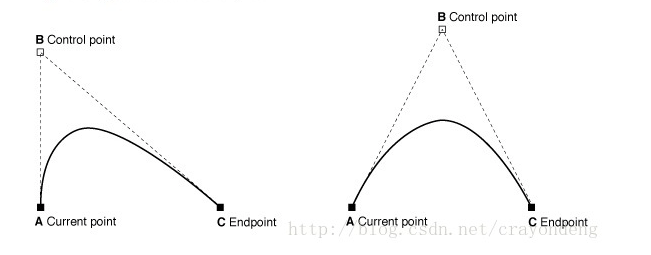
下面是添加二次贝赛尔曲线的方法
- (void)addQuadCurveToPoint:(CGPoint)endPoint controlPoint:(CGPoint)controlPoint;
上代码:
- (void)drawRect:(CGRect)rect {

    // Drawing code

    //设置线条颜色

    UIColor *color = [UIColor redColor];

    [color set];

    //创建UIBezierPath

    UIBezierPath *apath = ({

        UIBezierPath *path = [UIBezierPath bezierPath];

        path.lineWidth     = 2.0f;              //设置线条宽度

        //path.lineCapStyle = kCGLineCapRound;   //设置拐角

        //绘制二次贝赛尔曲线

        //设置起始点

        [path moveToPoint:CGPointMake(, )];

        //设置EndPoint & Control Point

        [path addQuadCurveToPoint:CGPointMake(, ) controlPoint:CGPointMake(, )];

        path;

    });

    //更具坐标连线

    [apath stroke];

}
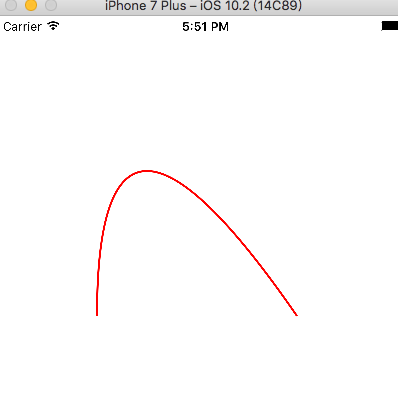
运行结果为:
可以参照下面这张图看看每个点的定义
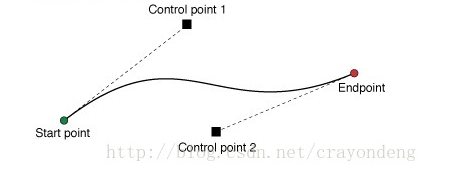
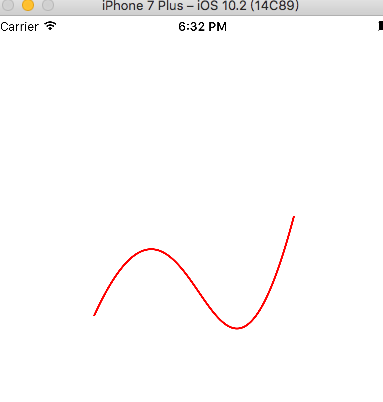
三次贝赛尔曲线会有2个控制点
上代码:
- (void)drawRect:(CGRect)rect {

    // Drawing code

    //设置线条颜色

    UIColor *color = [UIColor redColor];

    [color set];

    //创建UIBezierPath

    UIBezierPath *apath = ({

        UIBezierPath *path = [UIBezierPath bezierPath];

        path.lineWidth     = 2.0f;              //设置线条宽度

        //绘制三次贝赛尔曲线

        //设置起始点

        [path moveToPoint:CGPointMake(, )];

        //设置EndPoint & Control Point

        [path addCurveToPoint:CGPointMake(, )

                controlPoint1:CGPointMake(, )

                controlPoint2:CGPointMake(, )];

        path;

    });

    //更具坐标连线

    [apath stroke];

}
运行结果:
使用UIBezierPath绘制图形的更多相关文章
- 11-UIKit(Storyboard、View的基本概念、绘制图形、UIBezierPath)
目录: 1. Storyboard 2. Views 3. View的基本概念介绍 4. 绘制图形 5. UIBezierPath 回到顶部 1. Storyboard 1.1 静态表视图 1)Sec ...
- CSS 魔法系列:纯 CSS 绘制图形(心形、六边形等)
<CSS 魔法系列>继续给大家带来 CSS 在网页中以及图形绘制中的使用.这篇文章给大家带来的是纯 CSS 绘制五角星.六角形.五边形.六边形.心形等等. 我们的网页因为 CSS 而呈现千 ...
- html5 Canvas绘制图形入门详解
html5,这个应该就不需要多作介绍了,只要是开发人员应该都不会陌生.html5是「新兴」的网页技术标准,目前,除IE8及其以下版本的IE浏览器之外,几乎所有主流浏览器(FireFox.Chrome. ...
- html5 canvas 笔记一(基本用法与绘制图形)
<canvas> 元素 <canvas id="tutorial" width="150" height="150"> ...
- WPF2D绘制图形方法
我们先看看效果如何: xaml文件: <Window x:Class="WPF2D绘制图形方法.MainWindow" xmlns="http://schemas. ...
- HTML5—canvas绘制图形(1)
1.canvas基础知识 canvas元素是HTML5中新增的一个重要的元素,专门用来绘制图形,不过canvas本身不具备画图的能力,在页面中放置了canvas元素,就相当于在页面中放置了一块矩形的“ ...
- 【canvas学习笔记二】绘制图形
上一篇我们已经讲述了canvas的基本用法,学会了构建canvas环境.现在我们就来学习绘制一些基本图形. 坐标 canvas的坐标原点在左上角,从左到右X轴坐标增加,从上到下Y轴坐标增加.坐标的一个 ...
- HTML5使用Canvas来绘制图形
一.Canvas标签: 1.HTML5<canvas>元素用于图形的绘制,通过脚本(通常是javascript)来完成. 2.<canvas>标签只是图形容器,必须使用脚本来绘 ...
- canvas 绘制图形
canvas 绘制图形: 注意: canvas 的宽高设置在行内,否则会使画布(canvas)产生扭曲,绘图变形: <!DOCTYPE html> <html lang=" ...
随机推荐
- C# 正则表达式大全
文章导读 正则表达式的本质是使用一系列特殊字符模式,来表示某一类字符串.正则表达式无疑是处理文本最有力的工具,而.NET提供的Regex类实现了验证正则表达式的方法.Regex 类表示不可变(只读)的 ...
- 获取Canvas当前坐标系矩阵
前言 在我的另一篇博文 Canvas坐标系转换 中,我们知道了所有的平移缩放旋转操作都会影响到画布坐标系.那在我们对画布进行了一系列操作之后,怎么再知道当前矩阵数据状态呢. 具体代码 首先请看下面的一 ...
- 高频交易算法研发心得--MACD指标算法及应用
凤鸾宝帐景非常,尽是泥金巧样妆. 曲曲远山飞翠色:翩翩舞袖映霞裳. 梨花带雨争娇艳:芍药笼烟骋媚妆. 但得妖娆能举动,取回长乐侍君王. [摘自<封神演义>纣王在女娲宫上香时题的诗] 一首定 ...
- 《JavaScript设计模式 张》整理
最近在研读另外一本关于设计模式的书<JavaScript设计模式>,这本书中描述了更多的设计模式. 一.创建型设计模式 包括简单工厂.工厂方法.抽象工厂.建造者.原型和单例模式. 1)简单 ...
- ASP.NET Core 中文文档 第四章 MVC(4.1)Controllers, Actions 和 Action Results
原文:Controllers, Actions, and Action Results 作者:Steve Smith 翻译:姚阿勇(Dr.Yao) 校对:许登洋(Seay) Action 和 acti ...
- Linux命令【第一篇】
1.创建一个目录/data 记忆方法:英文make directorys缩写后就是mkdir. 命令: mkdir /data 或 cd /;mkdir data #提示:使用分号可以在一行内分割两个 ...
- 安装并使用PHPunit
安装并使用PHPunit Linux 下安装PHPunit PHP 档案包 (PHAR) 要获取 PHPUnit,最简单的方法是下载 PHPUnit 的 PHP 档案包 (PHAR),它将 PHPU ...
- linux下配置matlab运行环境(MCR)
在安装好的matlab下有MCR(MatlabCompilerRuntime)在matlab2011/toolbox/compiler/deploy/glnxa64下找到MCRInstaller.zi ...
- 一年之计在于春,2015开篇:PDF.NET SOD Ver 5.1完全开源
前言: 自从我2014年下半年到现在的某电商公司工作后,工作太忙,一直没有写过一篇博客,甚至连14年股票市场的牛市都错过了,现在马上要过年了,而今天又是立春节气,如果再不动手,那么明年这个无春的年,也 ...
- 从零开始,DIY一个jQuery(2)
在上篇文章我们简单实现了一个 jQuery 的基础结构,不过为了顺应潮流,这次咱把它改为模块化的写法,此举得以有效提升项目的可维护性,因此在后续也将以模块化形式进行持续开发. 模块化开发和编译需要用上 ...