
WPF实现简易计算器(MVVM、控件自定义样式)
WPF实现简易计算器(MVVM、控件自定义样式)
运行环境:VS2022 .Net framework4.8
完整项目:Gitee仓库
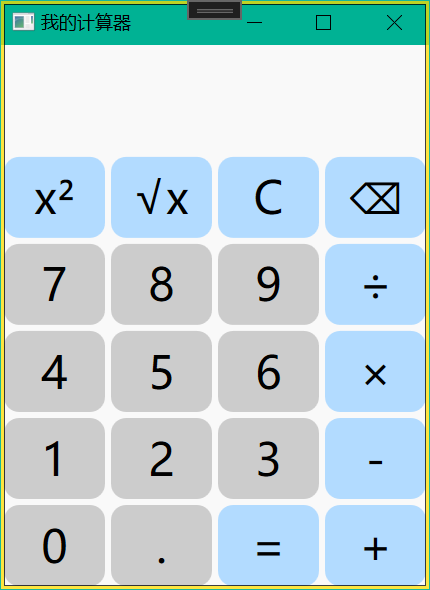
界面
界面如下图所示
文件结构
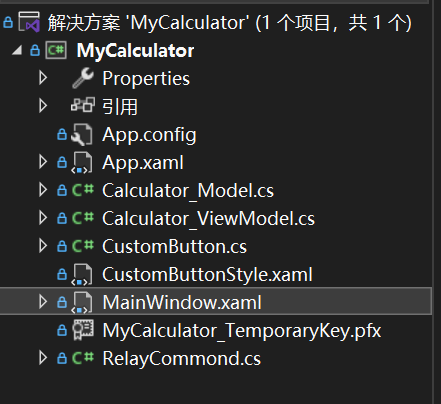
文件结构:
MVVM实现: Calculator_Model、Calculator_ViewModel、RelayCommond、MainWindow
控件自定义样式:CustomButton、CustomButtonStyle
详细如下图所示
项目代码
MainWindow.xaml
<Window x:Class="MyCalculator.MainWindow"

        xmlns="http://schemas.microsoft.com/winfx/2006/xaml/presentation"

        xmlns:x="http://schemas.microsoft.com/winfx/2006/xaml"

        xmlns:d="http://schemas.microsoft.com/expression/blend/2008"

        xmlns:mc="http://schemas.openxmlformats.org/markup-compatibility/2006"

        xmlns:local="clr-namespace:MyCalculator"

        mc:Ignorable="d"

        Title="我的计算器" Height="400" Width="300" MinHeight="400" MinWidth="300">

    <Grid Background="#f9f9f9">

        <Grid.RowDefinitions>

            <RowDefinition Height="2*"/>

            <RowDefinition Height="8*"/>

        </Grid.RowDefinitions>

        <Grid Grid.Row="0">

            <Grid.RowDefinitions>

                <RowDefinition Height="*"/>

                <RowDefinition Height="2*"/>

            </Grid.RowDefinitions>

            <TextBox Grid.Row="0" Text="{Binding Str1}" HorizontalAlignment="Right" FontSize="15" Foreground="#616161" BorderBrush="{x:Null}" BorderThickness="0" Background="#f9f9f9"/>

            <TextBox Grid.Row="1" Text="{Binding Str2}" HorizontalAlignment="Right" FontSize="30" Foreground="Black" BorderBrush="{x:Null}" BorderThickness="0" Background="#f9f9f9"/>

        </Grid>

        <Grid Grid.Row="1">

            <Grid.RowDefinitions>

                <RowDefinition Height="*"/>

                <RowDefinition Height="*"/>

                <RowDefinition Height="*"/>

                <RowDefinition Height="*"/>

                <RowDefinition Height="*"/>

            </Grid.RowDefinitions>

            <Grid.ColumnDefinitions>

                <ColumnDefinition Width="*"/>

                <ColumnDefinition Width="*"/>

                <ColumnDefinition Width="*"/>

                <ColumnDefinition Width="*"/>

            </Grid.ColumnDefinitions>

            <local:CustomButton Grid.Row="0" Grid.Column="0" Content="x²" Margin="2" FontSize="30" ButtonCornerRadius="10" Background="#b2dbff" BackgroundHover="#c5e4ff" BackgroundPress="#d9edff" Command="{Binding Powx}"/>

            <local:CustomButton Grid.Row="0" Grid.Column="1" Content="√x" Margin="2" FontSize="30" ButtonCornerRadius="10" Background="#b2dbff" BackgroundHover="#c5e4ff" BackgroundPress="#d9edff" Command="{Binding Sqrtx}"/>

            <local:CustomButton Grid.Row="0" Grid.Column="2" Content="C" Margin="2" FontSize="30" ButtonCornerRadius="10" Background="#b2dbff" BackgroundHover="#c5e4ff" BackgroundPress="#d9edff" Command="{Binding Clear}"/>

            <local:CustomButton Grid.Row="0" Grid.Column="3" Content="⌫" Margin="2" FontSize="30" ButtonCornerRadius="10" Background="#b2dbff" BackgroundHover="#c5e4ff" BackgroundPress="#d9edff" Command="{Binding Backspace}"/>

            <local:CustomButton Grid.Row="1" Grid.Column="0" Content="7" Margin="2" FontSize="30" ButtonCornerRadius="10" Background="#cccccc" BackgroundHover="#dddddd" BackgroundPress="#eeeeee" Command="{Binding Addnum7}"/>

            <local:CustomButton Grid.Row="1" Grid.Column="1" Content="8" Margin="2" FontSize="30" ButtonCornerRadius="10" Background="#cccccc" BackgroundHover="#dddddd" BackgroundPress="#eeeeee" Command="{Binding Addnum8}"/>

            <local:CustomButton Grid.Row="1" Grid.Column="2" Content="9" Margin="2" FontSize="30" ButtonCornerRadius="10" Background="#cccccc" BackgroundHover="#dddddd" BackgroundPress="#eeeeee" Command="{Binding Addnum9}"/>

            <local:CustomButton Grid.Row="1" Grid.Column="3" Content="÷" Margin="2" FontSize="30" ButtonCornerRadius="10" Background="#b2dbff" BackgroundHover="#c5e4ff" BackgroundPress="#d9edff" Command="{Binding Div}"/>

            <local:CustomButton Grid.Row="2" Grid.Column="0" Content="4" Margin="2" FontSize="30" ButtonCornerRadius="10" Background="#cccccc" BackgroundHover="#dddddd" BackgroundPress="#eeeeee" Command="{Binding Addnum4}"/>

            <local:CustomButton Grid.Row="2" Grid.Column="1" Content="5" Margin="2" FontSize="30" ButtonCornerRadius="10" Background="#cccccc" BackgroundHover="#dddddd" BackgroundPress="#eeeeee" Command="{Binding Addnum5}"/>

            <local:CustomButton Grid.Row="2" Grid.Column="2" Content="6" Margin="2" FontSize="30" ButtonCornerRadius="10" Background="#cccccc" BackgroundHover="#dddddd" BackgroundPress="#eeeeee" Command="{Binding Addnum6}"/>

            <local:CustomButton Grid.Row="2" Grid.Column="3" Content="×" Margin="2" FontSize="30" ButtonCornerRadius="10" Background="#b2dbff" BackgroundHover="#c5e4ff" BackgroundPress="#d9edff" Command="{Binding Mul}"/>

            <local:CustomButton Grid.Row="3" Grid.Column="0" Content="1" Margin="2" FontSize="30" ButtonCornerRadius="10" Background="#cccccc" BackgroundHover="#dddddd" BackgroundPress="#eeeeee" Command="{Binding Addnum1}"/>

            <local:CustomButton Grid.Row="3" Grid.Column="1" Content="2" Margin="2" FontSize="30" ButtonCornerRadius="10" Background="#cccccc" BackgroundHover="#dddddd" BackgroundPress="#eeeeee" Command="{Binding Addnum2}"/>

            <local:CustomButton Grid.Row="3" Grid.Column="2" Content="3" Margin="2" FontSize="30" ButtonCornerRadius="10" Background="#cccccc" BackgroundHover="#dddddd" BackgroundPress="#eeeeee" Command="{Binding Addnum3}"/>

            <local:CustomButton Grid.Row="3" Grid.Column="3" Content="-" Margin="2" FontSize="30" ButtonCornerRadius="10" Background="#b2dbff" BackgroundHover="#c5e4ff" BackgroundPress="#d9edff" Command="{Binding Sub}"/>

            <local:CustomButton Grid.Row="4" Grid.Column="0" Content="0" Margin="2" FontSize="30" ButtonCornerRadius="10" Background="#cccccc" BackgroundHover="#dddddd" BackgroundPress="#eeeeee" Command="{Binding Addnum0}"/>

            <local:CustomButton Grid.Row="4" Grid.Column="1" Content="." Margin="2" FontSize="30" ButtonCornerRadius="10" Background="#cccccc" BackgroundHover="#dddddd" BackgroundPress="#eeeeee" Command="{Binding AddDot}"/>

            <local:CustomButton Grid.Row="4" Grid.Column="2" Content="=" Margin="2" FontSize="30" ButtonCornerRadius="10" Background="#b2dbff" BackgroundHover="#c5e4ff" BackgroundPress="#d9edff" Command="{Binding Equ}"/>

            <local:CustomButton Grid.Row="4" Grid.Column="3" Content="+" Margin="2" FontSize="30" ButtonCornerRadius="10" Background="#b2dbff" BackgroundHover="#c5e4ff" BackgroundPress="#d9edff" Command="{Binding Plus}"/>

        </Grid>

    </Grid>

</Window>
Calculator_ViewModel.cs
using System;

using System.ComponentModel;

using System.Windows.Input;

namespace MyCalculator

{

    internal class Calculator_ViewModel : INotifyPropertyChanged

    {

        public event PropertyChangedEventHandler PropertyChanged;

        private void RaisePropertyChanged(string propertyName)

        {

            PropertyChangedEventHandler handler = PropertyChanged;

            if (handler != null) handler(this, new PropertyChangedEventArgs(propertyName));

        }

        //Model实例化

        private Calculator_Model _CalculatorM = new Calculator_Model();

        #region 声明数据

        /// <summary>

        /// 声明Model的数据

        /// </summary>

        public double Num1

        {

            get { return _CalculatorM.Num1; }

            set

            {

                _CalculatorM.Num1 = value;

                RaisePropertyChanged("Num1");

            }

        }

        public double Num2

        {

            get { return _CalculatorM.Num2; }

            set

            {

                _CalculatorM.Num2 = value;

                RaisePropertyChanged("Num2");

            }

        }

        public string Flag1

        {

            get { return _CalculatorM.Flag1; }

            set

            {

                _CalculatorM.Flag1 = value;

                RaisePropertyChanged("Flag1");

            }

        }

        public string Flag2

        {

            get { return _CalculatorM.Flag2; }

            set

            {

                _CalculatorM.Flag2 = value;

                RaisePropertyChanged("Flag2");

            }

        }

        public string Str1

        {

            get { return _CalculatorM.Str1; }

            set

            {

                _CalculatorM.Str1 = value;

                RaisePropertyChanged("Str1");

            }

        }

        public string Str2

        {

            get { return _CalculatorM.Str2; }

            set

            {

                _CalculatorM.Str2 = value;

                RaisePropertyChanged("Str2");

            }

        }

        #endregion

        /// <summary>

        /// 按钮控件函数

        /// </summary>

        void Btn_Addnum0()

        {

            if (Str1 != null && Str1.Contains("="))

            {

                Str1 = null;

                Str2 = "0";

            }

            else

            {

                Str2 = Str2 + "0";

            }

        }

        void Btn_Addnum1()

        {

            if (Str1 != null && Str1.Contains("="))

            {

                Str1 = null;

                Str2 = "1";

            }

            else

            {

                Str2 = Str2 + "1";

            }

        }

        void Btn_Addnum2()

        {

            if (Str1 != null && Str1.Contains("="))

            {

                Str1 = null;

                Str2 = "2";

            }

            else

            {

                Str2 = Str2 + "2";

            }

        }

        void Btn_Addnum3()

        {

            if (Str1 != null && Str1.Contains("="))

            {

                Str1 = null;

                Str2 = "3";

            }

            else

            {

                Str2 = Str2 + "3";

            }

        }

        void Btn_Addnum4()

        {

            if (Str1 != null && Str1.Contains("="))

            {

                Str1 = null;

                Str2 = "4";

            }

            else

            {

                Str2 = Str2 + "4";

            }

        }

        void Btn_Addnum5()

        {

            if (Str1 != null && Str1.Contains("="))

            {

                Str1 = null;

                Str2 = "5";

            }

            else

            {

                Str2 = Str2 + "5";

            }

        }

        void Btn_Addnum6()

        {

            if (Str1 != null && Str1.Contains("="))

            {

                Str1 = null;

                Str2 = "6";

            }

            else

            {

                Str2 = Str2 + "6";

            }

        }

        void Btn_Addnum7()

        {

            if (Str1 != null && Str1.Contains("="))

            {

                Str1 = null;

                Str2 = "7";

            }

            else

            {

                Str2 = Str2 + "7";

            }

        }

        void Btn_Addnum8()

        {

            if (Str1 != null && Str1.Contains("="))

            {

                Str1 = null;

                Str2 = "8";

            }

            else

            {

                Str2 = Str2 + "8";

            }

        }

        void Btn_Addnum9()

        {

            if (Str1 != null && Str1.Contains("="))

            {

                Str1 = null;

                Str2 = "9";

            }

            else

            {

                Str2 = Str2 + "9";

            }

        }

        void Btn_AddDot()

        {

            if (Str2 == null)

            {

                return;

            }

            else if (!Str2.Contains("."))

            {

                Str2 = Str2 + ".";

            }

        }

        void Btn_Powx()

        {

            Flag2 = "pow";

            if (Str2 != null && Str1 == null)

            {

                Str1 = $"pow({Str2})=";

                Num1 = double.Parse(Str2);

                Str2 = Math.Pow(Num1, 2).ToString();

            }

            else if (Str2 != null && (!Str1.Contains(Flag2)))

            {

                Str1 = $"pow({Str2})=";

                Num1 = double.Parse(Str2);

                Str2 = Math.Pow(Num1, 2).ToString();

            }

        }

        void Btn_Sqrtx()

        {

            Flag2 = "sqrt";

            if (Str2 != null && Str1 == null)

            {

                Str1 = $"sqrt({Str2})=";

                Num1 = double.Parse(Str2);

                Str2 = Math.Pow(Num1, 0.5).ToString();

            }

            else if (Str2 != null && (!Str1.Contains(Flag2)))

            {

                Str1 = $"sqrt({Str2})=";

                Num1 = double.Parse(Str2);

                Str2 = Math.Pow(Num1, 0.5).ToString();

            }

        }

        void Btn_Clear()

        {

            Num1 = 0;

            Num2 = 0;

            Str1 = null;

            Str2 = null;

            Flag1 = null;

            Flag2 = null;

        }

        void Btn_Backspace()

        {

            if (Str2 != null && Str2.Length > 1)

            {

                Str2 = Str2.Substring(0, Str2.Length - 1);

            }

            else

            {

                Str2 = null;

            }

        }

        void Btn_Plus()

        {

            Flag1 = "+";

            if ((Str1 == null && Str2 != null) || Str1.Contains("="))

            {

                Str1 = Str2 + "+";

                Str2 = null;

            }

            else if (Str1.Contains("-") || Str1.Contains("×") || Str1.Contains("÷"))

            {

                Str1 = Str1.Substring(0, Str1.Length - 1);

                Str1 = Str1 + "+";

            }

        }

        void Btn_Sub()

        {

            Flag1 = "-";

            if ((Str1 == null && Str2 != null) || Str1.Contains("="))

            {

                Str1 = Str2 + "-";

                Str2 = null;

            }

            else if (Str1.Contains("+") || Str1.Contains("×") || Str1.Contains("÷"))

            {

                Str1 = Str1.Substring(0, Str1.Length - 1);

                Str1 = Str1 + "-";

            }

        }

        void Btn_Mul()

        {

            Flag1 = "×";

            if ((Str1 == null && Str2 != null) || Str1.Contains("="))

            {

                Str1 = Str2 + "×";

                Str2 = null;

            }

            else if (Str1.Contains("+") || Str1.Contains("-") || Str1.Contains("÷"))

            {

                Str1 = Str1.Substring(0, Str1.Length - 1);

                Str1 = Str1 + "×";

            }

        }

        void Btn_Div()

        {

            Flag1 = "÷";

            if ((Str1 == null && Str2 != null) || Str1.Contains("="))

            {

                Str1 = Str2 + "÷";

                Str2 = null;

            }

            else if (Str1.Contains("+") || Str1.Contains("-") || Str1.Contains("×"))

            {

                Str1 = Str1.Substring(0, Str1.Length - 1);

                Str1 = Str1 + "÷";

            }

        }

        void Btn_Equ()

        {

            if (Str1!=null&&Str2!=null&&(!Str1.Contains("=")))

            {

                if(Str1.Contains("+") || Str1.Contains("-") || Str1.Contains("×") || Str1.Contains("÷"))

                {

                    double ans;

                    Num1 = double.Parse(Str1.Substring(0, Str1.Length - 1));

                    Num2 = double.Parse(Str2);

                    switch (Str1.Substring(Str1.Length - 1, 1))

                    {

                        case "+": ans = Num1 + Num2;break;

                        case "-": ans = Num1 - Num2; break;

                        case "×": ans = Num1 * Num2; break;

                        case "÷": ans = Num1 / Num2; break;

                        default: return;

                    }

                    Str1 = Str1 + Str2 + "=";

                    Str2=ans.ToString();

                }

            }

        }

        bool CanLoginExecute()

        {

            return true;

        }

        public ICommand Addnum0 => new RelayCommond(Btn_Addnum0, CanLoginExecute);

        public ICommand Addnum1 => new RelayCommond(Btn_Addnum1, CanLoginExecute);

        public ICommand Addnum2 => new RelayCommond(Btn_Addnum2, CanLoginExecute);

        public ICommand Addnum3 => new RelayCommond(Btn_Addnum3, CanLoginExecute);

        public ICommand Addnum4 => new RelayCommond(Btn_Addnum4, CanLoginExecute);

        public ICommand Addnum5 => new RelayCommond(Btn_Addnum5, CanLoginExecute);

        public ICommand Addnum6 => new RelayCommond(Btn_Addnum6, CanLoginExecute);

        public ICommand Addnum7 => new RelayCommond(Btn_Addnum7, CanLoginExecute);

        public ICommand Addnum8 => new RelayCommond(Btn_Addnum8, CanLoginExecute);

        public ICommand Addnum9 => new RelayCommond(Btn_Addnum9, CanLoginExecute);

        public ICommand AddDot => new RelayCommond(Btn_AddDot, CanLoginExecute);

        public ICommand Powx => new RelayCommond(Btn_Powx, CanLoginExecute);

        public ICommand Sqrtx => new RelayCommond(Btn_Sqrtx, CanLoginExecute);

        public ICommand Clear => new RelayCommond(Btn_Clear, CanLoginExecute);

        public ICommand Backspace => new RelayCommond(Btn_Backspace, CanLoginExecute);

        public ICommand Plus => new RelayCommond(Btn_Plus, CanLoginExecute);

        public ICommand Sub => new RelayCommond(Btn_Sub, CanLoginExecute);

        public ICommand Mul => new RelayCommond(Btn_Mul, CanLoginExecute);

        public ICommand Div => new RelayCommond(Btn_Div, CanLoginExecute);

        public ICommand Equ => new RelayCommond(Btn_Equ, CanLoginExecute);

    }

}
CustomButton.cs
using System.Windows;

using System.Windows.Controls;

using System.Windows.Media;

namespace MyCalculator

{

    public class CustomButton:Button

    {

        //依赖属性

        /// <summary>

        /// propdp +Tab键

        /// </summary>

        public CornerRadius ButtonCornerRadius

        {

            get { return (CornerRadius)GetValue(ButtonCornerRadiusProperty); }

            set { SetValue(ButtonCornerRadiusProperty, value); }

        }

        // Using a DependencyProperty as the backing store for ButtonCornerRadius.  This enables animation, styling, binding, etc...

        public static readonly DependencyProperty ButtonCornerRadiusProperty =

            DependencyProperty.Register("ButtonCornerRadius", typeof(CornerRadius), typeof(CustomButton));

        public Brush BackgroundHover

        {

            get { return (Brush)GetValue(BackgroundHoverProperty); }

            set { SetValue(BackgroundHoverProperty, value); }

        }

        // Using a DependencyProperty as the backing store for BackgroundHover.  This enables animation, styling, binding, etc...

        public static readonly DependencyProperty BackgroundHoverProperty =

            DependencyProperty.Register("BackgroundHover", typeof(Brush), typeof(CustomButton));

        public Brush BackgroundPress

        {

            get { return (Brush)GetValue(BackgroundPressProperty); }

            set { SetValue(BackgroundPressProperty, value); }

        }

        // Using a DependencyProperty as the backing store for BackgroundPress.  This enables animation, styling, binding, etc...

        public static readonly DependencyProperty BackgroundPressProperty =

            DependencyProperty.Register("BackgroundPress", typeof(Brush), typeof(CustomButton));

    }

}
CustomButtonStyle.xaml
<ResourceDictionary xmlns="http://schemas.microsoft.com/winfx/2006/xaml/presentation"

                    xmlns:x="http://schemas.microsoft.com/winfx/2006/xaml"

                    xmlns:local="clr-namespace:MyCalculator">

    <Style TargetType="{x:Type local:CustomButton}">

        <Setter Property="Template">

            <Setter.Value>

                <ControlTemplate TargetType="{x:Type local:CustomButton}">

                    <Border x:Name="ButtonBorder" Background="{TemplateBinding Background}" CornerRadius="{TemplateBinding ButtonCornerRadius}">

                        <TextBlock Text="{TemplateBinding Content}" HorizontalAlignment="{TemplateBinding HorizontalContentAlignment}"

                               VerticalAlignment="{TemplateBinding VerticalContentAlignment}"/>

                    </Border>

                    <!--触发器-->

                    <ControlTemplate.Triggers>

                        <Trigger Property="IsMouseOver" Value="True">

                            <Setter TargetName="ButtonBorder" Property="Background" Value="{Binding BackgroundHover,RelativeSource={RelativeSource TemplatedParent}}"/>

                        </Trigger>

                        <Trigger Property="IsPressed" Value="True">

                            <Setter TargetName="ButtonBorder" Property="Background" Value="{Binding BackgroundPress,RelativeSource={RelativeSource TemplatedParent}}"/>

                        </Trigger>

                    </ControlTemplate.Triggers>

                </ControlTemplate>

            </Setter.Value>

        </Setter>

    </Style>

</ResourceDictionary>
WPF实现简易计算器(MVVM、控件自定义样式)的更多相关文章
- WPF Timeline简易时间轴控件的实现
原文:WPF Timeline简易时间轴控件的实现 效果图: 由于整个控件是实现之后才写的教程,因此这里记录的代码是最终实现后的,前后会引用到其他的一些依赖属性或者代码,需要阅读整篇文章. 1.确定T ...
- WPF自定义控件与样式(5)-Calendar/DatePicker日期控件自定义样式及扩展
一.前言 申明:WPF自定义控件与样式是一个系列文章,前后是有些关联的,但大多是按照由简到繁的顺序逐步发布的等,若有不明白的地方可以参考本系列前面的文章,文末附有部分文章链接. 本文主要内容: 日历控 ...
- 【转】WPF自定义控件与样式(5)-Calendar/DatePicker日期控件自定义样式及扩展
一.前言 申明:WPF自定义控件与样式是一个系列文章,前后是有些关联的,但大多是按照由简到繁的顺序逐步发布的等. 本文主要内容: 日历控件Calendar自定义样式: 日期控件DatePicker自定 ...
- silverlight 控件自定义样式 实现方法
1:在app.xaml中加入需实现的样式,如: <Application.Resources> <Style x:Key="NodeStyle" TargetTy ...
- android 控件自定义样式
一.按钮(Button) 方式1.存在.9图片或图片时 可在drawable文件夹下新建xml文件style_button_one.xml,代码如下 <?xml version=" ...
- WPF控件自定义样式(FasControls)
一.界面预览
- Android 常用控件自定义样式RadioButton、CheckBox、ProgressBar、
一.RadioButton / CheckBox 系统自带的RadioButton/CheckBox的样式,注定满足不了实际运用中的情况,有时候自定义自己的样式:此次把自己中工作学习过程中所学到的东西 ...
- 【C#】wpf自定义calendar日期选择控件的样式
原文:[C#]wpf自定义calendar日期选择控件的样式 首先上图看下样式 原理 总览 ItemsControl内容的生成 实现 界面的实现 后台ViewModel的实现 首先上图,看下样式 原理 ...
- WPF Menu控件自定义Style
自定义WPF中Menu控件的样式
- WPF 自定义Button控件及样式
这次通过最近做的小例子说明一下自定义Button控件和样式. 实现的效果为:
随机推荐
- AI 代理的未来是事件驱动的
AI 代理即将彻底改变企业运营,它们具备自主解决问题的能力.适应性工作流以及可扩展性.但真正的挑战并不是构建更好的模型. 代理需要访问数据.工具,并且能够在不同系统之间共享信息,其输出还需要能被多个服 ...
- AI与.NET技术实操系列(七):使用Emgu CV进行计算机视觉操作
引言 计算机视觉(Computer Vision, CV)是人工智能领域中最为引人注目的分支之一.从自动驾驶汽车到医疗影像分析,从智能安防系统到虚拟现实体验,计算机视觉的应用无处不在,深刻地改变着我们 ...
- 项目管理知识体系指南(PMBOK 指南)
项目管理知识体系指南(PMBOK 指南) 第6版--笔记项目管理十大知识领域,五大管理过程组,49个过程.如下表格:项目:项目的定义 : (Project Management Institute)项 ...
- CentOS 7 下 Docker 的离线安装方法
现遇到部分学校提供的服务器并没有外网连接,故需要在断网条件下安装 Docker ,本贴简述断网安装 Docker 的方法. 去 Docker 或者相关镜像源中下载 Docker RPM 包,以下链接的 ...
- (踩坑)windows本地部署Dify ,玩转智能体、知识库
windows 安装docker windows 本地部署deepseek windows 通过docker本地部署dify 一:安装Docker 前提: 开启Hyper-V 打开 控制面 ...
- 【JVM之内存与垃圾回收篇】垃圾回收相关概念
垃圾回收相关概念 System.gc() 的理解 在默认情况下,通过 System.gc() 或者 Runtime.getRuntime().gc() 的调用,会显式触发 FullGC,同时对新生代. ...
- PostgreSQL 密码忘了
许久不登, 倒是把默认的 postgres 用户的密码给忘了... 首先关闭 PostgreSQL. 我这是 Windows 上安装的, 所以到服务 (services.msc) 里关闭. 然后修改配 ...
- sql server2008出现set 选项的设置不正确:"ARITHABORT”
( SELECT STUFF(( SELECT '','' + CODE FROM INVNEWSAL11 WHERE (MASTERI=BILRCV.SRCERI) OR (LINKERI IN ( ...
- TJSON的烦人的泄漏
System.Json中的JSON应该说还是好用的,因为相关superObject的json使用,转换过来概念思路上有点混淆搞不清. 正题:老是泄漏.一会儿是TJSONArray,一会儿是TJSONO ...
- nodejs环境准备
这是为了针对nodejs使用来进行的环境准备,分出windows和ubuntu两种情况: Windows 环境 安装 Node.js 下载安装包:访问下面nodejs官网: 选择适合 Windows ...