
在Maven上Web项目添加Spring框架
1. pom.xml添加Spring依赖包
    <!-- spring 核心依赖-->

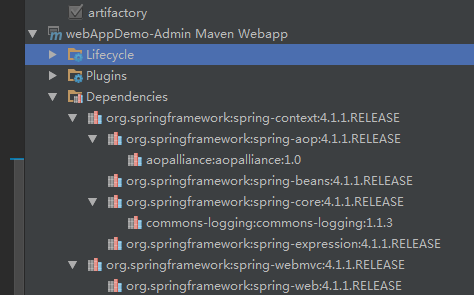
    <!-- context依赖beans,aop,core,expression;core依赖logging;所以一次导入6个包-->

    <dependency>

      <groupId>org.springframework</groupId>

      <artifactId>spring-context</artifactId>

      <version>${spring.version}</version>

    </dependency>

    <!-- webmvc依赖web;导入web和webmvc包-->

    <dependency>

      <groupId>org.springframework</groupId>

      <artifactId>spring-webmvc</artifactId>

      <version>${spring.version}</version>

    </dependency>

    <!-- spring 核心依赖-->
查看项目的依赖,可以发现依赖层级关系,导入了其他的架包。
2. 添加servlet,jsp架包
   <!-- servlet,jsp依赖-->

    <dependency>

      <groupId>javax.servlet</groupId>

      <artifactId>javax.servlet-api</artifactId>

      <version>3.0.1</version>

    </dependency>

    <dependency>

      <groupId>javax.servlet.jsp</groupId>

      <artifactId>jsp-api</artifactId>

      <version>2.1</version>

    </dependency>

    <!-- servlet,jsp依赖-->
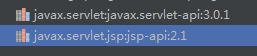
查看项目依赖:
3. 在web.xml配置Spring MVC DispatcherServlet,配置Spring过滤器
 <!-- Spring MVC DispatcherServlet-->

  <servlet>

    <servlet-name>springMVC</servlet-name>

    <servlet-class>org.springframework.web.servlet.DispatcherServlet</servlet-class>

    <init-param>

      <param-name>contextConfigLocation</param-name>

      <param-value>classpath:applicationContext.xml</param-value>

    </init-param>

  </servlet>

  <servlet-mapping>

    <servlet-name>springMVC</servlet-name>

    <url-pattern>/</url-pattern>

  </servlet-mapping>

  <!-- encodingFilter -->

  <filter>

    <filter-name>encodingFilter</filter-name>

    <filter-class>org.springframework.web.filter.CharacterEncodingFilter</filter-class>

    <init-param>

      <param-name>encoding</param-name>

      <param-value>UTF-8</param-value>

    </init-param>

    <init-param>

      <param-name>forceEncoding</param-name>

      <param-value>true</param-value>

    </init-param>

  </filter>

  <filter-mapping>

    <filter-name>encodingFilter</filter-name>

    <url-pattern>/</url-pattern>

  </filter-mapping>
4. 配置Spring contextConfigLocation,这里是applicationContext.xml文件
<?xml version="1.0" encoding="UTF-8"?>

<beans xmlns="http://www.springframework.org/schema/beans"

       xmlns:xsi="http://www.w3.org/2001/XMLSchema-instance"

       xmlns:context="http://www.springframework.org/schema/context"

       xmlns:mvc="http://www.springframework.org/schema/mvc"

       xsi:schemaLocation="http://www.springframework.org/schema/beans

       http://www.springframework.org/schema/beans/spring-beans.xsd

       http://www.springframework.org/schema/mvc

       http://www.springframework.org/schema/mvc/spring-mvc-4.0.xsd

       http://www.springframework.org/schema/context

       http://www.springframework.org/schema/context/spring-context.xsd">

    <!-- 配置包扫描器 -->

    <context:component-scan base-package="self.springmvc.*"/>

    <!-- 配置注解驱动 -->

    <mvc:annotation-driven/>

    <!-- 视图解析器 -->

    <bean class="org.springframework.web.servlet.view.InternalResourceViewResolver">

        <property name="prefix" value="/WEB-INF/pages/"/>

        <property name="suffix" value=".jsp"/>

    </bean>

</beans>
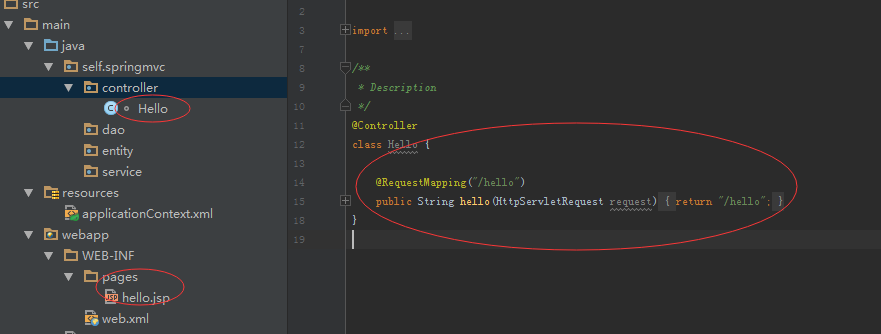
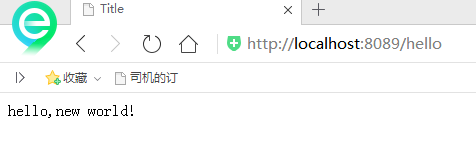
5. 编写范例,运行
在Maven上Web项目添加Spring框架的更多相关文章
- IDEA02 利用Maven创建Web项目、为Web应用添加Spring框架支持、bean的创建于获取、利用注解配置Bean、自动装配Bean、MVC配置
1 环境版本说明 Jdk : 1.8 Maven : 3.5 IDEA : 专业版 2017.2 2 环境准备 2.1 Maven安装及其配置 2.2 Tomcat安装及其配置 3 详细步骤 3.1 ...
- 使用myeclipse为java web项目添加SSH框架
添加SSH框架时,要严格按照先Struts,再Spring,最后Hibernate.添加方法见下方: 第一步:添加Struts框架 请按照图示一步步认真执行,配置好struts才可以进行下一步 第二步 ...
- 【SSM】Eclipse使用Maven创建Web项目+整合SSM框架
自己接触ssm框架有一段时间了,从最早的接触新版ITOO项目的(SSM/H+Dobbu zk),再到自己近期来学习到的<淘淘商城>一个ssm框架的电商项目.用过,但是还真的没有自己搭建过, ...
- Eclipse使用Maven创建Web项目+整合SSM框架
一.准备环境: maven:apache-maven-3.2.3 jdk:jdk1.8.0_25 tomcat:tomcat-9.0 二.配置Maven.jdk 1.Window——>Prefe ...
- intellij idea 12 搭建maven web项目 freemarker + spring mvc
配置spring mvc ,写这篇文章的时候spring已经出了4.0 这里还是用稳定的3.2.7.RELEASE,先把spring和freemarker配置好 1.spring mvc配置 在web ...
- 简述泛型、用Maven创建Web项目以及在Web项目上整合SpringMVC
表设计 Timestamp列是否取消"根据当前时间戳自动更新" 是否null及默认值选择合理不合理 外键命名规范及更新和删除时的动作是否合理 泛型 类型参数 --允许在外部指定 ...
- 【maven】 在 MyEcplise上使用maven搭建Web项目
二.在My Ecplise上使用Maven搭建Web项目 1.新建一个maven项目 2.create一个简单的骨架 3.就像在ecplise中一样设置项目的以下配置 4.新创建的项目结构如下 ...
- JAVA Eclipse使用Maven构建web项目详解(SSM框架)
tips: 启动项目后,welcome-file的链接即为测试用例 部署maven web项目 Eclipse使用Maven构建web项目详解 pom.xml添加webapp依赖: <depen ...
- maven 如何给web项目添加jar包依赖
maven 如何给web项目添加jar包依赖 CreateTime--2018年4月19日19:06:21 Author:Marydon 开发工具:eclipse 1.打开pom.xml文件--& ...
随机推荐
- Java虚拟机19:再谈四种引用状态
JVM的四种引用状态 在Java虚拟机5:Java垃圾回收(GC)机制详解一文中,有简单提到过JVM的四种引用状态,当时只是简单学习,知道有这么一个概念,对四种引用状态理解不深.这两天重看虚拟机这部分 ...
- wk_06.md
IO与文件操作 文件内建函数open 内建函数open提供了初始化输入/输出(I/O)操作的通用接口.open()内建函数成功打开文件后会返回一个文件对象.open函数的语法如下: open(file ...
- Raft一致性算法
所有的分布式系统,都面临的一个问题是多个节点之间的数据共享问题,这个和团队协作的道理是一样的,成员可以分头干活,但总是需要共享一些必须的信息,比如谁是 leader, 都有哪些成员,依赖任务之间的顺序 ...
- 20165318 《Java程序设计》实验一(Java开发环境的熟悉)实验报告
20165318 <Java程序设计>实验一(Java开发环境的熟悉)实验报告 一.实验报告封面 课程:Java程序设计 班级:1653班 姓名:孙晓暄 ...
- Zookeeper学习之路 (二)集群搭建
ZooKeeper 软件安装须知 鉴于 ZooKeeper 本身的特点,服务器集群的节点数推荐设置为奇数台.我这里我规划为三台, 为别为 hadoop1,hadoop2,hadoop3 ZooKeep ...
- Python之Cubes框架使用
本文主要内容包含Cubes框架的介绍和简单使用. 一. 介绍和安装 Cubes是一个轻量级的Python框架和一套工具,用于开发报告和分析应用程序,在线分析处理(OLAP),多维分析和聚合数据的浏览. ...
- iOS 基础函数解析 - Foundation Functions Reference
iOS 基础函数解析 - Foundation Functions Reference 太阳火神的漂亮人生 (http://blog.csdn.net/opengl_es) 本文遵循"署名- ...
- 【jq】插件—弹出层layer.js
layer.js包含了所有的层级情形,并且附加的有:tab层,相册层.webIM层. 适用于移动版本的layer.js 为layer for mobile 配套的layui 非常适合用于后台系统的 ...
- jQuery选择器(上)
一.基本选择器 1.ID选择器 $("#id") 2.类选择器 $(".class") 3.元素选择器 $("element") 4 ...
- 探索photo-sphere-viewer全景插件
此插件是一位外国人写的,官网API地址:https://photo-sphere-viewer.js.org/#methods 我只是记录下我在使用此插件时用到的方法和相关属性,以防以后忘记 1.按要 ...