
Closing a window
The obvious way to how to close a window is to click on the x mark on the titlebar. In the next example, we will show how we can programatically close our window. We will briefly touch signals and slots.
The following is the constructor of a QtGui.QPushButton that we will use in our example.
QPushButton(string text, QWidget parent = None)
The text parameter is a text that will be displayed on the button. The parent is a widget on which we place our button. In our case it will be a QtGui.QWidget.
#!/usr/bin/python

# -*- coding: utf-8 -*-

"""

ZetCode PyQt4 tutorial

This program creates a quit

button. When we press the button,

the application terminates.

author: Jan Bodnar

website: zetcode.com

last edited: October 2011

"""

import sys

from PyQt4 import QtGui, QtCore

class Example(QtGui.QWidget):

    def __init__(self):

        super(Example, self).__init__()

        self.initUI()

    def initUI(self):

        qbtn = QtGui.QPushButton('Quit', self)

        qbtn.clicked.connect(QtCore.QCoreApplication.instance().quit)

        qbtn.resize(qbtn.sizeHint())

        qbtn.move(50, 50)

        self.setGeometry(300, 300, 250, 150)

        self.setWindowTitle('Quit button')

        self.show()

def main():

    app = QtGui.QApplication(sys.argv)

    ex = Example()

    sys.exit(app.exec_())

if __name__ == '__main__':

    main()
In this example, we create a quit button. Upon clicking on the button, the application terminates.
from PyQt4 import QtGui, QtCore
An object from the QtCore module will be needed. Therefore, we import the module.
qbtn = QtGui.QPushButton('Quit', self)
We create a push button. The button is an instance of the QtGui.QPushButton class. The first parameter of the constructor is the label of the button. The second parameter is the parent widget. The parent widget is the Example widget, which is a QtGui.QWidget by inheritance.
qbtn.clicked.connect(QtCore.QCoreApplication.instance().quit)
The event processing system in PyQt4 is built with the signal & slot mechanism. If we click on the button, the signal clicked is emitted. The slot can be a Qt slot or any Python callable. TheQtCore.QCoreApplication contains the main event loop. It processes and dispatches all events. Theinstance() method gives us its current instance. Note that QtCore.QCoreApplication is created with theQtGui.QApplication. The clicked signal is connected to the quit() method which terminates the application. The communication is done between two objects: the sender and the receiver. The sender is the push button, the receiver is the application object.
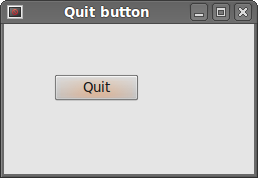 Figure: Quit button
Closing a window的更多相关文章
- Sublime Text 2配置文件详解
Sublime Text 2是那种让人会一眼就爱上的编辑器,不仅GUI让人眼前一亮,功能更是没的说,拓展性目前来说也完全够用了,网上介绍软件的文章和推荐插件的文章也不少,而且很不错,大家可以去找找自己 ...
- vim - buffer
1. buffer switching http://vim.wikia.com/wiki/Easier_buffer_switching :buffer:ls:files 2. vim defaul ...
- SUBLIME TEXT 2 设置文件详解
SUBLIME TEXT 2 设置文件详解 Preferences.sublime-settings文件: // While you can edit this file, it’s best to ...
- js关闭浏览器的tab页(兼容)
由于在脚本中使用了 window.close(), 当前非弹出窗口在最新版本的chrome和firefox里总是不能关闭,而在 IE中是可以关闭的 . 在console中弹出提示"Scrip ...
- NUnit-Console 命令行选项详解
本文为 Dennis Gao 原创或翻译技术文章,发表于博客园博客,未经作者本人允许禁止任何形式的转载. NUnit-Console 命令行选项 NUnit-Console 命令行选项列表 指定运行哪 ...
- [转]Sublime Text 2 设置文件详解
Sublime Text 2是那种让人会一眼就爱上的编辑器,不仅GUI让人眼前一亮,功能更是没的说,拓展性目前来说也完全够用了,网上介绍软件的文章和推荐插件的文章也不少,而且很不错,大家可以去找找自己 ...
- Sublime Text 设置文件详解
Sublime Text 2是那种让人会一眼就爱上的编辑器,不仅GUI让人眼前一亮,功能更是没的说,拓展性目前来说也完全够用了,网上介绍软件的文章和推荐插件的文章也不少,而且很不错,大家可以去找找自 ...
- Oracle Database 11g express edition
commands : show sys connect sys as sysdba or connect system as sysdba logout or disc clear screen or ...
- 在vs环境中跑动sift特征提取(代码部分)
因为在前两天的学习中发现.在opencv环境中跑动sift特征点提取还是比较困难的. 所以在此,进行记述. 遇到的问题分别有,csdn不愿意花费积分.配置gtk困难.教程海量然而能跑者鲜.描述不详尽等 ...
随机推荐
- sqlserver存储过程循环写法
用游标,和WHILE可以遍历您的查询中的每一条记录并将要求的字段传给变量进行相应的处理==================DECLARE @A1 VARCHAR(10),@A2 VARCHAR(10) ...
- 初识云计算的三种服务模式 (IaaS SaaS PaaS)
近期公司在使用其它云服务的同一时候.要封装自己的云服务,以下作为开发产品前的热身.来了解云计算中的三种服务模式,笔者也是从网络上查找,进行综合总结.请拍.. 三种服务模式 依据如今最经常使用.也就是比 ...
- java基础学习总结——static关键字
一.static关键字
- [runtime] iOS-Runtime-Headers
Dynamically Generated iOS Headers https://github.com/nst/iOS-Runtime-Headers Here are iOS Objective- ...
- APACHE 2.2.8+TOMCAT6.0.14配置负载均衡
目标: 使用 apache 和 tomcat 配置一个可以应用的 web 网站,要达到以下要求: 1. Apache 做为 HttpServer ,后面连接多个 tomcat 应用实例,并进行负载均 ...
- 分割流 SequenceInputStream (转)
import java.io.*;import java.util.*; class SplitFile{ public static void main(String[] args) throws ...
- TR069协议小结
也称为CWMP,是在Internet网上通过wan口控制通信终端设备的协议.其协议流程如下图所示: 具体网上有很多资料.其主要的两个内容是:HTTP Client模型.DATA模型. ...
- E470 外放没声音问题解决
到官网下载声卡驱动.和热键驱动,安装就ok了
- mac下使用brew安装java等应用
可以使用brew安装很多应用,比如java,idea,iterms,sublime brew tap caskroom/versions 将会安装新的brew仓库源brew cask install ...
- guess-number-higher-or-lower-ii
// https://discuss.leetcode.com/topic/51353/simple-dp-solution-with-explanation // https://en.wikipe ...