
QT学习记录(1)-控件 QPushButton, QLineEdit, QLabel, QHBoxLayout, QGridLayout
1.一个简单的QT程序(QPushButton)
/* 应用程序抽象类 */

#include <QApplication>

/*窗口类*/

#include <QWidget>

/* 按钮 */

#include <QPushButton>

int main(int argc, char* argv[])

{

    QApplication app(argc, argv);

    /* 构造一个窗口*/

    QWidget w;

    /*显示窗口*/

    w.show();

    /* 按钮也是个窗口 */

    QPushButton button;

    button.setText("Button");

    /* 窗口对象的父子关系,影响显示位置 */

    /* 没有父窗口的窗口,我们称之为主窗口 */

    button.setParent(&w);

    button.show();

    /* 设置按钮的坐标位置 */

    button.setGeometry(, , , );

    /* QT对C++的拓展 */

    // std::bind std::function

    QObject::connect(&button, SIGNAL(clicked()), &w, SLOT(close()));

    w.setWindowTitle("Hello World");

    /*在exec中有一个消息循环*/

    return app.exec();

}
PS:需要在.pro文件中声明
SOURCES += \

    qgridlayoutdemo.cpp

QT += gui widgets
才能正常运行。
运行结果:
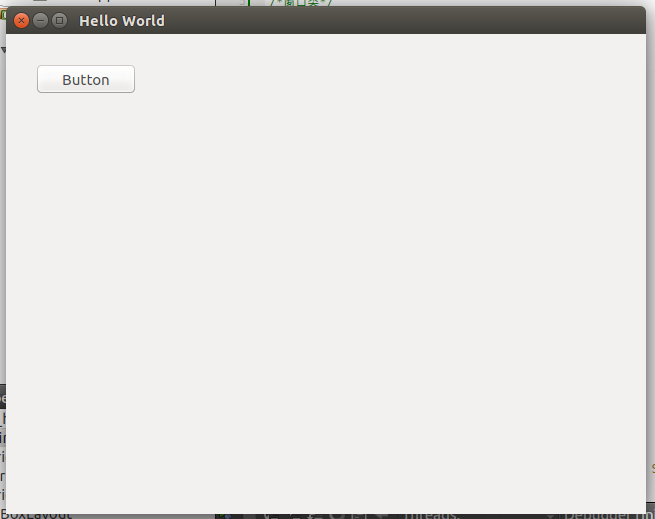
2.QLineEdit, QLabel, QGridLayout, QHBoxLayout的用法
#include <QApplication>

#include <QWidget>

#include <QGridLayout>

#include <QLabel>

#include <QLineEdit>

#include <QTextEdit>

#include <QHBoxLayout>

#include <QPushButton>

int main(int argc, char *argv[])

{

    QApplication app(argc, argv);

    QWidget w;

    QGridLayout *layout = new QGridLayout;

    layout->setColumnStretch(, );

    layout->setColumnStretch(, );

    layout->setColumnStretch(, );

    layout->setColumnStretch(, );

    layout->setColumnStretch(, );

    QLabel *lb_first_name = new QLabel("First Name:");

    QLineEdit *ed_first_name = new QLineEdit;

    QLabel *lb_last_name = new QLabel("Last Name:");

    QLineEdit *et_last_name = new QLineEdit;

    QLabel *lb_sex = new QLabel("Sex:");

    QLineEdit *et_sex = new QLineEdit;

    QLabel *lb_birthday = new QLabel("Birthday:");

    QLineEdit *et_birthday = new QLineEdit;

    QLabel *lb_address = new QLabel("Address:");

    QTextEdit *te_edit = new QTextEdit;

    layout->addWidget(lb_first_name, , );

    layout->addWidget(ed_first_name, , );

    layout->addWidget(lb_last_name, , );

    layout->addWidget(et_last_name, , );

    layout->addWidget(lb_sex, , );

    layout->addWidget(et_sex, , );

    layout->addWidget(lb_birthday, , );

    layout->addWidget(et_birthday, , );

    layout->addWidget(lb_address, , );

    layout->addWidget(te_edit, , , , );

//    QGridLayout layout;

//    QLineEdit *pwd;

//    layout.setColumnStretch(0, 1);

//    layout.setColumnStretch(3, 1);

//    layout.setRowStretch(0, 1);

//    layout.setRowStretch(4, 1);

//    layout.addWidget(new QLabel("UserName:"), 1, 1);

//    layout.addWidget(new QLineEdit(), 1, 2);

//    layout.addWidget(new QLabel("Password"), 2, 1);

//    layout.addWidget(pwd = new QLineEdit(), 2, 2);

//    QHBoxLayout *hBoxLayout;

//    layout.addLayout(hBoxLayout = new QHBoxLayout(), 3, 2);

//    hBoxLayout->addStretch(1);

//    hBoxLayout->addWidget(new QPushButton("Login"));

//    pwd->setEchoMode(QLineEdit::Password);

    w.setLayout(layout);

    w.setWindowTitle("QGridLayoutDemo");

    w.show();

    return app.exec();

}
运行结果:
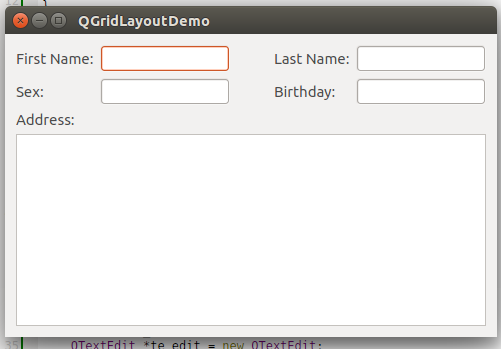
QT学习记录(1)-控件 QPushButton, QLineEdit, QLabel, QHBoxLayout, QGridLayout的更多相关文章
- QT学习记录之控件布局
作者:朱金灿 来源:http://blog.csdn.net/clever101 想到控件布局就会想到Windows编程中要实现对话框上的控件的合理布局是一件多么艰难的事情.对此QT提出了一个很方便的 ...
- asp.net学习之Repeater控件
asp.net学习之Repeater控件 文章摘自:http://www.cnblogs.com/shipfi/archive/2009/10/19/1585703.html Repeater控件和D ...
- asp.net学习之数据绑定控件、数据源控件概述
原文:asp.net学习之数据绑定控件.数据源控件概述 1.asp.net数据绑定控件分为三大类,每个类分别进行详细: ● 列表式数据绑定控件: 列表式数据绑定控件常用来在一个表格内的一个字 ...
- asp.net学习之 数据绑定控件--表格绑定控件
原文:asp.net学习之 数据绑定控件--表格绑定控件 数据绑定 Web 服务器控件是指可绑定到数据源控件,以实现在 Web 应用程序中轻松显示和修改数据的控件.数据绑定 Web 服务器控件 ...
- Swift学习之熟悉控件
最近是比较清闲一些的,对于一个开发者来说,这也是一个很好的充电机会.以前做项目都是使用Objective-C去开发,但我们都知道,Swift语言从2014年的出现到现在,一步一步变的完善,渐渐变的受欢 ...
- asp.net学习之DataList控件
asp.net学习之DataList控件 DataList控件与Repeater控件一样由模板驱动,与Repeater控件不同的是: DataList控件默认输出是一个HTML表格.DataLis ...
- 在Qt中使用ActiveX控件
Qt的windows商业版本提供了ActiveQt这个framework,使用这个组件我们可以在Qt中使用ActiveX控件,并且也开发基于Qt的ActiveX控件.ActiveQt包含了两个组件QA ...
- asp.net学习之 数据绑定控件--List数据绑定控件
原文:asp.net学习之 数据绑定控件--List数据绑定控件 List控件(如 CheckBoxList.DropDownList.ListBox 和 RadioButtonList 类)继承自L ...
- Qt 开发 MS VC 控件终极篇
Qt 开发 MS VC 控件终极篇 1. 使用 MSVC2015 通过项目向导创建 Qt ActiveQt Server 解决方案 项目配置:以下文件需要修改 1. 项目属性页->项目属性-&g ...
随机推荐
- 开源 免费 java CMS - FreeCMS1.5-数据对象-guestbook
下载地址:http://code.google.com/p/freecms/ guestbook 从FreeCMS 1.5 开始支持 在使用留言相关标签时,标签会封装guestbook供页面调用. 属 ...
- [转]查看linux服务器硬盘IO读写负载
最近一台linux服务器出现异常,系统反映很慢,相应的应用程序也无法反映,而且还出现死机的情况,经过几天的观察了解,发现服务器压力很大,主要的压力来自硬盘的IO访问已经达到100% 为了方便各位和自己 ...
- 寻找[nginx] 由Lua 粘合的Nginx生态环境-- agentzh
来自:linuxtone org Chnangelog: 120312 fixed as s/hhttp/http/g ,thanx muxueqz 12030 ...
- 一致性 hash 算法( consistent hashing )(转)
consistent hashing 算法早在 1997 年就在论文 Consistent hashing and random trees 中被提出,目前在 cache系统中应用越来越广泛: 1 基 ...
- MySQL优化之——权限管理
转载请注明出处:http://blog.csdn.net/l1028386804/article/details/46763767 在mysql数据库中,有mysql_install_db脚本初始化权 ...
- 【cookie】cookie和session的终极区别
如果浏览器使用的是 cookie,那么所有的数据都保存在浏览器端,比如你登录以后,服务器设置了 cookie用户名(username),那么,当你再次请求服务器的时候,浏览器会将username一块发 ...
- 转载:PHP JSON_ENCODE 不编码中文汉字的方法
1.PHP版本5.4(包含)+ json_encode($data, JSON_UNESCAPED_UNICODE); //必须PHP5.4+ 2.PHP版本5.4- function encode_ ...
- NYOJ——————数的长度(斯特林公式的应用)
数的长度 时间限制:3000 ms | 内存限制:65535 KB 难度:1 描述 N!阶乘是一个非常大的数,大家都知道计算公式是N!=N*(N-1)······*2*1.现在你的任务是计算出 ...
- poj----Maximum sum(poj 2479)
Maximum sum Time Limit: 1000MS Memory Limit: 65536K Total Submissions: 30704 Accepted: 9408 Desc ...
- 使用Apache FtpServer
Java大法一统天下.遇到任何问题,先查一下Java中的解决方案. 地球上的许多事情,在Java中都能找到完美的解决方案. FtpServer是apache MINA项目的一个子项目,它实现了一个ft ...