
【Android】6.4 DatePickerDialog和TimePickerDialog
分类:C#、Android、VS2015;
创建日期:2016-02-08
一、简介
在Android应用中,日期选择对话框和时间选择对话框是分别提供的。
日期选择对话框(DatePickerDialog)用于选择年、月、日;
时间选择对话框(TimePickerDialog)用于选择时、分。
二、示例--Demo04DatePicker
1、运行截图
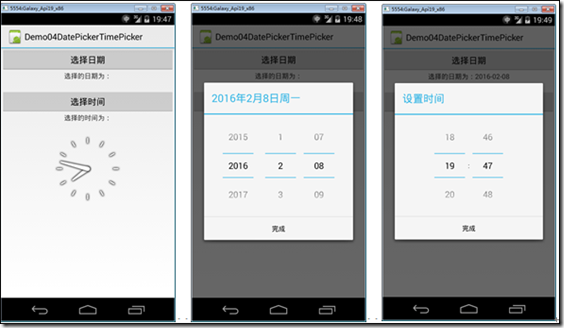
2、添加Demo04_DatePicker.axml文件
在layout文件夹下添加该文件。
<?xml version="1.0" encoding="utf-8"?>

<LinearLayout xmlns:android="http://schemas.android.com/apk/res/android"

    android:layout_width="fill_parent"

    android:layout_height="fill_parent"

    android:orientation="vertical">

    <Button

        android:id="@+id/btnDate"

        android:layout_width="fill_parent"

        android:layout_height="wrap_content"

        android:text="选择日期" />

    <TextView

        android:id="@+id/textDateInfo"

        android:layout_width="fill_parent"

        android:layout_height="wrap_content"

        android:cursorVisible="false"

        android:editable="false"

        android:gravity="center"

        android:layout_marginBottom="20dp"

        android:text="选择的日期为:" />

    <Button

        android:id="@+id/btnTime"

        android:layout_width="fill_parent"

        android:layout_height="wrap_content"

        android:text="选择时间" />

    <TextView

        android:id="@+id/textTimeInfo"

        android:layout_width="fill_parent"

        android:layout_height="wrap_content"

        android:cursorVisible="false"

        android:editable="false"

        android:gravity="center"

        android:layout_marginBottom="20dp"

        android:text="选择的时间为:" />

    <AnalogClock

        android:layout_width="match_parent"

        android:layout_height="wrap_content"

        android:id="@+id/analogClock1" />

</LinearLayout>
3、添加Demo04DatePicker.cs文件
在SrcActivity文件夹下添加该文件。
using System;

using Android.App;

using Android.OS;

using Android.Widget;

namespace ch06demos.SrcActivity

{

    [Activity(Label = "Demo04DatePickerTimePicker")]

    public class Demo04DatePickerDialog : Activity

    {

        protected override void OnCreate(Bundle savedInstanceState)

        {

            base.OnCreate(savedInstanceState);

            SetContentView(Resource.Layout.Demo04_DatePickerDialog);

            var date = DateTime.Now;

            var hour = date.Hour;

            var minute = date.Minute;

            var textDateInfo = FindViewById<TextView>(Resource.Id.textDateInfo);

            var btnDate = FindViewById<Button>(Resource.Id.btnDate);

            btnDate.Click += delegate

            {

                var dialog = new DatePickerDialog(this, (sender, args) =>

                {

                    date = args.Date;

                    textDateInfo.Text = string.Format("选择的日期为:{0:yyyy-MM-dd}", date);

                },

                date.Year,

                date.Month - ,  //Andoid的月份从0开始计数,所以要减1

                date.Day);

                dialog.Show();

            };

            var textTimeInfo = FindViewById<TextView>(Resource.Id.textTimeInfo);

            var btnTime = FindViewById<Button>(Resource.Id.btnTime);

            btnTime.Click += delegate

            {

                var dialog = new TimePickerDialog(this, (sender, args) =>

                {

                    hour = args.HourOfDay;

                    minute = args.Minute;

                    textTimeInfo.Text = string.Format("选择的时间为:{0:00}:{1:00}", hour, minute);

                }, hour, minute, true);  //true:24小时制,false:12小时制

                dialog.Show();

            };

        }

    }

}
4、运行
按<F5>键调试运行。
【Android】6.4 DatePickerDialog和TimePickerDialog的更多相关文章
- Android开发之DatePickerDialog与TimePickerDialog的功能和使用方法具体解释
DatePickerDialog与TimePickerDialog的功能比較简单,使用方法也非常easy.仅仅要以下两步就可以. Ø 通过newkeyword创建DatePickerDialog.T ...
- android学习笔记19——对话框(DatePickerDialog、TimePickerDialog)
DatePickerDialog.TimePickerDialog ==> DatePickerDialog.TimePickerDialog功能.用法都比较简单,操作步骤: 1.通过new关键 ...
- Android中DatePicker与TimePicker用法讲解(包括DatePickerDialog与TimePickerDialog)
实现效果:将DatePicker和TimePicker修改的日期和时间实时显示在程序标题栏上. 1.通过DatePicker和TimePicker来实现 布局为main.xml <?xml ve ...
- 完全参照系统自带的DatePickerDialog、TimePickerDialog的源代码仿写的DateTimePickerDialog
完全参照系统自带的DatePickerDialog.TimePickerDialog的源代码仿写的DateTimePickerDialog.具有同时选择日期.时间的功能.在2.2.2.3平台,显示的效 ...
- 使用DatePickerDialog、TimePickerDialog
DatePickerDialog与TimerPicker的功能比较简单,用户也简单,只要如下两步即可. ①通过new关键字创建DatePickerDialog.TimePickerDialog实例,调 ...
- Android开发手记(9) DatePickerDialog 和 TimePickerDialog
1.DatePickerDialog 用于获取用户输入的日期信息.其原型为: public DatePickerDialog(Contex contex, DatePickerDialog.OnDa ...
- Android DatePickerDialog和TimePickerDialog显示样式
可以用DatePickerDialog显示选取日期的对话框.可以设置显示的样式 1.通过构造方法设置显示样式. 可以通过DatePickerDialog(Context context, int th ...
- Android日期时间控件DatePickerDialog和TimePickerDialog
1.DatePickerDialog 在一些万年历.日程表等APP上我们经常可以看到日期选择控件,由于很少有用户会老老实实的手工输入日期,所以该控件的作用就是为了控制用户的输入格式,在Android中 ...
- android入门 — ProgressDialog/DatePickerDialog/TimePickerDialog
这三个Dialog都是AlertDialog的子类. ①DatePickerDialog 1.创建DatePickerDialog的实例: 2.通过Calendar类获得系统时间: 3.通过DateP ...
随机推荐
- Silverlight 之 创建
Silverlight 项目文件是您可以使用不同工具来创建和编辑的文本文件.例如,可以使用 Visual Studio 2010 以及 Expression Blend 来创建 Silve ...
- 从零开始学JavaScript二(基本概念)
基本概念 一.区分大小写 在ECMAScript中的一切(变量.函数名.操作符)都是区分大小写的. 如变量名test和Test分别表示两个不同的变量, 二.标识符 所谓标识符,就是指变量.函数.属性的 ...
- MVC MVP MVVM 图解
1.MVC (1)图解 解释: 视图(View):用户界面. 控制器(Controller):业务逻辑 模型(Model):数据保存 各部分之间的通信方式如下: View 传送指令到 Controll ...
- 实战c++中的vector系列--将迭代器转换为索引
stl的迭代器非常方便 用于各种算法. 可是一想到vector.我们总是把他当做数组,总喜欢使用下标索引,而不是迭代器. 这里有个问题就是怎样把迭代器转换为索引: #include <vecto ...
- 使用spring的事务的三种方法
1.编程式事务管理 spring的配置文件 <!-- 事务管理器 --> <bean id="transactionManager" class="or ...
- python之函数用法iter()
# -*- coding: utf-8 -*- #python 27 #xiaodeng #python之函数用法iter() #iter() #说明:对一个对象调用 iter() 就可以得到它的迭代 ...
- 科普:TLS、SSL、HTTPS以及证书(转)
最近在研究基于ssl的传输加密,涉及到了key和证书相关的话题,走了不少弯路,现在总结一下做个备忘 不少人可能听过其中的超过3个名词,但它们究竟有什么关联呢? TLS是 传输层安全协议(Transpo ...
- 【转】排名前十位的Linux发行版介绍
Linux Distributions众多,据说有350个之多.distrowatch.com网站评出了排名前十位的Linux发行版.它们是:1.Ubuntu,当前最新版本是10.10:2.Fedor ...
- VC6.0 +WDK 开发驱动的环境配置
前段时间,系统偶感风寒,挂掉了,苦于又没有备份过,只有重装了.原来开发驱动的环境是VC6+DDK+DriverStudio3.2,当时配置的时候就花了好一阵功夫,也没有彻底搞清楚.现在要重装了,决定改 ...
- HDUOJ-----1166敌兵布阵
敌兵布阵 Time Limit: 2000/1000 MS (Java/Others) Memory Limit: 65536/32768 K (Java/Others)Total Submis ...