
Quartz.NET+Topshelf 创建Windows服务
由于项目开发中经常会有定时任务执行的需求,所以会第一时间就想到 windows 服务 的方式,但是做过开发的同学都知道windows服务不利于调试,安装也麻烦;
并且有开源的作业框架Quartz.NET非常方便和好用,谁还愿意自己去写那些Timer定时器呢?既然选择用Quartz.NET,那怎么打包成一个Windows服务形式去运行呢?
那接下来就要引入Topshelf组件了。
Topshelf的使用
请查看博文地址:http://www.cnblogs.com/jys509/p/4614975.html
Quartz.NET和Topshelf的结合使用
请查看博文地址:https://www.cnblogs.com/jys509/p/4628926.html
由于上面2篇博文里面的组件版本都是较早的版本,所以本文重点介绍最新版本的应用案例:
第一步:安装
先建一个控制台项目JobServiceDemo,我用的是 .NET Framework 4.6.1,版本不低于4.5.2 就行
在NuGet中分别安装:log4net,Quartz,Quartz.Plugins,Topshelf,Topshelf.Log4Net 都选择最新版本,安装成功如下图:

第二步:实现Job
新建TestJob实现IJob接口,在Execute方法中实现自己的业务逻辑,代码如下:
using log4net;

using Quartz;

using System;

using System.Collections.Generic;

using System.Linq;

using System.Text;

using System.Threading.Tasks;

namespace JobServiceDemo

{

    public class TestJob : IJob

    {

        private readonly ILog _logger = LogManager.GetLogger(typeof(TestJob));

        public Task Execute(IJobExecutionContext context)

        {

            _logger.Info("每3秒输出");

            return Task.FromResult(true);

        }

    }

}
第三步:使用Topshelf调度任务
新建ServiceRunner服务运行类用于控制调度器的启动,停止,暂停,恢复运行4个接口方法,代码如下:
using Quartz;

using Quartz.Impl;

using System;

using System.Collections.Generic;

using System.Linq;

using System.Text;

using System.Threading.Tasks;

using Topshelf;

namespace JobServiceDemo

{

    public sealed class ServiceRunner : ServiceControl, ServiceSuspend

    {

        //调度器

        private readonly IScheduler scheduler;

        public ServiceRunner()

        {

            scheduler =  StdSchedulerFactory.GetDefaultScheduler().GetAwaiter().GetResult();

        }

        //开始

        public bool Start(HostControl hostControl)

        {

            scheduler.Start();

            return true;

        }

        //停止

        public bool Stop(HostControl hostControl)

        {

            scheduler.Shutdown(false);

            return true;

        }

        //恢复所有

        public bool Continue(HostControl hostControl)

        {

            scheduler.ResumeAll();

            return true;

        }

        //暂停所有

        public bool Pause(HostControl hostControl)

        {

            scheduler.PauseAll();

            return true;

        }

    }

}
第四步:程序入口
using System;

using System.Collections.Generic;

using System.IO;

using System.Linq;

using System.Text;

using System.Threading.Tasks;

using Topshelf;

namespace JobServiceDemo

{

    class Program

    {

        /// <summary>

        /// 主程序入口

        /// </summary>

        /// <param name="args"></param>

        static void Main(string[] args)

        {

            log4net.Config.XmlConfigurator.ConfigureAndWatch(new FileInfo(AppDomain.CurrentDomain.BaseDirectory + "log4net.config"));

            HostFactory.Run(x =>

            {

                x.UseLog4Net();

                x.Service<ServiceRunner>(s => {

                    s.ConstructUsing(name => new ServiceRunner());

                    s.WhenStarted((tc, hc) => tc.Start(hc));

                    s.WhenStopped((tc, hc) => tc.Stop(hc));

                    s.WhenContinued((tc, hc) => tc.Continue(hc));

                    s.WhenPaused((tc, hc) => tc.Pause(hc));

                });

                x.RunAsLocalService();

                x.StartAutomaticallyDelayed();

                x.SetDescription("用于系统定时任务计划执行");

                x.SetDisplayName("JobService");

                x.SetServiceName("JobService");

                x.EnablePauseAndContinue();

            });

        }

    }

}
第五步:配置quartz.config、quartz_jobs.xml、log4net.config
说明:这三个文件,分别选中→右键属性→复制到输入目录设为:始终复制
quartz.config
# You can configure your scheduler in either <quartz> configuration section

# or in quartz properties file

# Configuration section has precedence

quartz.scheduler.instanceName = QuartzTest

# configure thread pool info

quartz.threadPool.type = Quartz.Simpl.SimpleThreadPool, Quartz

quartz.threadPool.threadCount =

quartz.threadPool.threadPriority = Normal

# job initialization plugin handles our xml reading, without it defaults are used

quartz.plugin.xml.type = Quartz.Plugin.Xml.XMLSchedulingDataProcessorPlugin, Quartz.Plugins

quartz.plugin.xml.fileNames = ~/quartz_jobs.xml

# export this server to remoting context

#quartz.scheduler.exporter.type = Quartz.Simpl.RemotingSchedulerExporter, Quartz

#quartz.scheduler.exporter.port =

#quartz.scheduler.exporter.bindName = QuartzScheduler

#quartz.scheduler.exporter.channelType = tcp

#quartz.scheduler.exporter.channelName = httpQuartz
quartz_jobs.xml
<?xml version="1.0" encoding="UTF-8"?>

<job-scheduling-data xmlns="http://quartznet.sourceforge.net/JobSchedulingData" xmlns:xsi="http://www.w3.org/2001/XMLSchema-instance" version="2.0">

  <processing-directives>

    <overwrite-existing-data>true</overwrite-existing-data>

  </processing-directives>

  <schedule>

    <!--测试任务配置-->

    <job>

      <name>TestJob</name>

      <group>Test</group>

      <description>测试任务</description>

      <job-type>JobServiceDemo.TestJob,JobServiceDemo</job-type>

      <durable>true</durable>

      <recover>false</recover>

    </job>

    <trigger>

      <cron>

        <name>TestJobTrigger</name>

        <group>TestTrigger</group>

        <job-name>TestJob</job-name>

        <job-group>Test</job-group>

        <start-time>--04T00::+:</start-time>

        <cron-expression>/ * * * * ?</cron-expression>

      </cron>

    </trigger>

  </schedule>

</job-scheduling-data>
log4net.config
<?xml version="1.0" encoding="utf-8" ?>
<configuration>
<configSections>
<section name="log4net" type="log4net.Config.Log4NetConfigurationSectionHandler, log4net"/>
</configSections> <log4net>
<appender name="RollingLogFileAppender" type="log4net.Appender.RollingFileAppender">
<!--日志路径-->
<param name= "File" value= "D:\JobServiceDemo\Log\"/>
<!--是否是向文件中追加日志-->
<param name= "AppendToFile" value= "true"/>
<!--log保留天数-->
<param name= "MaxSizeRollBackups" value= ""/>
<!--日志文件名是否是固定不变的-->
<param name= "StaticLogFileName" value= "false"/>
<!--日志文件名格式为:--.log-->
<param name= "DatePattern" value= "yyyy-MM-dd".log""/>
<!--日志根据日期滚动-->
<param name= "RollingStyle" value= "Date"/>
<layout type="log4net.Layout.PatternLayout">
<param name="ConversionPattern" value="%d [%t] %-5p %c - %m%n %loggername" />
</layout>
</appender> <!-- 控制台前台显示日志 -->
<appender name="ColoredConsoleAppender" type="log4net.Appender.ColoredConsoleAppender">
<mapping>
<level value="ERROR" />
<foreColor value="Red, HighIntensity" />
</mapping>
<mapping>
<level value="Info" />
<foreColor value="Green" />
</mapping>
<layout type="log4net.Layout.PatternLayout">
<conversionPattern value="%n%date{HH:mm:ss,fff} [%-5level] %m" />
</layout>
<filter type="log4net.Filter.LevelRangeFilter">
<param name="LevelMin" value="Info" />
<param name="LevelMax" value="Fatal" />
</filter>
</appender> <root>
<!--(高) OFF > FATAL > ERROR > WARN > INFO > DEBUG > ALL (低) -->
<level value="all" />
<appender-ref ref="ColoredConsoleAppender"/>
<appender-ref ref="RollingLogFileAppender"/>
</root>
</log4net>
</configuration>
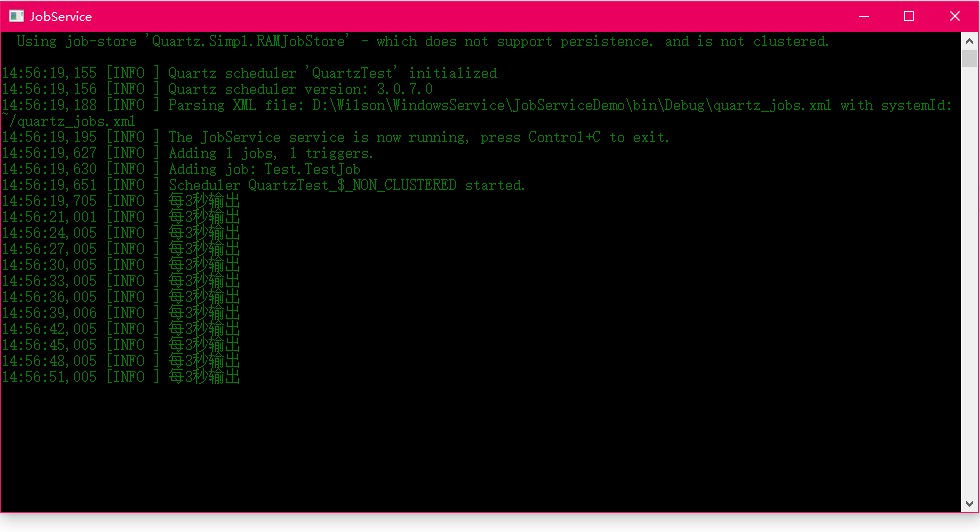
运行后,效果下图,每隔3秒有输出
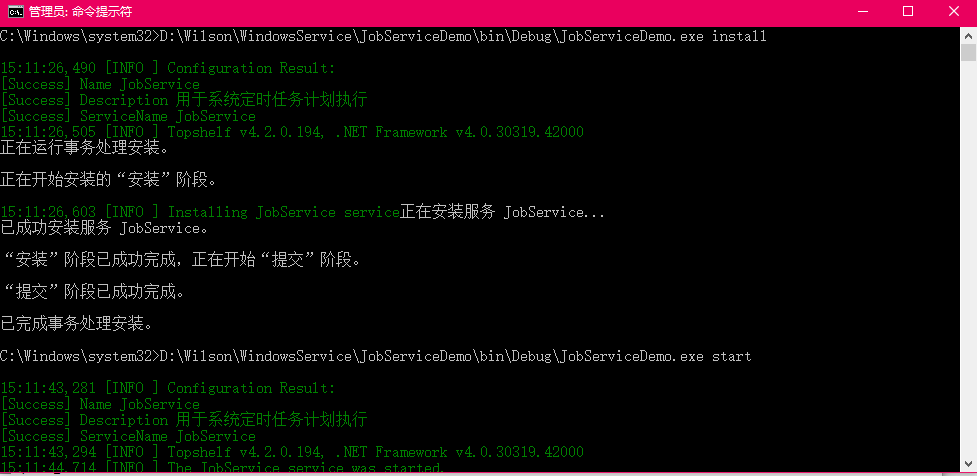
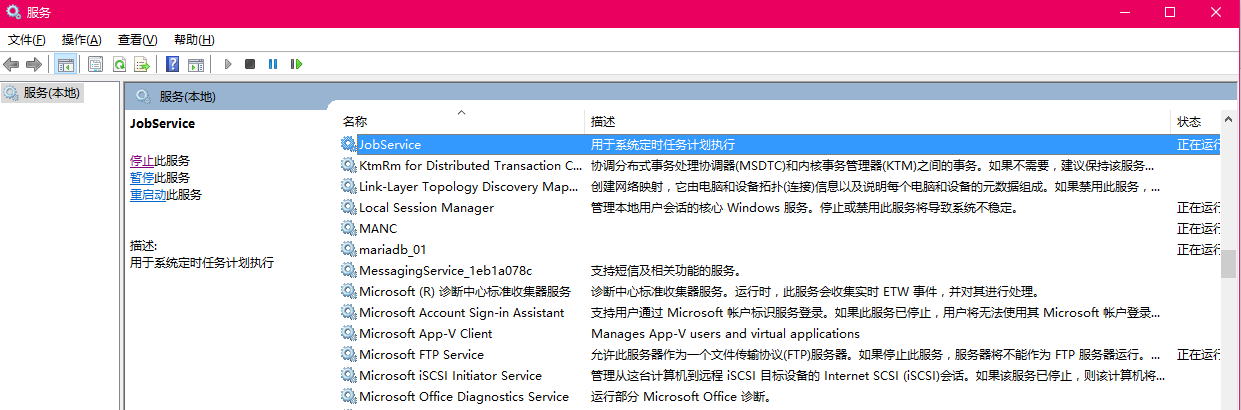
第六步:使用Topshelf安装成Windows服务运行
说明:cmd命令窗口一定要用管理员身份打开
Quartz.NET+Topshelf 创建Windows服务的更多相关文章
- 使用Topshelf创建Windows服务
概述 Topshelf是创建Windows服务的另一种方法,老外的一篇文章Create a .NET Windows Service in 5 steps with Topshelf通过5个步骤详细的 ...
- Topshelf创建Windows服务
使用Topshelf创建Windows服务 概述 Topshelf是创建Windows服务的另一种方法,老外的一篇文章Create a .NET Windows Service in 5 steps ...
- 【第三方插件】使用Topshelf创建Windows服务
概述 Topshelf是创建Windows服务的另一种方法,老外的一篇文章Create a .NET Windows Service in 5 steps with Topshelf通过5个步骤详细的 ...
- C#/.NET基于Topshelf创建Windows服务的守护程序作为服务启动的客户端桌面程序不显示UI界面的问题分析和解决方案
本文首发于:码友网--一个专注.NET/.NET Core开发的编程爱好者社区. 文章目录 C#/.NET基于Topshelf创建Windows服务的系列文章目录: C#/.NET基于Topshelf ...
- 使用Topshelf创建Windows服务[转载]
概述 Topshelf是创建Windows服务的另一种方法,老外的一篇文章Create a .NET Windows Service in 5 steps with Topshelf通过5个步骤详细的 ...
- 使用 Topshelf 创建 Windows 服务
Ø 前言 C# 创建 Windows 服务的方式有很多种,Topshelf 就是其中一种方式,而且使用起来比较简单.下面使用 Visual Studio Ultimate 2013 演示一下具体的使 ...
- [Solution] Microsoft Windows 服务(2) 使用Topshelf创建Windows服务
除了通过.net提供的windows服务模板外,Topshelf是创建Windows服务的另一种方法. 官网教程:http://docs.topshelf-project.com/en/latest/ ...
- 使用Topshelf创建Windows 服务
本文转载: http://www.cnblogs.com/aierong/archive/2012/05/28/2521409.html http://www.cnblogs.com/jys509/p ...
- Topshelf 创建windows服务注意事项
其中项目应该是控制台应用程序 test.exe需要赋与管理员权限,右键属性可以定义. test.exe install test.exe unstall
随机推荐
- WebGIS点要素渲染性能测试
$('#stationQuery').bind('click', function(){ var drawStyle = $.extend( { }, map.geomap( "option ...
- linux 文件搜索命令locate及updatedb
windows 搜索工具Everything是根据NTFS日志来搜索的,所以速度特别快 locate 类似于windows的Everything,搜索速度比较快 如果没有locate命令,可安装 yu ...
- 带你从零学ReactNative开发跨平台App开发(十一)
ReactNative跨平台开发系列教程: 带你从零学ReactNative开发跨平台App开发(一) 带你从零学ReactNative开发跨平台App开发(二) 带你从零学ReactNative开发 ...
- Oracle SQL_TRACE使用小结
一.关于基础表Oc_COJ^c680758 rd-A6z/&[1R1] H680758 Oracle10G之前,启用AUTOTRACE功能需要手工创建plan_table表,创建脚本为$ORA ...
- ES6-Generator
Generator 关键词:状态机,遍历器,同步方式写异步方法 基本概念 形式上,Generator函数是一个普通函数,但是有两个特征. function关键字与函数名之间有一个星号. 二是,函数体内 ...
- node和iisnode express手工安装
一.安装node.js的x86版本: 这样,node.js会安装在C:\Program Files (x86)\nodejs,这符合iisnode express7版本的期待. 二.安装iisnode ...
- c# 设计模式 之:装饰模式
一.引言 在软件开发中,我们经常想要对一类对象添加不同的功能,例如要给手机添加贴膜,手机挂件,手机外壳等,如果此时利用继承来实现的话,就需要定义无数的类,如StickerPhone(贴膜是手机类).A ...
- jquery如何设置与去除disabled属性?五种方法
//两种方法设置disabled属性 $('#areaSelect').attr("disabled",true); $('#areaSelect').attr("dis ...
- Win7如何设置多用户同时远程登录
有时候服务器是Win7系统的时候,远程登录桌面时,即使登录的是不同的管理账号,还是会把远程登录的人给记下来.即不同的账号只能同时存在一个会话窗.本文教大家如果设置Win7让两个账号的两会话同时存在,且 ...
- phpcas 整合 ecms的问题
如果有ecms整合phpCAS经验的小伙伴可以给我留言,有偿付费 需求是:ecms登录自动跳转到CAS认证(已完成),认证后直接跳转到帝国cms系统中,并保持帝国cms系统权限等都和以前一样 正常使用 ...