
设计标签选择器TitleSwitch
设计标签选择器TitleSwitch
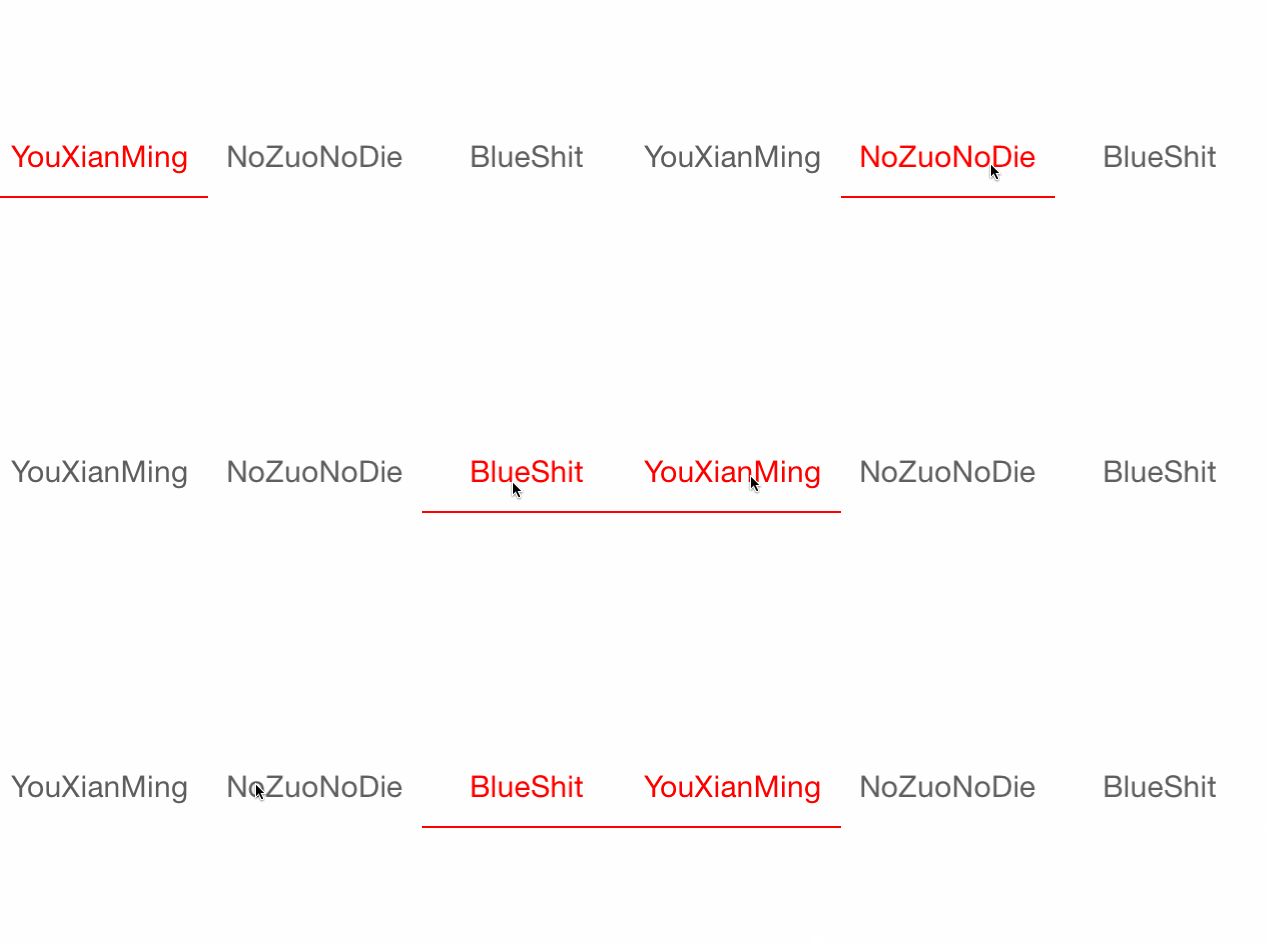
效果如下:
源码如下:
TitleSwitch.h 与 TitleSwitch.m
//

//  TitleSwitch.h

//  TitleSwitch

//

//  Created by YouXianMing on 14/11/4.

//  Copyright (c) 2014年 YouXianMing. All rights reserved.

//

#import <UIKit/UIKit.h>

@protocol TitleSwitchDelegate <NSObject>

@optional

- (void)willSelectIndex:(NSInteger)index;

- (void)didSelectIndex:(NSInteger)index;

@end

@interface TitleSwitch : UIView

/**

 *  协议

 */

@property (nonatomic, assign) id<TitleSwitchDelegate> delegate;

/**

 *  作为按钮的标题

 */

@property (nonatomic, strong) NSArray  *titles;

/**

 *  线的宽度

 */

@property (nonatomic, assign) CGFloat   lineWidth;

/**

 *  线的颜色

 */

@property (nonatomic, strong) UIColor  *lineColor;

/**

 *  标题字体

 */

@property (nonatomic, strong) UIFont   *titleFont;

/**

 *  普通标题颜色

 */

@property (nonatomic, strong) UIColor  *normalTitleColor;

/**

 *  选中标题的颜色

 */

@property (nonatomic, strong) UIColor  *selectedTitleColor;

/**

 *  一次只能按一个按钮触发动画效果

 */

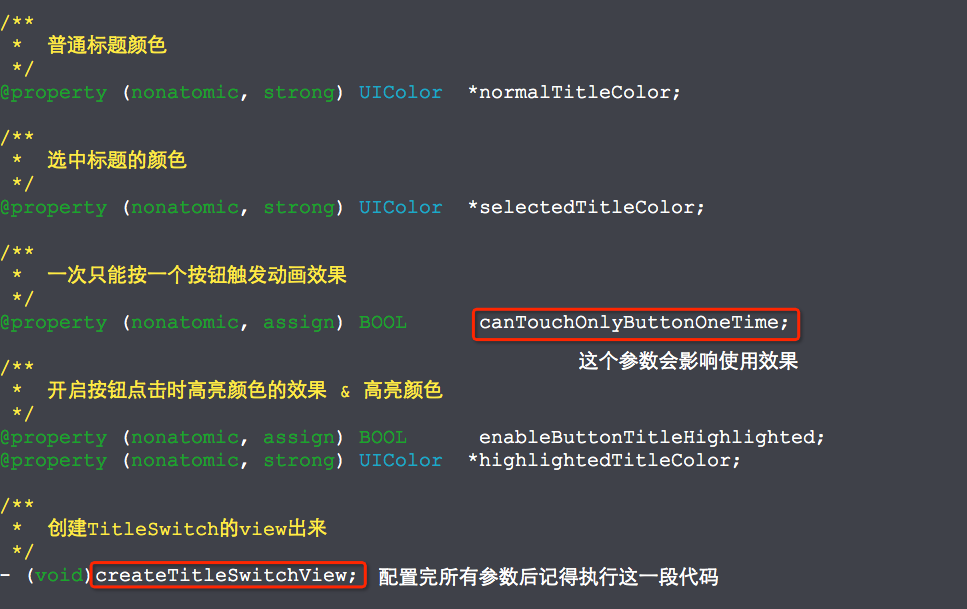
@property (nonatomic, assign) BOOL      canTouchOnlyButtonOneTime;

/**

 *  开启按钮点击时高亮颜色的效果 & 高亮颜色

 */

@property (nonatomic, assign) BOOL      enableButtonTitleHighlighted;

@property (nonatomic, strong) UIColor  *highlightedTitleColor;

/**

 *  创建TitleSwitch的view出来

 */

- (void)createTitleSwitchView;

@end
//

//  TitleSwitch.m

//  TitleSwitch

//

//  Created by YouXianMing on 14/11/4.

//  Copyright (c) 2014年 YouXianMing. All rights reserved.

//

#import "TitleSwitch.h"

typedef enum : NSUInteger {

    NORMAL_BUTTON = 0x11,

    LINE_VIEW = 0x1122,

} ENUM_VIEWTAG;

@implementation TitleSwitch

- (void)createTitleSwitchView {

    // 如果没有title,则直接返回

    if (_titles.count == ) {

        return;

    }

    // 获取尺寸

    CGFloat frameWidth  = self.bounds.size.width;

    CGFloat frameHeight = self.bounds.size.height;

    // 计算按钮的宽度&高度

    CGFloat buttonWidth      = frameWidth / _titles.count;

    CGFloat buttonHeight     = ;

    CGFloat defaultLineWidth = .f;

    if (_lineWidth == ) {

        buttonHeight = frameHeight - defaultLineWidth; // 默认线条占用一个像素

    } else {

        buttonHeight = frameHeight - _lineWidth;

    }

    // 初始化所有按钮

    for (int i = ; i < _titles.count; i++) {

        UIButton *button = [[UIButton alloc] initWithFrame:CGRectMake(buttonWidth * i,

                                                                      ,

                                                                      buttonWidth,

                                                                      buttonHeight)];

        button.tag       = NORMAL_BUTTON + i;

        [self addSubview:button];

        [button setTitle:_titles[i] forState:UIControlStateNormal];

        // 普通颜色

        if (i == ) {

            [self selectButtonStyle:button];

        } else {

            [self normalButtonStyle:button];

        }

        // 高亮颜色

        if (_enableButtonTitleHighlighted == YES && _highlightedTitleColor) {

            [button setTitleColor:_highlightedTitleColor forState:UIControlStateHighlighted];

        }

        // 添加事件

        [button addTarget:self action:@selector(buttonsEvent:) forControlEvents:UIControlEventTouchUpInside];

        // 设置字体

        if (_titleFont) {

            button.titleLabel.font = _titleFont;

        }

    }

    // 初始化横线view

    UIView *lineView = [[UIView alloc] initWithFrame:CGRectMake(, buttonHeight, buttonWidth,

                                                                (_lineWidth ==  ? defaultLineWidth : _lineWidth))];

    lineView.tag     = LINE_VIEW;

    [self addSubview:lineView];

    if (_lineColor) {

        lineView.backgroundColor = _lineColor;

    } else {

        lineView.backgroundColor = [UIColor redColor];

    }

}

/**

 *  按钮事件

 *

 *  @param button 触摸事件中的按钮

 */

- (void)buttonsEvent:(UIButton *)button {

    // 获取到lineView

    UIView *lineView      = [self viewWithTag:LINE_VIEW];

    // 哪一个button

    NSInteger whichButton = button.tag - NORMAL_BUTTON;

    // 计算按钮的宽度&高度

    CGFloat frameWidth    = self.bounds.size.width;

    CGFloat buttonWidth   = frameWidth / _titles.count;

    [[self subviews] enumerateObjectsUsingBlock:^(id obj, NSUInteger idx, BOOL *stop) {

        UIButton *tmp = (UIButton *)obj;

        if ([tmp isKindOfClass:[UIButton class]]) {

            if (tmp == button) {

                [self selectButtonStyle:tmp];

            } else {

                [self normalButtonStyle:tmp];

            }

        }

    }];

    // 做动画

    if (_canTouchOnlyButtonOneTime == YES) {

        self.userInteractionEnabled = NO;

    }

    if (_delegate && [_delegate respondsToSelector:@selector(willSelectIndex:)]) {

        [_delegate willSelectIndex:whichButton];

    }

    [UIView animateWithDuration:0.25f animations:^{

        CGRect rect    = lineView.frame;

        rect.origin.x  = whichButton * buttonWidth;

        lineView.frame = rect;

    } completion:^(BOOL finished) {

        if (_canTouchOnlyButtonOneTime == YES) {

            self.userInteractionEnabled = YES;

        }

        if (_delegate && [_delegate respondsToSelector:@selector(didSelectIndex:)]) {

            [_delegate didSelectIndex:whichButton];

        }

    }];

}

/**

 *  选中按钮的样式

 *

 *  @param button 按钮

 */

- (void)selectButtonStyle:(UIButton *)button {

    if (_normalTitleColor) {

        [button setTitleColor:_normalTitleColor

                     forState:UIControlStateNormal];

    } else {

        [button setTitleColor:[UIColor redColor]

                     forState:UIControlStateNormal];

    }

}

/**

 *  普通按钮样式

 *

 *  @param button 按钮

 */

- (void)normalButtonStyle:(UIButton *)button {

    if (_selectedTitleColor) {

        [button setTitleColor:_selectedTitleColor

                     forState:UIControlStateNormal];

    } else {

        [button setTitleColor:[UIColor colorWithRed:0.369 green:0.369 blue:0.369 alpha:]

                     forState:UIControlStateNormal];

    }

}

@end
使用:
//

//  ViewController.m

//  TitleSwitch

//

//  Created by YouXianMing on 14/11/4.

//  Copyright (c) 2014年 YouXianMing. All rights reserved.

//

#import "ViewController.h"

#import "TitleSwitch.h"

@interface ViewController ()<TitleSwitchDelegate>

@end

@implementation ViewController

- (void)viewDidLoad {

    [super viewDidLoad];

    TitleSwitch *titleSwitch              = [[TitleSwitch alloc] initWithFrame:CGRectMake(, , , )];

    titleSwitch.titles                    = @[@"YouXianMing", @"NoZuoNoDie", @"BlueShit"];

    titleSwitch.titleFont                 = [UIFont systemFontOfSize:.f];

    titleSwitch.lineWidth                 = .f;

    titleSwitch.canTouchOnlyButtonOneTime = YES;

    titleSwitch.delegate                  = self;

    [titleSwitch createTitleSwitchView];

    [self.view addSubview:titleSwitch];

}

- (void)willSelectIndex:(NSInteger)index {

    NSLog(@"willSelectIndex %ld", (long)index);

}

- (void)didSelectIndex:(NSInteger)index {

    NSLog(@"didSelectIndex %ld", (long)index);

}

@end
注意细节:
设计标签选择器TitleSwitch的更多相关文章
- CSS标签选择器(二)
一.CSS选择器概述 1.1.CSS功能 CSS语言具有两个基本功能:匹配和渲染 当浏览器在解析CSS样式时,首先应该确定哪些元素需要渲染,即匹配哪些HTML元素,这个操作由CSS样式中的选择器负责标 ...
- jQuery标签选择器
$(function() { //alert("hello jquery"); //选择器 //id选择器 $("#bt1").click( function( ...
- css标签选择器
/*标签选择器*/ input[type="text"] { width: 60%; } </style>
- jquery基本选择器:id选择器、class选择器、标签选择器、通配符选择器
全栈工程师开发手册 (作者:栾鹏) jquery系列教程1-选择器全解 jquery基本选择器 jquery基本选择器,包括id选择器.class选择器.标签选择器.通配符选择器,同时配合选择器的空格 ...
- H5 标签选择器
08-标签选择器 我是段落 我是段落 我是段落 我是段落 我是段落 我是标题 <!DOCTYPE html> <html lang="en"> <he ...
- CSS 标签选择器
CSS 标签选择器 再<stype>标签内,通过指定输入标签来配置CSS样式 <html> <head> <!-- style 设置头部标签--> &l ...
- css之标签选择器
标签(空格分隔): 标签选择器 选择器定义: 在一个HTML页面中会有很多很多的元素,不同的元素可能会有不同的样式,某些元素又需要设置相同的样式,选择器就是用来从HTML页面中查找特定元素的,找到元素 ...
- 前端基础之CSS的引入+HTML标签选择器+CSS操作属性
clear:left/ringt属性 CSS:语法形式上由选择器+以及一条或多条声明组成:选择器查找到指定的html标签后,使用css属性设置html标签的样式: ...
- 第三百二十五节,web爬虫,scrapy模块标签选择器下载图片,以及正则匹配标签
第三百二十五节,web爬虫,scrapy模块标签选择器下载图片,以及正则匹配标签 标签选择器对象 HtmlXPathSelector()创建标签选择器对象,参数接收response回调的html对象需 ...
随机推荐
- C++11中多线程库
一.Linux 线程API 线程是在操作系统层面支持的,所以多线程的学习建议还是先找一本linux系统编程类的书,了解linux提供线程的API,了解使用线程设计程序的基本操纵.完全使用系统调用编写多 ...
- HTML自己整理
1.margin:0 auto 表示什么意思?? margin后面如果只有两个参数的话,第一个表示top和bottom,第二个表示left和right因为0 auto,表示上下边界为0,左右则根据宽度 ...
- Android应用博客目录
应用有很多,开个博客都放进来方便查找,也方便修改 1 语言类: 1.1 JAVA 基础语言知识JAVA Collection与Collections,Array与Arrays的区别 JAVA练手--S ...
- Jquery Easy UI初步学习(三)数据增删改
第二篇只是学了加载用datagrid加载数据,数据的增删改还没有做,今天主要是解决这个问题了. 在做增删改前需要弹出对应窗口,这就需要了解一下EasyUi的弹窗控件. 摘自:http://philoo ...
- [日常] mysql的索引使用情况测试
1.索引(Index)是帮助MySQL高效获取数据的数据结构,可以理解为“排好序的快速查找数据结构”,在数据之外,数据库系统还维护着满足特定查找算法的数据结构,这些数据结构以某种方式引用(指向)数据, ...
- 把C程序的int main(void)改成static int main(void)会怎样呢?
如题,把C程序中的主函数int main(void)改成static int main(void)会怎么样呢? 比如把 #include <stdio.h> int main(void) ...
- MyBatis和Hibernate的优缺点对比。
Hibernate的优点: 1.hibernate是全自动,hibernate完全可以通过对象关系模型实现对数据库的操作,拥有完整的JavaBean对象与数据库的映射结构来自动生成sql. 2.功能强 ...
- @Controller和@RestController的区别(转)
@Controller和@RestController的区别? 官方文档: @RestController is a stereotype annotation that combines @Resp ...
- Linux学习3-Linux系统安装CentOS6.5
1.启动虚拟机(虚拟机的安装参见Linux学习1-创建虚拟机) 本此安装系统:CentOS6.5 2.启动客户端后迅速按下F2键进入Bios设置,注意:启动后需鼠标点击虚拟机的屏幕并迅 ...
- java工程师_基础_阶段一_HTML笔记篇
一.了解HTML语言 html:超文本标记语言. 二.HTML整体结构<html> <head> </head> <body> </body> ...