
[翻译] TSMessages
TSMessages
https://github.com/KrauseFx/TSMessages
This library provides an easy to use class to show little notification views on the top of the screen. (à la Tweetbot).
这个库提供了一个用于提示的view,显示在屏幕上.
The notification moves from the top of the screen underneath the navigation bar and stays there for a few seconds, depending on the length of the displayed text. To dismiss a notification before the time runs out, the user can swipe it to the top or just tap it.
提示的view从屏幕上面的navigation bar上出现,呆上几秒钟(多长时间依赖于显示的文本的长度).然后自动消失,当然,你也可以通过点击这个view让其消失.
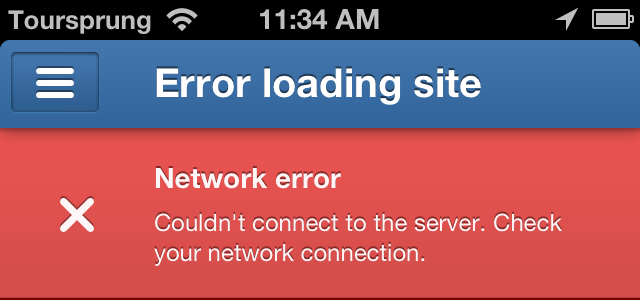
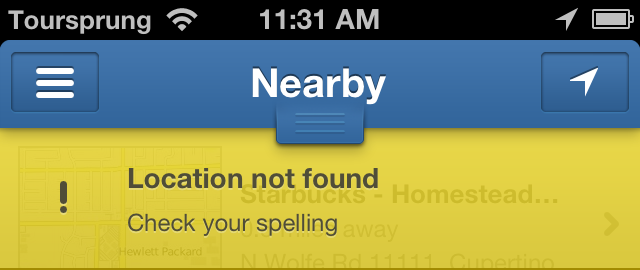
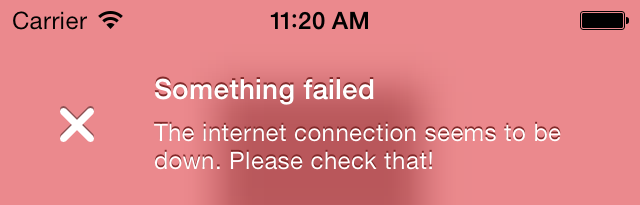
There are 4 different types already set up for you: Success, Error, Warning, Message (take a look at the screenshots)
有四种类型的样式供你选择:成功,失败,警告,消息.
It is very easy to add new notification types with a different design. Add the new type to the notificationType enum, add the needed design properties to the configuration file and set the name of the theme (used in the config file and images) in TSMessagesView.m inside the switch case.
添加新的样式也非常的简单.先在notificationType中添加新的枚举值,然后在配置文件中添加新的属性,以及对应的主题即可.
Take a look at the Example project to see how to use this library. You have to open the workspace, not the project file, since the Example project uses cocoapods.
你可以看看项目工程中是怎么使用的.因为是通过cocopods安装的,所以你需要打开workspace文件.
Get in contact with the developer on Twitter: KrauseFx (Felix Krause)
Installation
TSMessages is available through CocoaPods. To install it, simply add the following line to your Podfile:
你可以通过podfile安装,执行如下指令:
pod "TSMessages"Copy the source files TSMessageView and TSMessage into your project. Also copy the TSMessagesDesignDefault.json.
或者是手动将文件TSMessageView与TSMessage拖到你的项目当中,然后拷贝TSMessagesDesignDefault.json文件.
Usage
To show notifications use the following code:
你可以按照以下方式进行使用:
    [TSMessage showNotificationWithTitle:@"Your Title"

                                subtitle:@"A description"

                                    type:TSMessageNotificationTypeError];

    // Add a button inside the message

    [TSMessage showNotificationInViewController:self

                                          title:@"Update available"

                                       subtitle:@"Please update the app"

                                          image:nil

                                           type:TSMessageNotificationTypeMessage

                                       duration:TSMessageNotificationDurationAutomatic

                                       callback:nil

                                    buttonTitle:@"Update"

                                 buttonCallback:^{

                                     NSLog(@"User tapped the button");

                                 }

                                     atPosition:TSMessageNotificationPositionTop

                           canBeDismissedByUser:YES];

    // Use a custom design file

    [TSMessage addCustomDesignFromFileWithName:@"AlternativeDesign.json"];
You can define a default view controller in which the notifications should be displayed:
你可以指定一个默认的控制器,然后在该控制器上显示出提示信息:
[TSMessage setDefaultViewController:myNavController];
You can define a default view controller in which the notifications should be displayed:
   [TSMessage setDelegate:self];

   ...

   - (CGFloat)messageLocationOfMessageView:(TSMessageView *)messageView

   {

    return messageView.viewController...; // any calculation here

   }
You can customize a message view, right before it's displayed, like setting an alpha value, or adding a custom subview
你可以自定义一个信息的view,然后让他显示.
   [TSMessage setDelegate:self];

   ...

   - (void)customizeMessageView:(TSMessageView *)messageView

   {

      messageView.alpha = 0.4;

      [messageView addSubview:...];

   }
You can customize message view elements using UIAppearance
你也可以通过UIAppearance来定制信息的view
#import <TSMessages/TSMessageView.h>

@implementation TSAppDelegate

....

- (BOOL)application:(UIApplication *)application didFinishLaunchingWithOptions:(NSDictionary *)launchOptions

{

//If you want you can overidde some properties using UIAppearance

[[TSMessageView appearance] setTitleFont:[UIFont boldSystemFontOfSize:6]];

[[TSMessageView appearance] setTitleTextColor:[UIColor redColor]];

[[TSMessageView appearance] setContentFont:[UIFont boldSystemFontOfSize:10]];

[[TSMessageView appearance]setContentTextColor:[UIColor greenColor]];

[[TSMessageView appearance]setErrorIcon:[UIImage imageNamed:@"NotificationButtonBackground"]];

[[TSMessageView appearance]setSuccessIcon:[UIImage imageNamed:@"NotificationButtonBackground"]];

[[TSMessageView appearance]setMessageIcon:[UIImage imageNamed:@"NotificationButtonBackground"]];

[[TSMessageView appearance]setWarningIcon:[UIImage imageNamed:@"NotificationButtonBackground"]];

//End of override

return YES;

}
The following properties can be set when creating a new notification:
你在创建一个新的提示view时,可以设置以下的属性:
- viewController: The view controller to show the notification in. This might be the navigation controller.
- title: The title of the notification view
- subtitle: The text that is displayed underneath the title (optional)
- image: A custom icon image that is used instead of the default one (optional)
- type: The notification type (Message, Warning, Error, Success)
- duration: The duration the notification should be displayed
- callback: The block that should be executed, when the user dismissed the message by tapping on it or swiping it to the top.
Except the title and the notification type, all of the listed values are optional
除了标题以及提示的类型,其他都是可选的设置
If you don't want a detailed description (the text underneath the title) you don't need to set one. The notification will automatically resize itself properly.
如果你不想显示具体的提示信息,你不需要进行设置哦,提示的view会自己控制布局问题,不需要你担心.
Screenshots
[翻译] TSMessages的更多相关文章
- 《Django By Example》第五章 中文 翻译 (个人学习,渣翻)
书籍出处:https://www.packtpub.com/web-development/django-example 原作者:Antonio Melé (译者@ucag注:大家好,我是新来的翻译, ...
- 《Django By Example》第四章 中文 翻译 (个人学习,渣翻)
书籍出处:https://www.packtpub.com/web-development/django-example 原作者:Antonio Melé (译者注:祝大家新年快乐,这次带来<D ...
- [翻译]开发文档:android Bitmap的高效使用
内容概述 本文内容来自开发文档"Traning > Displaying Bitmaps Efficiently",包括大尺寸Bitmap的高效加载,图片的异步加载和数据缓存 ...
- 【探索】机器指令翻译成 JavaScript
前言 前些时候研究脚本混淆时,打算先学一些「程序流程」相关的概念.为了不因太枯燥而放弃,决定想一个有趣的案例,可以边探索边学. 于是想了一个话题:尝试将机器指令 1:1 翻译 成 JavaScript ...
- 《Django By Example》第三章 中文 翻译 (个人学习,渣翻)
书籍出处:https://www.packtpub.com/web-development/django-example 原作者:Antonio Melé (译者注:第三章滚烫出炉,大家请不要吐槽文中 ...
- 《Django By Example》第二章 中文 翻译 (个人学习,渣翻)
书籍出处:https://www.packtpub.com/web-development/django-example 原作者:Antonio Melé (译者注:翻译完第一章后,发现翻译第二章的速 ...
- 《Django By Example》第一章 中文 翻译 (个人学习,渣翻)
书籍出处:https://www.packtpub.com/web-development/django-example 原作者:Antonio Melé (译者注:本人目前在杭州某家互联网公司工作, ...
- 【翻译】Awesome R资源大全中文版来了,全球最火的R工具包一网打尽,超过300+工具,还在等什么?
0.前言 虽然很早就知道R被微软收购,也很早知道R在统计分析处理方面很强大,开始一直没有行动过...直到 直到12月初在微软技术大会,看到我软的工程师演示R的使用,我就震惊了,然后最近在网上到处了解和 ...
- ASP.NET MVC with Entity Framework and CSS一书翻译系列文章之第一章:创建基本的MVC Web站点
在这一章中,我们将学习如何使用基架快速搭建和运行一个简单的Microsoft ASP.NET MVC Web站点.在我们马上投入学习和编码之前,我们首先了解一些有关ASP.NET MVC和Entity ...
随机推荐
- InterView之PHP(2)
PHP 理论知识 常用的超全局变量(8个) $_GET ----->get传送方式 $_POST ----->post传送方式 $_REQUEST ----->可以接收到get和po ...
- spark、hadoop集群添加节点
1.首先添加hdfs的节点,将安装包上传到服务器,设置好环境变量.配置文件按之前spark集群搭建的那里进行修改. 设置完成后,要对新节点新型格式化: # hdfs dfs namenode - ...
- 关于js的 for...in 你了解多少
For...In 声明用于对数组或者对象的属性进行循环/迭代操作. 1. 求value: 对于数组 ,迭代出来的是数组元素,对于对象,迭代出来的是对象的属性值: 1)数组示例 var x var my ...
- Python List 基础学习
list&tuple&dict list list 常见操作 初始化: list1 = [123, 'abc', 4.56, ['inner', 'list'], 7-9j] list ...
- Linux 目录流管理
目录 1. 打开/关闭文件 1). 打开目录 / opendir 2). 关闭文件 / fclose 2. 读/写目录流 1). 目录流-读 / readdir & readdir_r 3. ...
- 能ping通外网dns但不能上网一例
一个win7本本仅通过一个无线路由一个人上网,突然一天不能上网了,甚是奇怪,一看本地连接均是正常的.而且能ping通外网的dns,但无论如何就是打不开网页,表现为输入任何网址很迅速的显示该页无法显示, ...
- CentOS普通用户没有sudo权限
sudo是linux系统管理指令,是允许系统管理员让普通用户执行一些或者全部的root命令的一个工具,如halt,reboot,su等等.这样不仅减少了root用户的登录 和管理时间,同样也提高了安全 ...
- MySQL7:性能优化
性能优化 优化MySQL数据库是数据库管理员和数据库开发人员的必备技能.MySQL优化,一方面是找出系统的瓶颈,提高MySQL数据库的整体性能:一方面需要合理的结构设计和参数调整,以提高用户操作响应的 ...
- Hive 基础你需要掌握这些
HDFS 中一个简单的 Join查询,是否需要撸一大串代码?我只会SQL语句 能不能入坑大数据?这里我们就来聊一聊 Hive. Hive 是什么? Hive 是一种数据仓库工具,不提供数据存储(数据还 ...
- 在windows上搭建redis集群(redis-cluster)
一 所需软件:Redis.Ruby语言运行环境.Redis的Ruby驱动redis-xxxx.gem.创建Redis集群的工具redis-trib.rb 二 安装配置redis redis下载地址 ...