
iOS开发UI篇—在UItableview中实现加载更多功能
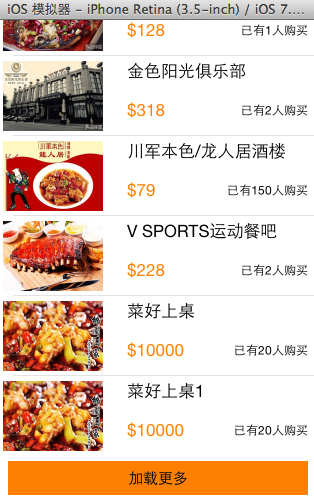
一、实现效果

点击加载更多按钮,出现一个加载图示,三秒钟后添加两条新的数据。

二、实现代码和说明
当在页面(视图部分)点击加载更多按钮的时候,主页面(主控制器)会加载两条数据进来。
视图部分的按钮被点击的时候,要让主控制器加载数据,刷新表格,2B青年会在视图中增加一个主控制器的属性,通过这个属性去调用进行加载,但在开发中通常通过代理模式来完成这个操作。
下面分别是两种实现的代码。
1、项目结构和说明

说明:加载更多永远都放在这个tableview的最下端,因此这里设置成了这个tableview的tableFooterView。
self.tableview.tableFooterView=footerview;
在实现上通过xib来进行处理,考虑到左右的留白,以及点击后的要切换到加载按钮和文字,要同时控制图标和文字,因此把加载图标和文字提示放在了一个view中以便控制,这个xib已经和YYfooterview.xib进行了关联,通过这个类来控制xib。
2、实现代码
(1).垃圾代码
数据模型部分
YYtg.h文件
 //

 //  YYtg.h

 //  02-团购(使用xib和类完成数据展示)

 //

 //  Created by apple on 14-5-29.

 //  Copyright (c) 2014年 itcase. All rights reserved.

 //

 #import <Foundation/Foundation.h>

 #import "Global.h"

 @interface YYtgModel : NSObject

 @property(nonatomic,copy)NSString *icon;

 @property(nonatomic,copy)NSString *buyCount;

 @property(nonatomic,copy)NSString *title;

 @property(nonatomic,copy)NSString *price;

 //对外接口

 YYinitH(tg)

 @end
YYtg.m文件
 //

 //  YYtg.m

 //  02-团购(使用xib和类完成数据展示)

 //

 //  Created by apple on 14-5-29.

 //  Copyright (c) 2014年 itcase. All rights reserved.

 //

 #import "YYtgModel.h"

 @implementation YYtgModel

 YYinitM(tg)

 @end
注意:对于数据转模型部分的构造方法接口和实现代码已经通过自定义带参数的宏来进行了封装。
封装代码如下:
 #ifndef _0____________Global_h

 #define _0____________Global_h

 /**

  *  自定义带参数的宏

  */

 #define     YYinitH(name)   -(instancetype)initWithDict:(NSDictionary *)dict;\

 +(instancetype)name##WithDict:(NSDictionary *)dict;

 #define     YYinitM(name)  -(instancetype)initWithDict:(NSDictionary *)dict\

 {\

     if (self=[super init]) {\

         [self setValuesForKeysWithDictionary:dict];\

     }\

     return self;\

 }\

 \

 +(instancetype)name##WithDict:(NSDictionary *)dict\

 {\

     return [[self alloc]initWithDict:dict];\

 }\

 #endif
视图部分
YYtgcell.h文件
 //

 //  YYtgcell.h

 //  02-团购(使用xib和类完成数据展示)

 //

 //  Created by apple on 14-5-29.

 //  Copyright (c) 2014年 itcase. All rights reserved.

 //

 #import <UIKit/UIKit.h>

 #import "YYtgModel.h"

 @interface YYtgcell : UITableViewCell

 @property(nonatomic,strong)YYtgModel *yytg;

 //把加载数据(使用xib创建cell的内部细节进行封装)

 +(instancetype)tgcellWithTableView:(UITableView *)tableView;

 @end
YYtgcell.m文件
 //

 //  YYtgcell.m

 //  02-团购(使用xib和类完成数据展示)

 //

 //  Created by apple on 14-5-29.

 //  Copyright (c) 2014年 itcase. All rights reserved.

 //

 #import "YYtgcell.h"

 //私有扩展

 @interface YYtgcell()

 @property (strong, nonatomic) IBOutlet UIImageView *img;

 @property (strong, nonatomic) IBOutlet UILabel *titlelab;

 @property (strong, nonatomic) IBOutlet UILabel *pricelab;

 @property (strong, nonatomic) IBOutlet UILabel *buycountlab;

 @end

 @implementation YYtgcell

 #pragma mark 重写set方法,完成数据的赋值操作

 -(void)setYytg:(YYtgModel *)yytg

 {

     _yytg=yytg;

     self.img.image=[UIImage imageNamed:yytg.icon];

     self.titlelab.text=yytg.title;

     self.pricelab.text=[NSString stringWithFormat:@"$%@",yytg.price];

     self.buycountlab.text=[NSString stringWithFormat:@"已有%@人购买",yytg.buyCount];

 }

 +(instancetype)tgcellWithTableView:(UITableView *)tableView

 {

     static NSString *identifier= @"tg";

     YYtgcell *cell=[tableView dequeueReusableCellWithIdentifier:identifier];

     if (cell==nil) {

         //如何让创建的cell加个戳

         //对于加载的xib文件,可以到xib视图的属性选择器中进行设置

         cell=[[[NSBundle mainBundle]loadNibNamed:@"tgcell" owner:nil options:nil]firstObject];

         NSLog(@"创建了一个cell");

     }

     return cell;

 }

 @end
YYfooterview.h文件
 //

 //  YYfooterview.h

 //  02-团购(使用xib和类完成数据展示)

 //

 //  Created by apple on 14-5-29.

 //  Copyright (c) 2014年 itcase. All rights reserved.

 //

 #import <UIKit/UIKit.h>

 @class YYViewController;

 @interface YYfooterview : UIView

 @property(nonatomic,strong) YYViewController *controller;

 @end
YYfooterview.m文件
 //

 //  YYfooterview.m

 //  02-团购(使用xib和类完成数据展示)

 //

 //  Created by apple on 14-5-29.

 //  Copyright (c) 2014年 itcase. All rights reserved.

 //

 #import "YYfooterview.h"

 #import "YYViewController.h"

 @interface YYfooterview ()

 @property (strong, nonatomic) IBOutlet UIActivityIndicatorView *loadingview;

 @property (strong, nonatomic) IBOutlet UIButton *loadbtn;

 @end

 @implementation YYfooterview

 - (IBAction)loadbtclick {

     NSLog(@"按钮被点击了");

     //隐藏按钮

     self.loadbtn.hidden=YES;

     //显示菊花

     self.loadingview.hidden=NO;

 #warning 模拟发送网络请求, 3秒之后隐藏菊花

     dispatch_after(dispatch_time(DISPATCH_TIME_NOW, (int64_t)(3.0 * NSEC_PER_SEC)), dispatch_get_main_queue(), ^{

         // 3.调用控制的加载数据方法

         [self.controller LoadMore];

         // 4.隐藏菊花视图

         self.loadingview.hidden = YES;

         // 5.显示按钮

         self.loadbtn.hidden = NO;

     });

 }

 @end
主控制器
YYViewController.h文件
 //

 //  YYViewController.h

 //  02-团购(使用xib和类完成数据展示)

 //

 //  Created by apple on 14-5-29.

 //  Copyright (c) 2014年 itcase. All rights reserved.

 //

 #import <UIKit/UIKit.h>

 @interface YYViewController : UIViewController

 //公开接口

 //- (void)LoadMore;

 @end
YYViewController.m文件
 //

 //  YYViewController.m

 //  02-团购(使用xib和类完成数据展示)

 //

 //  Created by apple on 14-5-29.

 //  Copyright (c) 2014年 itcase. All rights reserved.

 //

 #import "YYViewController.h"

 #import "YYtgModel.h"

 #import "YYtgcell.h"

 #import "YYfooterview.h"

 @interface YYViewController ()<UITableViewDataSource,UITableViewDelegate>

 @property (strong, nonatomic) IBOutlet UITableView *tableview;

 @property(strong,nonatomic)NSMutableArray *tg;

 @end

 @implementation YYViewController

 #pragma mark-加载数据方法

 -(void)LoadMore

 {

     //创建模型

     YYtgModel *tgmodel=[[YYtgModel alloc]init];

     tgmodel.title=@"菜好上桌";

     tgmodel.icon=@"5ee372ff039073317a49af5442748071";

     tgmodel.buyCount=@"";

     tgmodel.price=@"";

     //将模型添加到数组中

     [self.tg addObject:tgmodel];

     YYtgModel *tgmodelq=[[YYtgModel alloc]init];

     tgmodelq.title=@"菜好上桌1";

     tgmodelq.icon=@"5ee372ff039073317a49af5442748071";

     tgmodelq.buyCount=@"";

     tgmodelq.price=@"";

     [self.tg addObject:tgmodelq];

     //刷新表格

     [self.tableview reloadData];

 }

 - (void)viewDidLoad

 {

     [super viewDidLoad];

     self.tableview.rowHeight=.f;

     //加载底部视图

     //从xib中获取数据

     UINib *nib=[UINib nibWithNibName:@"YYfooterview" bundle:nil];

     YYfooterview *footerview=[[nib instantiateWithOwner:nil options:nil] firstObject];

     self.tableview.tableFooterView=footerview;

     //设置控制

     footerview.controller=self;

 }

 #pragma mark-  懒加载

 -(NSArray *)tg

 {

     if (_tg==nil) {

         NSString *fullpath=[[NSBundle mainBundle]pathForResource:@"tgs.plist" ofType:nil];

         NSArray *temparray=[NSArray arrayWithContentsOfFile:fullpath];

         NSMutableArray *arrayM=[NSMutableArray arrayWithCapacity:temparray.count];

         for (NSDictionary *dict in temparray) {

             YYtgModel *tg=[YYtgModel tgWithDict:dict];

             [arrayM addObject:tg];

         }

         _tg=arrayM;

     }

     return _tg;

 }

 #pragma mark- xib创建cell数据处理

 #pragma mark 多少组

 -(NSInteger)numberOfSectionsInTableView:(UITableView *)tableView

 {

     return ;

 }

 #pragma mark多少行

 -(NSInteger)tableView:(UITableView *)tableView numberOfRowsInSection:(NSInteger)section

 {

     return self.tg.count;

 }

 #pragma mark设置每组每行

 -(UITableViewCell *)tableView:(UITableView *)tableView cellForRowAtIndexPath:(NSIndexPath *)indexPath

 {

     //1.创建cell

     YYtgcell *cell=[YYtgcell tgcellWithTableView:tableView];

     //2.获取当前行的模型,设置cell的数据

     YYtgModel *tg=self.tg[indexPath.row];

     cell.yytg=tg;

     //3.返回cell

     return cell;

 }

 #pragma mark- 隐藏状态栏

 -(BOOL)prefersStatusBarHidden

 {

     return YES;

 }

 @end
2.通过代理完成
当按钮被点击的时候,视图部分本身不干活,而是通知它的代理(控制器)完成接下来的操作。
该部分代码在1的基础上对下面几个文件进行了修改:
视图部分:
YYfooterview.h文件
 //

 //  YYfooterview.h

 //  02-团购(使用xib和类完成数据展示)

 //

 //  Created by apple on 14-5-29.

 //  Copyright (c) 2014年 itcase. All rights reserved.

 //

 #import <UIKit/UIKit.h>

 @class YYViewController ,YYfooterview;

 //约定协议

 @protocol YYfooterviewDelegate <NSObject>

 -(void)footerviewLoadMore;

 @end

 @interface YYfooterview : UIView

 //声明一个id类型属性,遵守了协议的“人”即可成为它的代理

 @property(nonatomic,strong)id<YYfooterviewDelegate> delegate;

 //@property(nonatomic,strong) YYViewController *controller;

 @end
YYfooterview.m文件
 //

 //  YYfooterview.m

 //  02-团购(使用xib和类完成数据展示)

 //

 //  Created by apple on 14-5-29.

 //  Copyright (c) 2014年 itcase. All rights reserved.

 //

 #import "YYfooterview.h"

 #import "YYViewController.h"

 @interface YYfooterview ()

 @property (strong, nonatomic) IBOutlet UIActivityIndicatorView *loadingview;

 @property (strong, nonatomic) IBOutlet UIButton *loadbtn;

 @end

 @implementation YYfooterview

 - (IBAction)loadbtclick {

     NSLog(@"按钮被点击了");

     //隐藏按钮

     self.loadbtn.hidden=YES;

     //显示菊花

     self.loadingview.hidden=NO;

 #warning 模拟发送网络请求, 3秒之后隐藏菊花

     dispatch_after(dispatch_time(DISPATCH_TIME_NOW, (int64_t)(3.0 * NSEC_PER_SEC)), dispatch_get_main_queue(), ^{

         // 3.调用控制的加载数据方法

 //        [self.controller LoadMore];

         //通知代理

         [self.delegate footerviewLoadMore];

         // 4.隐藏菊花视图

         self.loadingview.hidden = YES;

         // 5.显示按钮

         self.loadbtn.hidden = NO;

     });

 }

 @end
主控制器部分
YYViewController.h文件
 //

 //  YYViewController.h

 //  02-团购(使用xib和类完成数据展示)

 //

 //  Created by apple on 14-5-29.

 //  Copyright (c) 2014年 itcase. All rights reserved.

 //

 #import <UIKit/UIKit.h>

 @interface YYViewController : UIViewController

 //公开接口

 //- (void)LoadMore;

 @end
YYViewController.m文件
 //

 //  YYViewController.m

 //  02-团购(使用xib和类完成数据展示)

 //

 //  Created by apple on 14-5-29.

 //  Copyright (c) 2014年 itcase. All rights reserved.

 //

 #import "YYViewController.h"

 #import "YYtgModel.h"

 #import "YYtgcell.h"

 #import "YYfooterview.h"

 @interface YYViewController ()<UITableViewDataSource,UITableViewDelegate,YYfooterviewDelegate>

 @property (strong, nonatomic) IBOutlet UITableView *tableview;

 @property(strong,nonatomic)NSMutableArray *tg;

 @end

 @implementation YYViewController

 #pragma mark-加载数据方法

 -(void)footerviewLoadMore

 {

     //创建模型

     YYtgModel *tgmodel=[[YYtgModel alloc]init];

     tgmodel.title=@"菜好上桌";

     tgmodel.icon=@"5ee372ff039073317a49af5442748071";

     tgmodel.buyCount=@"";

     tgmodel.price=@"";

     //将模型添加到数组中

     [self.tg addObject:tgmodel];

     YYtgModel *tgmodelq=[[YYtgModel alloc]init];

     tgmodelq.title=@"菜好上桌1";

     tgmodelq.icon=@"5ee372ff039073317a49af5442748071";

     tgmodelq.buyCount=@"";

     tgmodelq.price=@"";

     [self.tg addObject:tgmodelq];

     //刷新表格

     [self.tableview reloadData];

 }

 //-(void)LoadMore

 //{

 //    //创建模型

 //    YYtgModel *tgmodel=[[YYtgModel alloc]init];

 //    tgmodel.title=@"菜好上桌";

 //    tgmodel.icon=@"5ee372ff039073317a49af5442748071";

 //    tgmodel.buyCount=@"20";

 //    tgmodel.price=@"10000";

 //    //将模型添加到数组中

 //    [self.tg addObject:tgmodel];

 //

 //    YYtgModel *tgmodelq=[[YYtgModel alloc]init];

 //    tgmodelq.title=@"菜好上桌1";

 //    tgmodelq.icon=@"5ee372ff039073317a49af5442748071";

 //    tgmodelq.buyCount=@"20";

 //    tgmodelq.price=@"10000";

 //

 //    [self.tg addObject:tgmodelq];

 //    //刷新表格

 //    [self.tableview reloadData];

 //}

 - (void)viewDidLoad

 {

     [super viewDidLoad];

     self.tableview.rowHeight=.f;

     //加载底部视图

     //从xib中获取数据

     UINib *nib=[UINib nibWithNibName:@"YYfooterview" bundle:nil];

     YYfooterview *footerview=[[nib instantiateWithOwner:nil options:nil] firstObject];

     self.tableview.tableFooterView=footerview;

     //设置控制

 //    footerview.controller=self;

     //设置代理

     footerview.delegate=self;

 }

 #pragma mark-  懒加载

 -(NSArray *)tg

 {

     if (_tg==nil) {

         NSString *fullpath=[[NSBundle mainBundle]pathForResource:@"tgs.plist" ofType:nil];

         NSArray *temparray=[NSArray arrayWithContentsOfFile:fullpath];

         NSMutableArray *arrayM=[NSMutableArray arrayWithCapacity:temparray.count];

         for (NSDictionary *dict in temparray) {

             YYtgModel *tg=[YYtgModel tgWithDict:dict];

             [arrayM addObject:tg];

         }

         _tg=arrayM;

     }

     return _tg;

 }

 #pragma mark- xib创建cell数据处理

 #pragma mark 多少组

 -(NSInteger)numberOfSectionsInTableView:(UITableView *)tableView

 {

     return ;

 }

 #pragma mark多少行

 -(NSInteger)tableView:(UITableView *)tableView numberOfRowsInSection:(NSInteger)section

 {

     return self.tg.count;

 }

 #pragma mark设置每组每行

 -(UITableViewCell *)tableView:(UITableView *)tableView cellForRowAtIndexPath:(NSIndexPath *)indexPath

 {

     //1.创建cell

     YYtgcell *cell=[YYtgcell tgcellWithTableView:tableView];

     //2.获取当前行的模型,设置cell的数据

     YYtgModel *tg=self.tg[indexPath.row];

     cell.yytg=tg;

     //3.返回cell

     return cell;

 }

 #pragma mark- 隐藏状态栏

 -(BOOL)prefersStatusBarHidden

 {

     return YES;

 }

 @end
iOS开发UI篇—在UItableview中实现加载更多功能的更多相关文章
- iOS开发UI篇—在UITableview的应用中使用动态单元格来完成app应用程序管理界面的搭建
iOS开发UI篇—在UITableview的应用中使用动态单元格来完成app应用程序管理界面的搭建 一.实现效果 说明:该示例在storyboard中使用动态单元格来完成. 二.实现 1.项目文件结构 ...
- iOS开发UI篇—实现UItableview控件数据刷新
iOS开发UI篇—实现UItableview控件数据刷新 一.项目文件结构和plist文件 二.实现效果 1.说明:这是一个英雄展示界面,点击选中行,可以修改改行英雄的名称(完成数据刷新的操作). 运 ...
- iOS开发UI篇—使用UItableview完成一个简单的QQ好友列表(一)
iOS开发UI篇—使用UItableview完成一个简单的QQ好友列表(一) 一.项目结构和plist文件 二.实现代码 1.说明: 主控制器直接继承UITableViewController // ...
- iOS开发UI篇—在UIImageView中添加按钮以及Tag的参数说明
ios开发UI篇—在ImageView中添加按钮以及Tag的参数说明 一.tag参数 一个视图通常都只有一个父视图,多个子视图,在开发中可以通过使用子视图的tag来取出对应的子视图.方法为Viewwi ...
- ios开发UI篇—在ImageView中添加按钮以及Tag的参数说明
ios开发UI篇—在ImageView中添加按钮以及Tag的参数说明 一.tag参数 一个视图通常都只有一个父视图,多个子视图,在开发中可以通过使用子视图的tag来取出对应的子视图.方法为Viewwi ...
- iOS开发UI篇—使用UItableview完成一个简单的QQ好友列表(二)
一.实现效果 二.实现代码 1.数据模型部分 YYQQGroupModel.h文件 // // YYQQGroupModel.h // 02-QQ好友列表(基本数据的加载) / ...
- iOS开发UI篇—字典转模型
iOS开发UI篇—字典转模型 一.能完成功能的“问题代码” 1.从plist中加载的数据 2.实现的代码 // // LFViewController.m // 03-应用管理 // // Creat ...
- iOS开发UI篇—UITableview控件简单介绍
iOS开发UI篇—UITableview控件简单介绍 一.基本介绍 在众多移动应⽤用中,能看到各式各样的表格数据 . 在iOS中,要实现表格数据展示,最常用的做法就是使用UITableView,UIT ...
- iOS开发UI篇—UITableview控件基本使用
iOS开发UI篇—UITableview控件基本使用 一.一个简单的英雄展示程序 NJHero.h文件代码(字典转模型) #import <Foundation/Foundation.h> ...
随机推荐
- Ant安装、环境变量配置及验证
一.安装ant 到官方主页http://ant.apache.org下载新版(目前为Ant1.8.1)的ant,得到的是一个apache-ant-1.8.1-bin.zip的压缩包.将其解压到你的硬盘 ...
- 4.用PHP打印出前一天的时间格式是2006-5-10 22:21:21
echo date('Y-m-d H:i:s', strtotime('-1 days'));
- Extjs 3.4 复选框的,默认选中 ,禁用,(纯属于自己代码中需要,总结!)
var sm = new Ext.grid.CheckboxSelectionModel( { //一个特定的选择模型,它将渲染一列复选框,可以用来选择或反选多行数据. ...
- ef第一次启动较慢
解决ef第一次启动较慢的问题: protected void Application_Start() { //禁用第一次ef查询对表__MigrationHistory的问题使用了ef的Code fi ...
- .Net程序员安卓学习之路4:使用xutils Get Post数据
前面使用了一些网络上找来的类进行网络访问,后来发现了安卓开发中有一个国人写的类库xutils比较全面,也比较经典,故后续使用xutils类库进行记录. 本例服务端使用WCF来实现,写好的WCF服务端在 ...
- ubuntu登陆出现问题
手贱改了用户root权限结果登陆时提示system administrator is not allowed to login from this screen(郁闷勒) 这时可以按ctrl+F2进入 ...
- Codeforces 749C:Voting(暴力模拟)
http://codeforces.com/problemset/problem/749/C 题意:有n个人投票,分为 D 和 R 两派,从1~n的顺序投票,轮到某人投票的时候,他可以将对方的一个人K ...
- xcode 创建项目 勾选 git 出现警告
1. 解决方法: 在mac机上找到终端工具 >> 这里先介绍下使用Command-line. 1,下载Git installer,地址:http://git-scm.com/downlo ...
- 【转】 Tomcat v7.0 Server at localhost was unable to start within 45
转载地址:http://www.jsjtt.com/java/JavaWebkaifa/58.html Starting Tomcat v7.0 Server at localhost' has en ...
- Unity AngryBots愤怒的机器人demo研究
做为Unity早期的经典demo,一直从3.5以后沿用到4.7.x版本.但其内部一些做法十分不合理.比如使用过多的根目录, 创建怪物和玩家不用SpawnPoint.AI.CheckPoint的代码实现 ...