
WPF:带复选框CheckBox的树TreeView
最近要用WPF写一个树,同事给了我一个Demo(不知道是从哪里找来的),我基本上就是参照了这个Demo。
先放一下效果图(3棵树):
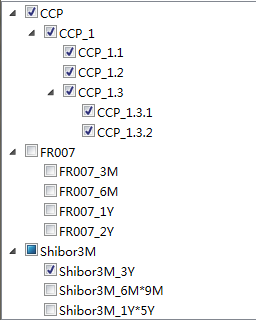
这个树索要满足的条件是:
- 父节点.Checked=true时,子节点全部选中(反之成立);
- 父节点.Checked=false时,子节点全部不选中(反之成立);
- 子节点存在部分节点选中,部分节点未选中时,父节点为非全选状态(null)(反之成立);
那么这个树究竟要怎么造出来呢?
由于用WPF,且用MVVM模式,故TreeView的ItemSource及复选框的选中状态IsChecked需要从ViewModel层进行绑定。先看一下树的xaml:
<Window x:Class="MyWpfCheckTreeDemo.MainWindow"

        xmlns="http://schemas.microsoft.com/winfx/2006/xaml/presentation"

        xmlns:x="http://schemas.microsoft.com/winfx/2006/xaml"

        xmlns:VM="clr-namespace:MyWpfCheckTreeDemo.AppViewModel"

        xmlns:i="http://schemas.microsoft.com/expression/2010/interactivity"

        Title="MainWindow" Height="350" Width="525" Loaded="LoadedEvent">

    <Window.Resources>

        <HierarchicalDataTemplate x:Key="MyTreeItemTemplate"

                                  DataType="{x:Type VM:CommonTreeView}"

                                  ItemsSource="{Binding Path=Children,Mode=OneWay}">

            <StackPanel x:Name="My_SP"  Orientation="Horizontal" Margin="2">

                <CheckBox  IsChecked="{Binding Path=IsChecked}" >

                </CheckBox>

                <ContentPresenter  Content="{Binding Path=NodeName,Mode=OneTime}" Margin="2,0"/>

            </StackPanel>

        </HierarchicalDataTemplate>

        <Style x:Key="TreeViewItemStyle" TargetType="{x:Type TreeViewItem}">

            <Setter Property="IsExpanded" Value="True" />

        </Style>

    </Window.Resources>

    <Grid>

       <TreeView Grid.Row="1"  x:Name="tv" ItemsSource="{Binding MyTrees}"

                      ItemContainerStyle="{StaticResource TreeViewItemStyle}"

                      ItemTemplate="{StaticResource MyTreeItemTemplate}">

                </TreeView>

            </Grid>

       </Window>
TreeView.xaml
在xaml中的数据绑定好之后,就是在后台如何实现数据的传递了。
先来看一下每个节点所需要包含的数据:
- 节点名称:NodeName,
- 父节点:Parent ,
- 该父节点的所有孩子:Children,为每一个节点增加创建孩子的方法
- 每个节点的选中状态:IsChecked,每次子节点的IsChecked变化时,需要去更新Parent节点的IsChecked.
现在将上述数据封装成一个树节点类:
    public  class CommonTreeView : NotifyPropertyBase

    {

      /// <summary>

      /// 父

      /// </summary>

        public CommonTreeView Parent

        {

            get;

            set;

        }

        /// <summary>

        /// 子

        /// </summary>

        public List<CommonTreeView> Children

        {

            get;

            set;

        }

        /// <summary>

        /// 节点的名字

        /// </summary>

        public string NodeName

        {

            get;

            set;

        }

        public bool? _isChecked;

        /// <summary>

        /// CheckBox是否选中

        /// </summary>

        public bool? IsChecked

        {

            get

            {

                return _isChecked;

            }

            set

            {

                SetIsChecked(value, true, true);

            }

        }

        public CommonTreeView(string name)

        {

            this.NodeName=name;

            this.Children=new List<CommonTreeView>();

        }

        public CommonTreeView() { }

        private void SetIsChecked(bool? value, bool checkedChildren, bool checkedParent)

        {

            if (_isChecked == value) return;

            _isChecked = value;

            //选中和取消子类

            if (checkedChildren && value.HasValue && Children != null)

                Children.ForEach(ch => ch.SetIsChecked(value, true, false));

            //选中和取消父类

            if (checkedParent && this.Parent != null)

                this.Parent.CheckParentCheckState();

            //通知更改

            this.SetProperty(x => x.IsChecked);

        }

        /// <summary>

        /// 检查父类是否选 中

        /// 如果父类的子类中有一个和第一个子类的状态不一样父类ischecked为null

        /// </summary>

        private void CheckParentCheckState()

        {

             List<CommonTreeView> checkedItems = new List<CommonTreeView>();

             string checkedNames = string.Empty;

            bool? _currentState = this.IsChecked;

            bool? _firstState = null;

            for (int i = 0; i < this.Children.Count(); i++)

            {

                bool? childrenState = this.Children[i].IsChecked;

                if (i == 0)

                {

                    _firstState = childrenState;

                }

                else if (_firstState != childrenState)

                {

                    _firstState = null;

                }

            }

            if (_firstState != null) _currentState = _firstState;

            SetIsChecked(_firstState, false, true);

        }

        /// <summary>

        /// 创建树

        /// </summary>

        /// <param name="children"></param>

        /// <param name="isChecked"></param>

        public void CreateTreeWithChildre( CommonTreeView children,bool? isChecked)

        {

            this.Children.Add(children);

//必须先把孩子加入再为Parent赋值,

//否则当只有一个子节点时Parent的IsChecked状态会出错

            children.Parent = this;

            children.IsChecked = isChecked;

        }

    }
CommonTreeView.cs
节点值变化时对UI进行通知的方法PropertyNotify:
    public class NotifyPropertyBase : INotifyPropertyChanged

    {

        public void OnPropertyChanged(string propertyName)

        {

            if (PropertyChanged != null)

            {

                PropertyChanged(this, new PropertyChangedEventArgs(propertyName));

            }

        }

        public event PropertyChangedEventHandler PropertyChanged;

    }

    /// <summary>

    /// 扩展方法

    /// 避免硬编码问题

    /// </summary>

    public static class NotifyPropertyBaseEx

    {

        public static void SetProperty<T, U>(this T tvm, Expression<Func<T, U>> expre) where T : NotifyPropertyBase, new()

        {

            string _pro = CommonFun.GetPropertyName(expre);

            tvm.OnPropertyChanged(_pro);

        }//为什么扩展方法必须是静态的

    }

    public class CommonFun

    {

        /// <summary>

        /// 返回属性名

        /// </summary>

        /// <typeparam name="T"></typeparam>

        /// <typeparam name="U"></typeparam>

        /// <param name="expr"></param>

        /// <returns></returns>

        public static string GetPropertyName<T, U>(Expression<Func<T, U>> expr)

        {

            string _propertyName = "";

            if (expr.Body is MemberExpression)

            {

                _propertyName = (expr.Body as MemberExpression).Member.Name;

            }

            else if (expr.Body is UnaryExpression)

            {

                _propertyName = ((expr.Body as UnaryExpression).Operand as MemberExpression).Member.Name;

            }

            return _propertyName;

        }

    }
INotifyPropertyChanged
到这里基本上这个树就可以投入使用了,现在在ViewModel中给树赋值,并取出选中状态的叶子的节点名称:
这个里面的方法只给出重点部分:
  /// <summary>

        /// 创建树

        /// </summary>

        /// <returns></returns>

        public List<CommonTreeView> MyCreateTree()

        {

            List<CommonTreeView> views = new List<CommonTreeView>();

            //CommonTreeView _myT = new CommonTreeView("合约");

            CommonTreeView _myy = new CommonTreeView("CCP");

            views.Add(_myy);

            CommonTreeView _myy1 = new CommonTreeView("CCP_1");

            _myy.CreateTreeWithChildre(_myy1, true);

            CommonTreeView _myy1_1 = new CommonTreeView("CCP_1.1");

            _myy1.CreateTreeWithChildre(_myy1_1, true);

       }

        /// <summary>

        /// 选中的节点名称保存在_names中

        /// </summary>

        public void SaveC()

        {

            _names = new List<string>();

            //SelectedTree=MyTrees.FindAll(r => r.IsChecked == true);

            foreach (CommonTreeView tree in MyTrees)

            {

                GetCheckedItems(tree);

            }

         }

        /// <summary>

        /// 获取选中项

        /// </summary>

        /// <param name="tree"></param>

        private void GetCheckedItems(CommonTreeView tree)

        {

            if (tree.Parent != null && (tree.Children == null || tree.Children.Count == 0))

            {

                if (tree.IsChecked.HasValue && tree.IsChecked == true)

                    _names.Add(tree.NodeName);

            }

            else if (tree.Children != null && tree.Children.Count > 0)

            {

                foreach (CommonTreeView tv in tree.Children)

                    GetCheckedItems(tv);

            }

          }
TreeViewModel.cs
到这里就结束啦。。。
WPF:带复选框CheckBox的树TreeView的更多相关文章
- easyUI带复选框的组合树
代码: <input id="depts"><script type="text/javascript">$(document).rea ...
- 雷林鹏分享:jQuery EasyUI 树形菜单 - 创建带复选框的树形菜单
jQuery EasyUI 树形菜单 - 创建带复选框的树形菜单 easyui 的树(Tree)插件允许您创建一个复选框树.如果您点击一个节点的复选框,这个点击的节点信息将向上和向下继承.例如:点击 ...
- 使用CSS3美化复选框checkbox
我们知道HTML默认的复选框样式十分简陋,而以图片代替复选框的美化方式会给页面表单的处理带来麻烦,那么本文将结合实例带您一起了解一下使用CSS3将复选框checkbox进行样式美化,并且带上超酷的滑动 ...
- jquery完成带复选框的表格行高亮显示
jquery完成带复选框的表格行高亮显示 通过jquery技术来操作表格是件简单的事,通过jquery的语法,可以很轻松的完成表格的隔行换色,悬浮高亮,在实际的应用中可能会出现表格中带复选框的,删除时 ...
- css3美化复选框checkbox
两种美化效果如下图: 代码(html) <div id="main"> <h2 class="top_title">使用CSS3美化复 ...
- [原创]纯JS实现网页中多选复选框checkbox和单选radio的美化效果
图片素材: 最终效果图: <html><title> 纯JS实现网页中多选复选框checkbox和单选radio的美化效果</title><head>& ...
- 复选框(checkbox)、单选框(radiobox)的使用
复选框(checkbox).单选框(radiobox)的使用 复选框: HTML: // 复选框 <input type="checkbox" name="chec ...
- php 判断复选框checkbox是否被选中
php 判断复选框checkbox是否被选中 复选框checkbox在php表单提交中经常被使用到,本文章通过实例向大家介绍php如何判断复选框checkbox中的值是否被选中,需要的朋友可以参考 ...
- jquery判断复选框checkbox是否被选中
jquery判断复选框checkbox是否被选中 使用is方法 //如果选中返回true //如果未选中返回false .is(':checked');
随机推荐
- 下载pdf_不同操作系统,无法正常下载(兼容性问题)
[功能点]:下载pdf文件 [问题描述]:window上传附件,linux无法下载 [根本原因]:window中路径分割符为"\",linux中路径分割符为"/" ...
- JQuery兼容IE6问题汇总(不断更新)
兼容IE6真是苦逼的差事,无奈中... 逗号的问题:IE6中要去掉最后的逗号 var o={ id:1, Name:"abc", //这里的逗号一定要去掉 } HTML的结构,由于 ...
- ios - block数据的回调
block在代理,kvo中传递数据效率最高 实现原理 控制器B想传递数据给控制器A.通过在B控制器中创建Block类型的类,创建方法,方法参数是刚才创建的block类型的变量.在方法实现的内部调用参数 ...
- RDIFramework.NET V2.9版本多语言的实现
RDIFramework.NET V2.9版本多语言的实现 现在是国际化时代,软件也不能落后.一个公司里很可能会有老外,也可能有台湾的朋友,他们用软件的习惯都不一样,若同样一个软件同时能适应多种语言文 ...
- 基于ArcGIS JS API的在线专题地图实现
0 引言 专题地图是突出而深入的表示一种或几种要素或现象,即按照地图主题的要求,集中表示与主题有关内容的地图.专题地图的专题要素多种多样,分类方法也多种多样,根据专题地图表现数据的特点可分为定 ...
- Leetcode: Find Right Interval
Given a set of intervals, for each of the interval i, check if there exists an interval j whose star ...
- sdutoj 2623 The number of steps
http://acm.sdut.edu.cn/sdutoj/problem.php?action=showproblem&problemid=2623 The number of steps ...
- ES6最具魔力的特性——生成器
ES6生成器(Generators)简介 我们从一个示例开始: function* quips(name) { yield "你好 " + name + "!" ...
- [已解决] MyBatis 中bind用法
JAVA: TC_ENTR_FLOW selectFlowForUpdate(String ENTR_ID); XML: <select id="selectFlowForUpdate ...
- keytool的使用
1. 创建数字证书 keytool -genkey -v -alias scent -dname "CN=John,OU=MNG,O=Corp,L=Hangzhou,ST=Zhejiang, ...