
Flappy Bird (Java实现)
运行效果:
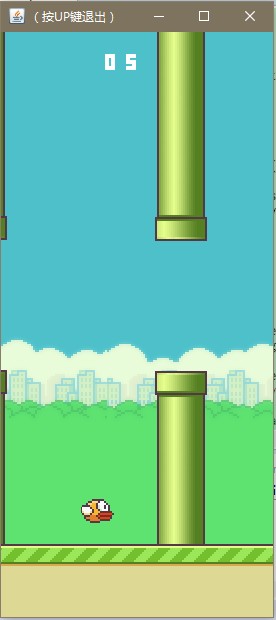
代码:
 package bird;

 import java.awt.Graphics;

 import java.awt.Image;

 import java.awt.Toolkit;

 import java.awt.event.KeyAdapter;

 import java.awt.event.KeyEvent;

 import java.io.BufferedReader;

 import java.io.BufferedWriter;

 import java.io.FileNotFoundException;

 import java.io.FileReader;

 import java.io.FileWriter;

 import java.io.IOException;

 import java.util.Random;

 import javax.swing.JFrame;

 import javax.swing.JOptionPane;

 import javax.swing.JPanel;

 public class Bird  extends JPanel  {

     private final int WIDTH=288;

     private  int HEIGHT=512+112;

 //    Image img;

     private  Image bg,land,pipe_up,pipe_down,bird,score_h,score_t,score_n;

     private  int y=300,land_x=0,pipe_x=200,current_y=0,time=0,down=0,bg_x=0,t=0,score=0,yt=-1;

     private int a = 0, b = 0, c = 0;

     private int[] pipe_ys=new int[4];

     private  Image [] score_number=new Image[10];

     private Random random;

     Bird(){

         getBestScores() ;

         Toolkit tool = this.getToolkit();

         bg= tool.getImage("images/bg_day.png");

         land=tool.getImage("images/land.png");

         pipe_up= tool.getImage("images/pipe_up.png");

         pipe_down= tool.getImage("images/pipe_down.png");

         bird= tool.getImage("images/bird0_01.png");

         random = new Random();

         for(int i=0;i<=9;i++){

         score_number[i]= tool.getImage("images/number_score_0"+i+".png");

         }

         init();

         this.addKeyListener(

                 new KeyAdapter() {

             public void keyPressed(KeyEvent e) {

                 int c = e.getKeyCode();

                 //System.out.print(c);

                 switch (c) {

                     case KeyEvent.VK_LEFT :

                         break;

                     case KeyEvent.VK_RIGHT :

                         break;

                     case KeyEvent.VK_UP :

                     System.exit(0);

                         break;

                     case KeyEvent.VK_DOWN :

                         break;

                     case KeyEvent.VK_SPACE :

                         down=0;

                         if(time<=0)time=16;

                         break;

                     default :

                         // System.out.print("hey");

                 }

             }

         });

         this.setFocusable(true);

     }

     void init(){

         y=300;

         land_x=0;

         pipe_x=200;

         current_y=0;

         time=0;

         down=0;

         bg_x=0;

         t=0;

         score=0;

         yt=-1;

         for(int i=0;i<=3;i++){

             pipe_ys[i]=-1* Math.abs(random.nextInt()) % 150;

         }

     }

     public int get_Height(){return HEIGHT;}

     public int get_Width(){return WIDTH;}

     private  void move(){

         while(true){

             moveImg();

             try {

             Thread.sleep(10);

         } catch (InterruptedException e) {

             e.printStackTrace();

         }

         moveBird();

         repaint();

         check();

         t++;

         }

     }

     private void  moveBird(){

         time--;

         if(t%1==0){if(time>0){y-=4;}}

         if(time<=-5&&y<=512-37){if(t%3==0){down+=1;y+=down;}}

     }

     private void moveImg(){

         bg_x--;

         if(bg_x<-288)bg_x+=288;

         land_x-=1;

         if(land_x<-20)land_x+=23;

         pipe_x-=1;

         if(pipe_x<=-52){

             pipe_x+=200;

             int ran = Math.abs(random.nextInt()) % 200;

             ran=-ran;

             pipe_ys[current_y]=ran;

             current_y++;

             current_y%=4;

         }

     }

     private void check(){

         int temp=current_y;

         for(int i=0;i<=3;i++){

             if(80+34>=pipe_x&&80<=pipe_x+52){

                 if(yt!=current_y){score++;yt=current_y;}

                 if(y<=pipe_ys[temp]+320||y+25>=pipe_ys[temp]+450){

                     gameOver();

                 init();

                 }

             }

         }

     }

     private int gameOver() {

         if (score > a) {

             c = b;

             b = a;

             a = score;

             save();

             //System.exit(0);

         }

         else if (score > b) {

             c = b;

             b = score;

             save();

             //System.exit(0);

             return 0;

         }

         else if (score > c) {

             c = score;

             save();

             //System.exit(0);

             return 0;

         }

         JOptionPane.showMessageDialog(null, "GAME OVER!\n\nBEST SCORE:\n"+a+"\n"+b+"\n"+c, "你死了(按任意键再来一次)",

                 JOptionPane.PLAIN_MESSAGE);

         //System.exit(0);

         return 0;

     }

     private void getBestScores() {

         BufferedReader reader = null;

         try {

             reader = new BufferedReader(new FileReader("score.txt"));

         } catch (FileNotFoundException e) {

             e.printStackTrace();

         }

         try {

             a = Integer.parseInt(reader.readLine());

             b = Integer.parseInt(reader.readLine());

             c = Integer.parseInt(reader.readLine());

         } catch (NumberFormatException e) {

             e.printStackTrace();

         } catch (IOException e) {

             e.printStackTrace();

         }

         try {

             reader.close();

         } catch (IOException e) {

             e.printStackTrace();

         }

         /*String bestS = new String("Best Score: " + new Integer(a).toString()

                 + "   " + new Integer(b).toString() + "   "

                 + new Integer(c).toString());*/

         return ;

     }

     private int save() {

         BufferedWriter writer = null;

         try {

             writer = new BufferedWriter(new FileWriter("score.txt"));

         } catch (IOException e) {

             e.printStackTrace();

         }

         String d = new Integer(a).toString(), e = new Integer(b).toString(),

                 f = new Integer(c).toString();

         try {

             writer.write(d);

             writer.newLine();

             writer.write(e);

             writer.newLine();

             writer.write(f);

             writer.flush();

             writer.close();

         } catch (NumberFormatException ev) {

             ev.printStackTrace();

         } catch (IOException ev) {

             ev.printStackTrace();

         }

         return 0;

     }

     private void showScore(Graphics g){

         int score_h=score/100,score_t=score%100/10,score_n=score%10;

         if(score_h!=0){g.drawImage(score_number[score_h], 80,20,this);}

         g.drawImage(score_number[score_t], 80+20,20,this);

         g.drawImage(score_number[score_n], 80+20+20,20,this);

     }

     public void paint(Graphics g) {//Component

         super.paintComponent(g);

         //g.drawLine(x,y,200,200);

         g.drawImage(bg, bg_x,0,this);

         g.drawImage(bg, bg_x+288,0,this);

         //g.drawImage(land_1, landx_1, HEIGHT-land_1.getHeight(this), WIDTH,WIDTH*land_1.getHeight(this)/land_1.getWidth(this), this);

         int temp=current_y;

         for(int i=0;i<=3;i++){

         g.drawImage(pipe_down,pipe_x+i*200,pipe_ys[temp],this);

         g.drawImage(pipe_up,pipe_x+i*200,pipe_ys[temp]+450,this);

         g.drawImage(bird,80,y,this);

         temp++;

         temp%=4;

         }

         g.drawImage(land, land_x,512,this);

         showScore(g);

     }

     public static void main(String[] args) {

         JFrame frame = new JFrame("(按UP键退出)");

         Bird b=new Bird();

         frame.getContentPane()

                 .add(b);

         frame.setDefaultCloseOperation(JFrame.EXIT_ON_CLOSE);

         frame.setSize(b.get_Width(),b.get_Height());

         frame.setLocation(200, 100);

         frame.setVisible(true);

         b.move();

     }

 }
素材:
bg_day.png

bird0_01.png

land.png
pipe_up.png

pipe_down.png

number_score_00.png~number_score_09.png (数字均为白色,图片背景为透明。为能够在博客中显示出来,特设置为灰色背景)


程序写于大三上学期。
2016.4.12更新博客。
END
Flappy Bird (Java实现)的更多相关文章
- 程序员带你一步步分析AI如何玩Flappy Bird
以下内容来源于一次部门内部的分享,主要针对AI初学者,介绍包括CNN.Deep Q Network以及TensorFlow平台等内容.由于笔者并非深度学习算法研究者,因此以下更多从应用的角度对整个系统 ...
- 教你从头到尾利用DQN自动玩flappy bird(全程命令提示,GPU+CPU版)【转】
转自:http://blog.csdn.net/v_JULY_v/article/details/52810219?locationNum=3&fps=1 目录(?)[-] 教你从头到尾利用D ...
- canvas 制作flappy bird(像素小鸟)全流程
flappy bird制作全流程: 一.前言 像素小鸟这个简单的游戏于2014年在网络上爆红,游戏上线一段时间内appleStore上的下载量一度达到5000万次,风靡一时, 近年来移动web的普及为 ...
- 自己动手写游戏:Flappy Bird
START:最近闲来无事,看了看一下<C#开发Flappy Bird游戏>的教程,自己也试着做了一下,实现了一个超级简单版(十分简陋)的Flappy Bird,使用的语言是C#,技术采用了 ...
- C语言版flappy bird黑白框游戏
在此记录下本人在大一暑假,2014.6~8这段时间复习C语言,随手编的一个模仿之前很火热的小游戏----flappy bird.代码bug基本被我找光了,如果有哪位兄弟找到其他的就帮我留言下吧,谢谢了 ...
- 闲扯游戏编程之html5篇--山寨版《flappy bird》源码
新年新气象,最近事情不多,继续闲暇学习记点随笔,欢迎拍砖.之前的〈简单游戏学编程语言python篇〉写的比较幼稚和粗糙,且告一段落.开启新的一篇关于javascript+html5的从零开始的学习.仍 ...
- 【Unity3D基础教程】给初学者看的Unity教程(四):通过制作Flappy Bird了解Native 2D中的RigidBody2D和Collider2D
作者:王选易,出处:http://www.cnblogs.com/neverdie/ 欢迎转载,也请保留这段声明.如果你喜欢这篇文章,请点[推荐].谢谢! 引子 在第一篇文章[Unity3D基础教程] ...
- 65行 JavaScript 代码实现 Flappy Bird 游戏
飞扬的小鸟(Flappy Bird)无疑是2014年全世界最受关注的一款游戏.这款游戏是一位来自越南河内的独立游戏开发者阮哈东开发,形式简易但难度极高的休闲游戏,很容易让人上瘾. 这里给大家分享一篇这 ...
- 用Phaser来制作一个html5游戏——flappy bird (二)
在上一篇教程中我们完成了boot.preload.menu这三个state的制作,下面我们就要进入本游戏最核心的一个state的制作了.play这个state的代码比较多,我不会一一进行说明,只会把一 ...
- 用Phaser来制作一个html5游戏——flappy bird (一)
Phaser是一个简单易用且功能强大的html5游戏框架,利用它可以很轻松的开发出一个html5游戏.在这篇文章中我就教大家如何用Phaser来制作一个前段时间很火爆的游戏:Flappy Bird,希 ...
随机推荐
- JS中数组去除重复
法一:返回新数组每个位子类型没变 function outRepeat(a){ var hash=[],arr=[]; for (var i = 0; i < a.length; i++) { ...
- Winform 图片鼠标滚动查看(放大,缩小,旋转,拖动查看)[日常随笔]
方法千千万,我只是其中一笔[通过控制PictureBox来控制图片,图片完全施展在控件中]...几久不做,还真有点陌生! 窗体构造中添加鼠标滚动: /// <summary> /// 窗体 ...
- JScript中的条件注释详解(转载自网络)
JScript中的条件注释详解-转载 这篇文章主要介绍了JScript中的条件注释详解,本文讲解了@cc_on.@if.@set.@_win32.@_win16.@_mac等条件注释语句及可用于条件编 ...
- SAP中删除假脱机请求
好几次公司的SAP都碰到所有的SMARTFORM都打印不了的情况.查了一下原因原来是假脱机请求太多了.清了一下,问题就解决了. 删除假脱机请求的一些方法: 1.避免经常出现此类错误,最好还 ...
- MSCRM 2013/2015 Ribbon Editor
由于新版本2015的解决方案与之前有变化,因此许多老的Tools已经不能使用,推荐给大家新的Ribbon Editor Tool. 下载地址: http://www.develop1.net/publ ...
- Windows 上的 Jetty 小工具
做项目经常遇到需要开发Java应用,我喜欢用Jetty进行开发.部署,主要是由于Jetty的轻量级. Jetty 项目主页:http://www.eclipse.org/jetty/, 最新版9.30 ...
- html框架—多对话框(相同id)处理
一个网站的数据大多数都是异步刷新的,这没什么好说的,然后现在很多前后端框架,大家都知道框架很好用,不用自己写样式,只要利用框架上的语法就能做出漂亮的动态的效果来,而用框架的话大多数的动态效果都是动态生 ...
- mac jdk 6设置
新装的mac 系统10.10 ,jdk是1.8,因为一些工具要使用 jdk 6,以下是设置过程 查看版本 java -version 查看java是再哪:在/usr/bin/java whereis ...
- IOS整体项目层级构建
在创建IOS项目时,若有一个比较明确的层级架构,将对于今后代码的维护或者功能的扩展很有帮助:本文将通过一个实例来展现我对于层级的一些观点:里面有一些零碎的知识点可能无法全部介绍,到时提供源代码进行下载 ...
- 使用AndroidStudio进行NDK开发简单配置
1. 准备工作 在实际写代码之前,首先我们还是需要做一些准备工作: 下载NDK开发包:Android官方下载页面 配置系统环境变量 下载好NDK开发包之后,直接解压到任意目录,然后需要配置一下系统环境 ...