
MVC缓存01,使用控制器缓存或数据层缓存
对一些浏览频次多、数据量大的数据,使用缓存会比较好,而对一些浏览频次低,或内容因用户不同的,不太适合使用缓存。
在控制器层面,MVC为我们提供了OutputCacheAttribute特性;在数据层使用缓存,用System.Runtime.Caching是不错的选择。
控制器层面使用OutputCacheAttribute缓存
□ OutputCacheAttribute默认的缓存时间是60秒。
[OutputCache(Duration=20, VaryByParam="none")]
public ActionResult Index()
{
ViewBag.Message = DateTime.Now.ToString();
return View();
}
.csharpcode, .csharpcode pre
{
font-size: small;
color: black;
font-family: consolas, "Courier New", courier, monospace;
background-color: #ffffff;
/*white-space: pre;*/
}
.csharpcode pre { margin: 0em; }
.csharpcode .rem { color: #008000; }
.csharpcode .kwrd { color: #0000ff; }
.csharpcode .str { color: #006080; }
.csharpcode .op { color: #0000c0; }
.csharpcode .preproc { color: #cc6633; }
.csharpcode .asp { background-color: #ffff00; }
.csharpcode .html { color: #800000; }
.csharpcode .attr { color: #ff0000; }
.csharpcode .alt
{
background-color: #f4f4f4;
width: 100%;
margin: 0em;
}
.csharpcode .lnum { color: #606060; }
□ 设置缓存位置
缓存的位置通过OutputCacheLocation这个枚举来设置,默认的缓存位置是OutputCacheLocation.Any。OutputCacheLocation其它枚举项包括:Client,Downstream, Server, None, or ServerAndClient。如果我们想把一个与用户有关的信息保存在客户端:
[OutputCache(Duration = 7200, Location = OutputCacheLocation.Client, VaryByParam = "none", NoStore = true)]
public ActionResult Index()
{
ViewBag.Message = "Welcome : " + User.Identity.Name;
return View();
}
.csharpcode, .csharpcode pre
{
font-size: small;
color: black;
font-family: consolas, "Courier New", courier, monospace;
background-color: #ffffff;
/*white-space: pre;*/
}
.csharpcode pre { margin: 0em; }
.csharpcode .rem { color: #008000; }
.csharpcode .kwrd { color: #0000ff; }
.csharpcode .str { color: #006080; }
.csharpcode .op { color: #0000c0; }
.csharpcode .preproc { color: #cc6633; }
.csharpcode .asp { background-color: #ffff00; }
.csharpcode .html { color: #800000; }
.csharpcode .attr { color: #ff0000; }
.csharpcode .alt
{
background-color: #f4f4f4;
width: 100%;
margin: 0em;
}
.csharpcode .lnum { color: #606060; }
数据层缓存,通过System.Runtime.Caching
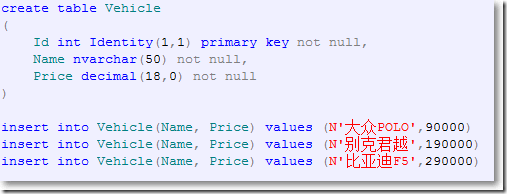
□ 创建一个叫Demo的数据库,并创建表Vehicle。
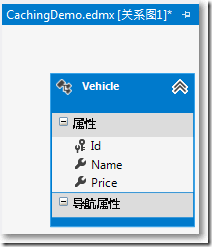
□ 从数据库生成一个"ADO.NET实体数据模型"CachingDemo.edmx
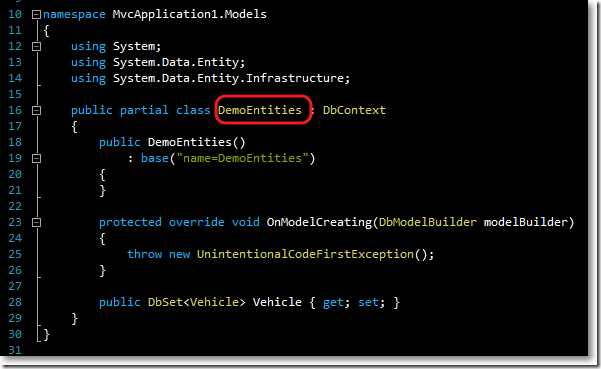
同时,自动生成了继承EF的DbContext的类DemoEntities:
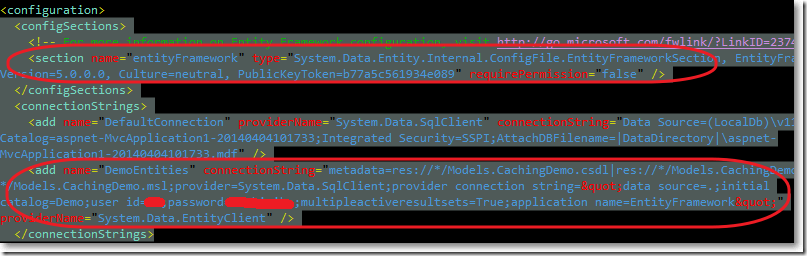
并且,在配置文件中自动生成了EF相关内容和连接字符串:
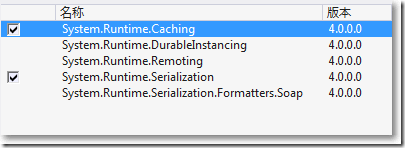
□ 引入System.Runtime.Cache
□ 缓存接口
namespace MvcApplication1.Cache
{
public interface ICacheProvider
{
object Get(string key);
void Set(string key, object data, int cacheTime);
bool IsSet(string key);
void Invalidate(string key);
}
}
.csharpcode, .csharpcode pre
{
font-size: small;
color: black;
font-family: consolas, "Courier New", courier, monospace;
background-color: #ffffff;
/*white-space: pre;*/
}
.csharpcode pre { margin: 0em; }
.csharpcode .rem { color: #008000; }
.csharpcode .kwrd { color: #0000ff; }
.csharpcode .str { color: #006080; }
.csharpcode .op { color: #0000c0; }
.csharpcode .preproc { color: #cc6633; }
.csharpcode .asp { background-color: #ffff00; }
.csharpcode .html { color: #800000; }
.csharpcode .attr { color: #ff0000; }
.csharpcode .alt
{
background-color: #f4f4f4;
width: 100%;
margin: 0em;
}
.csharpcode .lnum { color: #606060; }
□ 缓存实现
using System;
using System.Runtime.Caching;
namespace MvcApplication1.Cache
{
public class DefaultCacheProvider : ICacheProvider
{
private ObjectCache Cache
{
get { return MemoryCache.Default; }
}
public object Get(string key)
{
return Cache[key];
}
public void Set(string key, object data, int cacheTime)
{
CacheItemPolicy policy = new CacheItemPolicy();
policy.AbsoluteExpiration = DateTime.Now + TimeSpan.FromMinutes(cacheTime);
Cache.Add(new CacheItem(key, data), policy);
}
public bool IsSet(string key)
{
return (Cache[key] != null);
}
public void Invalidate(string key)
{
Cache.Remove(key);
}
}
}
.csharpcode, .csharpcode pre
{
font-size: small;
color: black;
font-family: consolas, "Courier New", courier, monospace;
background-color: #ffffff;
/*white-space: pre;*/
}
.csharpcode pre { margin: 0em; }
.csharpcode .rem { color: #008000; }
.csharpcode .kwrd { color: #0000ff; }
.csharpcode .str { color: #006080; }
.csharpcode .op { color: #0000c0; }
.csharpcode .preproc { color: #cc6633; }
.csharpcode .asp { background-color: #ffff00; }
.csharpcode .html { color: #800000; }
.csharpcode .attr { color: #ff0000; }
.csharpcode .alt
{
background-color: #f4f4f4;
width: 100%;
margin: 0em;
}
.csharpcode .lnum { color: #606060; }
□ Vehicle的Repository接口:
using System.Collections.Generic;
using MvcApplication1.Models;
namespace MvcApplication1.Repository
{
public interface IVehicleRepository
{
void ClearCache();
IEnumerable<Vehicle> GetVehicles();
}
}
.csharpcode, .csharpcode pre
{
font-size: small;
color: black;
font-family: consolas, "Courier New", courier, monospace;
background-color: #ffffff;
/*white-space: pre;*/
}
.csharpcode pre { margin: 0em; }
.csharpcode .rem { color: #008000; }
.csharpcode .kwrd { color: #0000ff; }
.csharpcode .str { color: #006080; }
.csharpcode .op { color: #0000c0; }
.csharpcode .preproc { color: #cc6633; }
.csharpcode .asp { background-color: #ffff00; }
.csharpcode .html { color: #800000; }
.csharpcode .attr { color: #ff0000; }
.csharpcode .alt
{
background-color: #f4f4f4;
width: 100%;
margin: 0em;
}
.csharpcode .lnum { color: #606060; }
□ Vehicle的Repository接口实现:
using System.Collections.Generic;
using System.Linq;
using MvcApplication1.Cache;
using MvcApplication1.Models;
namespace MvcApplication1.Repository
{
public class VehicleRepository : IVehicleRepository
{
protected DemoEntities DataContext { get; private set; }
public ICacheProvider Cache { get; set; }
public VehicleRepository() : this(new DefaultCacheProvider())
{
}
public VehicleRepository(ICacheProvider cacheProvider)
{
this.DataContext = new DemoEntities();
this.Cache = cacheProvider;
}
public void ClearCache()
{
Cache.Invalidate("vehicles");
}
public System.Collections.Generic.IEnumerable<Models.Vehicle> GetVehicles()
{
IEnumerable<Vehicle> vehicles = Cache.Get("vehicles") as IEnumerable<Vehicle>;
if (vehicles == null)
{
vehicles = DataContext.Vehicle.OrderBy(v => v.Id).ToList();
if (vehicles.Any())
{
Cache.Set("vehicles",vehicles,30); //设置缓存的时间为30分钟
}
}
return vehicles;
}
}
}
.csharpcode, .csharpcode pre
{
font-size: small;
color: black;
font-family: consolas, "Courier New", courier, monospace;
background-color: #ffffff;
/*white-space: pre;*/
}
.csharpcode pre { margin: 0em; }
.csharpcode .rem { color: #008000; }
.csharpcode .kwrd { color: #0000ff; }
.csharpcode .str { color: #006080; }
.csharpcode .op { color: #0000c0; }
.csharpcode .preproc { color: #cc6633; }
.csharpcode .asp { background-color: #ffff00; }
.csharpcode .html { color: #800000; }
.csharpcode .attr { color: #ff0000; }
.csharpcode .alt
{
background-color: #f4f4f4;
width: 100%;
margin: 0em;
}
.csharpcode .lnum { color: #606060; }
□ HomeController
using System.Web.Mvc;
using MvcApplication1.Repository;
namespace MvcApplication1.Controllers
{
public class HomeController : Controller
{
public IVehicleRepository Repository { get; set; }
public HomeController(IVehicleRepository repository)
{
this.Repository = repository;
}
public HomeController() : this(new VehicleRepository())
{
}
public ActionResult Index()
{
return View(Repository.GetVehicles());
}
[HttpPost]
public ActionResult Index(FormCollection form)
{
Repository.ClearCache();
return RedirectToAction("Index");
}
}
}
.csharpcode, .csharpcode pre
{
font-size: small;
color: black;
font-family: consolas, "Courier New", courier, monospace;
background-color: #ffffff;
/*white-space: pre;*/
}
.csharpcode pre { margin: 0em; }
.csharpcode .rem { color: #008000; }
.csharpcode .kwrd { color: #0000ff; }
.csharpcode .str { color: #006080; }
.csharpcode .op { color: #0000c0; }
.csharpcode .preproc { color: #cc6633; }
.csharpcode .asp { background-color: #ffff00; }
.csharpcode .html { color: #800000; }
.csharpcode .attr { color: #ff0000; }
.csharpcode .alt
{
background-color: #f4f4f4;
width: 100%;
margin: 0em;
}
.csharpcode .lnum { color: #606060; }
□ Home/Index.cshtml
@model IEnumerable<MvcApplication1.Models.Vehicle>
@{
ViewBag.Title = "Index";
Layout = "~/Views/Shared/_Layout.cshtml";
}
<style type="text/css">
table td {
border-collapse: collapse;
border: solid 1px black;
}
</style>
<table cellpadding="0" cellspacing="0" border="0">
<tr>
<th>编号</th>
<th>车型</th>
<th>价格</th>
</tr>
@foreach (var vehicle in Model)
{
<tr>
<td>@vehicle.Id.ToString()</td>
<td>@vehicle.Name</td>
<td>@string.Format("{0:c}",vehicle.Price)</td>
</tr>
}
</table>
@using (Html.BeginForm())
{
<input type="submit" value="使缓存失效重新获取数据库数据" id="InvalidButton" name="InvalidButton"/>
}
.csharpcode, .csharpcode pre
{
font-size: small;
color: black;
font-family: consolas, "Courier New", courier, monospace;
background-color: #ffffff;
/*white-space: pre;*/
}
.csharpcode pre { margin: 0em; }
.csharpcode .rem { color: #008000; }
.csharpcode .kwrd { color: #0000ff; }
.csharpcode .str { color: #006080; }
.csharpcode .op { color: #0000c0; }
.csharpcode .preproc { color: #cc6633; }
.csharpcode .asp { background-color: #ffff00; }
.csharpcode .html { color: #800000; }
.csharpcode .attr { color: #ff0000; }
.csharpcode .alt
{
background-color: #f4f4f4;
width: 100%;
margin: 0em;
}
.csharpcode .lnum { color: #606060; }
□ 结果
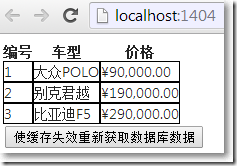
页面第一次加载:
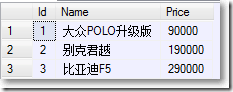
在数据库改变数据,页面内容不变:
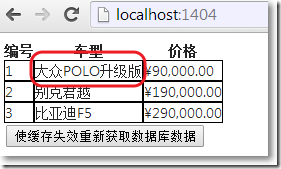
点击按钮使缓存失效,视图显示数据库最新数据:
总结
当在数据层使用System.Runtime.Caching,实际上,所有的缓存操作都围绕MemoryCache.Default返回类型为ObjectCache缓存而进行。
□ 参考资料
※ Understanding Caching in Asp.Net MVC with example
※ DATA CACHING WITH .NET 4.0 AND ASP.NET MVC – PART 1
MVC缓存01,使用控制器缓存或数据层缓存的更多相关文章
- [NewLife.XCode]数据层缓存(网站性能翻10倍)
NewLife.XCode是一个有10多年历史的开源数据中间件,支持nfx/netcore,由新生命团队(2002~2019)开发完成并维护至今,以下简称XCode. 整个系列教程会大量结合示例代码和 ...
- MVC缓存02,使用数据层缓存,添加或修改时让缓存失效
在"MVC缓存01,使用控制器缓存或数据层缓存"中,在数据层中可以设置缓存的有效时间.但这个还不够"智能",常常希望在编辑或创建的时候使缓存失效,加载新的数据. ...
- MVC缓存,使用数据层缓存,添加或修改时让缓存失效
在"MVC缓存01,运用控制器缓存或数据层缓存"中,在数据层中可以设置缓存的有用时刻.但这个还不够"智能",常常期望在修改或创立的时分使缓存失效,加载新的数据. ...
- 老司机带你玩转面试(1):缓存中间件 Redis 基础知识以及数据持久化
引言 今天周末,我在家坐着掐指一算,马上又要到一年一度的金九银十招聘季了,国内今年上半年受到 YQ 冲击,金三银四泡汤了,这就直接导致很多今年毕业的同学会和明年毕业的同学一起参加今年下半年的秋招,这个 ...
- ECMall关于数据查询缓存的问题
刚接触Ecmall的二次开发不久,接到一个任务.很常见的任务,主要是对数据库进行一些操作,其中查询的方法我写成这样: 01 function get_order_data($goods_id) 02 ...
- MVC学习系列3--怎么从控制器向视图传递数据
在MVC中,从控制器到视图,传递数据,可以使用 ViewData 和 ViewBag:同样从视图到控制器,传递数据,可以使用Post,QueryString,或者隐藏域:最后从控制器到控制器,传递数据 ...
- spring + redis 实现数据的缓存
1.实现目标 通过redis缓存数据.(目的不是加快查询的速度,而是减少数据库的负担) 2.所需jar包 注意:jdies和commons-pool两个jar的版本是有对应关系的,注意引入jar包是要 ...
- .NET MVC控制器向视图传递数据的四种方式
.NET MVC控制器向视图传递数据的四种方式: 1.ViewBag ViewBag.Mvc="mvc"; 2.ViewData ViewBag["Mvc"] ...
- Catalyst揭秘 Day8 Final 外部数据源和缓存系统
Catalyst揭秘 Day8 Final 外部数据源和缓存系统 今天是Catalyst部分的收官,主要讲一些杂项内容. 外部数据源处理 什么叫外部数据源,是SparkSql自己支持的一些文件格式,以 ...
随机推荐
- Qt5 任务栏托盘功能实现
23333 有一阵子没写博客了,研究了挺长时间qt,学到任务栏托盘时简直无语,网上找得到的代码大多是废码,Qt5不支持或者本身就有毛病不能实现却被n多人转来转去的,甚是无语. 简单托盘功能以下在Qt5 ...
- 3 EventTime 事件时间类和TimeNow函数——Live555源码阅读(一)基本组件类
这是Live555源码阅读的第一部分,包括了时间类,延时队列类,处理程序描述类,哈希表类这四个大类. 这里是时间相关类的第三个部分,也是最后一个部分. EventTime 事件时间类 这个类和Dela ...
- htpasswd命令
htpasswd命令是Apache的Web服务器内置工具,用于创建和更新储存用户名.域和用户基本认证的密码文件. 语法 htpasswd(选项)(参数) 选项 -c:创建一个加密文件:-n:不更新加密 ...
- js原生的url操作函数,及使用方法。(附:下边还有jquery对url里的中文解码函数)
js原生的url操作函数,完善的. /*****************************/ /* 动态修改url */ /*****************************/ var ...
- HTML锚点参考
锚点参考 <ul class="banner-pic"> <li style="background: url(../Content/images/ne ...
- struts2配置文件的加载顺序以及 struts.xml package 的配置说明
查看StrutsPrepareAndExecuteFilter:(核心过滤器)两个功能 :预处理 和 执行 在预处理功能中 init 方法中会有加载配置文件的代码: dispatcher.init() ...
- BUG归因
文字类1.名称不统一:日期/时间,编号/流水号, 2.单元格式 数据类错误:取值错位 编程上 控件类:JS报错 1.框架收缩 2.置灰,限定修改项 3.隐形,不显示 4.XX报错 5.无法输入:自动补 ...
- [转] Git 基础 - 打标签
2.6 Git 基础 - 打标签 打标签 同大多数 VCS 一样,Git 也可以对某一时间点上的版本打上标签.人们在发布某个软件版本(比如 v1.0 等等)的时候,经常这么做.本节我们一起来学习如何列 ...
- Python 开发轻量级爬虫01
Python 开发轻量级爬虫 (imooc总结01--课程目标) 课程目标:掌握开发轻量级爬虫 为什么说是轻量级的呢?因为一个复杂的爬虫需要考虑的问题场景非常多,比如有些网页需要用户登录了以后才能够访 ...
- Spring mvc 文件上传到文件夹(转载+心得)
spring mvc(注解)上传文件的简单例子,这有几个需要注意的地方1.form的enctype=”multipart/form-data” 这个是上传文件必须的2.applicationConte ...