
Spring的初始化:org.springframework.web.context.ContextLoaderListener
在web.xml中配置
<listener>
<listener-class>org.springframework.web.context.ContextLoaderListener</listener-class>
</listener>
ContextLoaderListener的作用就是启动Web容器时,自动装配ApplicationContext.xml的配置信息。因为它实现了ServletContextListener这个接口,在web.xml配置这个监听器,启动容器时,就会默认执行它实现的方法。
ApplicationContext.xml这个配置文件部一般默认放置在。applicationContext的默认的路径是”/WEB-INF/applicationContext.xml。也可以在web.xml中配置该文件的其他位置,配置如下:
<context-param>
<param-name>contextConfigLocation</param-name>
<param-value>
classpath:applicationContext.xml
classpath:applicationContext-security.xml;
</param-value>
</context-param>
以下详解
org.springframework.web.context.ContextLoaderListener类实现了javax.servlet.ServletContextListener接口。ServletContextListener接口能够监听ServletContext对象的生命周期,因为每个web应用仅有一个ServletContext对象,故实际上该接口监听的是整个web应用。
实现该接口的类在web.xml中作为监听器配置后,当web应用启动后,会触发ServletContextEvent事件,调用ContextLoaderListener的contextInitialized(ServletContextEvent sce)方法。
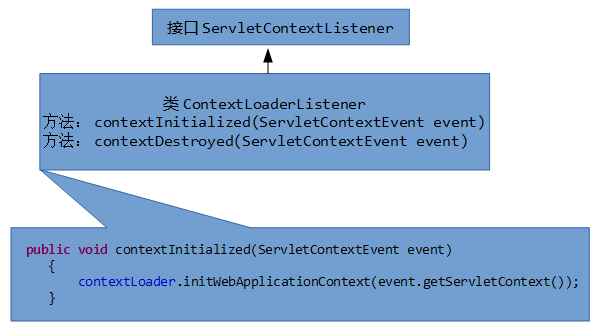
ContextLoaderListener通过一个ContextLoader对象来初始化Spring容器。在contextInitialized方法中调用contextLoader.initWebApplicationContext(event.getServletContext())。
ContextLoader类的initWebApplicationContext方法即可返回一个WebApplicationContext对象context。并通过 servletContext.setAttribute(WebApplicationContext.ROOT_WEB_APPLICATION_CONTEXT_ATTRIBUTE, context)将WebApplicationContext对象放置在ServletContext对象中。initWebApplicationContext方法通过调用以下方法实例化并设置WebApplicationContext对象。
protected WebApplicationContext createWebApplicationContext(ServletContext servletContext, ApplicationContext parent)

        throws BeansException

    {

        Class contextClass = determineContextClass(servletContext);//通过servletContext确定WebApplicationContext的具体类型

        if(!(org.springframework.web.context.ConfigurableWebApplicationContext.class).isAssignableFrom(contextClass))

        {

            throw new ApplicationContextException("Custom context class [" + contextClass.getName() + "] is not of type [" + (org.springframework.web.context.ConfigurableWebApplicationContext.class).getName() + "]");

        } else

        {

            ConfigurableWebApplicationContext wac = (ConfigurableWebApplicationContext)BeanUtils.instantiateClass(contextClass);

            wac.setParent(parent);

            wac.setServletContext(servletContext);

            wac.setConfigLocation(servletContext.getInitParameter("contextConfigLocation"));//设置配置文件的路径名

            customizeContext(servletContext, wac);

            wac.refresh();

            return wac;

        }

    }
因此可以通过WebApplicationContextUtils.getWebApplicationContext(ServletContext sc)获取WebApplicationContext。内部实现是通过servletContext对象查找该对象,属性名为WebApplicationContext.ROOT_WEB_APPLICATION_CONTEXT_ATTRIBUTE。
Spring的初始化:org.springframework.web.context.ContextLoaderListener的更多相关文章
- [key]严重: Exception sending context initialized event to listener instance of class org.springframework.web.context.ContextLoaderListener(Spring配置异常)
详细错误为: 严重: Exception sending context initialized event to listener instance of class org.springframe ...
- 异常将上下文初始化事件发送到类的侦听器实例.[org.springframework.web.context.ContextLoaderListener] org.springframework.beans.factory.BeanCreationException: Error creating bean with name 'sessionFactory' defined in class p
严重: 异常将上下文初始化事件发送到类的侦听器实例.[org.springframework.web.context.ContextLoaderListener]org.springframework ...
- maven创建spring项目之后,启动报错java.lang.ClassNotFoundException: org.springframework.web.context.ContextLoaderListener
出错情景:maven中已经加载了spring的核心包,但是项目启动时,报错: org.apache.catalina.core.StandardContext listenerStart严重: Err ...
- java.lang.ClassNotFoundException: org.springframework.web.context.ContextLoaderListener,环境Spring+Maven
记录一下莫名出现的错误.Spring+Maven+STS. 严重: Error configuring application listener of class org.springframewor ...
- 在eclipse中运行spring web application时的异常: java.lang.ClassNotFoundException: org.springframework.web.context.ContextLoaderListener
严重: Error configuring application listener of class org.springframework.web.context.ContextLoaderLis ...
- Exception sending context initialized event to listener instance of class org.springframework.web.context.ContextLoaderListener
严重: Exception sending context initialized event to listener instance of class org.springframework.we ...
- org.springframework.web.struts.ContextLoaderPlugIn 和 org.springframework.web.context.ContextLoaderListener
org.springframework.web.struts.ContextLoaderPlugIn 和 org.springframework.web.context.ContextLoaderLi ...
- Exception sending context initialized event to listener instance of class org.springframework.web.context.ContextLoaderListener org.springframework.beans.factory.BeanCreationException:
严重: Exception sending context initialized event to listener instance of class org.springframework.we ...
- 真正解决问题:maven eclipse tomcat java.lang.ClassNotFoundException: org.springframework.web.context.ContextLoaderListener
在使用eclipse进行整合springmvc时经常会碰到这样的异常: java.lang.ClassNotFoundException:org.springframework.web.context ...
随机推荐
- Delphi跨平台下的GetTickCount,GetCurrentThreadID
在Windows下只要uses Windows,就有这两个API可调用GetTickCount,GetCurrentThreadID 如果我们需要跨平台使用这两个函数,就不能仅仅Uses Window ...
- Learning notes | Data Analysis: 1.1 data evaluation
| Data Evaluation | - Use Shift + Enter or Shift + Return to run the upper box so as to make it disp ...
- Selenium_python自动化环境搭建篇
説 明: 本篇随笔讲解Selenium+python自动化环境的搭建,此随笔暂不介绍Selenium3,Selenium3需要考虑环境依赖驱动等相关问提比较多一篇随笔没法説完,所以暂不介绍,当然你可以 ...
- 最近最少使用算法(LRU)——页面置换
原创 上一篇博客写了先进先出算法(FIFO)——页面置换:http://www.cnblogs.com/chiweiming/p/9058438.html 此篇介绍最近最少使用算法(LRU)——页面置 ...
- 用gogs搭建git服务器
Gogs 是一款极易搭建的自助 Git 服务. Gogs 的目标是打造一个最简单.最快速和最轻松的方式搭建自助 Git 服务.使用 Go 语言开发使得 Gogs 能够通过独立的二进制分发,并且支持 G ...
- BZOJ 小Z的袜子 2038 国家集训队
过程: 想了很久如何求组合数C(n,m),然而 YL 同学提醒了可以直接除以 2*n*(n - 1 ).改了之后果然对了,以为一定是一次性AC 了,然而 WA 了3次,尴尬 —— 神 TM,ZC 苟看 ...
- 20155223 2016-2017-2《Java程序设计》课程总结
20155223 2016-2017-2<Java程序设计>课程总结 每周作业链接汇总 预备作业1 预备作业2 预备作业3 第一周 第二周 第三周 第四周 第五周 第六周 第七周 第八周 ...
- 20155231 信息安全技术概论实验二 Windows口令破解
20155231 信息安全技术概论实验二 Windows口令破解 实验目的 了解Windows口令破解原理 对信息安全有直观感性认识 能够运用工具实现口令破解 实验人数 每组一人 系统环境 windo ...
- 成都Uber优步司机奖励政策(4月16日)
滴快车单单2.5倍,注册地址:http://www.udache.com/ 如何注册Uber司机(全国版最新最详细注册流程)/月入2万/不用抢单:http://www.cnblogs.com/mfry ...
- 服务端调用接口API利器之HttpClient
前言 之前有介绍过HttpClient作为爬虫的简单使用,那么今天在简单的介绍一下它的另一个用途:在服务端调用接口API进行交互.之所以整理这个呢,是因为前几天在测试云之家待办消息接口的时候,有使用云 ...