
CentOS7.2 安装Chrome
/etc/yum.repos.d/目录下新建文件google-chrome.repo,向其中添加如下内容:
[google-chrome]

name=google-chrome

baseurl=http://dl.google.com/linux/chrome/rpm/stable/$basearch

enabled=1

gpgcheck=1

gpgkey=https://dl-ssl.google.com/linux/linux_signing_key.pub
安装:
sudo yum install google-chrome-stable --nogpgcheck
我已root进行登陆使用,发现chrome浏览器不允许使用,必须要。。。。no -sandbox

打开/usr/bin/google-chrome文件
修改文件底部的内容:
旧版本:
# Make sure that the profile directory specified in the environment, if any,

# overrides the default.

if [[ -n "$CHROME_USER_DATA_DIR" ]]; then

  # Note: exec -a below is a bashism.

  exec -a "$0" "$HERE/chrome"  \

    --user-data-dir="$CHROME_USER_DATA_DIR" "$@"

else

  exec -a "$0" "$HERE/chrome"  "$@"
修改后:
# Make sure that the profile directory specified in the environment, if any,

# overrides the default.

if [[ -n "$CHROME_USER_DATA_DIR" ]]; then

  # Note: exec -a below is a bashism.

  exec -a "$0" "$HERE/chrome"  \

    --user-data-dir="$CHROME_USER_DATA_DIR" "$@"

else

  exec -a "$0" "$HERE/chrome"  "$@" --no-sandbox --user-data-dir

fi
这样就可以在root时运行chrome
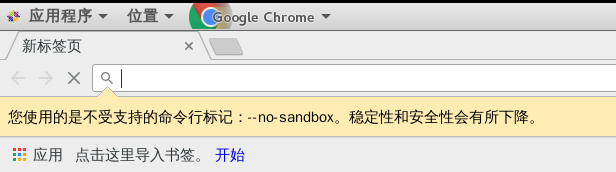
后来又改回来了。
http://www.cnblogs.com/fengbohello/p/4871445.html
http://blog.csdn.net/cooljsz/article/details/52410637
CentOS7.2 安装Chrome的更多相关文章
- [转帖]Centos7 yum安装Chrome浏览器
Centos7 yum安装Chrome浏览器 https://www.cnblogs.com/ianduin/p/8727333.html以及https://blog.csdn.net/libaine ...
- CentOS7系列--安装Chrome浏览器
CentOS7系列--安装Chrome浏览器 1. 创建yum源文件 [root@server20 ~]# cd /etc/yum.repos.d/ [root@server20 yum.repos. ...
- centos7.3安装chrome
Centos7安装chrome浏览器 1.配置yum源 在目录 /etc/yum.repos.d/ 下新建文件 google-chrome.repo cd /ect/yum.repos.d/ vim ...
- CentOS7下安装chrome浏览器
在CentOS 7环境下安装chrome浏览器 1.修改yum源 在/etc/yum.repos.d/目录下新建文件google-chrome.repo,向其中添加如下内容: [google-chro ...
- Centos7 yum安装Chrome浏览器
一.创建yum源文件 cd /etc/yum.repo.d/ touch google-chrome.repo 二.输入yum源信息 [google-chrome] name=google-chrom ...
- Ubuntu16.04/centos7 下为chrome/firefox安装flash player插件
为chrome安装flash: 打开终端,输入:sudo apt-get install pepperflashplugin-nonfree 或官网下载安装google-chrome-stable 为 ...
- centos7安装chrome及加载poatman开发插件
为什么要安装chrome?因为centos7的默认浏览器firefox的实在是不习惯,上面占了太多,本来显示器就不大... 好了,首先下载chome的rpm安装包(如果需要的可以留言,我有备份) 然后 ...
- CentOS7 安装chrome浏览器
本篇文章主要记录如何在CentOS7.0上安装chrome. 1.配置yum下载源: 在目录 /etc/yum.repos.d/ 下新建文件 google-chrome.repo, 并且在该文件中添加 ...
- 【转载】CentOS7 安装Chrome浏览器
本篇文章主要记录如何在CentOS7.0上安装Chrome浏览器. 方法1: Google官方源在国内可能无法正常访问,故而添加Fedora中文社区提供的镜像源: sudo wget http://r ...
随机推荐
- Android 内存泄露总结(附内存检测工具)
https://segmentfault.com/a/1190000006852540 主要是分三块: 静态储存区:编译时就分配好,在程序整个运行期间都存在.它主要存放静态数据和常量. 栈区:当方法执 ...
- 重构(Refactoring)技巧读书笔记(General Refactoring Tips)
重构(Refactoring)技巧读书笔记 之一 General Refactoring Tips, Part 1 本文简要整理重构方法的读书笔记及个人在做Code Review过程中,对程序代码常用 ...
- 【BZOJ3772】精神污染 DFS序+主席树
[BZOJ3772]精神污染 Description 兵库县位于日本列岛的中央位置,北临日本海,南面濑户内海直通太平洋,中央部位是森林和山地,与拥有关西机场的大阪府比邻而居,是关西地区面积最大的县,是 ...
- 【Android】android string.xml前后加空格的技巧
android string.xml 文字中间加入空格 <string name="password">密 码</string>   ...
- 小技巧------教你释放C盘空间
1.删除休眠文件hiberfil.sys. 该文件在c盘根部目录为隐藏的系统文件,隐藏的这个hiberfil.sys文件大小正好和自己的物理内存是一致的,当你让电脑进入休眠状态时,windows7在关 ...
- vue报错 vue-cli 引入 stylus 失败
1.1.1. vue-cli 引入 stylus 失败 先通过vue-cli的webpack模板建立文件夹: vue init webpack test-stylus 然后安装依赖 npm ins ...
- Gitlab备份和恢复操作
参考:https://www.cnblogs.com/kevingrace/p/7821529.html 一,设置开启备份以及备份路径 /etc/gitlab/gitlab.rb gitlab_rai ...
- HDU 1103 Flo's Restaurant(模拟+优先队列)
Flo's Restaurant Time Limit: 2000/1000 MS (Java/Others) Memory Limit: 65536/32768 K (Java/Others) ...
- PHP搭建(windows64+apache2.4.7+mysql-5.6+php5.5+phpMyAdmin)和Discuz安装
以下文章参考的3个来源,在加上本人搭建过程中遇到的问题的修复完善笔记: <PHP环境的搭建和Discuz!安装> http://www.myxzy.com/post-386.html ht ...
- Ubuntu下安装Nginx详细步骤
Nginx安装之前需要三个支持: 模块依赖性 ①gzip 模块需要 zlib 库 ②rewrite 模块需要 pcre 库 ③ssl 功能需要 openssl 库 预先编译好的包: sudo apt- ...