
【jQuery】jQuery与Ajax的应用
1.demo1
<script language="javascript" type="text/javascript">

//通过这个函数来异步获取信息

function Ajax(){

    var xmlHttpReq = null;    //声明一个空对象用来装入XMLHttpRequest

    if (window.ActiveXObject){//IE5 IE6是以ActiveXObject的方式引入XMLHttpRequest的

        xmlHttpReq = new ActiveXObject("Microsoft.XMLHTTP");

    }

    else if (window.XMLHttpRequest){//除IE5 IE6 以外的浏览器XMLHttpRequest是window的子对象

        xmlHttpReq = new XMLHttpRequest();//实例化一个XMLHttpRequest

    }

    if(xmlHttpReq != null){    //如果对象实例化成功

        xmlHttpReq.open("GET","test.php",true);    //调用open()方法并采用异步方式

        xmlHttpReq.onreadystatechange=RequestCallBack; //设置回调函数

        xmlHttpReq.send(null);    //因为使用get方式提交,所以可以使用null参调用

    }

    function RequestCallBack(){//一旦readyState值改变,将会调用这个函数

        if(xmlHttpReq.readyState == 4){

                if(xmlHttpReq.status == 200){

                    //将xmlHttpReq.responseText的值赋给ID为 resText 的元素

                    document.getElementById("resText").innerHTML = xmlHttpReq.responseText;

                }

        }

    }

}

</script>

</head>

<body>

<input type="button" value="Ajax提交" onclick="Ajax();" />

<div id="resText" ></div>

</body>
2.load()方法:能载入远程HTML代码并插入DOM中
<script language="javascript" type="text/javascript">

  $(function(){

      $("#send").click(function(){

              $("#resText").load("test.html");

      })

  })

</script>

</head>

<body>

<input type="button" id="send" value="Ajax获取" />

<div  class="comment">

    已有评论:

</div>

<div id="resText" ></div>

</body>
点击前后结果如下
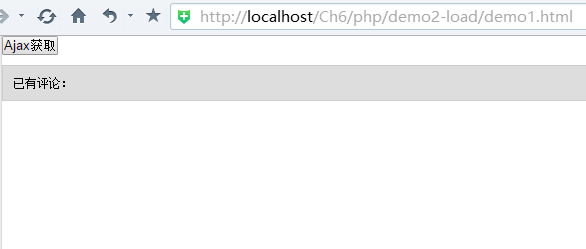
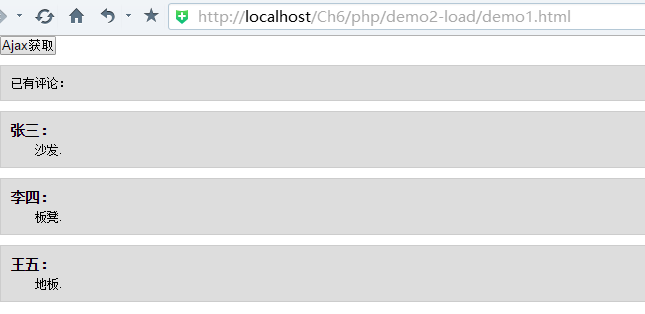
3.如果需要传递一些参数给服务器的页面,可以使用$get()或$post()
3.1 $get()
 <!--   引入jQuery -->

<script src="../scripts/jquery.js" type="text/javascript"></script>

<script type="text/javascript">

//<![CDATA[

    $(function(){

       $("#send").click(function(){

            $.get("get1.php", { //发送给get1.php的数据

                        username :  $("#username").val() ,

                        content :  $("#content").val()

                    }, function (data, textStatus){

                        $("#resText").html(data); // 回调,把返回的数据添加到页面上,还可以采用XML、json格式

                    }

            );

       })

    })

//]]>

</script>

</head>

<body>

<form id="form1" action="#">

<p>评论:</p>

 <p>姓名: <input type="text" name="username" id="username" /></p>

 <p>内容: <textarea name="content" id="content"  rows="2" cols="20"></textarea></p>

 <p><input type="button" id="send" value="提交"/></p>

</form>

<div  class='comment'>已有评论:</div>

<div id="resText" >

</div>

</body>
get1.php
<?php

    header("Content-Type:text/html; charset=utf-8");

    echo "<div class='comment'><h6>{$_REQUEST['username']}:</h6><p class='para'>{$_REQUEST['content']}</p></div>";

?>
3.2 $post()
与$get()方法的结构和使用方式都相同,但也存在以下区别
a.参数跟的位置不同
b.GET对传输数据有限制,请求的数据会被缓存,存在安全隐患
c.传递的数据在服务端获取的方式不同,PHP中数据通过$_GET[],$_POST[]获取,两种方式都可通过$_REQUEST[]获取
4 $.getScript()和$.getJson()--第三层
4.1 jQuery提供了$.getScript()方法直接加载js文件,也可以添加回掉函数
4.2 $.getJson()加载json文件
jQuery通用的遍历方法$.each(),$.each()不同于each()方法,它是一个全局函数,不操作jQuery对象,而是以一个数组或对象作为第一个参数,以一个回调函数作为第二个参数,回调函数拥有两个参数:第一个:对象的成员或数组的索引,第二个:对应变量或内容
1、选择器+遍历

$('div').each(function (i){

   i就是索引值

   this 表示获取遍历每一个dom对象

});

2、选择器+遍历

$('div').each(function (index,domEle){

   index就是索引值

  domEle 表示获取遍历每一个dom对象

});

3、更适用的遍历方法

1)先获取某个集合对象

2)遍历集合对象的每一个元素

var d=$("div");

$.each(d,function (index,domEle){

  d是要遍历的集合

  index就是索引值

  domEle 表示获取遍历每一个dom对

});
这里属于第三类:
 <!--   引入jQuery -->

<script src="../scripts/jquery.js" type="text/javascript"></script>

<script type="text/javascript">

//<![CDATA[

   $(function(){

        $('#send').click(function() {

             $.getJSON('test.json', function(data) {

                 $('#resText').empty();

                  var html = '';

                  $.each( data  , function(commentIndex, comment) {//jQuery通用的遍历方法$.each()

                      html += '<div class="comment"><h6>' + comment['username'] + ':</h6><p class="para">' + comment['content'] + '</p></div>';

                  })

                 $('#resText').html(html);

            })

       })

   })

//]]>

</script>

</head>

<body>

 <br/>

 <p>

     <input type="button" id="send" value="加载"/>

 </p>

<div  class="comment">已有评论:</div>

 <div id="resText" >

 </div>

</body>
test.json
[

  {

    "username": "张三",

    "content": "沙发."

  },

  {

    "username": "李四",

    "content": "板凳."

  },

  {

    "username": "王五",

    "content": "地板."

  }

]
5 $.ajax()方法
它是jQuery最底层的Ajax实现
6 serialize()
jQuery提供一种简化的方法来提交表单,不用一一列举表单元素,而是直接使用serialize(),它能将DOM元素内容序列化为字符串。
即使在表单中在增加字段,脚本仍能使用
</style>

 <!--   引入jQuery -->

<script src="../scripts/jquery.js" type="text/javascript"></script>

<script type="text/javascript">

    $(function(){

       $("#send").click(function(){

            $.get("get1.php", $("#form1").serialize() , function (data, textStatus){

                        $("#resText").html(data); // 把返回的数据添加到页面上

                    }

            );

       })

    })

</script>

</head>

<body>

<form id="form1" action="#">

<p>评论:</p>

 <p>姓名: <input type="text" name="username" id="username" /></p>

 <p>内容: <textarea name="content" id="content"  rows="2" cols="20"></textarea></p>

 <p><input type="button" id="send" value="提交"/></p>

</form>

<div  class='comment'>已有评论:</div>

<div id="resText" >

</div>

</body>
7 $.param()
<script type="text/javascript">

//<![CDATA[

    $(function(){

          var obj={a:1,b:2,c:3};

        var  k  = $.param(obj);

        alert(k)        // 输出  a=1&b=2&c=3

    })

//]]>

</script>
8 Ajax全局事件
Ajax请求开始时,会触发ajaxStart()方法的回调函数;
Ajax请求结束时,会触发ajaxStop()方法的回调函数;
<script src="../scripts/jquery.js" type="text/javascript"></script>

<script type="text/javascript">

//<![CDATA[

   $(function(){

    //demo1:

        $('#send1').click(function() {

            $.getJSON("http://api.flickr.com/services/feeds/photos_public.gne?tags=car&tagmode=any&format=json&jsoncallback=?",

                      function(data){

                          $("#resText1").empty();

                          $.each(data.items, function( i,item ){

                                $("<img/> ").attr("src", item.media.m ).appendTo("#resText1");

                                if ( i == 3 ) {

                                    return false;

                                }

                          });

                     }

            );

       });

   //demo2:

       $("#send2").click(function(){

            $.get("get1.php", {

                        username :  $("#username").val() ,

                        content :  $("#content").val()

                    }, function (data, textStatus){

                        $("#resText2").html(data); // 把返回的数据添加到页面上

                    }

            );

       })

        $.ajaxPrefilter(function( options ) {

            options.global = true;

        });

        //共用这2个全局的ajax事件

       $("#loading").ajaxStart(function(){

          $(this).show();

       });

       $("#loading").ajaxStop(function(){

          $(this).hide();

       });

   })

//]]>

</script>

</head>

<body>

<br/>

<div id="loading">加载中...</div>

<br/>

Demo1:

<br/>

<input type="button" id="send1" value="加载"/>

<div id="resText1" ></div>

<br/>

Demo2:

<br/>

<form id="form1" action="#">

<p>评论:</p>

 <p>姓名: <input type="text" name="username" id="username" /></p>

 <p>内容: <textarea name="content" id="content"  rows="2" cols="20"></textarea></p>

 <p><input type="button" id="send2" value="提交"/></p>

</form>

<div  class='comment'>已有评论:</div>

<div id="resText2" >

</div>

</body>
【jQuery】jQuery与Ajax的应用的更多相关文章
- Jquery中的Ajax
AJAX: * jQuery中的Ajax * 封装第一层 - 类似于原生Ajax的用法 * $.ajax() - 最复杂 * 选项 * url - 请求地址 * type - 请求类型,默认为GET ...
- jQuery入门(4)jQuery中的Ajax应用
jQuery入门(1)jQuery中万能的选择器 jQuery入门(2)使用jQuery操作元素的属性与样式 jQuery入门(3)事件与事件对象 jQuery入门(4)jQuery中的Ajax()应 ...
- 从jquery里的$.ajax()到angularjs的$http
jquery中对ajax的使用做了很多封装,使得我们使用习惯了,反而并不大清楚在请求过程中的一些细节. 在第一次使用angularjs的$http时,后台一直接受不到前端请求的数据,于是小小研究了一下 ...
- 【Java EE 学习 33 上】【JQuery样式操作】【JQuery中的Ajax操作】【JQuery中的XML操作】
一.JQuery中样式的操作 1.给id=mover的div采用属性增加样式.one $("#b1").click(function(){ $("#mover" ...
- jquery中的ajax参数
jquery中将ajax封装成了函数,我们使用起来非常方便,jquery会自动根据内容选择post还是get方式提交数据,并且会自动编码,但是要想完全掌握jquery中的ajax,我们必须将它的各个参 ...
- JQuery 插件之Ajax Autocomplete(ajax自动完成)搜索引擎自动显示下拉框
平时用百度,谷歌搜索的时候 会有一个下 拉列表进行提示 这是一个非常好的功能 本文要介绍的这个JQuery 插件 名叫Ajax Autocomplete 顾名思义 ajax 也就是用ajax的方式获取 ...
- prototype.js 和 jQuery.js中 ajax 的使用
这次还是prototype.js 和 jQuery.js冲突的问题,前面说到过解决办法http://www.cnblogs.com/Joanna-Yan/p/4836252.html,以及上网说的大部 ...
- jquery.validate 的ajax验证(转)
在做网站的时候有一块需要用到jquery.validate插件 ajax方式的方式来验证原始密码是否正确,研究了研究加上博客园朋友的帮助,终于实现了.贴出代码 <script type=&quo ...
- jQuery中的Ajax几种请求方式
1. load( url, [data], [callback] ) :载入远程 HTML 文件代码并插入至 DOM 中. url (String) : 请求的HTML页的URL地址. data (M ...
- jQuery 1.9 Ajax代码带注释
/* -----------ajax模块开始 -----------*/ var // Document location ajaxLocParts, ajaxLocation, ajax_nonce ...
随机推荐
- 访问Django项目出现DisallowedHost at / Invalid HTTP_HOST header问题
闲来无事,想玩玩django,源码安装碰到了一堆乱七八糟依赖性问题,耗费一下午的时间总算是在ubuntu14.04上搭建好了python3+django2开发环境, 心血来潮,创建了一个django项 ...
- [C#]跨模块的可选参数与常量注意事项
假设某个DLL里有这么一个类: // Lib.dll public class Lib { public const string VERSION = "1.0"; public ...
- php 在函数前面加个@的作用
@是错误控制运算符,用屏蔽错误提示比如:@mysql_connect() 不会出现Warning, 而原来mysql_connect 会在页面上访提示Warning.主要是高版本的php不在支持mys ...
- Tempter of the Bone 搜索---奇偶性剪枝
Tempter of the Bone Time Limit : 2000/1000ms (Java/Other) Memory Limit : 65536/32768K (Java/Other) ...
- Q:java中的泛型数组
对于java,其是不支持直接创建泛型数组的.当采用如下的方式去创建一个泛型数组时,其会出现错误,编译无法通过的情况. package other.jdk1_5; /** * 该类用于演示泛型数组的创 ...
- drupal 通过hook_menu实现添加菜单
$items['mypayment/onlinepay']=array( 'title' => '在线充值', 'description' => '在线充值', 'page callbac ...
- JS 数据容量转换/换算
function diskSize(num){ if (num == 0) return '0 B'; var k = 1024; //设定基础容量大小 var sizeStr = ['B','KB' ...
- void()表达式结果是SyntaxError
void是一元运算符,他出现在操作数之前,操作数可以使任意类型,操作数会照常计算,但忽略计算结果并返回undefined. 因此在操作数具有副作用的时候使用void来让程序根据语义 console.l ...
- web前端面试题(持续更新)
此文是我本人在面试的时候遇到的问题和一些同学遇到的问题加资料上面的问题的总结.(将会持续更新,因为未有满意工作) 面试时有几点需要注意: 1.面试题目:根据你的等级和职位的变化,入门级到大神级,广度和 ...
- layui-open-上传文件
<!--选择文件上传--> <script id="upload_file_dialog" type="text/html"> < ...